
On this page
Start here
Quick answer
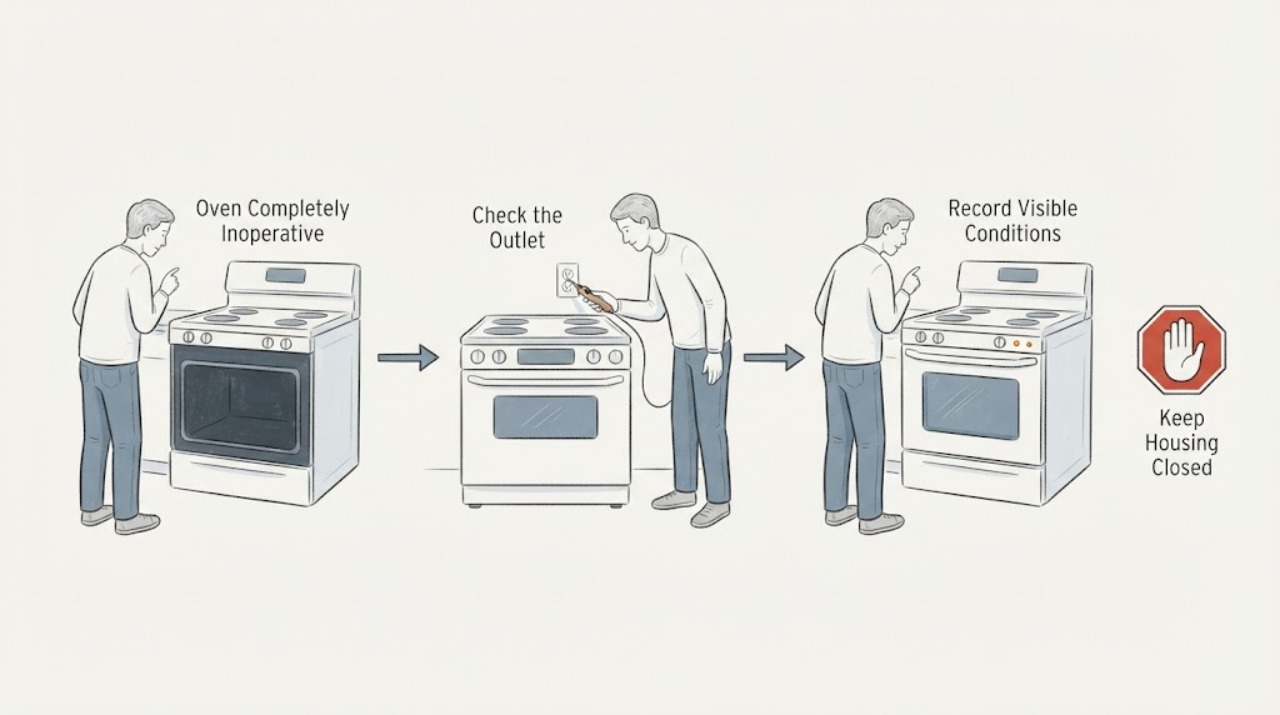
Maytag identifies the MER8674AB family as a 6.2-cu.-ft. electric range, so a completely inoperative oven should be separated into three observations: whether the whole range is dead, whether the cooktop still has power while the oven control is active, and whether Bake is selected but no heat starts. First record the exact model suffix, display and cooktop state, then check the accessible breaker once, Control Lock/demo mode, Delayed Start, door closure, and one normal Bake preheat. Do not remove the rear panel, terminal block, control panel, or heating-element cover, and do not test live voltage. If the breaker trips again, wiring is uncertain, the display remains dead, or a valid Bake attempt stays cold, leave the range off and arrange qualified electrical or appliance service.
Before you begin
Safety first
- Do not remove the control panel, rear cover, terminal block, heating-element cover, door hinges, or range from its location; do not test live voltage, bridge controls, or repeatedly reset a breaker. Stop for smoke, electrical odor or arc, hot/damaged cord, uncontrolled heat, or a repeat protection trip.
Work through in order
Diagnostic checks
Use only checks that match the exact appliance or system and its official guide.
-
Check 1
From a cool, safe position, look and listen for smoke, burning odor, electrical arcing, a hot or damaged cord or outlet, melted insulation, uncontrolled heating, or a breaker that trips again. Turn the oven off and leave the area if a fire, electrical, or smoke hazard is present.
Expected result: There is only a cold or unresponsive oven, or a gas-like/electrical/fire symptom, repeated trip, or exposed damage is present.
Next step: For smoke, arcing, burning odor, fire, or an energized damaged area, move away and contact emergency, electrical, or appliance professionals from a safe location. Do not operate the range until cleared.
Why this matters
Why: A cold oven permits limited control and accessible power checks. A hazard overrides troubleshooting and can make touching controls, resetting a breaker, or opening the range unsafe.
-
Check 2
Read the rating label and record MER8674AB0, then classify the appliance state: display and cooktop both dead, display active with cooktop active, or display active while only the oven is cold. Note any exact message such as Control Lock, Demo, Delayed Start, or an error indicator.
Expected result: The whole range is dead, the cooktop works while the oven control is active, or the display is active but shows a lock, delay, demo, or other message.
Next step: Use the exact MER8674AB0 manual for the displayed message and do not borrow a control sequence from another Maytag model. Do not remove the console or wiring to investigate the difference between cooktop and oven.
Why this matters
Why: Whole-range loss points first to accessible supply or protection. Cooktop power with no oven heat narrows the symptom to the oven control/setting or heating path, but does not select a component. A lock, demo, or delay can prevent heating without a hardware failure.
-
Check 3
With no hazard and the breaker accessible, inspect the range circuit status. If a breaker is clearly tripped, reset it once as the installation instructions permit; do not remove a fuse, terminal cover, or rear panel to inspect wiring.
Expected result: The display and cooktop return after one safe reset, the breaker trips again, or the range remains partly or completely dead.
Next step: If the breaker trips again, leave the range off and call a licensed electrician or qualified appliance technician. If power is stable, continue only with the control and Bake checks; never test live voltage yourself.
Why this matters
Why: A single reset can restore a protection device that opened, while a repeat trip points to an unresolved electrical or appliance fault. A range that remains partly dead can have an incomplete supply even if some controls or cooktop functions appear active.
-
Check 4
If the display is active, cancel Delayed Start, check whether Control Lock or Demo mode is shown, and select the model-documented Bake function with a temperature. Keep the door fully closed and wait for the normal preheat indication without pressing unrelated cycles.
Expected result: The display shows a lock, demo, or delayed state; Bake begins and preheats; or Bake is accepted but the cavity stays cold.
Next step: Clear only the documented setting and make one normal Bake attempt. If the oven still stays cold, stop using it and arrange service; do not remove an element cover or control panel.
Why this matters
Why: A lock, demo, or delay can explain an apparently inoperative oven. A normal preheat shows that the control and heating path did start. A valid Bake command with no heat leaves an internal heating, control, sensor, or power-path fault possible without identifying which one.
-
Check 5
When the oven is cool, verify that the door closes fully, no rack, pan, food, or residue blocks the latch or gasket area, and no foil or liner covers the entire rack or oven bottom. Do not remove the door or touch a hot element.
Expected result: The door is blocked or not closing, a rack or pan prevents closure, foil blocks airflow, or the cavity is correctly closed and still produces no heat.
Next step: Remove only a cool, loose obstruction and repeat one model-approved Bake check. If the door, hinge, gasket, or latch is damaged or the cavity remains cold, leave the range off and arrange service.
Why this matters
Why: Maytag notes that some models will not operate with an open door and that placement or foil can affect operation and airflow. Correct visible placement does not explain a completely cold oven after a valid Bake attempt.
-
Check 6
If the oven heats but appears slow rather than completely dead, keep the door closed during preheat, remove only unused racks, and confirm that the cavity floor or full rack is not lined with foil. Compare the result with the manual's model expectations; do not use a thermometer or meter inside energized circuitry.
Expected result: The oven eventually preheats, preheat is slower in a 208-V building supply, or it never produces heat after a valid Bake selection.
Next step: For a slow but functioning oven, have the installation rating checked if needed. For no heat, stop repeated tests and arrange qualified appliance service with the model, display state, breaker result, and Bake observation.
Why this matters
Why: Maytag says lower-voltage installation and heat loss from an open door can extend preheat, while a no-heat result after correct settings and a stable supply is a service branch. Slow preheat alone does not prove a weak element.
Use your observations
Decision map
Find the observation that best matches what you see, then follow the next safe action.
-
PATH 01Next step
What you see
Smoke, burning odor, electrical arc, hot or damaged cord/outlet, melted insulation, uncontrolled heat, or a breaker that trips again is present.
Do this next
Leave the appliance off and move away from the hazard. Contact emergency or qualified electrical/appliance help from a safe location. Do not reset protection repeatedly or open the range.
Why this path and its safety boundary
Why it matters: The range presents an electrical, fire, or heat hazard; a no-heat diagnosis must stop.
-
PATH 02Next step
What you see
The display and cooktop are both dead, and one safe breaker check does not restore them.
Do this next
Leave the range off and arrange licensed electrical or qualified appliance service. Do not pull the range or open the terminal block.
Why this path and its safety boundary
Why it matters: A household supply, range connection, protection device, or appliance power fault is more likely than an isolated bake-element diagnosis.
-
PATH 03Next step
What you see
The cooktop and display work, but the oven remains cold after Control Lock/Demo/Delayed Start are cleared, the door closes, and one valid Bake preheat is allowed.
Do this next
Stop using the oven and arrange qualified Maytag appliance service. Provide MER8674AB0, the display state, the exact Bake selection, preheat observation, and any breaker history; do not order an element from the symptom alone.
Why this path and its safety boundary
Why it matters: An oven-specific heat or control path is possible, including an element, sensor, relay, wiring, or control, but the user checks do not identify the failed component.
-
PATH 04Next step
What you see
Bake starts and the oven heats, but preheat is slower than expected or cooking is uneven; the door closes and there is no hazard.
Do this next
Run one normal model-approved preheat with the door closed and only the needed rack. If slow heating persists, provide the supply rating and observations to service; do not test the heating circuit live.
Why this path and its safety boundary
Why it matters: Repeated door opening, unused racks, foil blocking airflow, or a lower-voltage installation can extend preheat; correct placement should be separated from a true no-heat fault.
-
PATH 05Next step
What you see
A lock, demo, delayed-start, or other model-specific message remains after the documented control procedure, or the exact model/manual cannot be matched.
Do this next
Stop using generic button sequences and obtain the MER8674AB0 manual or qualified Maytag support. Do not bypass the control or replace a board based on the message alone.
Why this path and its safety boundary
Why it matters: The control state or model mismatch prevents a safe conclusion about the heating system.
Helpful context
Understand the symptom
Start with the exact symptom, not a heating part
The MER8674AB0 is an electric range, not a gas oven. “Completely inoperative” can mean a blank display and dead cooktop, an active control with no bake heat, or a control that appears active but is locked, delayed, or in demo mode. Those observations lead to different safe next steps. A cold cavity by itself does not identify the bake element, broil element, sensor, relay, control, or wiring as the failed part.
Why the range and oven can look different
An electric range can have a partial-power or control condition in which some indicators or cooktop functions appear normal while the oven heating circuit cannot operate. Maytag's support guidance treats breaker/fuse status and newly installed power connections as separate checks, and directs owners to stop if the problem persists. Do not open the terminal block to compare wires or measure voltage; that is qualified electrical work.
Use one normal Bake attempt only
After the low-risk setting and power checks, select the model-approved Bake function, enter a temperature, close the door, and allow the normal preheat indication. Do not use Self-Clean or repeated Broil cycles as a stress test. Maytag notes that repeated door opening, foil covering the cavity, unused racks, and a lower-voltage installation can affect preheat time, but a valid Bake attempt that remains cold requires service rather than a guessed part.
Only after diagnosis
Potential parts
- bake or broil heating element
An element is only a service hypothesis after a valid Bake or Broil command, stable power, and model-specific diagnosis; a cold cavity alone does not identify which element or prove it is open.
Verify the complete MER8674AB0 model and element position before ordering. Do not remove an element cover or perform continuity or live-voltage testing as a user check. - oven temperature sensor or control component
A sensor, relay, control, fuse, or wiring fault remains conditional when the control accepts Bake but no heat starts or temperature is wrong; no user observation here distinguishes those components.
Use the model-matched parts documentation and qualified diagnosis. Do not bridge, probe, or replace the control from a generic no-heat chart. - range power connection or terminal assembly
Consider the supply connection only when the range is partly dead, newly installed, or has a repeat protection trip; this is electrical service territory rather than a user repair.
A licensed electrician or qualified appliance technician must verify the installation and rating. Never open the terminal block or work on energized wiring.
When checks do not resolve it
Need a professional?
Arrange qualified Maytag appliance service when a valid Bake attempt remains cold after safe setting, door, and accessible power checks; when the display remains dead or partly active; when a door or latch is damaged; when a code persists; or whenever an element, sensor, control, wiring, or supply fault is suspected. Use licensed electrical service for an incorrect supply, terminal connection, or repeat breaker trip.
Safety scope: Do not remove the control panel, rear cover, terminal block, heating-element cover, door hinges, or range from its location; do not test live voltage, bridge controls, or repeatedly reset a breaker. Stop for smoke, electrical odor or arc, hot/damaged cord, uncontrolled heat, or a repeat protection trip.
Have this ready
- Provide the complete model MER8674AB0, whether the display and cooktop work, the exact message or mode, breaker behavior, whether the range was recently installed, the Bake temperature selected, preheat result, door condition, and any smoke, odor, heat, or sound observation.
Common questions
FAQ
Is the Maytag MER8674AB0 a gas or electric oven?
Maytag identifies the MER8674AB family as a 6.2-cu.-ft. electric range. Do not apply gas-igniter or gas-valve troubleshooting to this model; use the complete MER8674AB0 label for the matching manual and service.
Why can the cooktop work while the oven does not heat?
A range can show a partial-power or oven-specific control condition. Check the display, breaker once if safe, Control Lock, Demo mode, Delayed Start, door closure, and one valid Bake attempt. Do not infer a failed element or control without qualified diagnosis.
Can I test the bake element with a meter?
Not as a general user step here. Maytag's support guidance routes persistent no-heat and electrical-connection problems to service; do not remove covers, access terminals, or test live wiring.
Could Demo mode make the oven appear completely inoperative?
Yes. Maytag says Demo mode can leave the control displaying a presentation while the oven does not operate. Use only the MER8674AB0 manual's documented procedure to check or clear it; do not use a generic sequence from another model.
Read the exact guide
Official sources
- Oven Not Heating - Powering On - ElectricMaytag Product Help · Directly applicable to an electric MER8674AB0 when the controls power on; it does not identify an internal component or authorize live testing.
- Appliance Manuals and LiteratureMaytag · Supports using MER8674AB0 to retrieve the matching owner and installation documents; it does not define a component fault.
- Circuit Breaker Tripped or Fuse Blown - Electric RangeMaytag Product Help · Directly applicable to the range-level versus oven-only power distinction; persistent protection trips require service, not repeated resets.
- Oven Not Working - Light Doesn't Turn OffMaytag Product Help · Supports the visible door-closure branch for the electric range; it does not establish an element, latch, or control failure for MER8674AB0.
- Long Preheat - Electric RangeMaytag Product Help · Supports separating slow preheat from a completely cold oven; it does not select a weak element or control.
- MER8674AB | Maytag Owner's CenterMaytag · Directly establishes the MER8674AB family as an electric range; the exact MER8674AB0 suffix remains required for service and matching documents.
Community feedback
Share a repair observation
Share a plain-text repair observation. Accepted observations are published automatically; this page may take a moment to update.