
On this page
Start here
Quick answer
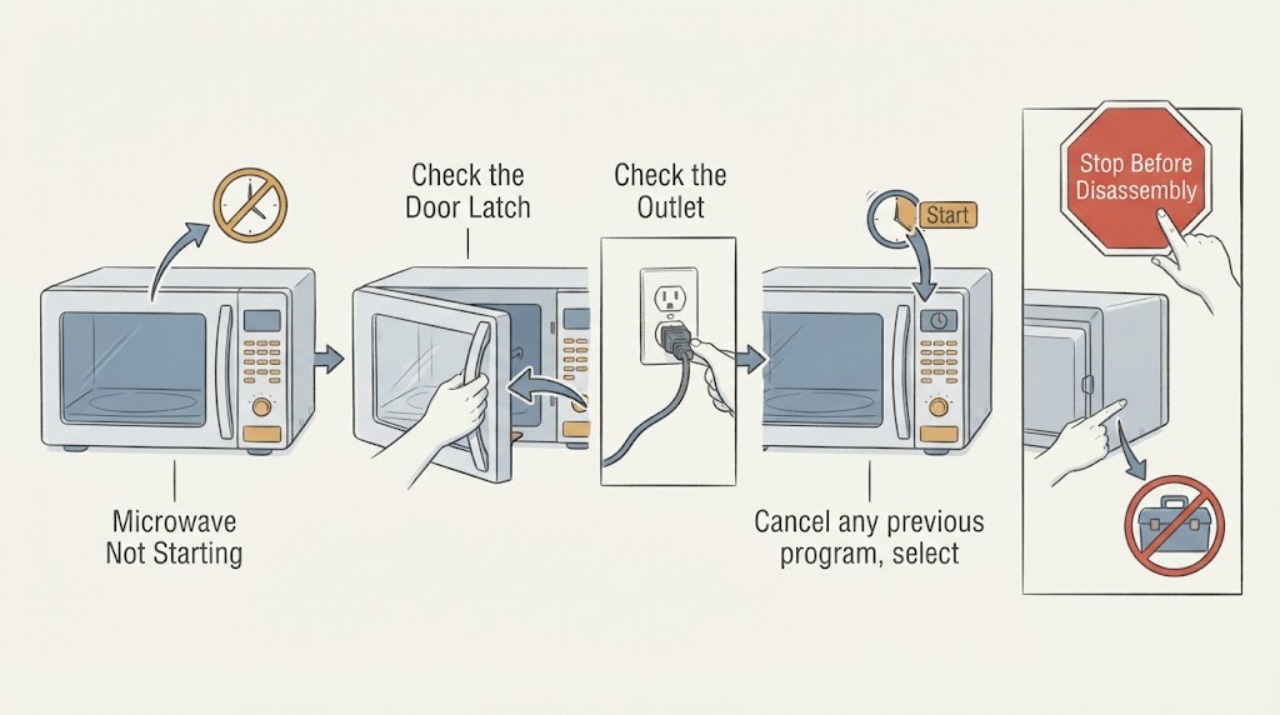
For a microwave that will not start, separate loss of power from a door or control condition. Check the outlet and breaker from outside, confirm the door closes fully and the program is selected, and use the exact manual for lock or reset steps. Do not bypass door interlocks or remove the cover.
Work through in order
Diagnostic checks
Use only checks that match the exact appliance or system and its official guide.
-
Check 1
Check the display and interior light, then verify the plug and outlet from outside with a suitable household device; do not open the cabinet.
Expected result: The display is blank, power is absent, or the display is on.
Next step: Restore a safe outlet or breaker condition only from outside; arrange service if power is present but the display stays dead.
Why this matters
Why: Blank power suggests supply or internal power service; an illuminated display moves the check to door and controls.
-
Check 2
Close the door firmly and inspect the accessible seal and latch area for food debris, warping, or a door that does not align.
Expected result: The door closes and latches normally, or remains misaligned.
Next step: Stop using the oven if the door, latch, or seal is damaged or will not align.
Why this matters
Why: A door interlock must close correctly; never defeat it.
-
Check 3
Cancel any previous program, select a short heating program with a suitable load, and press Start once as the model instructions show.
Expected result: Start is ignored, the unit beeps, or the program begins.
Next step: Use the manual’s cancel and Start sequence once, then arrange service for a repeat failure.
Why this matters
Why: An ignored command may be a lock, incomplete program, or control fault.
-
Check 4
Look for a lock symbol, Demo indication, or fault code and record it before seeking model-specific service.
Expected result: A lock, Demo message, or fault code appears.
Next step: Follow only the exact model procedure and stop for a recurring fault.
Why this matters
Why: The exact message determines the safe manual step; it does not identify a part by itself.
Use your observations
Decision map
Find the observation that best matches what you see, then follow the next safe action.
-
PATH 01Next step
What you see
The display is blank and the outlet has no power, or the breaker trips again.
Do this next
Leave the appliance off and have the outlet or circuit checked by an electrician.
Why this path and its safety boundary
Why it matters: The supply or household circuit is the leading issue.
-
PATH 02Next step
What you see
The display is on but the door will not close or the latch area is damaged.
Do this next
Do not bypass it; arrange qualified microwave service.
Why this path and its safety boundary
Why it matters: The door interlock safety condition is not satisfied.
-
PATH 03Next step
What you see
The door closes and controls respond, but Start is ignored or a fault returns.
Do this next
Use exact manual guidance once and contact authorized service if it persists.
Why this path and its safety boundary
Why it matters: A control, lock, or internal fault remains possible.
Helpful context
Understand the symptom
This guide focuses on what happens after Start is pressed. The symptom is a starting point, not a part diagnosis; use each observation to choose the next safe check.
Manufacturer guidance supports these symptom-level checks. Model-specific controls, parts, and service procedures must be confirmed in the appliance manual.
Only after diagnosis
Potential parts
- door latch or control assembly
Relevant only after power, door closure, and lock checks, with exact model diagnosis.
Confirm the exact appliance model and manufacturer instructions before ordering.
When checks do not resolve it
Need a professional?
Call qualified microwave service when power is present but it will not start, the door or seal is damaged, or a fault returns.
Common questions
FAQ
Can I bypass a microwave door switch to make it start?
No. Panasonic safety instructions prohibit tampering with door interlocks.
What if the display works but Start does nothing?
Check door closure, selected program, lock indication, and the manual sequence; recurring failure needs service.
Read the exact guide
Official sources
- NN-ST785S Operating InstructionsPanasonic · microwave power, door interlock, controls and service safety
Community feedback
Share a repair observation
Share a plain-text repair observation. Accepted observations are published automatically; this page may take a moment to update.