
On this page
Start here
Quick answer
First determine whether the drum never started or stopped after the program began. Miele lists an incompletely closed door and an active delay-start function as reasons a drum can remain inoperative after program start, and it treats the Normal Economy program's lack of direction reversal as normal. Record the exact model, program, display and load, then check the accessible door, delay setting, plug, breaker, load and lint filters. Remove only a visible obstruction, refit clean and dry filters, and never reach into a moving or hot machine. Do not order a belt or motor from the symptom alone: a jammed drum, drive, door switch, control or another fault can look the same. Burning odor, smoke, sparks, abnormal heat, loud metal contact, a damaged cord, water near electrical parts or a repeated breaker trip requires immediate shutdown and qualified service.
Before you begin
Safety first
- Only ordinary-access, dry, cool and non-invasive checks are described. Do not open panels, test live circuits, bypass the door interlock, reach into a moving drum, handle the belt or motor, touch sharp fins or repeatedly reset a hazardous appliance.
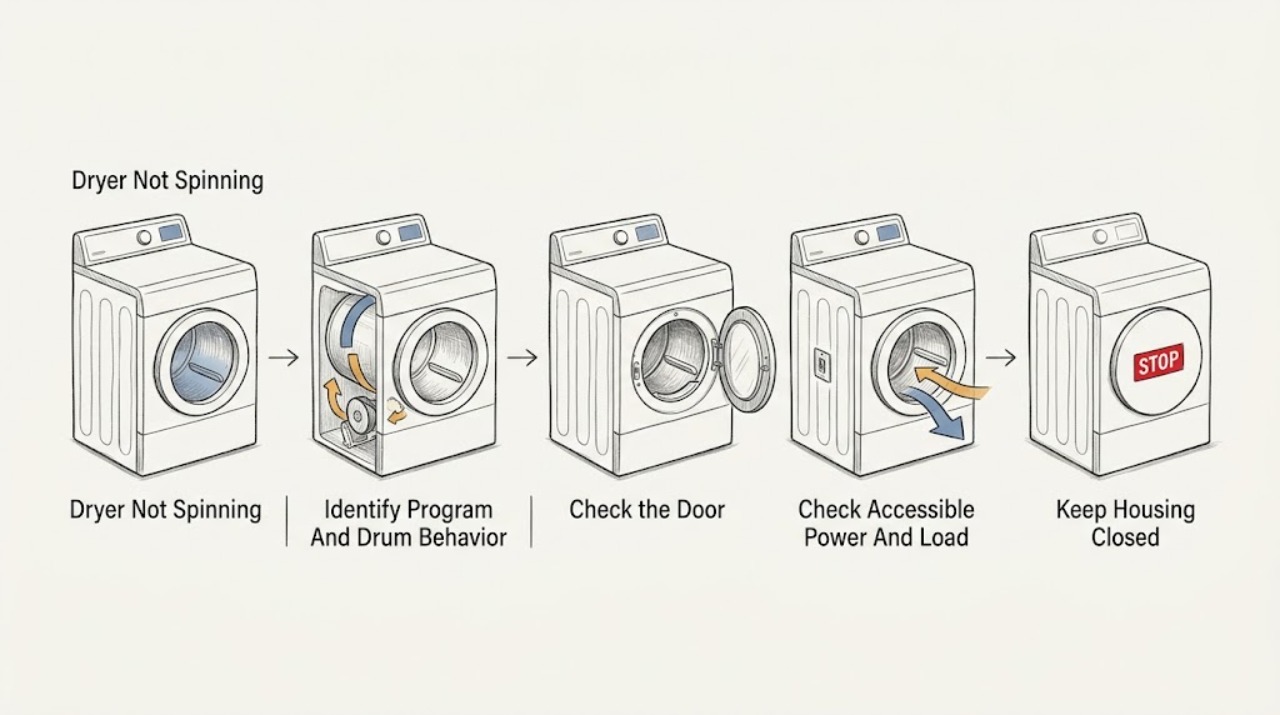
Work through in order
Diagnostic checks
Use only checks that match the exact appliance or system and its official guide.
-
Check 1
Record the exact Miele model, selected program, display or indicator, delay-start setting, load type and size, and whether the drum never moved, stopped during the cycle, or rotates only in one direction. From a safe position, note heat, airflow and sound without touching the drum or running a new test if there is a hazard.
Expected result: The program may be Normal Economy, a delayed cycle, a standard sensor cycle or a timed cycle. The drum may be stationary, intermittently turning, rotating in one direction, or making rubbing, scraping, thumping or humming sounds.
Next step: Continue only with dry, accessible checks when there is no safety symptom. If the drum is jammed, the sound is metallic or violent, or the cabinet is hot or scorched, stop and arrange service.
Stop if: Stop for burning odor, smoke, sparks, abnormal heat, loud impact or scraping, a damaged cord, water near electrical parts or a breaker that trips again.
Why this matters
Why: Normal Economy's lack of reversal is not the same as a stationary drum. A stationary drum after a normal start points first to door, delay, power, load, obstruction or an internal drive and control path.
-
Check 2
With the dryer stopped, close the door normally and check the visible seal and latch area for laundry or debris. Confirm in the exact manual whether delay start is active and whether the selected program should begin immediately; do not force the door or defeat the interlock.
Expected result: The door may not latch, a garment may be caught at the seal, the display may show a delay, or the door and delay setting may appear normal.
Next step: Remove only a visible garment obstruction, close the door normally and cancel or wait for delay only as the manual describes. If the drum still does not start, continue to the power and load checks once.
Stop if: Do not force the door, bypass the latch, insert tools into the seal or continue if the latch, seal, cord or cabinet is damaged or hot.
Why this matters
Why: Miele specifically identifies an improperly closed door and active delay start as reasons the drum can remain inoperative after program start. A normal latch and no delay make power, load, obstruction, motor, belt or control causes more likely.
-
Check 3
From a dry, undamaged position, check the accessible plug and household breaker as the model manual permits. If power is normal, switch the dryer off and let it cool, then remove only a visibly excessive, tightly rolled or foreign-object-obstructed load; do not reach behind the drum or dismantle the cabinet.
Expected result: The display may be blank, the breaker may have tripped, the load may be tightly wound or overloaded, or the dryer may have normal power with an empty or balanced load and a stationary drum.
Next step: Correct only an accessible plug, breaker or load condition documented by the manual, then make one normal start attempt. If the drum remains still or the breaker trips again, stop and arrange service.
Stop if: Do not use an adapter or extension cord, repeatedly reset a breaker, turn the drum against resistance, or continue after odor, smoke, sparks, abnormal heat or metal contact.
Why this matters
Why: A power or load condition can prevent startup or overload the drive, but normal power with a stationary drum does not identify whether the door switch, belt, motor, control or a mechanical obstruction is at fault.
-
Check 4
With the dryer off and cool, inspect and clean the accessible lint filters and air openings according to the exact operating instructions. If the manual permits rinsing a filter, dry it fully before refitting; do not open the drum drive area, insert a tool, or touch sharp heat-exchanger fins.
Expected result: Lint may block a filter or visible airflow opening, a filter may be damp or incorrectly seated, or the accessible air path may be clear. A clear air path with a non-spinning drum leaves the drive and control path unresolved.
Next step: Restore only the clean, dry, correctly seated filters and make one suitable test attempt. If the drum remains still, stops again, or airflow is abnormal, arrange service rather than opening the cabinet.
Stop if: Stop if lint is scorched, the cabinet is hot, wiring is visible, water reaches electrics, or cleaning would require high heat, sharp tools or panel removal.
Why this matters
Why: Miele's dryer guidance connects dirty filters and restricted airflow with operating and drying faults, while a filter condition alone does not prove a failed belt or motor. A recurring filter warning or weak airflow needs model-specific service assessment.
-
Check 5
After recording the symptom and completing safe external checks, make at most one normal start attempt on the correct program. Observe whether the drum starts smoothly, turns only in a documented program behavior, stops under load, or remains inoperative; do not keep restarting or order a drive part from this observation alone.
Expected result: The drum may start normally after a door, delay, power or load correction, remain stationary, stop with a code, or make abnormal rubbing, clicking, thumping or humming sounds.
Next step: Give Miele service the exact model, program, load, display, door and delay findings, power result, filter condition, drum sound and one-start result. Keep the dryer out of service if the symptom returns.
Stop if: Do not restore operation after smoke, sparks, burning odor, abnormal heat, violent vibration, metal scraping, water near electrical parts or repeated breaker operation.
Why this matters
Why: A successful start after an external correction points to that condition but does not rule out an intermittent fault. A stationary or noisy drum after the checks can involve a door switch, belt, motor, drum support, control or obstruction and requires qualified diagnosis.
Use your observations
Decision map
Find the observation that best matches what you see, then follow the next safe action.
-
PATH 01Safety boundary
What you see
The dryer is in Normal Economy and the drum rotates in one direction without reversing, with no other abnormal symptom.
Do this next
Continue the program if it is operating safely. Use the exact manual if the drum is actually stationary, the cycle stops, or the sound changes.
Why this path and its safety boundary
Why it matters: Miele identifies this program behavior as not a fault.
Safety stop: Stop for burning odor, smoke, sparks, abnormal heat, violent motion or a breaker event.
-
PATH 02Safety boundary
What you see
The door is not latched normally or delay start is active.
Do this next
Remove only visible obstruction, close the door normally and correct the documented delay setting. Make one start attempt; arrange service if the drum remains still.
Why this path and its safety boundary
Why it matters: The selected program may not be permitted to turn the drum yet.
Safety stop: Do not force or defeat the door interlock.
-
PATH 03Safety boundary
What you see
The display is blank, the breaker has tripped, or the load is tightly rolled, excessive or visibly obstructing the drum.
Do this next
Correct only the manual-documented external condition once and make one normal start attempt. If it returns, arrange service.
Why this path and its safety boundary
Why it matters: An accessible power or loading condition may explain the non-start or a drive that stops under load.
Safety stop: Do not keep resetting the breaker or run a damaged or hot appliance.
-
PATH 04Safety boundary
What you see
Accessible lint filters or airflow openings are blocked, damp or incorrectly seated.
Do this next
Clean and dry the filters exactly as the manual directs, refit them fully and test once. Escalate a stationary drum, recurring warning or restricted internal path.
Why this path and its safety boundary
Why it matters: Restricted airflow can cause operational or drying faults, but it does not identify a drive part.
Safety stop: Do not use high heat, sharp tools, panel removal or continued operation with scorched lint or abnormal heat.
-
PATH 05Safety boundary
What you see
The door, delay, accessible power, load and filter checks are normal but the drum remains still, stops again or makes rubbing, grinding, clicking or impact sounds.
Do this next
Keep the dryer out of service and arrange Miele technical service with the exact model, sound, display and test history. Do not open the cabinet.
Why this path and its safety boundary
Why it matters: A door switch, belt, motor, drum support, obstruction or control fault remains possible and cannot be identified safely from the symptom alone.
Safety stop: Stop immediately for smoke, sparks, burning odor, abnormal heat, water near electrics or a breaker event.
-
PATH 06Safety boundary
What you see
There is burning odor, smoke, sparks, abnormal heat, violent movement, metal scraping, a damaged cord or outlet, water near electrical parts, or repeated breaker operation.
Do this next
Stop using the dryer. Disconnect power only if safe and dry to do so without approaching a hazard; leave the area when necessary and arrange qualified appliance or electrical service.
Why this path and its safety boundary
Why it matters: This is a fire, electrical, water or mechanical safety event, not a normal no-spin check.
Safety stop: Do not re-energize, open panels, reach into the drum, bypass an interlock or continue testing.
Helpful context
Understand the symptom
Not reversing is different from not spinning
A Miele dryer can rotate in one direction without reversing in Normal Economy, which Miele describes as normal for that program. That is different from a drum that never moves, stops under a normal program, or turns only with a scraping or grinding sound. Identify the program before calling a normal behavior a failure.
Keep the first checks external
A closed door, an expired delay start, an accessible power problem, an unbalanced or oversized load, or a clogged filter can prevent normal operation. These checks do not prove that a belt, motor or control is bad. Do not bypass the door interlock, remove panels or put hands inside the drum while power is connected.
A filter problem can be a drying problem too
Miele's dryer support material links lint and filter conditions with drying faults and says filters cleaned with water must be dried carefully before use. Keep lint out of the waste-water system, do not use high heat to clear a blockage, and escalate when the filter, air path or drum cannot be inspected safely.
Safety boundary
Stop conditions
- Burning odor, smoke, sparks, abnormal heat, a damaged cord or outlet, water near electrical parts, or a breaker that trips again.
- Violent drum movement, metal scraping, a jammed drum or any need to reach into the drum while power is connected.
- A door or latch that cannot close normally, a need to defeat an interlock, or a cabinet or filter area that is damaged.
- A stationary or repeatedly stopping drum after the exact program, door, delay, power, load and filter checks.
- Any need to open panels, test live circuits, handle the motor or belt, or order a drive component without qualified diagnosis.
Only after diagnosis
Potential parts
- dryer door switch or latch
Consider only when qualified diagnosis confirms that the door is mechanically closed but the interlock is not reporting a safe closed state.
Confirm the complete Miele model and manufacturer fit information before ordering. - dryer drive belt
Consider only after service confirms a broken, stretched or displaced belt and rules out a jam, motor, drum support, door or control fault.
Belt size and routing vary by model; installation requires appropriate service access. - dryer drive motor
Consider only when qualified testing confirms motor or motor-control failure after door, power, load, obstruction and belt checks.
Electrical drive parts require exact model matching and qualified installation. - dryer drum support or roller
Consider only when service finds a seized or damaged support causing resistance, noise or a drum that stops under load.
Support components vary by model and must be matched and installed by a qualified technician.
When checks do not resolve it
Need a professional?
Arrange Miele technical service when the drum remains stationary after the exact program, door, delay, power, load and filter checks; when it stops repeatedly; when a code or technical-fault indicator returns; or when a door switch, belt, motor, drum support, control or obstruction needs diagnosis. Stop immediately for burning odor, smoke, sparks, abnormal heat, violent or metallic sounds, water near electrical parts, a damaged cord or repeated breaker operation.
Safety scope: Only ordinary-access, dry, cool and non-invasive checks are described. Do not open panels, test live circuits, bypass the door interlock, reach into a moving drum, handle the belt or motor, touch sharp fins or repeatedly reset a hazardous appliance.
Common questions
FAQ
Why does my Miele dryer not spin after I press Start?
Check the exact program, door latch, delay-start setting, accessible power and load first. Miele identifies an improperly closed door and active delay start as startup causes. If the drum remains still after one safe external check, arrange service.
Is it normal for a Miele dryer not to reverse direction?
Miele says the drum may not change direction in Normal Economy and that this behavior is not a fault. A drum that never rotates, stops unexpectedly or makes abnormal noise is a different symptom.
Can a full or tangled load stop the Miele dryer drum?
An excessive or tightly rolled load can prevent normal operation or make the drive stop under load. Switch off and cool the dryer, adjust only the visible load condition allowed by the manual, and arrange service if the drum remains still or the symptom returns.
Should I replace the belt when a Miele dryer will not spin?
Not from the symptom alone. A door interlock, delay, power condition, obstruction, belt, motor, drum support or control can produce a similar result. Have the exact model diagnosed before selecting a component.
When should I stop using a Miele dryer that will not spin?
Stop for burning odor, smoke, sparks, abnormal heat, violent movement, metal scraping, water near electrical parts, a damaged cord or a repeated breaker trip. Disconnect power only when safe and dry to do so, then arrange qualified service.
Read the exact guide
Official sources
- Normal Economy/drum does not change direction of rotationMiele USA · Miele USA support for models with the Normal Economy program.
- Tumble dryer does not startMiele USA · Miele USA tumble dryer support; follow the exact model manual for controls.
- Troubleshooting for All problem with Miele Tumble DryerMiele USA · Miele USA tumble dryer support index.
- Drum inoperative after program startMiele USA · Miele USA tumble dryer support; controls and messages vary by model.
- Fault F55Miele USA · Miele USA support for a specific F55 fault; filter and load practices should follow the exact model.
Community feedback
Share a repair observation
Share a plain-text repair observation. Accepted observations are published automatically; this page may take a moment to update.