
On this page
Start here
Quick answer
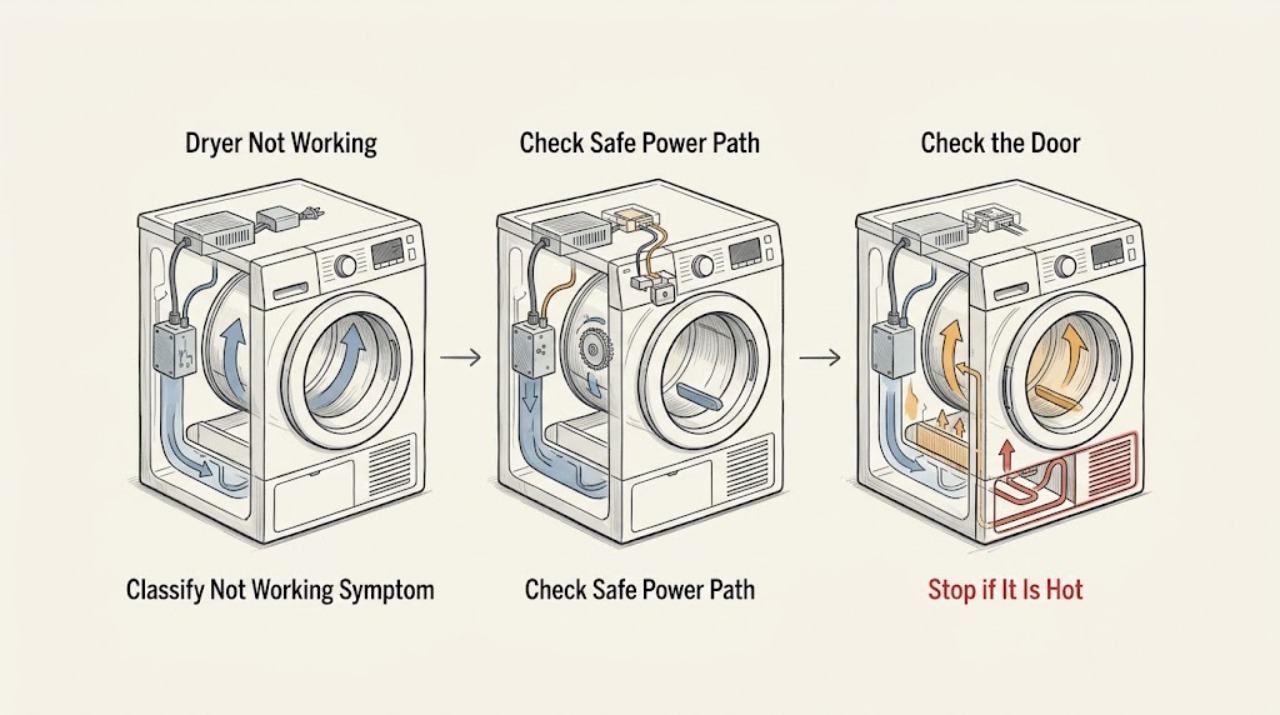
“Not working” can mean no display, no start, no drum movement, no heat, or a cycle that stops early. First stop the dryer if there is smoke, a burning smell, abnormal heat, sparking, or a tripped breaker. From a dry position, check whether the plug is connected, the breaker is on, the door is fully closed, and a programme was actually selected and started. Then note whether the drum turns, air moves, and the display shows a message. Clean only the accessible lint filter and check the visible exhaust or condensate route exactly as the model manual allows; do not remove panels or test live parts. A dryer with no display after a safe supply check, a door that will not latch, a repeated fault message, no drum movement, or no heat after airflow checks needs Miele or a qualified appliance technician.
Work through in order
Diagnostic checks
Use only checks that match the exact appliance or system and its official guide.
-
Check 1
Without opening the cabinet, classify the symptom as no display, display but no start, drum not turning, no heat, weak airflow, or cycle stopping early. Record any exact message, indicator, or unusual sound before changing settings.
Expected result: The display is blank, the display is lit but Start does nothing, the drum is still, the air is cold, airflow is weak, or the programme ends early.
Next step: Keep the dryer off if a hazard is present. Otherwise continue with the safe supply and door checks, preserving the exact message and symptom for the manual or technician.
Stop if: Stop for smoke, burning smell, sparks, abnormal heat, a repeated breaker trip, melted material, or an exposed damaged lead.
Why this matters
Why: Each symptom selects a different check: supply and control for a blank display, door and programme for no start, drive for no movement, heat and airflow for cold air, and load or sensor conditions for an early stop.
-
Check 2
From a dry position, confirm the plug is fully seated, the local switch is on if fitted, and the household breaker or fuse has not tripped. Do not repeatedly reset a breaker, use an extension lead as a workaround, or open the plug or cabinet.
Expected result: The dryer remains blank, the breaker is off, the breaker trips again, or the display returns normally.
Next step: If the breaker is safely restored and stays on, proceed to the door and programme checks. If the dryer remains blank or the breaker trips again, leave it disconnected and arrange qualified service.
Stop if: Stop for repeated trips, heat or discoloration at the plug or socket, a damaged lead, water near electrical equipment, sparks, or any need to test live wiring.
Why this matters
Why: A blank display with a sound household supply can indicate an appliance-side fault. A breaker that trips again indicates an electrical fault or overload and is not a restart instruction.
-
Check 3
With power available and no hazard, close the door fully without forcing it, check that no fabric is trapped in the seal, select a programme allowed by the model, and press Start once. Do not bypass or defeat a door interlock.
Expected result: The door will not close or latch, the controls respond but the cycle does not begin, or the programme starts.
Next step: Remove only a visible obstruction and consult the exact manual for a lock or programme procedure. If the latch, hinge, or interlock is damaged, stop using the dryer and request service.
Stop if: Stop for a broken latch, a door that springs open, a damaged seal, a lock that requires bypassing, or any need to dismantle the door or control panel.
Why this matters
Why: A door that is not closed prevents a start on documented Miele dryers. A lit control panel with no start can also reflect an incorrect selection sequence or an active lock; a cycle that starts moves the diagnosis to drum, airflow, heat, or early-stop symptoms.
-
Check 4
If the drum runs, stop the programme and let the appliance cool. Clean the accessible lint filter exactly as the model manual directs, check the visible exhaust path on a vented model, and check that the condensate container or visible drain route is not full or kinked on a condenser or heat-pump model.
Expected result: The filter is packed with lint, the visible vent path is restricted, the condensate container is full, the drain hose is kinked, airflow is weak, or these checks are clear.
Next step: Restore only the accessible filter, container, or hose arrangement described by the manual and allow the dryer to cool. If the symptom persists, stop using it and arrange model-specific service.
Stop if: Stop for lint near a hot area, scorched fabric, smoke, abnormal cabinet heat, a damaged vent, water near electricity, or any need to remove a fan, heater, or heat-pump cover.
Why this matters
Why: Restricted air or condensate handling can make drying take too long, end early, or appear ineffective. A clear external path with no heat or no drum movement points beyond routine airflow maintenance.
-
Check 5
If the dryer starts but stops early or leaves laundry damp, note whether the load is a single item, very small, tangled, or still heavily wet from the washer. Check the selected programme and fabric-care instructions without adding heat or repeatedly restarting the cycle.
Expected result: The load is unusually small or uneven, the laundry is very wet, the programme is unsuitable, or a normal load also stops early.
Next step: Use the exact manual to choose a suitable programme and load, then stop if the same symptom returns. Do not treat a load change as a repair for a persistent fault.
Stop if: Stop for hot or scorched laundry, smoke, a burning odor, a drum that stalls, repeated fault indications, or any sign of overheating.
Why this matters
Why: Miele documentation describes some programme stops or poor results as load or programme conditions, while repeated early stopping with a normal load can indicate a sensor, airflow, or control fault.
-
Check 6
Photograph or write down the exact display message or indicator pattern, the full model name or serial information from the rating plate, and what the drum, airflow, and heat did before the stop. Do not guess the meaning of a code from another Miele model.
Expected result: The same message returns after the manual's permitted reset or acknowledgement, the message clears and the dryer works, or no message is shown.
Next step: Use Miele's operating-manual finder with the exact model and give the recorded message and sequence to a qualified technician if it returns. Do not run repeated resets.
Stop if: Stop for a repeated fault, a fault accompanied by smoke or heat, a door that cannot be opened safely, or any instruction that would require bypassing a safety device.
Why this matters
Why: A repeated model-specific message indicates a fault path that needs the correct manual or service information. A one-time clear does not prove the underlying condition is fixed; no message does not rule out a mechanical or heating fault.
-
Check 7
Only when the supply, door, programme, accessible filter, and visible airflow or condensate checks are normal and no hazard exists, perform one brief model-approved recheck with a small suitable load. Stay nearby and stop at the first abnormal sound, smell, heat, message, or loss of movement.
Expected result: The dryer completes normally, the original symptom returns, the drum stops, the air remains cold, or a fault message appears again.
Next step: If any symptom returns, disconnect the dryer safely, keep it out of service, and arrange Miele or qualified appliance repair with the model, sequence, and observations.
Stop if: Stop immediately for smoke, burning smell, sparks, abnormal heat, loud mechanical noise, a stalled drum, repeated breaker trips, or a new leak.
Why this matters
Why: A normal brief run suggests the original condition may have been a selection, load, or accessible maintenance issue, but recurrence points to a fault needing diagnosis. No heat or no movement after the permitted checks is not a reason to open the cabinet.
Use your observations
Decision map
Find the observation that best matches what you see, then follow the next safe action.
-
PATH 01Next step
What you see
The breaker trips again, the plug or socket is hot or discolored, or there is smoke, burning odor, or sparking.
Do this next
Arrange qualified service and follow the exact model guidance.
Why this path and its safety boundary
Why it matters: Stop using the dryer, isolate power only from a dry safe position, keep clear of the appliance, and arrange qualified electrical or appliance service. Do not reset and retry.
-
PATH 02Next step
What you see
The dryer has no display after the plug, local switch, and household supply have been checked safely.
Do this next
Arrange qualified service and follow the exact model guidance.
Why this path and its safety boundary
Why it matters: Leave it disconnected and arrange service; do not open the cabinet or test the control board or heater.
-
PATH 03Next step
What you see
The display is active but the door will not latch or Start does not begin the programme.
Do this next
Arrange qualified service and follow the exact model guidance.
Why this path and its safety boundary
Why it matters: Check only visible fabric or debris and the model's programme sequence. A damaged latch, hinge, seal, or interlock is a service condition; never bypass it.
-
PATH 04Next step
What you see
The drum runs but drying is weak, takes too long, stops early, or airflow is reduced.
Do this next
Arrange qualified service and follow the exact model guidance.
Why this path and its safety boundary
Why it matters: Cool the dryer, clean the accessible filter, and check only the visible vent or condensate route allowed by the exact manual. Persistent symptoms need service.
-
PATH 05Next step
What you see
The programme starts but the drum does not turn or the air remains cold after the safe external checks.
Do this next
Arrange qualified service and follow the exact model guidance.
Why this path and its safety boundary
Why it matters: Stop using the dryer and arrange qualified diagnosis. Do not access the drive, heater, thermal device, fan, or control wiring.
-
PATH 06Next step
What you see
A display message or indicator returns after the model-approved acknowledgement or reset.
Do this next
Arrange qualified service and follow the exact model guidance.
Why this path and its safety boundary
Why it matters: Record the exact code, model, and sequence, then contact Miele or qualified service. Do not infer a component from a code belonging to another model.
-
PATH 07Next step
What you see
The dryer has power, latches, starts, turns, and has a clear accessible airflow path with no hazard.
Do this next
Arrange qualified service and follow the exact model guidance.
Why this path and its safety boundary
Why it matters: A single brief manual-approved recheck can distinguish a selection or load issue from a repeatable fault. Stop at the first abnormal sign and do not continue cycling to reproduce it.
Helpful context
Understand the symptom
Define what not working means
Record the exact symptom before trying to restart the dryer. A blank display is a supply or control symptom. A lit display with no start points toward programme selection, door closure, a lock, or a fault indication. A running cycle with no drum movement, no warm air, or an early stop is a different branch. Do not assume that a single symptom identifies one failed part.
Start with safe external checks
Keep the dryer off if there is smoke, a burning smell, unusual heat, a spark, or a breaker that trips again. Otherwise check the plug, the household supply, the breaker, the door, and the selected programme from a dry position. Miele manuals vary by model, so use the manual finder with the full model name or serial number before attempting any model-specific reset or access procedure.
Airflow and condensate are performance checks
A dryer may appear not to work when it runs but takes too long, stops with damp laundry, or has weak airflow. Clean the accessible lint filter as directed, check a visible exhaust route for obstruction on vented models, and check the condensate container or drain route on models that use one. Do not disassemble the fan, heater, heat-pump circuit, or cabinet.
Know when to stop
No display after a safe power check, repeated breaker trips, a locked or misaligned door, a repeated fault message, a drum that will not turn, or a heater that remains cold after the permitted external checks is a service boundary. Do not bypass a door switch, bridge a fuse, probe live wiring, or keep restarting a dryer that smells hot or electrical.
Safety boundary
Stop conditions
- Smoke, burning odor, sparks, abnormal cabinet or laundry heat, or a repeated breaker trip is present.
- The plug, socket, cord, door latch, seal, or visible housing is damaged or discolored.
- Water is near electrical equipment, a condensate leak is uncontrolled, or the dryer is unstable.
- The drum does not turn, the air remains cold, or the cycle repeatedly stops after safe external checks.
- A fault message or indicator returns, or a check would require bypassing a door lock or opening the cabinet.
- The dryer needs repeated restarts to reproduce the problem.
Only after diagnosis
Potential parts
- door latch or door seal
Consider this category only if inspection confirms a damaged latch or seal and the exact model documentation identifies it as the failed component.
Confirm the complete model and configuration before selecting a component; do not bypass the door interlock. - lint filter or airflow component
Consider this category only when the model manual and service diagnosis identify a damaged filter or airflow component after routine cleaning is ineffective.
Confirm the exact model, filter position, airflow design, and safe installation procedure. - drive or heating component
Consider this category only after qualified diagnosis confirms a drive or heating failure; no-drum or cold-air symptoms alone do not identify a part.
Confirm the exact model and service documentation; internal electrical and heating work is not a routine user replacement.
When checks do not resolve it
Need a professional?
The display stays blank after a safe household supply check or the breaker trips again., The door will not latch, the programme will not start, or a safety lock appears faulty., The drum will not turn, the air remains cold, or the cycle stops repeatedly., Cleaning the accessible filter or checking the visible vent or condensate path does not restore operation., Any smoke, burning smell, sparking, abnormal heat, water near electricity, or damaged cord or housing is present.
Common questions
FAQ
Why does my Miele dryer have no display?
From a dry position, check the plug, local switch, household supply, and breaker once. If the display stays blank or the breaker trips again, leave the dryer disconnected and arrange qualified service rather than opening the cabinet.
Why does the Miele dryer turn on but not start?
Check that the door is fully closed, no fabric is trapped, a valid programme is selected, and Start is pressed according to the exact model manual. A damaged latch or a repeated no-start condition needs service; do not bypass the door lock.
What if the Miele dryer runs but does not dry?
Note whether the drum turns and whether air moves. After cooling, clean the accessible lint filter and check the visible exhaust or condensate route as the manual allows. No heat, weak airflow, or repeated early stops after those checks require qualified diagnosis.
Can I reset a Miele dryer that is not working?
Only follow a reset or acknowledgement explicitly described for the exact model and recorded message. A message that returns is a fault clue, not a reason for repeated resets or continued operation.
When should I stop using a Miele dryer?
Stop for smoke, burning odor, sparks, abnormal heat, a repeated breaker trip, a damaged cord or door, water near electricity, a stalled drum, persistent cold air, or a recurring fault message. Keep it out of service and arrange qualified help.
Read the exact guide
Official sources
- Miele ServiceMiele · Miele self-help, operating manuals, technician booking, and qualified service support
- Miele Tumble Dryer | The tumble dryer does not start. | Miele USAMiele USA · Miele dryer start checks for power, breaker, and door closure, plus the operating-manual and technician paths
- Frequently asked questionsMiele USA · Miele dryer manual guidance for start sequence, door and supply checks, lint filter, airflow, load behavior, and fault indicators
- Operating manualsMiele · Miele model and serial based operating-manual lookup
Community feedback
Share a repair observation
Share a plain-text repair observation. Accepted observations are published automatically; this page may take a moment to update.