
On this page
Start here
Quick answer
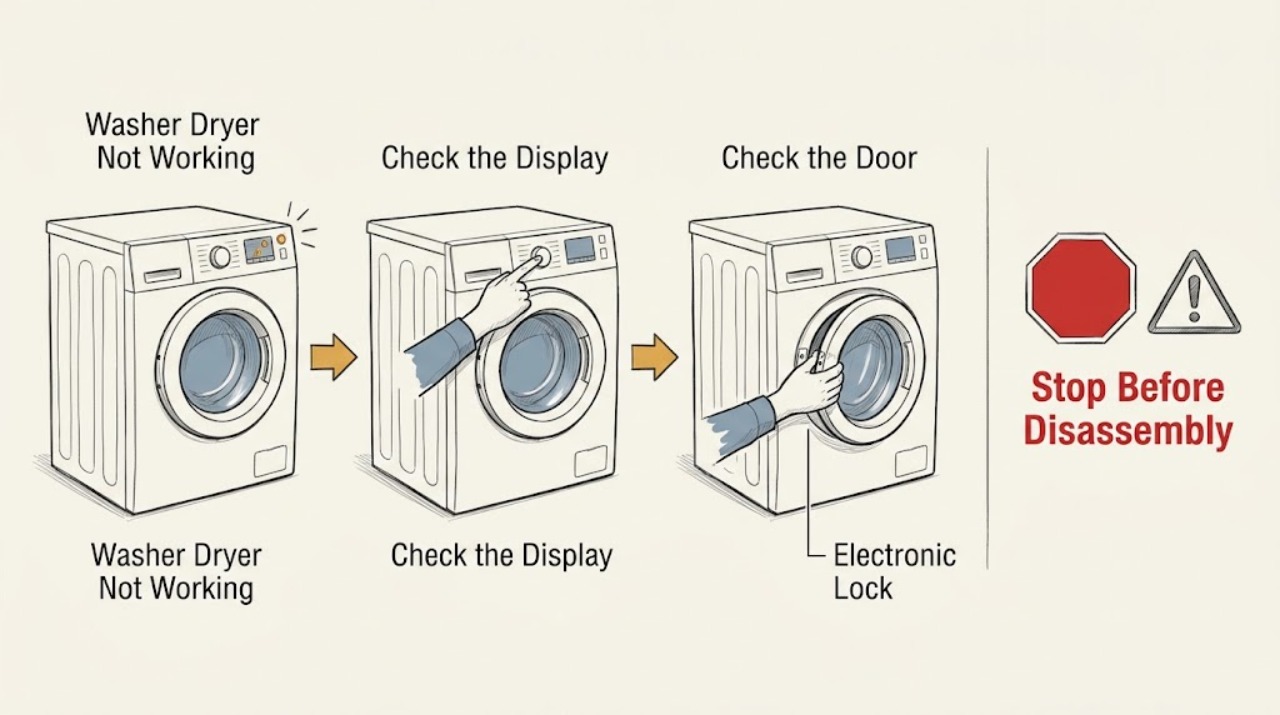
A Miele washer-dryer that is not working should be separated into a power/display problem, a start or door-lock problem, a control lock, or a displayed technical fault. First note whether the display and indicator lights respond, then check the On/Off control, plug, and breaker without repeatedly resetting a breaker that trips. If Start does not light, close the door correctly; if the display says Locked, Enter code, follow the model instructions. For F20 or Heating fault, Miele describes Thermostop as a possible pause while temperature is reached, but a recurring technical fault calls for one controlled power restart and service. Do not open the casing or bypass a safety device.
Work through in order
Diagnostic checks
Use only checks that match the exact appliance or system and its official guide.
-
Check 1
Press the Miele On/Off control once and observe the display and indicator lights. If the display remains dark, look at the plug connection and the appliance breaker or fuse position without removing covers. Do not keep resetting a breaker that trips.
Expected result: The display returns and controls respond; the display stays dark with no indicators; or the breaker trips again when the appliance is switched on.
Next step: If power and the controls are available, continue to the door and Start check. If the display stays dark after the simple power checks, or the breaker trips again, leave the appliance off and arrange qualified service.
Why this matters
Why: A responsive display points away from a total power loss. A dark display can be a switched-off or disconnected appliance, while a repeat breaker trip is an electrical safety symptom rather than a reason to continue testing.
-
Check 2
With the drum safely empty of loose items at the opening, close the door normally and press against the lock side as the Miele support instruction describes; then select a suitable program and observe the Start control. Do not force the door or defeat the interlock.
Expected result: Start lights and the program begins; Start remains unlit; or the door will not latch or remains locked.
Next step: If Start remains unlit after one careful, normal closure, stop and use the model manual or service. If the door is locked during a live program or cooling period, wait rather than pulling the handle.
Why this matters
Why: A program that begins identifies the door closure as the immediate cause. An unlit Start control can mean the door is not correctly closed, while a jammed or persistently locked door can be a technical fault.
-
Check 3
Read the complete display message before touching other controls. If it says Locked. Enter code, use the model's operating instructions to enter or deactivate the electronic lock; do not guess at a code or repeatedly press unrelated controls.
Expected result: The lock message clears and the controls accept a program, or the message remains and the controls still do not respond.
Next step: Run one normal program only after the lock state is clear. If the code is unavailable or the message returns, record it with the model number and contact Miele Service.
Why this matters
Why: A cleared lock message indicates an enabled electronic lock prevented normal operation. A persistent message after the documented control sequence needs model-specific support rather than an internal repair attempt.
-
Check 4
If the display shows Techn. fault, contact Service, F20, or Heating fault, record the exact message and whether the program paused or stopped. Switch the washer-dryer off, disconnect power only by the normal plug or breaker access, wait at least two minutes, reconnect, and restart the program once.
Expected result: The program resumes and the message does not return; the time display was only paused while temperature was reached; or the same fault returns immediately or during the cycle.
Next step: If the fault returns, stop using the appliance and book qualified service with the exact code and sequence. Do not open the casing, make live electrical measurements, replace a heater, or bypass a thermal or door safety.
Why this matters
Why: Miele says Thermostop can pause a program until the selected temperature is reached. A recurring technical message means the reset did not resolve the fault and the cause may be a model-specific heating, sensor, control, or wiring problem.
-
Check 5
If the program ended but the door is still locked, note whether the drum may still be warm, water may remain, or anti-crease operation is active. Wait for the documented cooling or program condition and consult the exact operating instructions; never pull the door open by force.
Expected result: The door unlocks after the program or cooling condition, or it remains locked, the drum contains water, the machine is unusually hot, or an F35/door-release message appears.
Next step: If the door remains locked, keep the appliance off and arrange Miele Service or a qualified technician. Use an emergency release only when the model manual explicitly describes it and the appliance is safe to access.
Why this matters
Why: A temporarily locked door can be normal during an active program, anti-crease operation, or high temperature. A persistent lock, water retention, unusual heat, or a fault message needs service because the interlock and release system protects against injury and water exposure.
Use your observations
Decision map
Find the observation that best matches what you see, then follow the next safe action.
-
PATH 01Next step
What you see
The display is dark and no control responds.
Do this next
Check the On/Off control, plug connection, and breaker or fuse position once. If power is present but the display remains dark, stop and request service.
-
PATH 02Next step
What you see
The display works but Start does not light.
Do this next
Close the door normally at the lock side and retry once. If Start remains unlit, use the model instructions or arrange service; do not bypass the door lock.
-
PATH 03Next step
What you see
The display says Locked. Enter code.
Do this next
Follow the model-specific lock instructions. If the lock message remains or the code is unavailable, contact Miele Service with the model information.
-
PATH 04Next step
What you see
F20 or Heating fault appears while the time display pauses.
Do this next
Allow for Thermostop behavior only if the program resumes as temperature is reached. If the fault persists, perform the single two-minute power restart and then request service if it returns.
-
PATH 05Next step
What you see
A technical fault, repeated breaker trip, burning odor, smoke, leakage, unusual heat, or persistent door release problem is present.
Do this next
Stop using the washer-dryer, disconnect power only if safe, and arrange qualified service. Do not open the casing or attempt live electrical or interlock work.
Helpful context
Understand the symptom
Start with the symptom, not a guessed part
“Not working” can mean that the display is dark, the machine powers up but will not start, a door remains locked, or a program stops with a message. Those symptoms point to different checks. Record the exact display text, whether any indicator is lit, whether the drum contains water, and whether the problem affects washing, drying, or both. That short record is more useful than ordering a heater or control board from the symptom alone.
What the controls can tell you
Miele's support pages identify simple causes such as the appliance being switched off, an unplugged power connection, a tripped breaker, an incorrectly closed door, or an enabled electronic lock. A door can also remain locked during a program, while the load cools, or during anti-crease operation. Do not force it. Wait for the stated condition to finish and use the model-specific operating instructions when an emergency release is actually needed.
When a no-start symptom becomes a service issue
If the same technical message returns after the single restart that Miele recommends, or if the breaker trips again, smoke, burning odor, leakage, visible damage, unusual heat, or a jammed door is present, stop troubleshooting. Keep the washer-dryer off and give qualified service the model information, exact message, and sequence that led to it. Internal heating, lock, sensor, control, and wiring work is model-specific and is not a safe consumer repair from a generic symptom.
Only after diagnosis
Potential parts
- door interlock or door-latch assembly
Consider this category only if qualified diagnosis confirms that the door does not latch or a door-release fault persists after the normal closure and reset checks.
Confirm the complete appliance model and the manufacturer's fit information before ordering any part. - temperature sensor or heating circuit component
Consider this category only after a recurring F20 or Heating fault has been diagnosed by qualified service; the display alone does not identify a replacement part.
Heating and sensor components are model-specific and require professional compatibility and safety checks. - electronic control module
Consider this category only if service diagnosis finds a control or communication fault after power, door, and lock causes are excluded.
Do not order a control module from a generic not-working symptom; verify the exact model and approved fitment.
When checks do not resolve it
Need a professional?
Arrange qualified service when the display remains dark after the basic power checks, Start remains unlit after one normal door closure, a lock or door-release message persists, a technical fault returns after the single controlled restart, the breaker trips again, or there is smoke, burning odor, leakage, unusual heat, or visible damage. Do not open the casing, bypass a safety, or make live electrical measurements.
Common questions
FAQ
Why is my Miele washer-dryer not working at all?
Check which symptom you have first. A dark display points to the On/Off control, plug, or breaker path; a working display with an unlit Start control points to door closure; Locked. Enter code points to the electronic lock; and a recurring technical message needs service.
What should I do if the Miele washer-dryer display is blank?
Press the On/Off control once and check the plug connection and breaker or fuse position without opening the appliance. If the display remains dark, or the breaker trips again, leave the machine off and arrange qualified service.
Why will my Miele washer-dryer not start when the display is on?
The Start control may remain unlit when the door is not closed correctly. Close it normally at the lock side and retry once. If the control still does not light or the door will not latch, use the model instructions or contact service rather than bypassing the interlock.
Is F20 on a Miele washer-dryer always a failed heater?
No. Miele says Thermostop can pause the program while the selected temperature is reached. If F20 or Heating fault persists, perform the single controlled two-minute power restart described by Miele; if it returns, stop and arrange service.
Read the exact guide
Official sources
- Miele Washer | Fault F20 or Heating fault is shown on the display of the washing machine/washer-dryer.Miele USA · Miele washer-dryer F20 and heating-fault behavior
- Miele Washer | The display on the washing machine/washer-dryer shows Locked. Enter code. The factory default PIN code for washing machines/washer dryers is 1 2 5.Miele USA · Miele washer-dryer electronic lock function
- Miele Washer | The door of the washing machine is locked.Miele USA · Miele washer and washer-dryer door-lock behavior
- Miele Washer | The washing machine does not work. The display remains dark and no indicator light comes on.Miele USA · Miele washers and washer-dryers
- Miele Washer | The Start sensor control on the washing machine/washer-dryer/tumble dryer does not light up.Miele USA · Miele washer-dryer Start control and door closure
- Miele Washer | Techn. fault, contact Service appears in the display on the washing machine/washer-dryer.Miele USA · Miele washer and washer-dryer technical fault messages
- Troubleshooting for Display messages & light indicators problem with Miele WasherMiele USA · Miele washer and washer-dryer display messages and light indicators
- Miele Washer | The washing machine display shows fault F35, Door release, contact Miele Service, or The door lock is jammed. Contact Miele Service. The door could not be unlocked or the drum could not be unlocked on the top loader.Miele USA · Miele washer and washer-dryer door-release faults
Community feedback
Share a repair observation
Share a plain-text repair observation. Accepted observations are published automatically; this page may take a moment to update.