
On this page
Start here
Quick answer
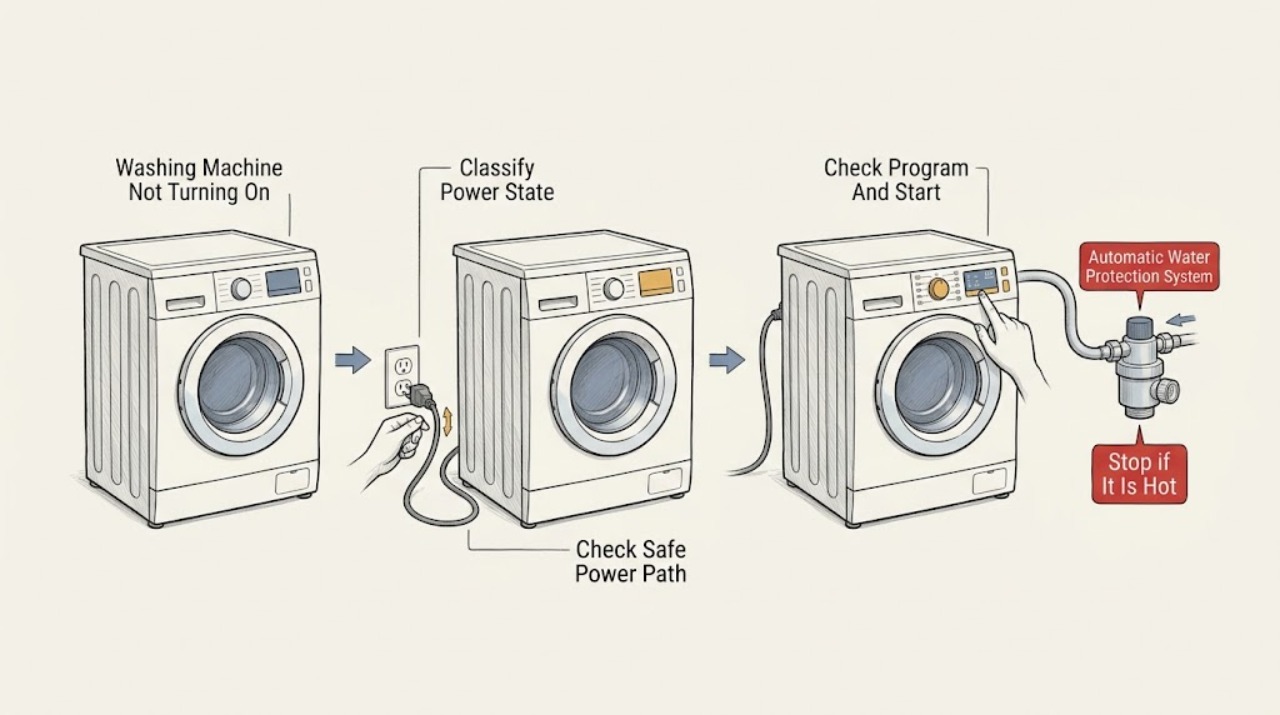
First separate a Miele washer with a completely dark display from one that has lights or a message but will not start. For a dark machine, check the On/Off control and whether the plug is connected, but do not touch a hot, wet, scorched, loose, or damaged connection; a tripped breaker needs safe electrical assessment, not repeated resets. If the display works, close the door firmly, select a program, press the model's Start/Stop or Start/Add laundry control, and check for a safety lock, PIN/Child Lock, delay start, door-lock message, or technical-fault message. A Waterproof system message means Miele detected an internal leak: close the water inlet if safely reachable, keep away from water near electricity, disconnect power only from a safe position, and contact Miele Service. Smoke, burning odor, sparking, a hot plug or outlet, water contacting electrical parts, shock, or repeated breaker trips is an immediate stop-use boundary.
Work through in order
Diagnostic checks
Use only checks that match the exact appliance or system and its official guide.
-
Check 1
Observe the washer without moving it and record whether the display and indicator lights are completely dark, the display is lit but the program will not start, or a specific message or code is shown.
Expected result: There is no light or display, the controls respond but the drum does not start, or the display shows Locked, a door message, Waterproof system, a technical fault, or another exact message.
Next step: Write down the exact message or code, take a safe photo, and follow the matching branch below instead of repeatedly pressing Start or resetting power.
Stop if: Stop for smoke, burning odor, sparking, a hot or discolored plug/outlet, water near electrical parts, shock, damaged wiring, or a breaker that trips again.
Why this matters
Why: A completely dark machine points first to the On/Off state and power path. A lit display means power is present and the next check is a control, door, program, lock, water-protection, or fault state; the exact message must not be generalized across Miele models.
-
Check 2
For a completely dark display only, press the washer's On/Off control and visually check from a dry, stable position that the plug is seated and the relevant breaker has not opened; do not touch a hot, wet, loose, scorched, or damaged connection.
Expected result: The washer wakes after the On/Off control, the plug or breaker state explains the loss of power, or the connection is damaged/hot/loose or the breaker opens again.
Next step: If the connection and supply are safe and the washer wakes, continue to the door and start checks. If the machine stays dark or the breaker trips again, leave it out of service and arrange qualified electrical and appliance assessment.
Stop if: Do not repeatedly reset the breaker, use an extension or adapter, pull the cord, bend plug blades, touch a wet or hot connection, open the electrical panel, or take energized electrical readings.
Why this matters
Why: Miele lists the On/Off state, an unplugged machine, and a tripped breaker as causes of a dark display. A damaged connection or repeated trip is an electrical hazard rather than a normal restart opportunity.
-
Check 3
If the display is active, select a program allowed by the exact Miele model, confirm the displayed settings, close the door normally, and touch the model's Start/Stop or Start/Add laundry control once.
Expected result: The program starts, the control does nothing, the display shows a delay or lock, the door message remains, or a technical or water-related message appears.
Next step: Record the exact control labels and message, then follow the relevant lock, door, delay, Waterproof, or technical-fault action; do not cycle through unrelated programs to force a response.
Stop if: Do not bypass the Start control, force the door closed, start a cycle with a damaged seal or leak, or continue if smoke, odor, sparking, water, or a breaker trip appears.
Why this matters
Why: A lit display with no start is not a power-loss diagnosis. Miele manuals require a selected program and model-specific Start control, while a displayed status can prevent starting until the status is resolved.
-
Check 4
With the drum stationary, inspect the door opening and seal from ordinary safe access for a plainly visible garment edge or object preventing normal closure, then close the door without slamming or forcing it; read the exact display for Door lock, F34, Locked, or a similar message.
Expected result: The door closes and the program starts, the machine reports a door-lock fault, the Locked/safety-lock state is shown, or water/heat remains in the drum.
Next step: Use only the exact model's lock or program-cancel instructions; if a door-lock message returns, water remains, or the door is jammed, leave it for Miele Service rather than forcing or bypassing the lock.
Stop if: Do not pry, pull, drill, bypass, or electrically defeat the door lock; do not reach into a rotating or hot drum or open the door against resistance.
Why this matters
Why: Miele links a door-lock fault to a door that cannot engage and describes a safety lock that can restrict controls. A locked door can also be normal during an active, hot, or anti-crease phase; water or heat changes the safe response.
-
Check 5
Read the display for Locked, Enter code, Delay start, SmartStart, or a similar control status and compare the control sequence with the exact Miele operating instructions; change only a clearly identified user setting once.
Expected result: The safety lock or PIN clears using the documented model-specific controls, a delay is active, or the washer still does not respond after the status is correctly addressed.
Next step: Record the status and exact model, then request service if the lock cannot be cleared from the instructions or the machine remains unresponsive; do not guess PINs or repeatedly toggle settings.
Stop if: Do not bypass a safety lock, use an undocumented factory code, repeatedly press controls on a faulting machine, or continue if water, heat, smoke, odor, or electrical danger is present.
Why this matters
Why: Miele states that a safety lock can be deactivated through model-dependent Start/Stop controls, while the manual identifies PIN and delay functions. A persistent no-start after a documented setting change points to a fault, not a reason to guess another code.
-
Check 6
If the display shows Waterproof system, Waterproof syst., Check inlet, Check drain, or another water-protection message, observe the floor and visible hoses from a safe dry position and note whether water is present without reaching behind the washer.
Expected result: There is an internal-leak or Waterproof message, water on the floor or near electricity, a wet hose or connection, or no visible water but the protection message remains.
Next step: If safely reachable without touching wet electrical parts, close the water inlet and keep the washer out of service; arrange Miele Service. Keep away and obtain electrical help when water contacts a plug, outlet, cord, or other electrical part.
Stop if: Do not reach behind a wet appliance, remove panels, open the pump or emergency release with hot or standing water, reconnect power to test, or run a cycle after a Waterproof warning.
Why this matters
Why: Miele says the Waterproof system reacts to detected internal water and requires the water inlet to be closed and service contacted. A clear floor does not clear an internal leak or authorize opening the cabinet.
-
Check 7
Only when there is no leak, heat, smoke, odor, spark, damaged connection, or repeated breaker trip, apply the exact Miele instruction for the displayed technical fault: turn the machine off, disconnect power only from a safe position, wait the manual's stated interval, reconnect, and switch it on once.
Expected result: The washer starts normally and the message stays cleared, or the same fault, door message, no-start condition, or electrical symptom returns.
Next step: If the fault returns, leave the washer out of service and give Miele Service the exact code, model, event sequence, water state, and reset result; do not repeat the reset as a diagnostic loop.
Stop if: Do not reset a machine with water near electricity, smoke, burning odor, sparking, a hot plug/outlet, shock, or a breaker that has tripped repeatedly; do not open panels or work inside the appliance.
Why this matters
Why: Miele documents a single power-disconnect and restart for some technical or door-lock faults, but a returning message means the fault needs service. A reset cannot make a leaking, sparking, hot, or damaged machine safe.
Use your observations
Decision map
Find the observation that best matches what you see, then follow the next safe action.
-
PATH 01Next step
What you see
The display and indicators remain dark, with no smoke, odor, heat, sparking, water, damaged connection, or repeated breaker trip.
Do this next
Check the On/Off state and visually confirm the plug and breaker from a dry safe position. If power does not return, leave the washer out of service for qualified electrical and appliance assessment.
-
PATH 02Next step
What you see
The display is active but the cycle does not begin after the normal program and Start control are selected.
Do this next
Check the exact displayed status for door lock, safety lock/PIN, delay, water protection, or a technical fault, then follow only that model's instructions. Do not press Start repeatedly.
-
PATH 03Next step
What you see
The door remains locked, F34 or a door-lock message appears, the program is active, anti-crease is running, or the drum may still be hot or contain water.
Do this next
Keep the drum stationary and follow the exact model's cancel/cooling/lock guidance. Do not force the door or bypass the lock; arrange Miele Service for a recurring lock fault, trapped water, or jammed door.
-
PATH 04Next step
What you see
Locked, Enter code, a PIN prompt, Delay start, SmartStart, or another control-status message prevents the expected start.
Do this next
Use the exact model's documented control sequence once. If the status cannot be cleared or the washer remains unresponsive, record the model and request Miele Service.
-
PATH 05Next step
What you see
Waterproof system, Waterproof syst., or a related water-protection message appears, or water is present near the washer.
Do this next
If safely reachable, close the water inlet, keep away from water near electricity, disconnect power only from a safe position, and contact Miele Service. Do not run or open the cabinet.
-
PATH 06Next step
What you see
A technical-fault message or exact code remains after the normal start sequence, with no immediate hazard.
Do this next
Apply the model's documented single power reset only once. If the message returns, leave the machine out of service and provide the exact code and reset result to Miele Service.
-
PATH 07Next step
What you see
There is smoke, a burning or hot electrical smell, sparking, a hot or discolored plug or outlet, shock, a damaged cord, or repeated breaker trips.
Do this next
Stop using the washer and do not touch or reset the hazard. Leave the area for fire or smoke risk and obtain emergency or qualified electrical help from a safe location, followed by appliance assessment.
-
PATH 08Next step
What you see
The washer remains dark or will not start after safe, documented checks, and no single user setting or message explains it.
Do this next
Keep it out of service and arrange qualified Miele appliance service. Do not substitute a generic reset, open the cabinet, or assume a failed part from the symptom alone.
Helpful context
Understand the symptom
A dark display and a silent start are different faults
If no indicator, display, or Start control lights, begin with the basic power path and the washer's On/Off state. If the display is lit, the washer has power and the decision changes to program selection, Start control, door engagement, lock settings, delay status, water protection, or a displayed fault. Record exactly what is visible before changing anything. Miele's support pages and manuals use different instructions for these states, so do not substitute a generic appliance reset for the message on the machine.
Door and control locks can look like a dead washer
A Miele washer may keep its door locked during a program, while cooling, or during an anti-crease phase. A safety lock or electronic PIN can also prevent controls from behaving as expected. Read the exact model's display and operating instructions; do not force the door, bypass a lock, or assume that a locked door means the appliance has no power. If there is water in the drum, high temperature, or a door-lock fault, keep the drum stationary and use service guidance rather than forcing access.
Waterproof and electrical warnings take priority
Miele says its Waterproof system reacts when water is detected from an internal leak and directs the user to close the water inlet, disconnect the washer from power, and contact service. That is not an ordinary no-start condition. Keep water away from electrical connections, do not reach into a rotating drum, and do not open panels or try to locate the leak. Smoke, a burning smell, sparking, a hot plug or outlet, a shock, or repeated breaker trips likewise ends user troubleshooting and requires appropriate qualified or emergency help.
Safety boundary
Stop conditions
- Stop immediately for smoke, burning or hot electrical odor, sparking, a hot or discolored plug or outlet, shock, damaged wiring, or a repeated breaker trip.
- Stop for a Waterproof-system message, water near the washer, water contacting electrical parts, or a leak that cannot be safely isolated; do not run or reconnect the machine to test it.
- Do not force, pry, drill, or bypass the door or safety lock, and do not reach into a rotating, hot, or water-filled drum.
- Do not repeatedly reset a breaker or repeat the power reset when the fault returns; a reset is not a repair.
- Do not use an extension cord or adapter, open the electrical panel, take energized electrical readings, or repair internal wiring.
- Do not open panels, reach behind the washer, move plumbing, or search for an internal leak after a Waterproof warning.
- Do not guess a PIN, error-code meaning, or control sequence across Miele models; use the exact manual or contact Miele Service.
Only after diagnosis
Potential parts
- door lock assembly
Only consider this category if Miele Service or a qualified technician confirms a recurring door-lock fault after the door, program, and model-specific control checks.
Door-lock fit and safety procedure are exact-model dependent; do not select or bypass a lock from a no-start symptom alone. - power cord or supply connection
Only consider this category if qualified electrical and appliance assessment identifies a damaged or incorrect supply connection as the cause of the dark display or no-start condition.
Verify the exact model rating, installation instructions, outlet, grounding, and local electrical requirements before any repair; do not use an adapter or extension as a workaround. - control or power module
Only consider this category after qualified diagnosis confirms an internal control or power-module fault that remains after safe external checks and any documented one-time reset.
No fit or failure can be inferred from a dark display alone. Confirm exact model documentation and professional repair requirements before selecting a component.
When checks do not resolve it
Need a professional?
Arrange qualified Miele appliance service when the washer remains dark without a safe supply explanation, will not start after the model-specific program, door, lock, and one-time reset checks, or shows a recurring code, door-lock fault, or Waterproof-system message. Obtain emergency or qualified electrical help from a safe location for smoke, burning odor, sparking, a hot plug or outlet, shock, water at electrical parts, or repeated breaker trips.
Common questions
FAQ
Why is my Miele washing machine completely dark?
Miele lists the On/Off state, an unplugged machine, or a tripped breaker for a dark display. Check only from a dry, safe position. A hot, damaged, wet, or repeatedly tripping connection needs qualified electrical and appliance assessment rather than repeated resets.
Why does my Miele washer have power but not start?
Check that a permitted program is selected, the door closes normally, and the correct Start/Stop or Start/Add laundry control is used. Then read the display for a door lock, safety lock/PIN, delay, Waterproof system, or technical-fault message. Do not press Start repeatedly.
Can Child Lock stop a Miele washing machine from starting?
Miele calls this a safety lock or electronic lock on the support pages; the control sequence varies by model. Follow the exact manual's unlock procedure once. Do not bypass the lock or guess a code, and arrange service if the state cannot be cleared.
Why is my Miele washer door locked when it will not turn on?
The door may still be locked because a program or anti-crease phase is active, the drum is hot, water remains, the energy supply was interrupted, or a door-lock fault is present. Keep the drum stationary, do not force the door, and use the exact model guidance or Miele Service.
What does Waterproof system activated mean on a Miele washer?
Miele says the system has detected water from an internal leak. If safely reachable, close the water inlet, keep away from water near electrical parts, disconnect power only from a safe position, and contact Miele Service. Do not run the washer or open its cabinet.
How many times should I reset a Miele washer that will not start?
Use a documented model-specific power reset only once when there is no water, heat, smoke, odor, spark, damaged connection, or repeated breaker trip. If the message or no-start condition returns, leave the washer out of service and provide the exact code and reset result to Miele Service.
What should I do if my Miele washer trips the breaker?
Do not repeatedly reset it or use an adapter or extension cord. If there is smoke, burning odor, sparking, a hot or discolored plug/outlet, water, or shock, keep away and obtain electrical or emergency help from a safe location. Have the appliance assessed before further use.
When should I call Miele Service for a washer that will not turn on?
Call when the washer stays dark without a safe supply explanation, a recurring door-lock, Waterproof, or technical-fault message remains, or the machine will not start after the exact manual's safe checks. Provide the model, display state, code, program, door state, and any water or electrical symptoms.
Read the exact guide
Official sources
- Operating and Installation InstructionsMiele USA · Miele WWH 860-US-en washer manual example for dark display, PIN, door lock, Waterproof system, technical fault, and model-specific controls
- Waterproof system activatedMiele USA · Miele washer internal leak detection, water inlet closure, safe power disconnection, stationary drum, and service boundary
- Techn. fault, contact ServiceMiele USA · Miele washer and washer-dryer technical fault restart and service escalation
- Door lockedMiele USA · Miele washer door lock during active or hot programs, anti-crease, interrupted energy supply, and manual/service guidance
- Washing machine inoperativeMiele USA · Miele washer with dark display and no indicator light, On/Off state, power connection, and breaker checks
- Fault F34 or door lockMiele USA · Miele washer door-lock fault, overloaded drum, one-time power restart, and service escalation
- LockedMiele USA · Miele washer safety lock and model-dependent Start/Stop control sequence
Community feedback
Share a repair observation
Share a plain-text repair observation. Accepted observations are published automatically; this page may take a moment to update.