
On this page
Start here
Quick answer
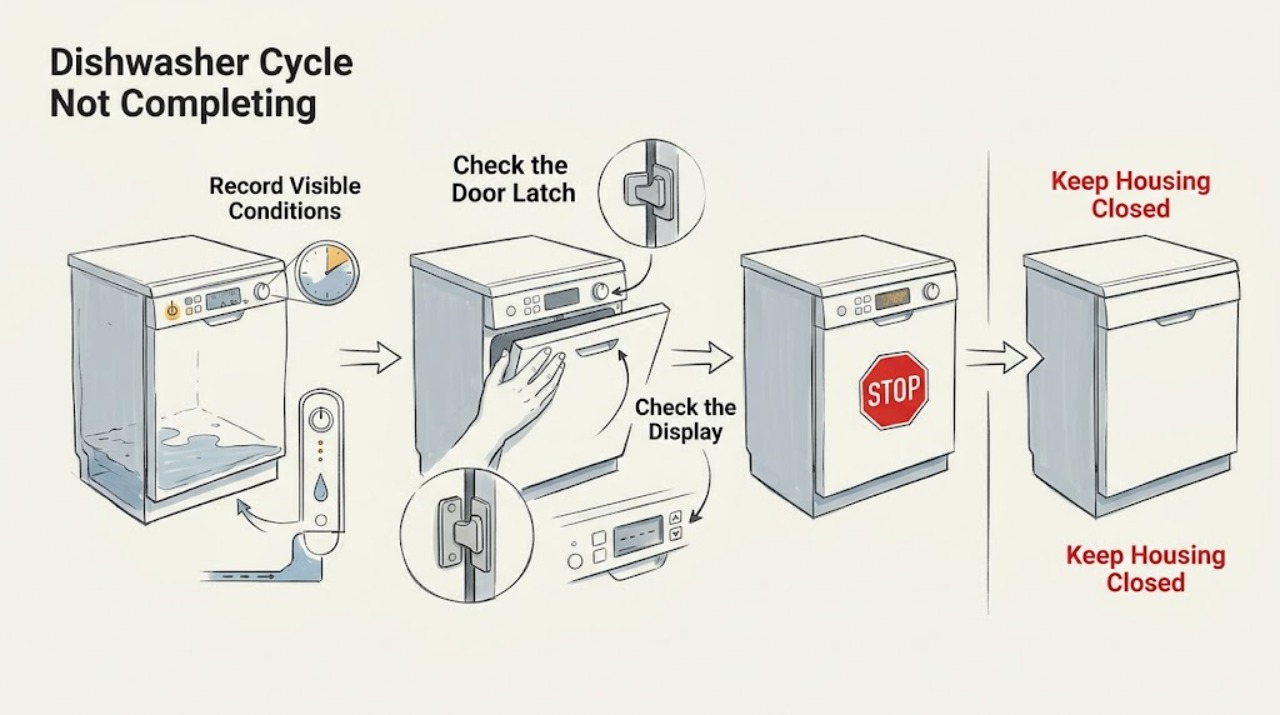
Note whether the Monogram dishwasher stops during fill, wash, drain, or dry, and whether water remains. Check that the door latches, the control is not locked or delayed, and the visible drain/air-gap path is clear. Monogram guides describe model-dependent cycle and reset behavior; recurring stopping, leaks, or a code should be handled with the exact manual or service.
Work through in order
Diagnostic checks
Use only checks that match the exact appliance or system and its official guide.
-
Check 1
Record the cycle stage, display lights/code, remaining time, and whether the door was opened before the cycle stopped.
Expected result: The display is active with no code, a code is present, or the panel is dark.
Next step: Use the exact model manual before clearing the display or restarting.
Why this matters
Why: A code or stage identifies a different path from a power interruption; a dark panel needs a safe power check.
-
Check 2
Close the door firmly and check that no rack, trim, insulation, or dish prevents the latch from engaging.
Expected result: The door latches and the dishwasher resumes, or it will not latch.
Next step: Reposition the obstruction only if accessible. Do not bypass the latch; service a door that will not engage.
Why this matters
Why: The latch signal is required for operation; a door-state interruption can leave a cycle incomplete without proving a pump failure.
-
Check 3
Check the control lock, delay-start, sleep/demo state, and model-specific reset instructions in the owner manual.
Expected result: A lock/delay/state setting is active, or controls are set normally.
Next step: Disable a documented setting and run one supervised test. Do not apply a reset sequence from another model.
Why this matters
Why: GE support lists lock, delay, demo, and sleep modes as causes of apparent non-running behavior on some models.
-
Check 4
If water remains, inspect the visible filter/sump, drain hose, sink drain, disposer connection, and air gap for an accessible blockage or kink.
Expected result: The tub is full and a visible path is blocked, or the drain path looks clear.
Next step: Clear only accessible debris and never put hands in a disposer. Stop if the problem returns or panels would be needed.
Why this matters
Why: A drain restriction can leave the cycle incomplete; GE notes that some water in the sump is normal, but excess water covering the tub is not.
Use your observations
Decision map
Find the observation that best matches what you see, then follow the next safe action.
-
PATH 01Next step
What you see
The cycle resumes after the door is properly latched and no code returns
Do this next
Run one supervised cycle and monitor the same stage.
-
PATH 02Next step
What you see
The dishwasher stops with water remaining and the visible drain path is blocked
Do this next
Clear the accessible filter/air gap/hose condition and stop if it recurs.
-
PATH 03Next step
What you see
The cycle repeatedly stops at the same stage with normal latch, settings, and drain path
Do this next
Save the stage/code and arrange Monogram service.
Helpful context
Understand the symptom
The stopping stage is the useful clue
A dishwasher that is silent during a normal pause is not necessarily broken. Record the last action you heard and whether the display is still active before resetting it.
When checks do not resolve it
Need a professional?
Arrange Monogram service for a recurring incomplete cycle, leak, error code, dark panel after a live-circuit check, failed latch, or any diagnosis requiring panels to be removed.
Common questions
FAQ
Why can a Monogram dishwasher seem stopped even when it is normal?
Some models pause or run quietly during parts of a cycle. Record the stage and display first; a repeated stop at one stage or standing water is different from a brief normal pause.
Should I reset the dishwasher immediately?
Record the code and stopping stage before resetting. Use only the exact model's documented reset, especially when water remains or a door/lock condition is present.
Read the exact guide
Official sources
- Dishwasher - Not DrainingGE Appliances · GE/Monogram built-in dishwasher guidance
- Frequently Asked Questions About GE DishwashersGE Appliances · GE/Monogram dishwasher support categories
- Your Monogram DishwasherGE Appliances / Monogram · Monogram guide; exact model may differ
- Dishwasher - Will Not Start or Run but Has Lights or SoundGE Appliances · GE/Monogram support guidance; exact model behavior varies
Community feedback
Share a repair observation
Share a plain-text repair observation. Accepted observations are published automatically; this page may take a moment to update.