
On this page
Start here
Quick answer
First identify whether the oven is electric, gas, or dual-fuel and describe what has failed: no display, no start, no heat, no ignition, a locked door, or an error message. From a safe position, check the user controls, clock or delay setting, control lock, door closure, and the breaker without opening the appliance. A gas oven may need a different ignition path from an electric oven, and a self-clean or high-temperature lock may be a normal temporary state. Do not force a locked door, test a burner or heating element, open wiring, or repeat an ignition or electrical fault. Stop for gas odor, delayed ignition, smoke, arcing, overheating, or a repeat breaker trip and arrange qualified appliance service.
Before you begin
Safety first
- The homeowner scope ends at identifying fuel and symptom, checking dry user controls, door closure, accessible racks, and safe external power observations. Internal elements, sensors, relays, igniters, gas valves, wiring, locks, and live testing require qualified service.
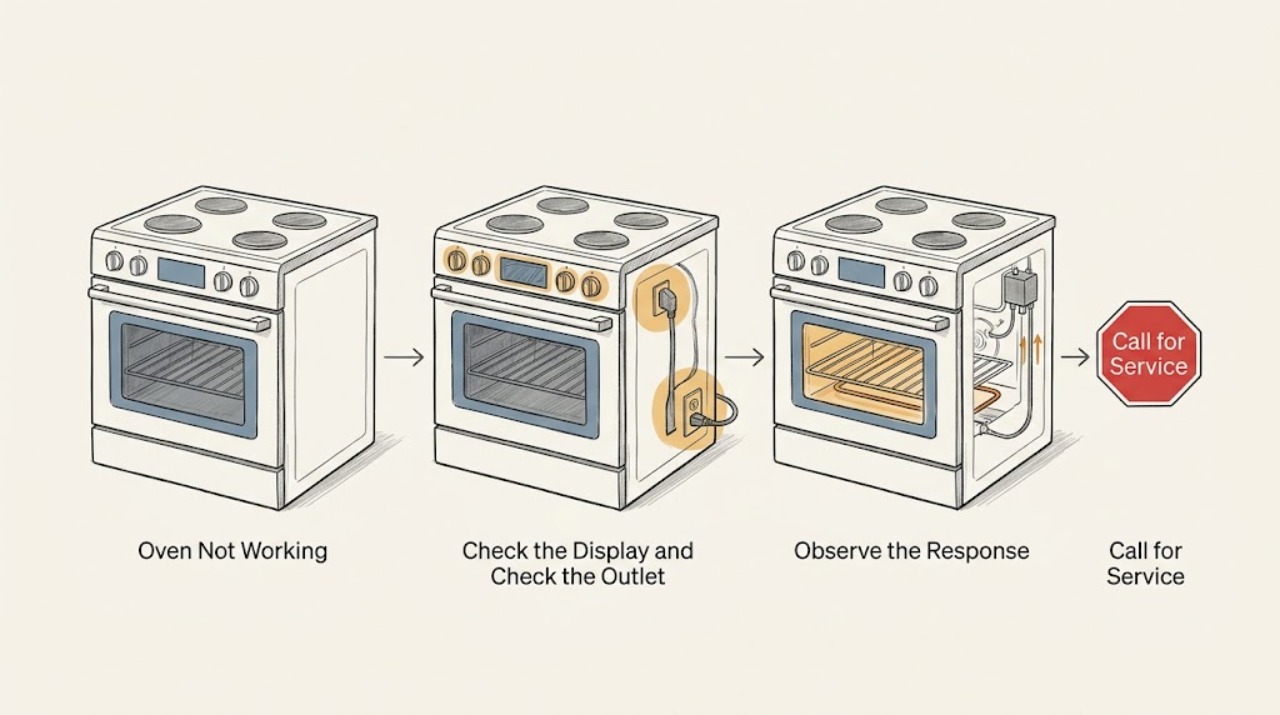
Work through in order
Diagnostic checks
Use only checks that match the exact appliance or system and its official guide.
-
Check 1
Identify whether the oven is electric, gas, or dual-fuel from the model manual or installation information, then describe the first failed behavior: blank display, no response, no heat, no ignition, locked door, or an error message; do not remove a panel to identify the fuel system.
Expected result: The oven has no display, has a display but will not start, starts but remains cold, is gas and does not ignite, is locked, or shows a code.
Next step: Write down the model, fuel type, exact display or code, and selected mode. Use that identity for the remaining checks and do not generalize gas ignition behavior to an electric oven.
Why this matters
Why: Fuel type and symptom determine whether power, controls, heating elements, ignition, door safety, or a model-specific error path should be investigated first.
-
Check 2
From a dry, safe position, check the display, interior light, nearby outlet if the appliance is user-plugged, and the labeled breaker or fuse; do not touch wet equipment, open the panel, or replace a fuse with a different rating.
Expected result: The display and light are both dead, the display is alive but the breaker is open, only one function is dead, or the breaker trips again.
Next step: If the circuit is dry and the manual or panel permits one ordinary reset, restore power once only. If it trips again, leave it off and arrange qualified electrical or appliance service; do not keep resetting it.
Why this matters
Why: A dead display and light can indicate a power interruption, while a live display narrows the issue toward settings, door, heating, ignition, or controls; a repeat trip indicates an unresolved electrical fault.
-
Check 3
With the oven cool, set the intended cooking mode and temperature, cancel any delay or timer-only mode, verify the clock if the model requires it, and check that control or child lock is not active; do not force a control or use an unverified key combination.
Expected result: The oven begins responding after a setting correction, remains in a lock or delay state, or still will not start with valid settings.
Next step: Use only the exact manual's unlock or start procedure. If the controls remain unresponsive, arrange appliance service rather than opening the console or repeatedly cycling power.
Why this matters
Why: A mode, clock, delay, or control-lock state can make a working oven appear dead, while valid settings with no start point toward power, door, control, or component service.
-
Check 4
Inspect the cool door and latch area from outside, confirm the door closes fully without a rack or divider blocking it, and note whether the lock indicator relates to a recent self-clean or high-temperature cycle; do not pull, pry, or bypass the latch.
Expected result: The door is obstructed, the lock indicator is present after self-cleaning or heat, the door closes normally, or the latch appears damaged or stays locked while cool.
Next step: Remove only a cool, obvious rack obstruction if the manual allows it and wait for the documented cool-down. If the lock remains or the door is damaged, leave the oven off and request appliance service.
Why this matters
Why: A door or lock state can prevent heating or starting, and a self-clean lock may need a model-specific cool-down period; a damaged or unexplained latch is a service issue.
-
Check 5
For an electric oven, observe only the cold, visible interior for an obviously broken element, scorch mark, or loose rack-related obstruction; do not touch an element, remove covers, or energize the oven repeatedly to watch it heat.
Expected result: The element is visibly damaged, no visible damage is present, the oven reaches some heat but not the set temperature, or the breaker opens when heating is requested.
Next step: Leave the oven off for visible damage or another trip and arrange appliance or electrical service. Do not perform resistance or live-voltage tests.
Why this matters
Why: A visible element failure or partial heating can need appliance service, but an intact element does not clear sensors, relays, wiring, or power; a breaker event adds an electrical fault path.
-
Check 6
For a gas oven, observe only from a safe position whether ignition produces a brief expected sound and a stable flame according to the exact manual; do not relight, adjust a valve, test for leaks with a flame, or repeat a failed ignition.
Expected result: There is no ignition, a brief cycle-linked click or poof, delayed ignition or a boom, abnormal flame, continuous clicking, or an unburned-gas odor.
Next step: Stop using the gas oven and arrange qualified gas-appliance service for an abnormal ignition or flame. For a strong gas odor, do not operate switches or flames; leave and contact emergency or gas-safety help from outside.
Why this matters
Why: Some gas models make brief ignition sounds, but delayed ignition, a door-moving boom, abnormal flame, persistent clicking, or gas odor can indicate a fuel or ignition fault.
-
Check 7
Record any displayed error exactly, including letters, numbers, symbols, when it appeared, the cooking mode, and whether the door was locked; consult only the exact model manual and use one manual-authorized reset if it specifies one.
Expected result: The error clears and the oven works, the same error returns, the display stays frozen, or the oven has no code but still fails.
Next step: Stop after the single authorized reset. Preserve the code and arrange appliance service if it returns, the display remains frozen, or the symptom continues.
Why this matters
Why: An error can be a temporary control state or a model-specific pointer to a sensor, lock, heating, ignition, or power issue; an identical recurring code needs service rather than a guessed part.
-
Check 8
Prepare a service handoff with model, fuel type, symptom, settings, power behavior, door-lock state, error text, heat or flame observation, and any odor, smoke, arcing, or breaker event; do not repeat a hazardous start to improve the record.
Expected result: The record points to a power issue, control or lock state, electric heating fault, gas ignition fault, recurring error, or an unsafe symptom.
Next step: Leave the oven off whenever the cause is unresolved or a warning sign occurred. Arrange qualified appliance service, adding an electrician or gas professional when the evidence points to those systems.
Why this matters
Why: A precise handoff lets the professional follow the correct model and fuel path without invasive homeowner testing or repeated ignition.
Use your observations
Decision map
Find the observation that best matches what you see, then follow the next safe action.
-
PATH 01Next step
What you see
The display and normal controls have no power or the breaker is open.
Do this next
Check power only from a dry, safe position and follow one ordinary model or panel reset if permitted. If power does not return or the breaker trips again, leave it off and call qualified electrical or appliance service.
-
PATH 02Next step
What you see
The controls have power but the cycle does not begin.
Do this next
Check mode, clock, delay, control lock, and door closure using the exact manual. If a valid start still fails, arrange appliance service without opening the control area.
-
PATH 03Next step
What you see
A cooking cycle appears active but the cavity stays cold or reaches an inadequate temperature.
Do this next
Keep electric and gas paths separate: use only a cold external visual check for an electric element, or observe no more than the safe ignition behavior for a gas model. Persistent failure needs appliance service.
-
PATH 04Next step
What you see
The oven is gas and ignition is absent, delayed, unusually loud, or associated with an abnormal flame or gas odor.
Do this next
Stop using it. Do not relight, adjust, search for a leak, or repeat the ignition; leave for a strong gas odor and arrange qualified gas-appliance service from safety.
-
PATH 05Next step
What you see
The lock indicator remains after the oven is cool or the latch is damaged or unexplained.
Do this next
Do not force or bypass the lock. Follow only the exact manual's cool-down or unlock instructions, then request appliance service if it remains locked.
-
PATH 06Next step
What you see
The same code reappears, the display remains frozen, or the oven fails again after the documented reset.
Do this next
Stop resetting and arrange model-specific appliance service. Give the technician the exact code, mode, timing, and door or heat state.
-
PATH 07Next step
What you see
There is smoke, flame outside the intended burner, electrical arcing, a burning odor, extreme heat, or a carbon-monoxide alarm.
Do this next
Stop using the oven and keep clear. Leave for active smoke, fire, gas odor, or a carbon-monoxide alarm and contact emergency help from outside; do not re-enter or reuse the appliance until cleared.
Helpful context
Understand the symptom
Define what not working means
An oven with a blank display has a different first path from an oven that has a display but will not enter a cooking cycle. An oven that starts but stays cold can have a mode, door, power, heating, or ignition issue. On gas models, a normal brief ignition sound is different from delayed ignition or unburned gas. A locked door may be expected during or after self-cleaning, but it must never be forced. Record the exact symptom before choosing a repair direction.
Keep checks external and model-specific
The safe homeowner scope is the dry control panel, user settings, door closure, accessible racks, and the breaker or fuse only when it can be reached safely. Do not remove covers, reach near energized elements or igniters, adjust gas controls, bypass a lock, probe wiring, or repeatedly re-energize a fault. Use the exact model manual for any reset or lock behavior; generic instructions cannot establish safe access to an unknown oven.
Safety boundary
Stop conditions
- Stop immediately for smoke, flame outside the intended burner, visible arcing or continuous sparking, sizzling, a burning or melting odor, a hot or discolored control area, or a breaker that trips again.
- For a strong or persistent unburned-gas odor, do not operate switches, flames, or the oven. Leave and contact emergency or gas-safety help from outside; do not search for the leak.
- If a carbon-monoxide alarm sounds or anyone has possible carbon-monoxide symptoms, leave for fresh air and follow emergency guidance. Do not re-enter or reuse a fuel-burning oven until trained personnel clear it.
- Do not force or bypass a door lock; open covers; touch elements, igniters, valves, or wiring; test live voltage; use a flame to test gas; or repeat a failed ignition or electrical fault.
- Stop using the oven when it remains dead, does not heat, repeatedly shows an error, stays locked while cool, or has a noise or symptom that the exact manual does not explain; arrange qualified service.
When checks do not resolve it
Need a professional?
Call appliance service for an oven that remains dead, will not start, does not heat, does not ignite, stays locked while cool, repeats an error, or shows abnormal flame, fan, relay, or mechanical behavior. Use qualified electrical service for breaker, wiring, arcing, or power faults and qualified gas service for gas supply, ignition, flame, or odor faults.
Safety scope: The homeowner scope ends at identifying fuel and symptom, checking dry user controls, door closure, accessible racks, and safe external power observations. Internal elements, sensors, relays, igniters, gas valves, wiring, locks, and live testing require qualified service.
Common questions
FAQ
What should I check first when an oven is not working?
Identify gas or electric operation and the exact symptom, then check the display, mode, clock or delay, control lock, door closure, and safe power state. Do not open the oven or repeat an ignition or electrical fault.
Why does an oven have power but not start?
A control lock, delayed start, clock requirement, incorrect mode, door-latch state, error condition, or internal control fault can prevent starting. Use only the exact model manual's controls and call service if a valid start still fails.
What should I do if a gas oven does not ignite?
Do not relight it, adjust gas controls, test for a leak with a flame, or repeat a failed ignition. A qualified gas-appliance professional should assess it; leave immediately for a strong unburned-gas odor or a carbon-monoxide alarm.
Can I force an oven door open if it is locked?
No. A lock may be part of a hot or self-cleaning cycle, and forcing it can cause injury or damage. Follow only the exact manual's cool-down and unlock guidance; if it remains locked while cool, arrange appliance service.
Read the exact guide
Official sources
- Samsung Wall Oven FAQsSamsung · Manufacturer examples of wall-oven power, settings, lock, error, heating, and unusual-noise troubleshooting
- Gas Range - What is Normal Operation vs What Requires ServiceGE Appliances · Manufacturer gas-oven ignition, flame, sound, gas-odor, and delayed-ignition service boundaries
- Range & Wall Oven - Fan Noise and Normal OperationGE Appliances · Manufacturer examples of convection and cooling fan operation across electric, gas, and dual-fuel models
- Carbon Monoxide Fact SheetU.S. Consumer Product Safety Commission · Carbon-monoxide risk, fuel-burning appliance safety, and alarm response
- Range & Wall Oven - Clicking and Other NoisesGE Appliances · Manufacturer examples of normal range and wall-oven relay, fan, and metal-expansion sounds
Community feedback
Share a repair observation
Share a plain-text repair observation. Accepted observations are published automatically; this page may take a moment to update.