
On this page
Start here
Quick answer
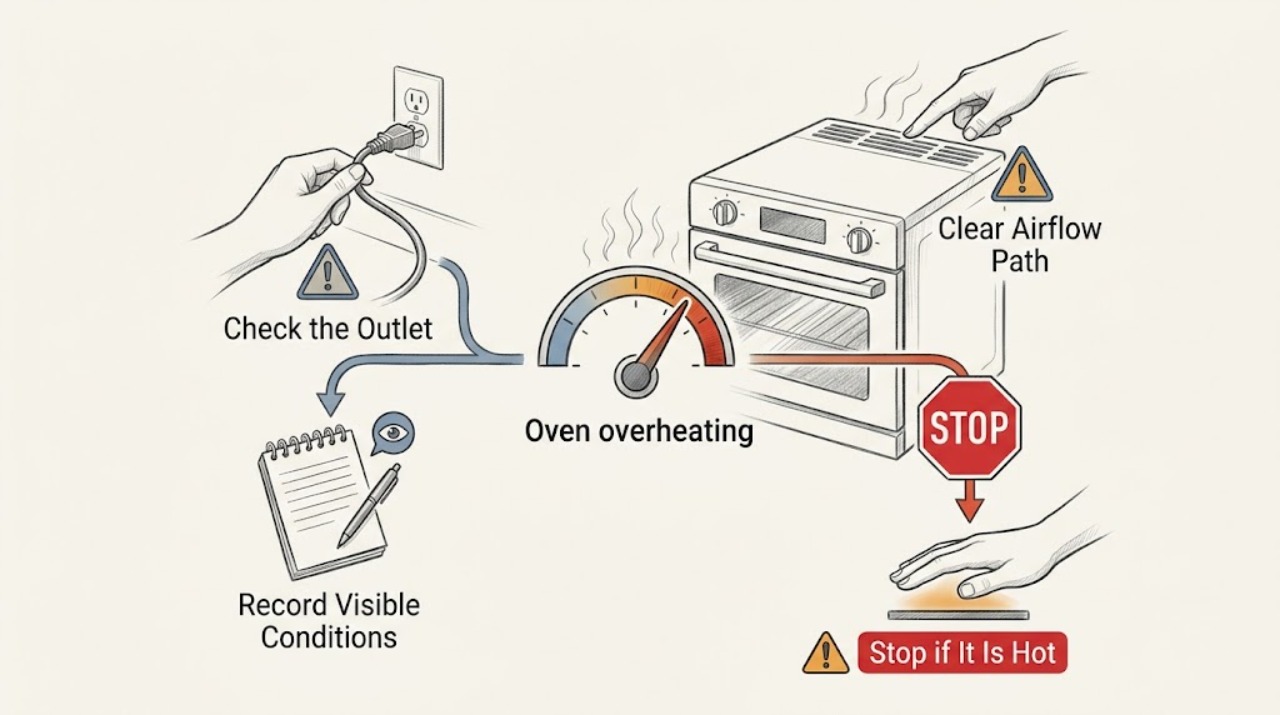
First distinguish normal heat from uncontrolled overheating. Warm glass, an operating cooling fan, and elements cycling on and off can be normal for some models, while food burning at a normal setting, a temperature that keeps rising, an oven that continues heating after shutoff, smoke, an abnormal flame, gas odor, arcing, or a breaker trip is not. Turn the oven off and keep away from smoke, fire, gas, or electrical hazards. Once cool and safe, verify the mode, temperature units, rack and cookware setup, and whether foil blocks airflow. Use only the exact model's documented calibration or reset procedure; do not open the control, bypass a thermostat, or test live wiring. Persistent or uncontrolled overheating needs qualified appliance service.
Work through in order
Diagnostic checks
Use only checks that match the exact appliance or system and its official guide.
-
Check 1
If the oven is running, check from a safe position for smoke, fire, gas odor, soot, an abnormal flame, visible arcing, a hot cord or outlet, a carbon-monoxide alarm, or heating that continues after the controls are off. If any appears, stop using the oven.
Expected result: A little warmth or a cooling fan without smoke may be normal; smoke, fire, gas odor, abnormal combustion, arcing, or uncontrolled heat is not a temperature-calibration problem.
Next step: Turn the control off only if safe, do not open the oven to investigate a flare-up, and leave for fire, gas odor, or a carbon-monoxide alarm. Contact emergency or gas-safety help from outside and do not reuse the oven until cleared.
Why this matters
Why: Continuing to run a gas or electric oven with combustion, fire, or electrical symptoms can cause burns, fire, shock, or carbon-monoxide exposure.
-
Check 2
With the oven cool and no hazard sign, record the selected mode, set temperature, temperature unit, preheat or cooking stage, food result, display behavior, and whether heat continues after Cancel or Off. Do not rely on a generic code or another model's operating range.
Expected result: Overcooking only during preheat or with a changed temperature unit can be an operating-state issue. A set temperature that is exceeded during normal cooking, a display that does not match the selected setting, or heat that continues after shutoff points toward calibration or control service.
Next step: Keep the record and use the exact model manual. Leave the oven off if the temperature continues to rise or the heat source does not stop normally.
Why this matters
Why: The stage and control response distinguish expected preheat or cycling from a thermostat, sensor, relay, valve, or control fault without opening the appliance.
-
Check 3
From outside the cavity, verify that the documented cycle and temperature are selected, racks and cookware match the manual, and no full rack, oven floor, vent, or foil liner blocks airflow. Do not touch hot parts or place foil over the oven floor.
Expected result: A wrong mode, rack position, cookware choice, or blocked airflow can change cooking results without proving the oven is overheating. If the setup is correct and the food still burns at the expected setting, the fault remains unresolved.
Next step: Correct only a cool, loose setup issue that the manual supports. If overheating persists with a correct setup, stop use and arrange service rather than modifying vents or seals.
Why this matters
Why: Airflow and heat distribution affect apparent temperature, while foil or liners can obstruct airflow and create unsafe conditions on applicable models.
-
Check 4
Observe the cooling fan and heating cycle only from outside and only when the oven has no hazard sign. Note whether the fan runs after shutoff, whether the heat source cycles, and whether the cabinet or door remains unusually hot after the documented cool-down. Do not block vents or remove covers.
Expected result: A fan running after cooking or heat sources cycling can be normal on some models. A fan that never cools the appliance, a heat source that stays on continuously, or escalating cabinet heat suggests a cooling, control, or component fault.
Next step: Keep the oven unused and arrange qualified service for continuous heating, abnormal heat after cool-down, damaged insulation, or a cooling-fan fault. Do not test by running another long cycle.
Why this matters
Why: Normal cycling is not the same as uncontrolled heating; the model manual determines expected fan and cycle behavior.
-
Check 5
If the oven is cool, no hazard is present, and the manual documents calibration or one power reset, follow that model-specific procedure once. Leave internal electrical checks and gas adjustments to qualified service, and do not open the control panel or repeatedly reset power.
Expected result: If the documented correction resolves the temperature behavior and it stays stable, the issue may have been a setting or temporary control state. If it returns, the oven remains hot, or the circuit trips, treat it as a fault.
Next step: Leave the oven off and arrange appliance service when the procedure is unavailable, fails, or the symptom recurs. Use electrician service for a supply, outlet, or repeated breaker concern.
Why this matters
Why: Calibration or reset cannot confirm that a sensor, relay, valve, ignitor, wiring, or cooling system is safe.
-
Check 6
Prepare a service handoff with the model and fuel type, mode, set temperature and unit, when the overheating begins, food or surface symptoms, fan and cycling behavior, error code, smoke or odor, breaker history, and whether the oven continues heating after shutoff.
Expected result: A precise timeline can separate normal preheat, cookware or airflow effects, calibration drift, door or vent issues, and an uncontrolled heating or combustion fault.
Next step: Arrange qualified appliance service and keep the oven out of use until the cause is verified. For gas odor, smoke, fire, carbon-monoxide alarm, or immediate electrical danger, obtain emergency or gas-safety clearance first.
Why this matters
Why: Internal temperature, gas, and electrical diagnosis requires model-specific knowledge and tools; symptoms alone do not justify replacing or bypassing a part.
Use your observations
Decision map
Find the observation that best matches what you see, then follow the next safe action.
-
PATH 01Next step
What you see
There is smoke, fire, gas odor, soot, abnormal flame, arcing, a carbon-monoxide alarm or symptoms, a hot damaged cord, or heating continues after shutoff.
Do this next
Arrange qualified service and follow the exact model guidance.
Why this path and its safety boundary
Why it matters: Stop immediately, leave the hazard area as needed, and contact emergency or gas-safety help from outside. Do not reopen, reset, or reuse the oven until qualified responders clear it.
-
PATH 02Next step
What you see
The oven only seems hot during preheat, the fan runs after cooking, or the heat source cycles on and off.
Do this next
Arrange qualified service and follow the exact model guidance.
Why this path and its safety boundary
Why it matters: Check the exact manual for expected model behavior and cool-down. If cooking is normal and no hazard sign exists, record the behavior; if temperature keeps rising or the source never cycles off, arrange service.
-
PATH 03Next step
What you see
Food burns at the selected temperature but the oven does not continue heating uncontrollably.
Do this next
Arrange qualified service and follow the exact model guidance.
Why this path and its safety boundary
Why it matters: Check the mode, temperature unit, rack, cookware, airflow, and any model-authorized calibration procedure. If the result persists with correct settings, leave the oven unused and request service.
-
PATH 04Next step
What you see
A gas oven has an abnormal flame, recent fuel conversion, or a combustion-related symptom.
Do this next
Arrange qualified service and follow the exact model guidance.
Why this path and its safety boundary
Why it matters: Turn it off if safe and do not adjust jets, regulators, or gas pressure. Keep the oven unused and obtain qualified gas-appliance service; treat odor, smoke, or delayed ignition as an emergency.
-
PATH 05Next step
What you see
The oven displays a temperature or fault code, remains too hot after cooling, or the symptom returns after one documented reset.
Do this next
Arrange qualified service and follow the exact model guidance.
Why this path and its safety boundary
Why it matters: Do not apply a cross-brand code explanation or repeat resets. Record the exact code and arrange qualified appliance service.
Helpful context
Understand the symptom
Overheating may mean the cavity or cabinet feels hot, food cooks too quickly, the displayed temperature is wrong, the heating source never stops, or a gas flame is abnormal. These are different symptoms. An oven may cycle its heat source to hold an average temperature, and some models intentionally run hotter during preheat. A persistent rise, severe smoke, or heat after the controls are off is a stop-use condition.
Brand and model matter. Temperature calibration, Celsius/Fahrenheit settings, cooling-fan behavior, vents, door seals, gas controls, and error messages vary. Keep the exact model manual available and limit user checks to cool, external observations. Gas combustion and mains electricity require qualified service when the safe boundary is crossed.
Safety boundary
Stop conditions
- Stop immediately for smoke, fire, gas odor, soot, abnormal flame, carbon-monoxide alarm or symptoms, visible arcing, electric shock, hot or damaged cord, uncontrolled temperature rise, heat after shutoff, or repeated breaker trips.
- Do not block vents, cover the oven floor with foil, open panels, test live wiring, bypass a thermostat or safety device, adjust gas pressure, remove a burner or sensor, use a flame, or repeatedly run, reset, or calibrate the oven.
- Keep the oven out of service when overheating persists with correct settings, a code returns, the fan or heat source behaves abnormally, the fuel type is uncertain, or the cause cannot be established by cool external checks.
Common questions
FAQ
Is it normal for an oven to feel hot or for the fan to run after cooking?
Some warmth, cooling-fan operation, and heating-source cycling are normal on some models. Check the exact manual. Continued heating after shutoff, uncontrolled temperature rise, smoke, abnormal flame, or a damaged hot surface is not normal and needs service.
Why does my oven burn food even though the setting looks correct?
Check the mode, temperature unit, rack and cookware arrangement, airflow, and any model-authorized calibration procedure. If food still burns at a correct setting, or the oven runs hotter during ordinary cooking rather than only preheat, keep it off and arrange service.
What should I do if the oven keeps heating after I turn it off?
Treat continued heating as a stop-use condition. Turn the control off only if safe, stay clear of heat or smoke, and arrange qualified service. If there is fire, gas odor, abnormal combustion, a carbon-monoxide alarm, or electrical danger, leave and seek emergency or gas-safety help from outside.
Read the exact guide
Official sources
- Oven Over Cooking - Gas RangesLG USA Support · Manufacturer examples for gas-oven preheat behavior, settings, fan operation, rack position, calibration, and fuel conversion
- Oven Elements Turning On/Off - Electric RangeWhirlpool Product Help · Manufacturer example for normal heating-element cycling and door-related operation
- Introduction to electrical safetyHealth and Safety Executive · Electrical shock, arcing, fire, wet conditions, and competent-person service boundaries
- Carbon Monoxide Fact SheetU.S. Consumer Product Safety Commission · Fuel-burning appliance, carbon-monoxide, and qualified-service safety
- Wolf Oven Temperature Is Too HotSub-Zero, Wolf, and Cove · Manufacturer examples for cookware, rack, mode, temperature, convection, and service escalation
- Oven Calibrated - Too HotWhirlpool Product Help · Manufacturer examples for hot cooking, cycle selection, airflow, temperature units, calibration, and service
Community feedback
Share a repair observation
Share a plain-text repair observation. Accepted observations are published automatically; this page may take a moment to update.