
On this page
Start here
Quick answer
If the ice maker still makes ice but the Profile water dispenser does not, purge air after a new installation or filter change, then check for a frozen reservoir/tube and a clogged filter. If the doors were removed during installation, confirm the model-specific wiring harness connection without opening live panels. If water is still absent after these checks, arrange service.
Before you begin
Safety first
- Do not use sharp tools or concentrated heat to thaw tubing, bypass interlocks, open live controls, or disconnect pressurized water lines.
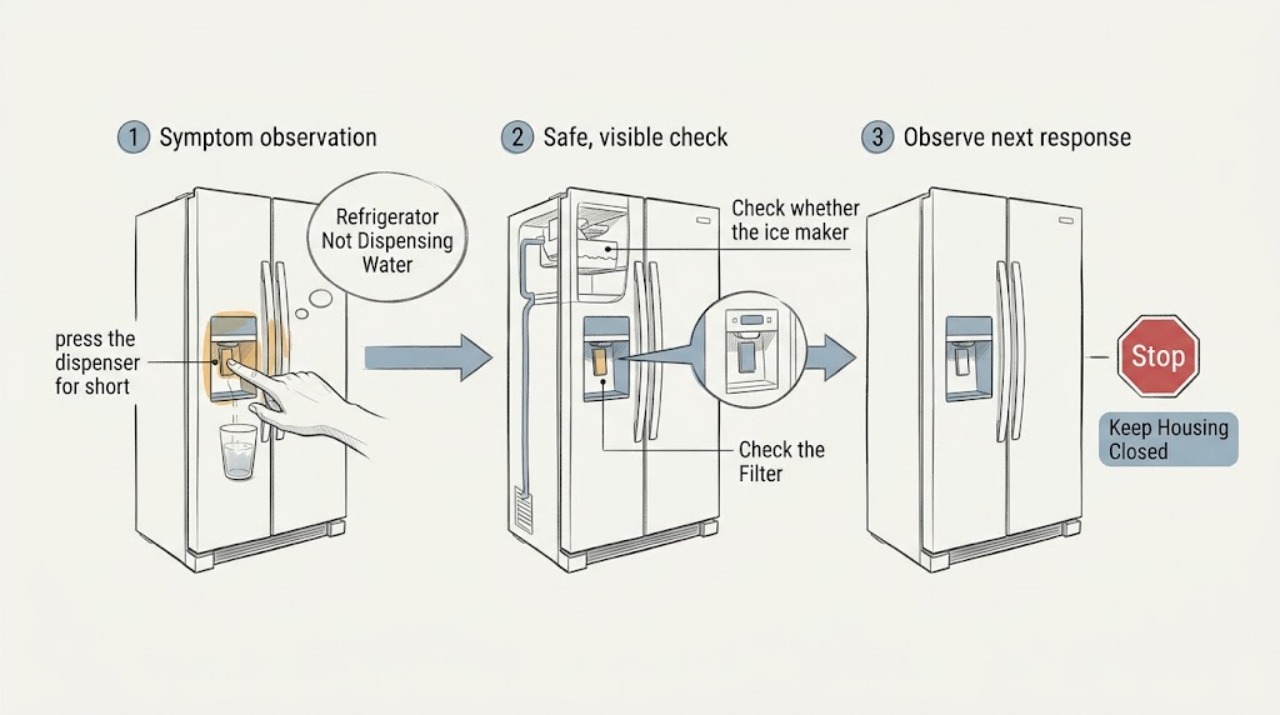
Work through in order
Diagnostic checks
Use only checks that match the exact appliance or system and its official guide.
-
Check 1
If the refrigerator was newly installed or the filter was just changed, press the dispenser for short intervals to purge air until the line fills, following the model manual.
Expected result: Water begins flowing after air is purged, or no flow appears.
Next step: Continue to the reservoir/tubing check if the dispenser remains dry; do not run the pump continuously.
Why this matters
Why: Trapped air can temporarily stop a new or recently serviced dispenser; no flow after purging points elsewhere.
-
Check 2
Check whether the ice maker is receiving water and making ice while the dispenser remains dry, then inspect only the accessible reservoir area for visible frost.
Expected result: Ice making works and the reservoir/tube is visibly frozen, or both functions lack water.
Next step: Use the model controls to set the temperature as directed and allow thaw time; do not use a heat gun or sharp tool.
Why this matters
Why: A frozen reservoir or tube can block the dispenser while the ice maker still receives water; both functions failing suggests supply, filter, or inlet issues.
-
Check 3
Check the water filter indicator and seating, and use the model's approved bypass procedure only if the bypass plug is available and the manual permits it.
Expected result: Flow returns with a correctly seated filter or approved bypass, or remains absent.
Next step: Install only a model-matched filter and arrange service if flow remains absent.
Why this matters
Why: A clogged or incorrectly seated filter can restrict both the dispenser and ice maker; unchanged flow points to another water-path fault.
-
Check 4
If the doors were removed during installation, use the Installation Instructions to inspect the accessible door wiring-harness connection; do not remove hinge covers unless the manual clearly directs a safe check.
Expected result: The connection was loose and the dispenser returns, or it is connected and the symptom remains.
Next step: Secure only an accessible connector as instructed; otherwise arrange service.
Why this matters
Why: A disconnected door harness can interrupt dispenser controls after installation; persistent failure needs model-specific diagnosis.
Use your observations
Decision map
Find the observation that best matches what you see, then follow the next safe action.
-
PATH 01Next step
What you see
Water returns after purging air following installation or a filter change.
Do this next
Use the dispenser normally and monitor for renewed loss of flow.
Why this path and its safety boundary
Why it matters: The line had not yet filled rather than proving a failed dispenser.
-
PATH 02Next step
What you see
The ice maker makes ice, but the dispenser remains dry and the reservoir or tubing is frozen.
Do this next
Follow the model temperature guidance and allow thawing; arrange service if it remains frozen or dry.
Why this path and its safety boundary
Why it matters: The dispenser water path is likely blocked by ice or a temperature condition.
-
PATH 03Next step
What you see
Neither ice maker nor dispenser receives water, or flow stays absent with a correct filter and supply.
Do this next
Stop repeated filter or control changes and arrange appliance service.
Why this path and its safety boundary
Why it matters: The restriction may be at the supply, inlet valve, or another internal component.
Helpful context
Understand the symptom
Use the ice maker as a clue
Ice production with no dispenser flow narrows the problem toward the dispenser line, reservoir, filter, or door connection. No water to either function points instead toward the supply, filter, or inlet path.
Only after diagnosis
Potential parts
- refrigerator water filter
Only relevant when the model uses a filter and flow testing or the indicator supports a clogged filter diagnosis.
Confirm the exact refrigerator model and approved filter before ordering.
When checks do not resolve it
Need a professional?
Arrange service for persistent no-flow, an inaccessible frozen line, a door harness issue that cannot be checked safely, or no water to both functions after the external checks.
Safety scope: Do not use sharp tools or concentrated heat to thaw tubing, bypass interlocks, open live controls, or disconnect pressurized water lines.
Have this ready
- Provide the model, whether ice making works, installation or filter-change timing, filter state, temperature setting, and any visible frost or leak.
Common questions
FAQ
Why can the ice maker work when the Profile dispenser does not?
GE Appliances notes that a frozen reservoir or tube can block the dispenser while water still reaches the ice maker.
Can a new filter cause no dispenser water?
Yes. After a filter change, air may remain in the reservoir or line; purge it as directed, and confirm the filter is seated correctly.
Read the exact guide
Official sources
- Refrigerator - Dispenser Not Getting WaterGE Appliances (GE Profile) · GE Profile refrigerator water-dispenser, frozen tubing, filter, and installation wiring guidance
Community feedback
Share a repair observation
Share a plain-text repair observation. Accepted observations are published automatically; this page may take a moment to update.