
On this page
Start here
Quick answer
A Roper dishwasher that stops before the cycle completes may have been interrupted by the door or a power outage, may be unable to drain, or may have stored an error. Close and resume the cycle, check the accessible filter and drain hose, record any code, and use one model-appropriate reset. A recurring stop or standing water needs service.
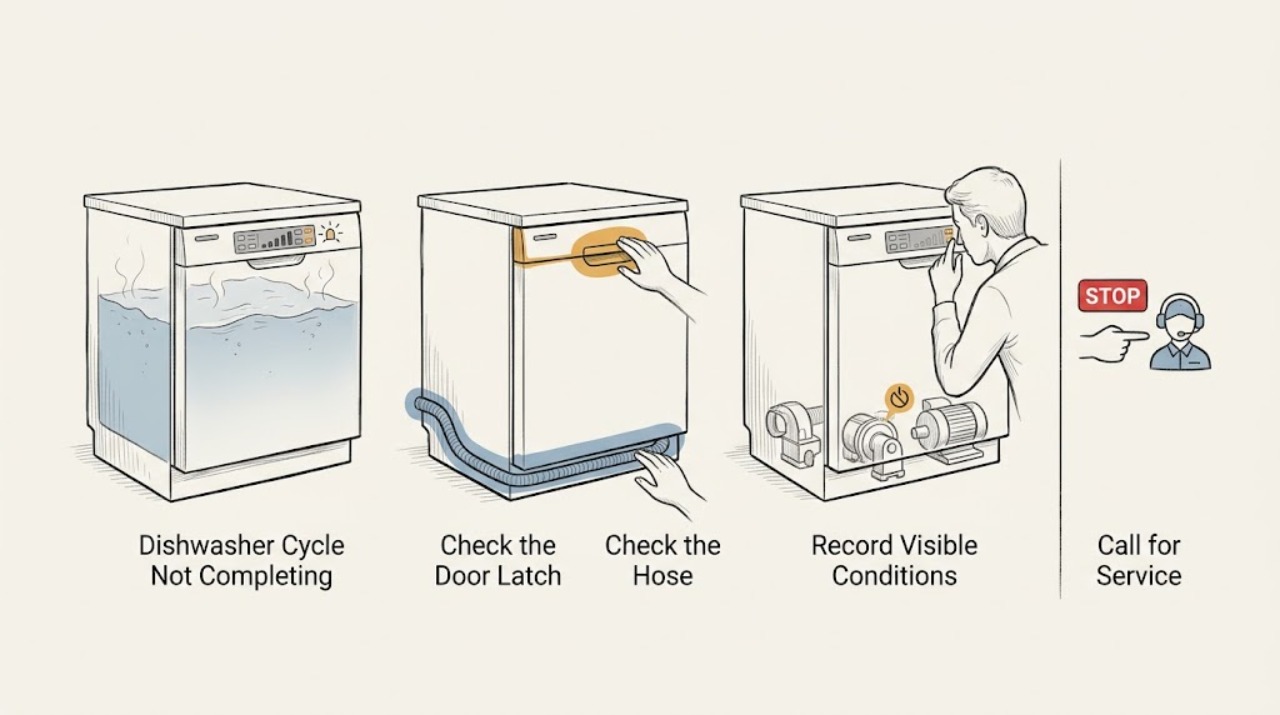
Work through in order
Diagnostic checks
Use only checks that match the exact appliance or system and its official guide.
-
Check 1
Close the door firmly until it latches and press Start or Resume according to the controls; if power was interrupted, use the model's cancel or drain control before starting a new cycle.
Expected result: The cycle resumes and advances, or it remains stopped after the door is latched.
Next step: Monitor a resumed cycle through its final drain; continue to the drain check if it stops again.
Why this matters
Why: The manufacturer guidance identifies an opened door or power interruption as a common suspension path; a persistent stop needs another check.
-
Check 2
Check for standing water, remove and rinse the accessible filter, and inspect the drain hose for a kink or blockage; if connected to a disposer or air gap, check that accessible connection.
Expected result: Water drains after the accessible path is cleared, or water remains in the tub.
Next step: Do not repeatedly restart with standing water. Arrange service if the path is clear but the dishwasher still cannot drain.
Why this matters
Why: A blocked filter, hose, disposer, or air gap can prevent completion; persistent water suggests a drain-system fault.
-
Check 3
Record every flashing light or displayed error before clearing it, including how many flashes occur in each group.
Expected result: A repeatable code or flash pattern appears, or no indicator returns.
Next step: Use the Roper model manual or authorized service with the recorded pattern; do not replace a control board based only on a symptom.
Why this matters
Why: The exact model code can identify a wash-motor, heating, or control condition that a generic article cannot safely decode.
-
Check 4
After the accessible checks, disconnect power once for 30 seconds using the plug or the correct breaker, then restore it and run one test cycle.
Expected result: The next cycle completes, or the same stop/code returns.
Next step: Arrange qualified service if the failure returns, if the clean indicator flashes, or if the unit needs internal testing.
Why this matters
Why: A power cycle can clear a transient control state but does not establish that a recurring mechanical or electrical issue is repaired.
Use your observations
Decision map
Find the observation that best matches what you see, then follow the next safe action.
-
PATH 01Next step
What you see
The cycle resumes immediately after the door is latched
Do this next
Let the cycle finish and verify that the final drain completes.
-
PATH 02Next step
What you see
The dishwasher stops with water remaining
Do this next
Clear only the accessible path and arrange service if water remains.
-
PATH 03Next step
What you see
The same code or flashing pattern returns after one reset
Do this next
Keep the code record and stop repeated resets or cabinet disassembly.
Helpful context
Understand the symptom
The stopping point narrows the path
Note whether the dishwasher stopped just after the door opened, during draining, or with a flashing indicator. Those patterns separate a normal interruption from a drain or control fault.
When checks do not resolve it
Need a professional?
Arrange qualified service for recurring cycle stops, persistent standing water, a returning code or flashing clean indicator, leaks, or any repair requiring internal electrical or pump access.
Common questions
FAQ
Why does my Roper dishwasher stop before the clean light?
Check for a door or power interruption, standing water, a blocked accessible drain path, and a returning code or flash pattern. A recurring stop needs service.
Should I keep pressing Start when water remains?
No. Clean the accessible filter and inspect the hose, disposer, or air gap. If water remains after those checks, stop using the dishwasher and arrange service.
Read the exact guide
Official sources
- Stops Mid Cycle - DishwasherWhirlpool Product Help · General guidance for a Roper dishwasher that stops before completion; verify exact behavior in the Roper model manual
Community feedback
Share a repair observation
Share a plain-text repair observation. Accepted observations are published automatically; this page may take a moment to update.