
On this page
Start here
Quick answer
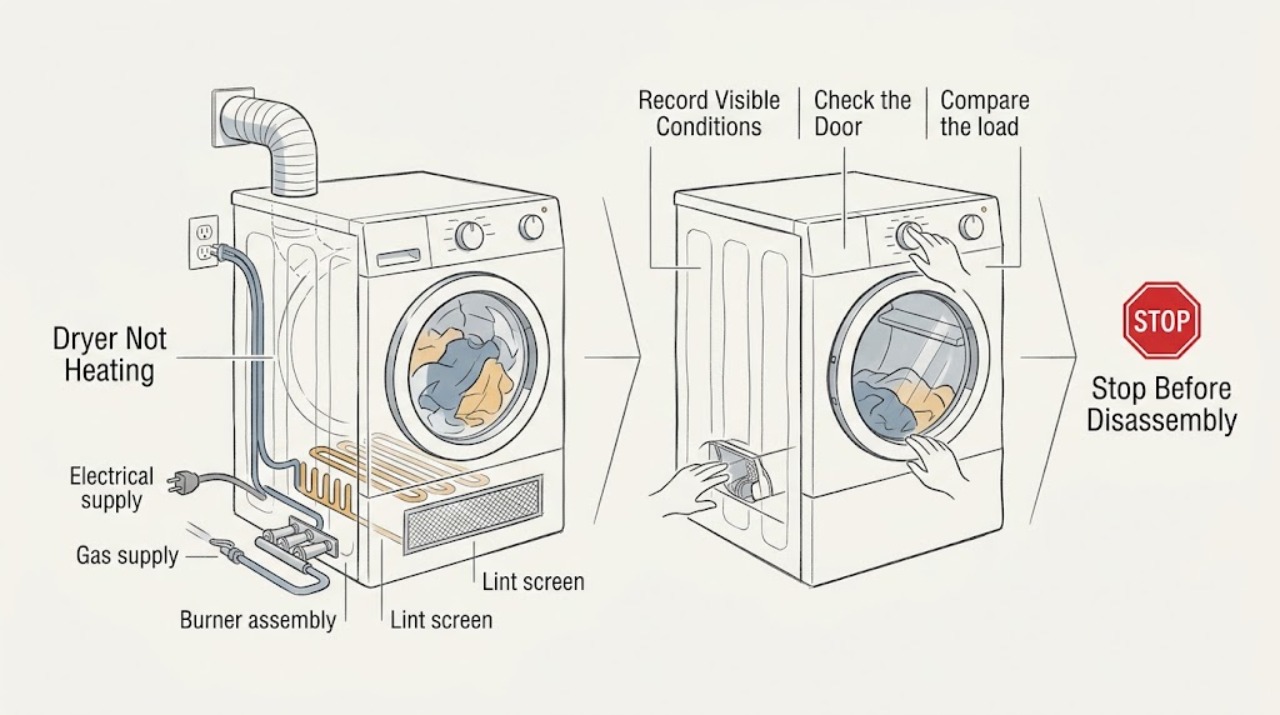
First distinguish a true no-heat problem from an Air Only or No Heat cycle, a small or overloaded load, or restricted airflow. With no smoke, burning odor, gas smell, sparks, unusual heat, damaged cord, or repeated breaker trip, select a heated timed cycle and use the model-safe heat check; if the drum is warm, the heater is working and the next branch is load, lint, or vent performance. Clean and fully refit the lint screen, keep the area and outside vent clear, and do not run the dryer with a loose, damaged, blocked, or missing screen. For an electric Roper dryer, a tripped side of the supply or incorrect voltage can leave the drum turning without heat. For a gas model, a closed supply valve can leave the drum turning without heat, but never inspect or adjust gas parts when an odor is present. Stop immediately for gas odor, smoke, fire, burning or electrical smell, sparks, abnormal heat, a damaged cord, water near electrics, or a breaker that trips again; leave internal heater, burner, wiring, and vent repairs to qualified service.
Work through in order
Diagnostic checks
Use only checks that match the exact appliance or system and its official guide.
-
Check 1
Record the selected cycle, temperature setting, load type and size, whether the drum tumbles, and whether the complaint is cold air or simply long drying. If there is no gas odor, smoke, burning smell, spark, abnormal heat, damaged cord, or unstable power, select a heated timed cycle and perform only the model-approved short heat check.
Expected result: Warm air after a brief safe test means the heating system is producing heat and the likely branch is cycle choice, load, lint, or exhaust airflow. A tumbling drum with consistently cold air on a heated cycle indicates a power, gas-supply, control, or heating-system branch.
Next step: If any safety warning appears, stop immediately. Otherwise continue to the lint, load, and vent checks when heat is present, or identify the electrical or gas model before supply checks when heat is absent.
Why this matters
Why: Roper and Whirlpool distinguish heat selection and drying performance from a true no-heat fault. Air Only or No Heat is expected to stay cold and is not evidence of a failed heater.
-
Check 2
With the dryer off and cool, remove lint from the screen and refit it firmly. Check the accessible area around the door, lint-screen holder, exhaust opening, and outside hood for lint or an obstruction; do not open the cabinet to clean internal lint.
Expected result: A clogged screen, lint-covered opening, or restricted outside hood can reduce airflow and make drying slow or cause overheating. A screen that is loose, damaged, blocked, or missing is unsafe to operate even if the dryer otherwise runs.
Next step: Clean and refit the screen and arrange qualified vent or cabinet cleaning when lint is internal or the exhaust cannot be cleared safely. Do not use the dryer until a damaged screen is replaced with a model-compatible item.
Why this matters
Why: Restricted airflow can look like weak heat because warm air cannot move through the load. Roper says internal cabinet lint removal should be done by a qualified servicer and says not to run without a sound, fitted screen.
-
Check 3
Compare the load with the care label and cycle: remove an excessive or tightly packed load, separate heavy items so they can tumble freely, and avoid testing heat-sensitive materials on a high-heat cycle. Confirm the selected cycle is not No Heat or Air Only.
Expected result: A normal heated cycle with a freely tumbling load should produce a different result from a no-heat cycle or a dense load that blocks air movement. If drying is slow but the exhaust airflow is weak, the problem is more likely venting than the heater itself.
Next step: Run one appropriate, smaller load only after the screen and vent area are safe. If the load remains cold on a heated cycle, continue to the model-specific power or gas branch rather than increasing heat settings.
Why this matters
Why: Roper says drying varies with fabric, load size, dryness setting, and temperature; it also lists No Heat, a large load, and restricted exhaust as distinct causes of poor drying.
-
Check 4
Identify the Roper dryer as electric or gas from the rating label or manual. For an electric model, check the external dryer breakers or fuses once and note whether the drum runs while the heater does not; do not remove the terminal cover or touch wiring. For a gas model, only if there is no gas odor and the valve is safely visible without moving the dryer, confirm the external supply shutoff has not been closed.
Expected result: An electric dryer can tumble with one side of its supply unavailable, leaving no heat. A gas dryer can tumble while a closed supply valve prevents heat. A tripping breaker, damaged cord, gas odor, uncertain valve, or inaccessible connection is not a homeowner test result.
Next step: Restore an external breaker or valve only when the appliance and area are dry, stable, and free of odor or damage, then perform one safe heat check. If the supply is present and heat is still absent, arrange qualified service.
Why this matters
Why: Whirlpool and Roper document separate electric and gas causes. The supply type changes the next step, but neither branch authorizes live electrical measurements or gas-line disassembly.
-
Check 5
Inspect the vent hose only from accessible ends for crushing, kinks, disconnection, excessive length, or a blocked outside hood; do not pull the dryer out across a gas connector or open the cabinet. If the manual permits a safe airflow observation, compare air movement at the outside hood during a normal, closely supervised cycle with no odor or overheating.
Expected result: Little or no outside airflow, a crushed hose, or heavy lint at the hood indicates an exhaust restriction that can lengthen drying and raise temperature. Strong airflow with cold air points back to the heating or supply branch.
Next step: Stop and have the vent system cleaned or corrected if airflow is restricted. If airflow is normal but heated cycles remain cold, stop testing and arrange appliance service.
Why this matters
Why: Roper identifies a clogged or incorrectly routed exhaust as a drying-performance problem and says the dryer must not operate with unsafe lint or vent conditions. Airflow observation cannot diagnose a burner, heater, or thermal control.
-
Check 6
After the cycle, load, screen, vent, and external supply checks, record any fault display, unusual sound, heat behavior, and breaker or gas-supply result. Do not repeat a test to reproduce a smell, smoke, spark, unusual heat, or a trip; do not open panels or replace a heater, igniter, fuse, thermostat, valve, or control without model-specific qualified service.
Expected result: Heat still absent with a confirmed appropriate cycle and stable external supply indicates an unresolved internal heating, burner, control, wiring, or safety-device fault. A recurring warning is more significant than a single brief result.
Next step: Leave the dryer out of use and arrange qualified appliance service. Provide the model number, fuel type, cycle, heat result, load, screen and vent observations, supply result, and any safety symptom.
Why this matters
Why: Roper directs service when a gas supply is open but the dryer remains without heat, and its guide assigns internal lint and major repairs to qualified service. A reset or repeated cycle does not verify those components.
Use your observations
Decision map
Find the observation that best matches what you see, then follow the next safe action.
-
PATH 01Next step
What you see
The dryer is on Air Only, No Heat, or another intentionally unheated cycle.
Do this next
Select a model-appropriate heated cycle for the fabric and test only when there is no safety warning; if it remains cold, follow the supply branch.
-
PATH 02Next step
What you see
The dryer warms but drying is slow, the load is packed, or airflow at the outside hood is weak.
Do this next
Reduce and separate the load, clean and refit the lint screen, and have a restricted or damaged vent corrected; do not keep using an overheating or unsafe vent.
-
PATH 03Next step
What you see
The dryer is electric and the drum turns while heat is absent or one supply breaker is not stable.
Do this next
Check the external supply once if dry and safe. If a breaker trips again, the cord or supply is damaged, or both sides are present but there is still no heat, arrange electrical or appliance service.
-
PATH 04Next step
What you see
The dryer is gas-fired, there is no gas odor, and the external shutoff is safely visible but closed.
Do this next
Follow the model instructions for the external shutoff only if it is safe and accessible, then perform one heat check. If the valve is open and heat is absent, arrange qualified service.
-
PATH 05Next step
What you see
The dryer has a gas odor, smoke, burning or electrical smell, sparks, abnormal heat, a damaged cord, water near electrics, or a repeated breaker trip.
Do this next
Stop immediately. For gas odor, leave and contact gas or emergency services from a safe location without using electrical controls inside. For electrical or fire warnings, isolate power only if safe and obtain qualified or emergency help.
-
PATH 06Next step
What you see
The cycle and external checks are correct but heat remains absent, or the same fault returns.
Do this next
Keep the dryer out of use and arrange qualified appliance service for the heater, burner, igniter, thermal control, wiring, or control diagnosis; do not test those parts live.
Helpful context
Understand the symptom
Confirm that the dryer is supposed to add heat
Air Only, No Heat, and some low-temperature settings are intentional. A dryer that tumbles with no heat on a heated cycle is a different problem from a dryer that heats but dries slowly. Note the cycle, temperature, load size, drum movement, and whether the cabinet or exhaust feels warm only during a safe, brief observation. Roper's controls and cycle names vary by model.
Treat heat, gas, and electrical warnings as stop conditions
Do not continue a test for smoke, a burning or electrical odor, gas odor, sparks, unusual cabinet heat, a damaged cord, water near electrical parts, or a repeatedly tripping breaker. Never open the cabinet, test a heater or burner live, alter gas pressure, or run the dryer with the lint screen or venting unsafe.
When checks do not resolve it
Need a professional?
Arrange qualified appliance service when a correct heated cycle, clean screen, safe vent, and stable external supply do not restore heat, or when a gas shutoff is open but a gas dryer remains cold., Stop immediately for gas odor, smoke, fire, burning or electrical odor, sparks, abnormal cabinet or cord heat, water near electrical parts, a damaged cord, or a breaker that trips again., Do not open the cabinet, terminal cover, burner, or gas connection; test live wiring; change gas type or pressure; or replace an internal heater, igniter, fuse, valve, thermostat, or control without qualified model-specific service., Do not run the dryer with a loose, damaged, blocked, or missing lint screen, a crushed or disconnected vent, or an uncontrolled airflow or lint hazard.
Common questions
FAQ
Why is my Roper dryer running but not heating?
Confirm the cycle is heated rather than Air Only or No Heat, then check the lint screen and airflow. An electric dryer may have a supply-side breaker issue; a gas dryer may have a closed external shutoff. If those checks are normal, service is needed.
Can a clogged lint screen make a Roper dryer seem like it has no heat?
Yes. Restricted airflow can make drying slow and can raise temperature, even when the heater operates. Clean and refit the screen and have an internal or exhaust blockage handled safely. Never run without a sound screen.
How can I tell whether my Roper dryer is gas or electric?
Use the rating label or the model manual rather than guessing from the sound. Gas and electric models have different supply checks. Do not disconnect a gas line or open an electrical cover to identify the type.
Why does my Roper electric dryer tumble but produce no heat?
A supply-side breaker or fuse can leave the motor running while the heater is unavailable. Check external breakers once if safe; do not touch terminal wiring. If supply is stable but heat is absent, arrange qualified service.
Why does my Roper gas dryer tumble but not heat?
A closed external gas shutoff can prevent heat while the drum turns. Check it only when there is no gas odor and it is safely visible. If it is open or inaccessible, stop and use qualified gas-appliance service.
Is it safe to keep using a Roper dryer that smells hot or trips the breaker?
No. Stop for burning or electrical odor, smoke, sparks, abnormal heat, a damaged cord, or a breaker that trips again. Isolate power only from a safe position and obtain qualified or emergency help; do not keep testing.
Read the exact guide
Official sources
- Not Heating - Gas DryerWhirlpool · Whirlpool-family gas dryer heat check, Air Only cycle, gas supply, shutoff valve, and service guidance
- Use and Care Guide – RGD4516FWRoper Appliances · Roper gas dryer cycle, heat, lint-screen, load, exhaust, electrical, and no-heat troubleshooting guidance
- Dryer is Not HeatingWhirlpool · Whirlpool-family electric and gas dryer no-heat, cycle, vent, breaker, power-supply, and gas-shutoff guidance
- Installation Instructions – RGD4516FWRoper Appliances · Roper gas dryer electrical and gas installation, venting, start checks, heat observation, and qualified-service boundary
Community feedback
Share a repair observation
Share a plain-text repair observation. Accepted observations are published automatically; this page may take a moment to update.