
On this page
Start here
Quick answer
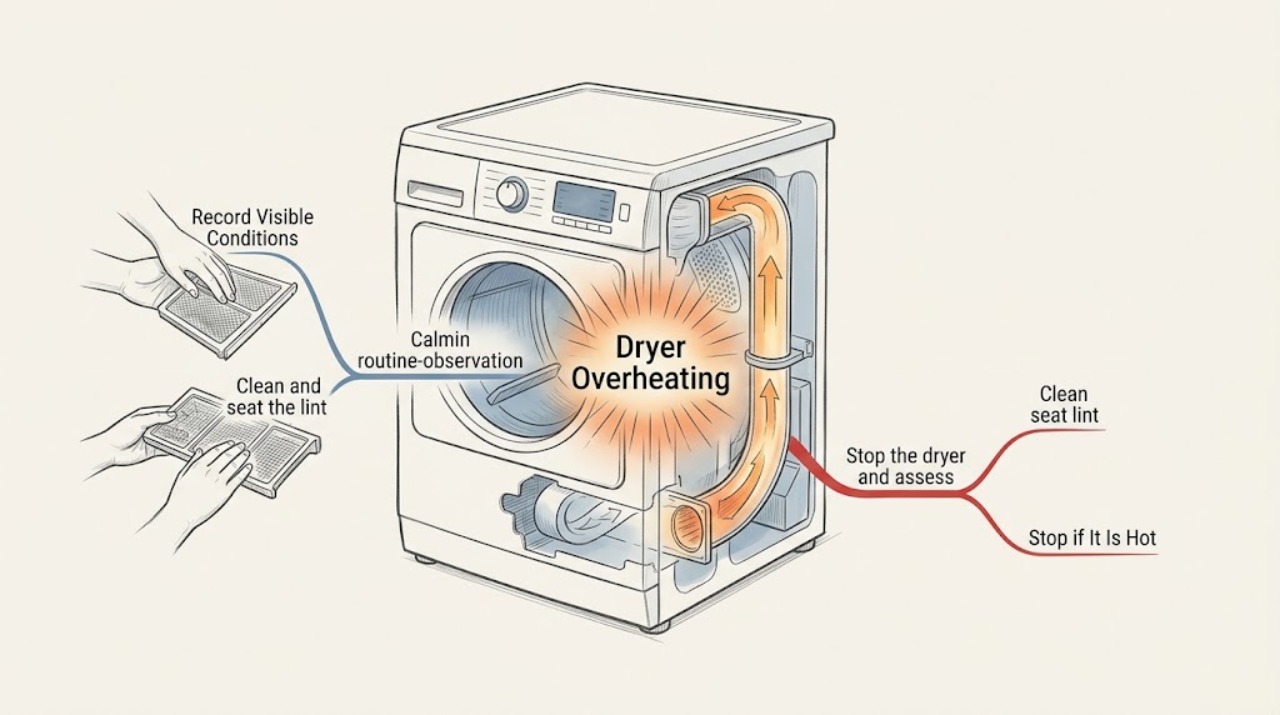
Stop a Roper dryer that is unusually hot, smells burnt, scorches clothing, smokes, or keeps heating after the control is Off. Keep the door closed if there is smoke or a fire risk, disconnect power only when the area is dry and it is safe to do so, and do not run another load to test it. After the dryer is fully cool and there is no immediate hazard, identify whether it is electric or gas, clean the lint screen, inspect the accessible vent for crushing or blockage, and review the load and cycle. Roper and safety guidance connect restricted airflow, lint, installation, and load conditions with excess heat, but an internal heater, sensor, motor, control, or gas component cannot be confirmed safely at home. If overheating returns after the safe external checks, keep the dryer out of service and arrange qualified repair.
Work through in order
Diagnostic checks
Use only checks that match the exact appliance or system and its official guide.
-
Stop the dryer and assess immediate fire risk
Turn the Roper dryer Off immediately if the cabinet is unusually hot, clothing is scorched, the dryer keeps heating after Off, or you notice a burning odor, smoke, sparks, or a flame. Keep clear of smoke or fire, keep the door closed when appropriate, and disconnect power only if the floor and controls are dry and doing so is safe.
Expected result: There is smoke, fire, sparking, a strong burning or gas odor, visible heat damage, or a dryer that cannot be stopped; or the dryer is fully Off and cooling with no immediate hazard.
Next step: For smoke, fire, a gas odor, or dangerous electrical symptoms, leave the area when appropriate and obtain emergency help. Otherwise leave the dryer out of service until it is fully cool, then continue with external checks only.
Why this matters
Why: An active fire, gas, or electrical symptom is an emergency or stop-use path, not a lint-cleaning opportunity. Repeated operation can ignite lint or damaged material.
-
Record the model, fuel type, and overheating pattern
After the dryer is cool and safe, photograph the model label inside the door and record whether the Roper dryer is electric or gas. Note the selected cycle and temperature, load size and fabric type, when the cabinet became hot, whether clothes were damp or scorched, whether an error or check-vent indicator appeared, and whether the heat was concentrated near the drum, rear, top, or exhaust.
Expected result: Overheating appears on every cycle, only on a high-heat or timed cycle, only with heavy or small loads, only near the exhaust, or after the dryer has run for a while.
Next step: Use the exact Roper model guide for the recorded cycle and fuel type. Do not select a replacement component or change a gas setting from the symptom alone.
Why this matters
Why: The pattern separates load or cycle conditions from an airflow, thermal-protection, heater, motor, control, or gas-system concern without pretending that one generic cause fits every Roper model.
-
Clean and seat the lint screen
With the dryer Off and cool, remove the lint screen, clear the lint, and return it fully to its holder as described by the Roper guide. Look for a screen coated with invisible softener residue or a screen that does not seat correctly. Do not use the dryer without its lint screen.
Expected result: The screen is heavily blocked, coated, damaged, missing, or loose; or it is clean, intact, and seated correctly.
Next step: Correct only the accessible screen condition. If overheating, scorching, or a burning smell occurred, do not run a confirmation load; arrange service or continue only with the vent inspection after the dryer is fully safe.
Why this matters
Why: A blocked or poorly seated screen can reduce lint capture and airflow. A clean screen does not rule out lint in the internal cabinet or the exhaust duct.
-
Inspect the external exhaust path and installation
When the dryer is Off and cool, inspect from behind and outside without opening the cabinet: look for a crushed or kinked duct, lint around the wall connection or outside hood, a closed or obstructed exterior flap, excessive bends, and clutter blocking the dryer's surrounding airflow. Do not remove internal covers or use a heater or dryer that has already overheated merely to measure airflow.
Expected result: The duct is crushed, kinked, disconnected, lint-filled, or obstructed at the outside hood; the surrounding clearance is poor; or the accessible path looks clear.
Next step: Have the vent run cleaned or corrected according to the Roper installation instructions. If the path is clear but overheating occurred, keep the dryer out of service for qualified diagnosis rather than restarting it to test the result.
Why this matters
Why: Restricted exhaust can keep hot, moist air inside the dryer and make the cabinet very warm. A clear visible path does not prove that the full wall run or internal chassis is clear.
-
Review load, cycle, and fabric conditions
After the dryer is cool, compare the recorded load with the Roper cycle and temperature guidance. Look for a tightly packed load, a cycle or heat setting unsuitable for the fabric, items that retain heat, or clothing contaminated with cooking oil, gasoline, solvents, or other flammable substances. Do not place contaminated items back in the dryer to see whether they ignite or dry normally.
Expected result: The overheating was limited to a heavy or tightly packed load, a high-heat selection, or fabric with flammable residue; or it occurred with an ordinary correctly selected load.
Next step: Follow the garment and Roper cycle guidance for future loads only after the appliance is cleared for use. If an ordinary load overheated, stop and arrange qualified service.
Why this matters
Why: Load and cycle conditions can increase heat retention and fire risk, but ordinary loads that produce excessive heat shift concern toward airflow, thermal protection, or an internal fault.
-
Separate electric and gas service boundaries
Use the model label and Roper manual to confirm the fuel type before any further decision. For an electric dryer, note repeated breaker trips, a hot plug or outlet, or a burning electrical smell. For a gas dryer, note any gas odor, delayed ignition, flame irregularity, or abnormal combustion smell. Do not open the appliance, alter the gas supply, or perform internal electrical checks.
Expected result: The symptom is limited to an electric supply concern, involves gas ignition or odor, or persists across both normal external conditions and cycles.
Next step: For gas odor or abnormal flame, leave the area when appropriate and seek gas or emergency assistance from a safe location. For electrical symptoms or persistent overheating, keep the dryer Off and arrange qualified appliance service.
Why this matters
Why: Electric and gas dryers share airflow risks but have different fuel and service hazards. A gas odor or abnormal flame is an immediate stop-use event; a repeat trip, hot connection, or internal burning smell is also not a normal home adjustment.
Use your observations
Decision map
Find the observation that best matches what you see, then follow the next safe action.
-
PATH 01Next step
What you see
The dryer is smoking, sparking, on fire, scorching clothing, or remains hot after the control is Off.
Do this next
Stop use immediately, keep clear, and obtain appropriate emergency or qualified service. Do not restart the dryer or open its cabinet.
-
PATH 02Next step
What you see
A gas Roper dryer has a gas odor, delayed ignition, an abnormal flame, or an unusual combustion smell.
Do this next
Do not relight or run it. Leave the area when appropriate and seek gas or emergency assistance from a safe location; arrange qualified service before reuse.
-
PATH 03Next step
What you see
The lint screen is blocked or damaged, or lint is visible around the screen, cabinet, duct, or outside hood.
Do this next
Keep the dryer Off, correct only the accessible screen condition, and have the complete exhaust path or internal lint accumulation cleaned as appropriate by qualified service.
-
PATH 04Next step
What you see
The exhaust duct is crushed, kinked, disconnected, obstructed, or poorly installed.
Do this next
Do not run the dryer until the venting is corrected and the full path is cleaned or inspected according to the model installation instructions.
-
PATH 05Next step
What you see
Overheating occurred only with an unsuitable load or cycle and there are no odor, smoke, scorch, electrical, gas, or repeat-fault symptoms.
Do this next
After the appliance is fully cool and the vent path is clear, follow the exact Roper cycle and load guidance. Stop if the dryer becomes unusually hot again.
-
PATH 06Next step
What you see
The dryer remains too hot with a clean screen, suitable load, correct cycle, and apparently clear accessible vent.
Do this next
Keep it out of service and arrange qualified diagnosis of the thermal protection, heater, sensor, motor, controls, or gas components. Do not keep resetting or restarting it.
Helpful context
Understand the symptom
Overheating is a stop-use symptom
A warm cabinet after a normal cycle is not enough to identify a fault, but excessive heat, a burnt odor, scorched fabric, smoke, or a dryer that will not stop is not a condition for repeated testing. Lint and restricted exhaust can trap hot air, while an internal heater, control, sensor, motor, or gas component may also be involved.
Use the Roper model, not a generic part diagnosis
Roper sells both electric and gas dryers, and model generations differ in cycles, airflow design, and service procedures. Find the model label inside the dryer door, then use the matching Roper manual. External checks can narrow the problem; internal chassis cleaning, heater work, gas work, and electrical diagnosis belong with qualified service.
Safety boundary
Stop conditions
- Stop immediately for smoke, fire, sparks, scorched clothing, a burning or plastic odor, a gas odor, an abnormal flame, or heat that continues after the control is Off.
- Stop if the dryer repeatedly trips a breaker, has a hot electrical connection, shows visible heat damage, or overheats again after an external airflow correction.
- Do not run a confirmation load in a dryer that has overheated, do not use it without a lint screen, and do not keep resetting a returning thermal or airflow warning.
- Do not open the cabinet, clean internal chassis lint, alter gas components, or perform internal electrical checks; use qualified service for those tasks.
Only after diagnosis
Potential parts
- thermal fuse, thermostat, or temperature sensor
Consider only when qualified model-specific diagnosis identifies a failed thermal-protection or temperature-sensing component after airflow is verified.
Confirm the complete Roper model and manufacturer fit information before ordering any component. - electric heating element or gas burner assembly
Relevant only after qualified diagnosis confirms the dryer fuel type and identifies a heater or burner fault rather than restricted airflow.
Gas and electrical heater work require qualified service and exact model confirmation. - blower wheel or airflow component
Consider only when qualified inspection finds an internal airflow component damaged, obstructed, or not moving air after the external vent path is addressed.
Do not infer fit or failure from cabinet temperature alone. - electronic control or motor component
Relevant only when model-specific service diagnosis links continued heating, abnormal cycling, or motor behavior to the control or motor.
Internal electrical diagnosis and replacement require qualified service.
When checks do not resolve it
Need a professional?
Keep the Roper dryer out of service and arrange qualified repair for recurring overheating, a clean and clear accessible vent that does not resolve the heat, an unexplained hot cabinet, abnormal cycling, repeated trips, heat that continues after Off, or any internal burning smell. For smoke, fire, sparks, gas odor, or dangerous electrical symptoms, leave the area when appropriate and use emergency or gas-safety assistance from a safe location.
Common questions
FAQ
Why is my Roper dryer getting too hot?
Restricted airflow from lint, a crushed or blocked vent, poor installation, or load and cycle conditions can trap heat. An internal heater, sensor, motor, control, or gas component can also be involved, so recurring overheating needs qualified diagnosis.
Should I run the Roper dryer again after it overheats?
No if it was unusually hot, smelled burnt, scorched clothing, smoked, sparked, or kept heating after Off. Let it cool, inspect only safe external conditions, and arrange service rather than using a confirmation load.
Can a blocked dryer vent cause overheating?
Yes. Lint or a crushed, kinked, disconnected, or obstructed exhaust path can reduce airflow and keep hot air inside. Keep the dryer Off until the full path is corrected or professionally cleaned.
Does a gas Roper dryer need different checks?
Yes. It shares lint and exhaust risks with an electric dryer but also has gas and combustion hazards. A gas odor, delayed ignition, or abnormal flame is a stop-use condition requiring help from a safe location.
What if the lint screen is clean but the dryer still overheats?
A clean screen does not prove the wall vent, outside hood, or internal cabinet is clear. Keep the dryer out of service if overheating returns and provide the model, cycle, load, vent observations, and odor or scorch details to qualified repair.
Read the exact guide
Official sources
- Installation Instructions – RGD4516FWRoper Appliances · Roper gas dryer installation, exhaust venting, gas and electrical safety, qualified installation, and gas-odor stop guidance
- Manuals & Guides | Roper® AppliancesRoper Appliances · Roper model-number manual lookup and dryer model-label location
- How to Check VentingWhirlpool · Manufacturer guidance on dryer lint screens, crushed or restricted vents, exterior hood obstructions, vent length, elbows, and airflow service
- CPSC Publication 5022 - Overheated Clothes Dryers Safety AlertU.S. Consumer Product Safety Commission · Clothes-dryer overheating and fire prevention: lint, restricted exhaust, hot-air buildup, safe venting, and flammable fabric contamination
- Owner Support | Roper® AppliancesRoper Appliances · Roper owner support, model manuals, replacement-part resources, and factory-authorized service routing
- Use and Care Guide – RGD4516FWRoper Appliances · Roper gas dryer use, lint-screen care, load and cycle guidance, airflow, fire safety, and qualified internal service boundaries
Community feedback
Share a repair observation
Share a plain-text repair observation. Accepted observations are published automatically; this page may take a moment to update.