
On this page
Start here
Quick answer
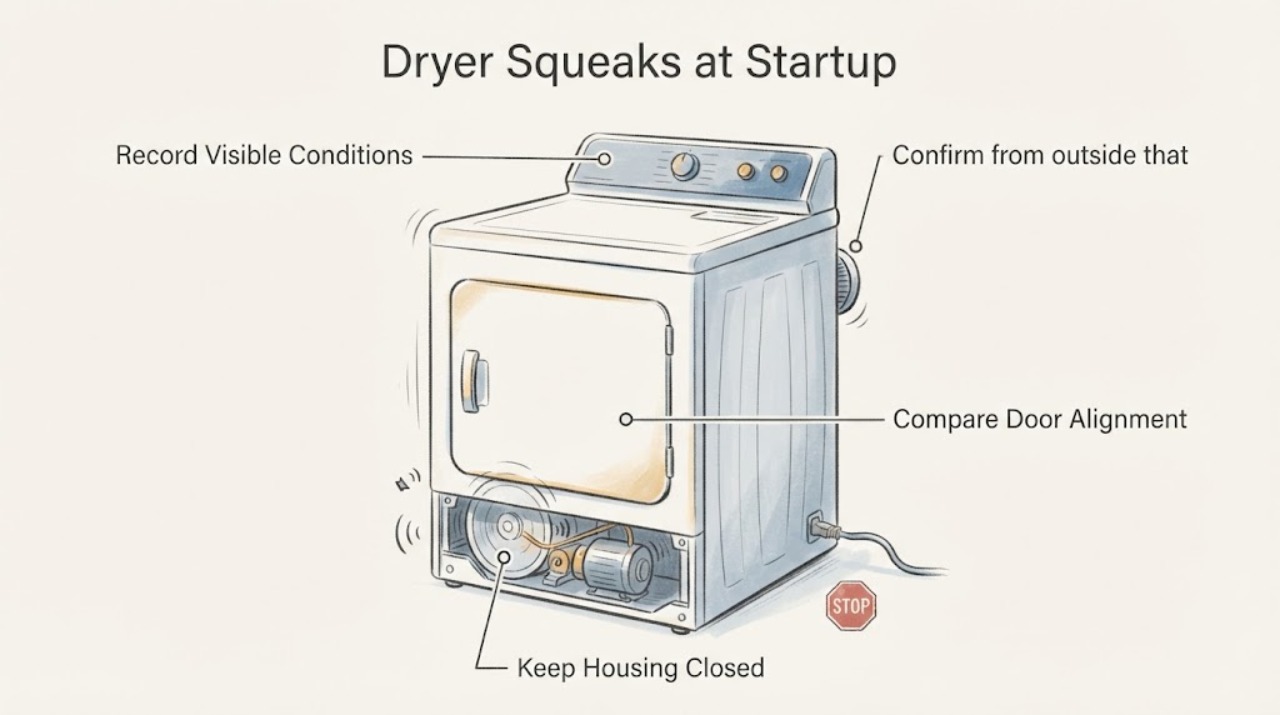
For a Roper dryer that squeaks at startup, first record whether the sound comes from the door, loose items, the drum area or the lint path; confirm the dryer is level and the lint screen is installed; then stop before opening panels. Roper's official support route requires the complete model for the correct manual and parts/service path. Whirlpool's official dryer-noise guidance, used here only as a manufacturer noise-screening reference rather than proof of a Roper part failure, lists loose items, leveling, lint in the belt/pulley area and an object in the lint chute as possible branches. If the squeak persists, grows louder, accompanies scraping, burning smell, poor tumbling or a visible obstruction, unplug the dryer and arrange factory-authorized Roper service instead of replacing a belt, roller or pulley by guesswork.
Before you begin
Safety first
- Do not run the dryer without the lint screen, remove panels, reach into the blower or drum drive, perform live electrical or gas tests, lubricate an unknown part, or order a belt, roller, pulley, blower or bearing without exact model evidence.
Work through in order
Diagnostic checks
Use only checks that match the exact appliance or system and its official guide.
-
Check 1
With the dryer stopped, record the complete model from the label inside the door on the upper-left front panel. Note whether the squeak happens only at startup, continues while the drum turns, changes when the door opens or closes, or is accompanied by scraping, rattling or rubbing.
Expected result: The model is readable and the sound is linked to door movement, drum rotation, the first seconds of a cycle, or an accessible lint/foreign-object area.
Next step: Use the exact Roper manual once the model is known. Continue only with the relevant external checks below; do not use a different Roper model's repair steps.
Why this matters
Why: Roper's support system uses the model to select the correct manual. Sound timing separates the door-squeak branch from drum/lint-path screening, but it does not identify a specific internal part.
-
Check 2
Confirm from outside that the dryer is stable, all installed feet contact the floor, and nothing is leaning against or touching the cabinet, vent or top. Do not reach behind a running dryer or adjust gas/electrical connections.
Expected result: The cabinet rocks, a foot is missing or lifted, the dryer is pressed against another object, or the dryer is stable with clearance.
Next step: If safe and permitted by the exact installation instructions, correct only the external leveling/contact issue. If the squeak remains, continue with load and lint checks rather than opening the cabinet.
Why this matters
Why: The official dryer-noise guide identifies an unlevel dryer as a noise contributor and says objects or contact can create vibration/noise. A stable cabinet makes that branch less likely but does not diagnose the drum drive.
-
Check 3
With the dryer off, remove the load and inspect garment pockets for coins, clips, zippers, buckles or other loose items. If the squeak occurs only while opening or closing the door, inspect the visible door alignment and screws without removing the door.
Expected result: A loose item is found, or the sound is limited to door movement and the door trim appears to rub or a hinge screw is visibly loose; alternatively, the empty drum/door is quiet.
Next step: Remove only loose laundry items. For a door-only issue, follow the exact Roper manual for any permitted external screw check; stop if alignment or hinge work would require door removal. If the empty drum still squeaks at startup, continue to the lint-path check and service boundary.
Why this matters
Why: Loose items can tumble and make noise. The official door-squeak guide describes alignment rubbing and loose hinge screws for a door-only squeak. These observations do not prove a belt, roller or bearing fault.
-
Check 4
Switch the dryer off, disconnect power where safe, and let it cool. Remove and clean the lint screen according to the exact Roper manual, reinstall it firmly, and look only into the accessible lint-screen opening for a visible foreign object. Do not remove panels or insert hands/tools into the blower or drum drive.
Expected result: The lint screen is blocked or missing, a visible object is present at the opening, or the screen and accessible path are clear.
Next step: Reinstall the screen and remove only a loose, visible object using the exact manual's safe method. If the object is not reachable or the squeak persists, unplug the dryer and arrange authorized service.
Why this matters
Why: Roper's opened manual warns against operating without a proper lint screen and assigns cabinet-lint removal to a qualified servicer. The official noise guide says a foreign object in the lint chute can contact the blower wheel and that belt/pulley lint may require service.
-
Check 5
Do not keep running the dryer to force the squeak to disappear. Stop immediately for burning smell, smoke, scraping, a drum that hesitates or fails to turn, damaged lint-screen parts, repeated tripping or a visible obstruction that cannot be removed externally.
Expected result: The squeak stops after an external correction, or it persists/returns and is accompanied by a hazard or changing drum behavior.
Next step: Keep the dryer unplugged and provide the full Roper model, sound timing, load condition and external observations to an authorized Roper service route. Do not replace a belt, roller, pulley, blower or motor by generic diagnosis.
Why this matters
Why: A corrected external cause may explain the sound, but persistent or worsening noise requires model-specific inspection. The official guides identify belt/pulley wear as a service/parts issue and Roper directs owners to factory-authorized technicians.
Use your observations
Decision map
Find the observation that best matches what you see, then follow the next safe action.
-
PATH 01Next step
What you see
The sound occurs only when the dryer door opens or closes, not when the drum rotates.
Do this next
Inspect visible alignment and screws only as the exact Roper manual allows. Stop if the door would need removal or the sound also occurs during a cycle.
Why this path and its safety boundary
Why it matters: The official dryer-door guide describes alignment rubbing and loose hinge screws as possible door-noise causes.
-
PATH 02Next step
What you see
A pocket item is found, the cabinet rocks, a foot is missing, or an object/vent touches the dryer.
Do this next
Remove the loose item and correct only safe external contact/leveling. Reassess once; stop if the squeak remains or becomes harsher.
Why this path and its safety boundary
Why it matters: The official dryer-noise guidance identifies loose items, unlevel installation and contact as noise contributors.
-
PATH 03Next step
What you see
The lint screen is blocked/missing or a foreign object is visibly present at the accessible lint-screen opening.
Do this next
Power down and cool the dryer, reinstall/clean the screen as the exact manual says, and remove only an accessible loose object. Do not open panels or probe deeper.
Why this path and its safety boundary
Why it matters: The Roper manual treats lint-screen installation and qualified cabinet cleaning as safety matters, while the noise guide says objects in the lint chute may contact the blower wheel.
-
PATH 04Next step
What you see
The dryer is level, the load and accessible lint path are clear, the door branch does not fit, and the squeak returns at startup or during drum rotation.
Do this next
Unplug the dryer and schedule factory-authorized Roper service with the exact model and sound description. Do not continue cycles or order generic maintenance parts.
Why this path and its safety boundary
Why it matters: The published noise guidance allows belt/pulley wear as a possibility but does not identify a Roper-specific failed part for an unidentified model.
Helpful context
Understand the symptom
Identify where and when the squeak occurs
The assigned topic has no Roper model, so a startup squeak should be separated by location and timing before anyone names an internal part. A sound only when the door moves follows a different branch from a sound that begins when the drum starts. A loose pocket item or lint-chute object can also sound different from a belt or pulley noise. Record a short, safe description and obtain the full model from the label inside the door before using a model-specific manual.
Keep the first checks external
A Roper dryer manual identifies the lint screen, venting, leveling and qualified service boundaries, while the manufacturer noise guide lists external checks for leveling, loose items and visible lint-chute obstructions. Do not remove a back panel or test a belt, roller, pulley, blower wheel or motor from this symptom alone. The correct Roper manual and authorized service route depend on the exact model.
When checks do not resolve it
Need a professional?
Arrange factory-authorized Roper service when the squeak persists after safe external checks, when the sound suggests belt/pulley or blower-area access, or when there is smoke, burning smell, scraping, drum hesitation, repeated tripping or an unreachable obstruction.
Safety scope: Do not run the dryer without the lint screen, remove panels, reach into the blower or drum drive, perform live electrical or gas tests, lubricate an unknown part, or order a belt, roller, pulley, blower or bearing without exact model evidence.
Have this ready
- Provide the full rating-label model, gas or electric configuration, whether the sound occurs at startup or throughout rotation, whether it changes with the door, whether the drum turns normally, and what external lint/load/level checks showed.
Common questions
FAQ
Could a startup squeak be the Roper dryer belt?
It is one possible internal branch in the official manufacturer noise guidance, but sound alone does not identify a belt, pulley, roller or bearing on an unidentified Roper model. Verify the external conditions first and use the exact model for an authorized service diagnosis.
What should I check before calling about a Roper dryer squeak?
Record the full model, separate door noise from drum-startup noise, check for loose pocket items, confirm the dryer is stable and level, clean and reinstall the lint screen, and inspect only the accessible lint-screen opening for a visible object. Stop before opening panels.
Can I keep running the dryer until the squeak goes away?
Do not continue testing if the noise persists or worsens, or if there is burning smell, smoke, scraping, drum hesitation, repeated tripping or a visible obstruction. Unplug it and arrange authorized service.
Where do I find the Roper dryer model number?
Roper's official manuals page says the dryer model number is inside the door on the upper-left side of the front panel. Use that complete identity to retrieve the correct manual and service path.
Read the exact guide
Official sources
- Owner SupportRoper Appliances · Directly applicable to the assigned Roper brand and supports exact-model identification and authorized service escalation; it does not define a squeak cause or compatible part for an unidentified dryer.
- Dryer Door Squeaking - DryerWhirlpool Product Help · Opened official Whirlpool-only page and used only to distinguish a door-motion squeak from a drum-startup squeak. It does not establish a Roper model procedure or part.
- Squealing or Squeaking Sound - DryerWhirlpool Product Help · Opened official Whirlpool-only page and used as a bounded manufacturer noise-screening reference. It supports the external branches of level, loose items, lint/foreign objects and service escalation, but does not prove that any cause or part fits an unidentified Roper dryer.
- Use and Care Guide – RGD4516FWRoper Appliances · Opened official Roper manual for one identified Roper model family, not the unspecified task model. Used only for safe external lint-screen/vent/leveling and qualified-service boundaries; no RGD4516FW-specific control or part is transferred.
- Manuals & GuidesRoper Appliances · Directly applicable to the assigned Roper brand. It establishes that the correct dryer manual requires the model number and locates that number inside the door on the upper-left front panel; it does not establish a universal Roper squeak diagnosis.
Community feedback
Share a repair observation
Share a plain-text repair observation. Accepted observations are published automatically; this page may take a moment to update.