
On this page
Start here
Quick answer
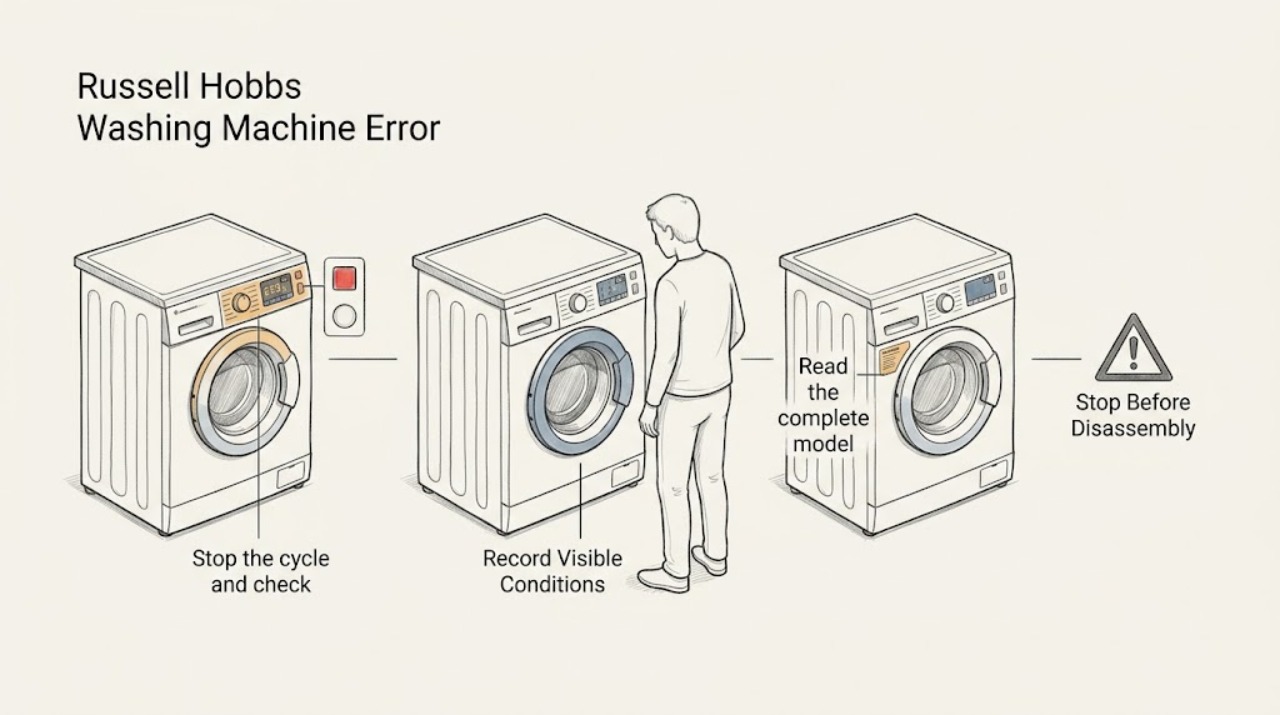
Do not diagnose a Russell Hobbs washing-machine display from a code list for another model. First make the machine safe, photograph or write down the exact letters, numbers, and flashing lights, and note whether the display appeared during filling, washing, draining, or spinning. Then use the full model number and the Russell Hobbs manual search for the correct regional instructions. Only perform a reset or a simple check when that exact manual authorizes it; if the indication returns, the machine leaks, will not drain, repeatedly trips power, or shows a burning smell, stop using it and arrange qualified service.
Work through in order
Diagnostic checks
Use only checks that match the exact appliance or system and its official guide.
-
Check 1
Stop the cycle and check the area from a dry, safe position for standing water, an active leak, smoke, a burning smell, a hot or damaged plug, exposed wiring, or repeated power trips. If water is near electrical parts, do not touch the appliance or water; use a safe external shutoff only when it can be reached without exposure.
Expected result: A safety symptom is present, or the washer is dry with no smoke, heat, damaged wiring, or repeated power fault.
Next step: For a safety symptom, keep the washer out of service and arrange the appropriate qualified appliance, electrical, or water professional. If no symptom is present, continue without opening panels or reaching into the machine.
Why this matters
Why: A safety symptom takes priority over interpreting the display and can indicate flood, fire, shock, or overheating risk.
-
Check 2
Record the display exactly before pressing buttons: every letter and number, decimal or symbol, which indicator lights flash, and whether the message appeared at startup, filling, washing, draining, or spinning. Take a clear photo and note whether the door is locked, water remains inside, or the cycle stopped.
Expected result: The complete display pattern and the operating stage are preserved, or the indication is only a vague light pattern that cannot yet be identified.
Next step: Do not substitute a similar-looking code from another model. Keep the washer stopped if the indication is unclear or accompanied by a symptom, and use the exact model search next.
Why this matters
Why: The full pattern and stage are the evidence needed to select the correct manual; a partial code cannot safely identify a fault across model families.
-
Check 3
Read the complete model or product number from the washer label without moving the appliance or removing a cover, and confirm the region shown by the support site. Enter that identifier into the Russell Hobbs user-manual search.
Expected result: A matching manual appears, or the search returns no matching model or a result for a different product family or region.
Next step: Use only the matching manual. If no matching manual is available, contact Russell Hobbs support with the model and the recorded display rather than using a generic code table.
Why this matters
Why: A matching manual gives the only model-specific meaning and permitted response; a mismatch means the displayed indication remains unverified.
-
Check 4
Follow the matching manual's low-risk branch only if it identifies one: for example, an external door or tap check, a visible hose or drain-path check, or a specified control setting. Keep the machine stopped and do not dismantle a pump, door lock, wiring, or cabinet to clear the indication.
Expected result: The manual-authorized check clears the indication and the washer completes the appropriate stage, or the indication remains or returns.
Next step: If the indication remains or returns, stop troubleshooting and arrange service. Do not force the door, reach into moving parts, or open electrical or water-control areas.
Why this matters
Why: A successful manual-authorized check supports that documented cause; a returning indication means the underlying condition is unresolved and should not be guessed from another model.
-
Check 5
Use a reset only when the exact Russell Hobbs manual explicitly authorizes it, the washer is dry and otherwise safe, and no active leak, smoke, burning smell, unusual heat, or repeated power trip is present. Make one reset attempt and retain the original display record.
Expected result: The indication clears once and the washer behaves normally, or the same indication returns or another symptom appears.
Next step: If it returns or a new symptom appears, leave the washer out of service and contact Russell Hobbs support or qualified appliance service with the model, display, stage, and checks already completed.
Why this matters
Why: A cleared indication may have been temporary, but a recurrence is diagnostic evidence rather than permission to keep cycling power.
-
Check 6
Prepare the service report without opening the washer: provide the model, exact display, photo, cycle stage, water level, door state, recent move or installation, whether the code clears, and any leak, odor, noise, or power symptom. Keep the washer disconnected or unused when the safety boundary applies.
Expected result: Support or the technician has enough model-specific context to select the correct repair path, or the indication remains ambiguous.
Next step: Use the Russell Hobbs contact route or a qualified local appliance professional; do not continue operating the washer merely to obtain more codes.
Why this matters
Why: A precise report avoids applying a code meaning or part diagnosis to the wrong Russell Hobbs model.
Use your observations
Decision map
Find the observation that best matches what you see, then follow the next safe action.
-
PATH 01Next step
What you see
Smoke, burning smell, hot electrical connection, exposed wiring, repeated power trips, standing water near electrical parts, or an active uncontrolled leak
Do this next
Stop immediately, keep clear, use only a safe external water or power shutoff, and arrange the appropriate qualified professional. Do not reset or run the washer.
-
PATH 02Next step
What you see
The exact display, stage, model, and region are known and a matching Russell Hobbs manual is available
Do this next
Follow only the low-risk check or reset that this manual authorizes. Preserve the original display if the fault returns.
-
PATH 03Next step
What you see
The display is incomplete, the manual search result is for another product or region, or no matching manual is found
Do this next
Do not decode the indication from a generic list. Contact Russell Hobbs support with the model and a photo of the display.
-
PATH 04Next step
What you see
A manual-authorized external check clears the display and the washer completes the affected stage without a safety symptom
Do this next
Monitor the next appropriate cycle, but stop and arrange service if the display returns or the washer develops a leak, abnormal noise, odor, or power fault.
-
PATH 05Next step
What you see
The indication returns after one authorized reset or a documented check, or the washer stops again mid-cycle
Do this next
Keep it out of service and arrange qualified appliance service; do not open the pump, lock, control, or cabinet to continue diagnosis.
Helpful context
Understand the symptom
Why the exact display matters
A flashing light pattern, a short text message, and a letter-number combination are not interchangeable. Russell Hobbs sells appliances for different regions and model families, so the same-looking indication should not be assigned a universal meaning. Keep the display record and model number together when looking for instructions.
Start with safe observations
Before touching filters, hoses, or the door, check for standing water, an active leak, hot water, smoke, a burning smell, damaged wiring, or a repeatedly tripping supply. If any is present, stop the machine and use only a safe external water or power shutoff; do not put hands into water that may be near electrical parts.
Use the Russell Hobbs manual search
Find the full product number on the appliance label, then enter it into Russell Hobbs' manual search for the applicable instructions. If the result is missing or the country and model do not match, contact Russell Hobbs support instead of borrowing a code explanation from another appliance.
A reset is not a repair
A one-time power reset can be appropriate only when the exact manual permits it and there is no safety symptom. A code that returns, a machine that stops mid-cycle, or a display paired with a water or electrical problem is evidence to preserve for service, not a reason to repeat resets.
Safety boundary
Stop conditions
- Stop immediately for smoke, burning smell, unusual heat, damaged wiring, repeated power trips, or an active leak toward electrical parts.
- Do not touch standing water near the washer's electrical connection, and do not operate the machine while water is escaping or the floor is unsafe.
- Do not force the door, reach into a moving drum, remove panels, open a pump or lock, handle wiring, or bypass a safety device.
- Do not use a code explanation from another Russell Hobbs model, another region, or another appliance family.
- Stop after one manual-authorized reset if the indication returns; repeated resets can hide a continuing fault.
When checks do not resolve it
Need a professional?
Arrange Russell Hobbs support or qualified appliance service when the model-specific manual cannot be found, the display is ambiguous, the indication returns after one authorized check or reset, the washer stops mid-cycle, or any leak, drain problem, abnormal noise, smoke, burning smell, unusual heat, damaged wiring, or power trip is present.
Have this ready
- Provide the complete model or product number, country or region, exact display and flashing lights, a photo, cycle stage, water and door state, recent installation or move, and all safe checks already performed.
Common questions
FAQ
How do I find the meaning of a Russell Hobbs washer error display?
Record the complete display and flashing lights, find the full model number, and use the Russell Hobbs manual search for the matching regional manual. Do not use a code list from another model.
Should I reset the washer when an error appears?
Only make a reset when the exact model manual authorizes it and there is no leak, smoke, burning smell, unusual heat, damaged wiring, or repeated power trip. Make one attempt and stop if the indication returns.
What if the display is only flashing lights?
Photograph the complete pattern and record which stage stopped. A partial light pattern is not enough to assign a universal meaning, so send it with the model number to Russell Hobbs support.
Can I use a manual for a similar Russell Hobbs washer?
No. Use a manual that matches the full model and region. Different controls and model families can use different indications and permitted checks.
When should I stop using the washer?
Stop for a returning display, an unexplained mid-cycle stop, standing water near electrical parts, an active leak, smoke, burning smell, unusual heat, damaged wiring, or repeated power trips. Arrange qualified service.
What information will support need?
Provide the model or product number, region, exact display and lights, photo, cycle stage, water and door state, recent installation or move, and the safe checks already performed.
Read the exact guide
Official sources
- Russell HobbsRussell Hobbs Help Centre · Russell Hobbs support; regional availability and model documentation vary
- Users Manuals | Russell Hobbs EuropeRussell Hobbs · Russell Hobbs products; select the exact product and region
- Search User ManualsRussell Hobbs UK · Use the exact product name or model number and region
Community feedback
Share a repair observation
Share a plain-text repair observation. Accepted observations are published automatically; this page may take a moment to update.