
On this page
Start here
Quick answer
When a Samsung cooktop will not turn on, first determine whether the whole cooktop is dead or only one element is affected. Confirm the appliance has power, the circuit breaker has not tripped, the control panel is clean and dry, and Control Lock or Child Lock is off. On an induction model, center compatible magnetic cookware on the zone; an empty or unsuitable pan can make the zone switch off. If the display stays blank, controls remain unresponsive, a single element fails after the basic checks, or the breaker trips again, stop and arrange qualified Samsung appliance service.
Before you begin
Safety first
- User diagnosis is limited to external supply and control observation, one normal breaker check, model-guided lock handling, cleaning and drying the panel, and cookware or zone checks that do not expose heat or wiring. A qualified technician must access internal power, controls, elements, ignition, gas, and safety systems.
Work through in order
Diagnostic checks
Use only checks that match the exact appliance or system and its official guide.
-
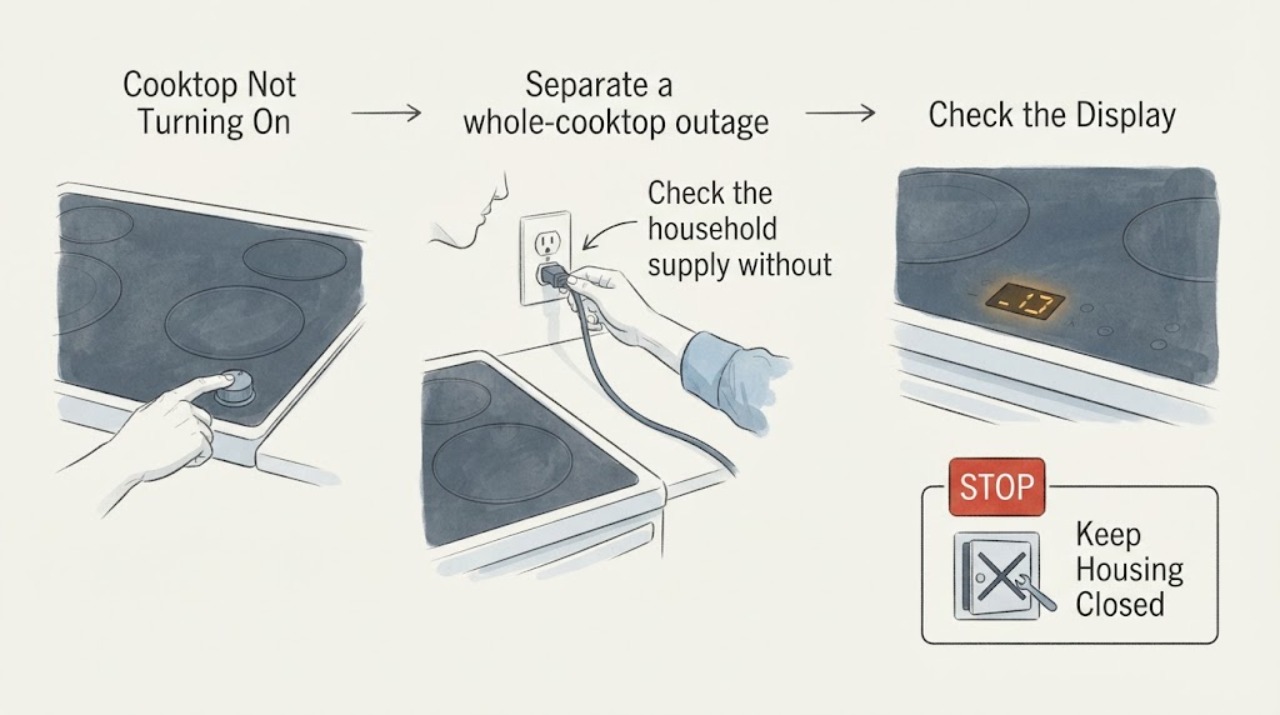
Separate a whole-cooktop outage from one-zone failure
Look at the display or indicator lights and try the normal controls for more than one cooking zone without placing hands on a hot surface. Identify whether the panel is completely dark, the panel lights but no zone responds, or one zone alone fails.
Expected result: The whole panel is blank or unresponsive, several zones fail, or only one zone fails while the others operate.
Next step: For a dark or multi-zone panel, continue with supply and lock checks. For one failed zone, verify cookware or normal element cycling as applicable, then arrange service if it still does not work.
Why this matters
Why: A whole-panel symptom points toward incoming power, lock, control, or control-panel conditions. A single failed zone with working neighbors is more consistent with a localized element or zone fault.
-
Check the household supply without opening the cooktop
Confirm the cooktop's external connection is present and that the relevant kitchen circuit breaker or fuse has not tripped, using only the normal household panel procedure. If a breaker is visibly tripped, reset it once with the cooktop controls Off; do not remove covers or repeatedly reset it.
Expected result: The display returns after the one reset, remains blank, or the breaker trips again or will not hold.
Next step: If power returns, continue with lock, panel, and zone checks. If the breaker trips again, leave the cooktop Off and arrange qualified electrical or appliance service.
Why this matters
Why: Power restoration after a single reset suggests a supply interruption or temporary control state, but a repeated trip indicates a fault or unsafe load condition. A blank display with a stable household supply needs service diagnosis.
-
Clear Control Lock and dry the controls
Check for a Control Lock or Child Lock indicator and use the exact model manual's unlock command. Wipe grease, spills, and moisture from the control area with the cooktop Off, then try the normal Power or zone control with clean, dry hands. Do not press through a cracked glass panel.
Expected result: The panel responds after unlocking or drying, beeps without accepting input, or stays completely unresponsive.
Next step: Use the cooktop normally only if the controls respond consistently and no safety symptom is present. Otherwise keep it Off and request service; do not bypass the lock.
Why this matters
Why: A response after unlocking or drying supports a control-state or touch-sensing condition. Continued beeps or no response after the panel is clean and dry can indicate a touch-panel or control fault.
-
Verify induction cookware and zone placement
If the Samsung cooktop is induction, place a flat, magnetic pan centered on the selected zone and use a small amount of water for a normal heating check. Follow the model manual for cookware size. Do not use an empty pan as the test and do not touch the surface to judge heat.
Expected result: The induction zone activates with compatible centered cookware, or it still does not detect the pan or heat water while other controls work.
Next step: Use cookware that the manual approves and center it on the zone. If the zone remains inactive, stop and arrange service rather than repeatedly cycling it.
Why this matters
Why: Activation after changing the pan supports cookware compatibility, size, or placement as the immediate cause. Failure with suitable cookware points toward a zone or control fault rather than a universal no-power issue.
-
Check the selected control and normal element behavior
For a radiant electric model, confirm the intended zone and heat control are selected, using the printed control markings or model manual. Observe only from a safe distance whether the element begins its normal heating cycle; do not touch the glass or remove a knob to access wiring. For gas models, confirm the intended knob is in the operating position only when there is no gas smell, then stop at any abnormal ignition behavior.
Expected result: The intended zone heats or cycles normally, the wrong control was selected, or one zone remains cold while the others work.
Next step: If a zone remains cold or gas ignition is abnormal, keep the cooktop Off and request qualified service. Do not relight repeatedly, adjust gas components, or work inside the appliance.
Why this matters
Why: Correcting a control selection explains a no-start report. A single cold zone with working zones is a localized fault; an abnormal flame, failed ignition, or gas odor is a safety and service condition, not a repeated-test opportunity.
-
Record the fault for a service handoff
Record the model code, cooktop type, whether the display is blank, any visible error indicator, which zones fail, breaker behavior, lock status, panel condition, cookware used for induction, and any smoke, odor, crack, or unusual sound. Photograph only safe external indicators and do not remove trim or panels.
Expected result: The cooktop remains dead or unreliable after the safe checks, the breaker trips, or a safety symptom is present.
Next step: Keep the cooktop out of service and provide the recorded details to Samsung support or a qualified appliance technician. Use emergency or gas-safety help for smoke, fire, arcing, or gas odor.
Why this matters
Why: This history distinguishes a supply or control-state problem from a localized zone, element, ignition, or internal control fault and avoids guessing at a replacement component.
Use your observations
Decision map
Find the observation that best matches what you see, then follow the next safe action.
-
PATH 01Next step
What you see
The display is blank or several zones fail, and the breaker is tripped.
Do this next
Turn the controls Off and reset the breaker once using normal household procedure. If it trips again or will not hold, leave the cooktop disconnected and request qualified service.
-
PATH 02Next step
What you see
The panel is lit but does not accept touch input.
Do this next
Turn off Control Lock or Child Lock according to the exact manual, clean and dry the panel, and use clean, dry bare-skin contact if the model uses capacitive touch. If it remains unresponsive, request service.
-
PATH 03Next step
What you see
An induction zone does not activate with a compatible centered pan.
Do this next
Stop repeated testing and arrange service for the affected zone if suitable cookware and placement do not restore operation.
-
PATH 04Next step
What you see
Only one radiant element or gas burner fails while other zones operate.
Do this next
After confirming the correct control and safe normal operation, leave the affected zone Off and request qualified diagnosis; do not open the cooktop or alter gas or electrical components.
-
PATH 05Next step
What you see
Smoke, burning odor, arcing, cracked glass, exposed wiring, uncontrolled heat, or gas smell is present.
Do this next
Stop use immediately. Keep clear, do not operate switches or relight gas, and use the appropriate emergency or gas-safety response from a safe location.
Helpful context
Understand the symptom
A Samsung cooktop that will not turn on can have a whole-appliance power problem, a locked or wet touch panel, a control-setting issue, or a single-zone fault. Gas, radiant electric, and induction models also behave differently, so identify the cooktop type and whether every zone is affected before choosing a repair path.
Do not remove the glass, open the wiring compartment, test live voltage, bypass a lock or safety device, or keep resetting a breaker that trips. Treat smoke, burning odor, arcing, cracked glass, exposed wiring, or a gas smell as an immediate stop condition.
Safety boundary
Stop conditions
- Stop for smoke, fire, arcing, burning electrical odor, exposed wiring, cracked glass, uncontrolled heat, or a breaker that trips again.
- If gas odor is present, do not light or turn on appliances or operate electrical switches in the affected area; leave and seek gas-safety help from a safe location.
- Do not remove the glass or wiring cover, test live voltage, bypass Control Lock or a safety device, or adjust gas components.
- Do not keep cycling a dead, unresponsive, sparking, or overheating cooktop to see whether it starts.
Only after diagnosis
Potential parts
- touch-control panel or user-interface assembly
Consider only after a technician confirms the panel remains unresponsive with power and lock conditions correct and the surface clean and dry.
Match the exact Samsung model and revision; no control part fit follows from a blank or unresponsive panel alone. - radiant element or induction cooking-zone assembly
Consider only when a technician confirms a localized zone or element fault after control, cookware, and supply checks.
Verify the exact model, zone position, and cooktop type before ordering or replacing. - power control, relay, or wiring component
Consider only after qualified testing confirms an internal power or control fault; a repeated breaker trip requires diagnosis before any part choice.
Internal electrical work is for qualified service and requires exact model matching.
When checks do not resolve it
Need a professional?
Request qualified Samsung appliance service when the display remains blank after the normal supply check, touch controls remain unresponsive after unlocking and drying, an induction zone fails with suitable cookware, one element or burner remains inactive, an error persists, or the breaker trips again. Treat smoke, fire, arcing, cracked glass, uncontrolled heat, and gas odor as immediate safety stops.
Safety scope: User diagnosis is limited to external supply and control observation, one normal breaker check, model-guided lock handling, cleaning and drying the panel, and cookware or zone checks that do not expose heat or wiring. A qualified technician must access internal power, controls, elements, ignition, gas, and safety systems.
Common questions
FAQ
Why will my Samsung cooktop not turn on at all?
Check the household supply and breaker, then check Control Lock and make sure the panel is clean and dry. If the display stays blank or the breaker trips again, leave the cooktop Off and request qualified service.
Why does one Samsung induction burner not turn on?
Induction zones can remain inactive when a pan is empty, unsuitable, too small, or off-center. Try the model-approved magnetic cookware centered on the zone. If it still does not heat, request service.
Why are my Samsung cooktop touch controls not responding?
Control Lock or Child Lock may be enabled, or moisture, grease, or improper contact may prevent capacitive sensing. Unlock the panel according to the model manual, clean and dry it, and use clean, dry hands.
Can I keep using a Samsung cooktop if the breaker keeps tripping?
No. Do not repeatedly reset a breaker or keep testing the cooktop after a repeated trip. Leave it Off and arrange qualified electrical or appliance diagnosis.
Read the exact guide
Official sources
- One burner on the Samsung cooktop does not workSamsung Support US · Samsung radiant and induction cooktop zone troubleshooting
- Samsung Cooktop FAQsSamsung USA · Samsung cooktop power, lock, panel, induction, reset, and service guidance
- Home Appliance Terms and ConditionsSamsung · Samsung cooking-appliance fire, gas, electrical, glass, smoke, and qualified-repair safety boundaries
- Electric cooktop panel isn't responsiveSamsung Support US · Samsung electric and induction capacitive touch-panel lock, dryness, and service guidance
Community feedback
Share a repair observation
Share a plain-text repair observation. Accepted observations are published automatically; this page may take a moment to update.