
On this page
Start here
Quick answer
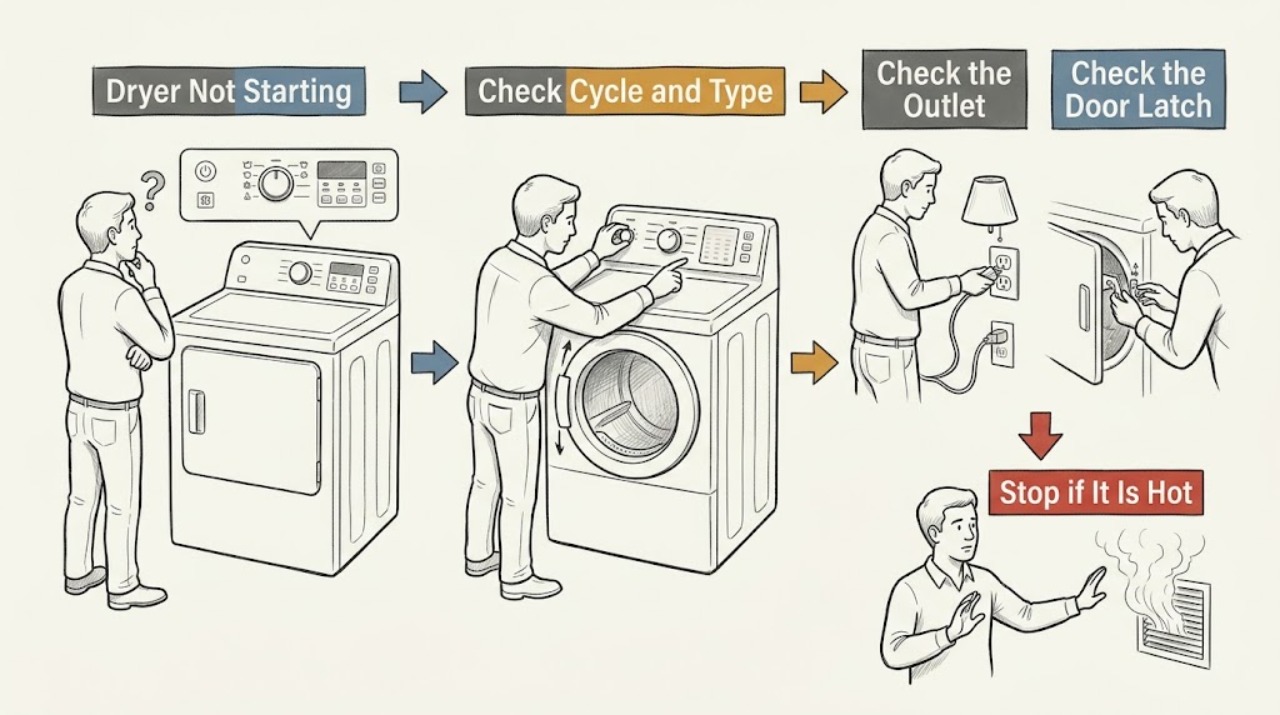
First separate a completely dead dryer from one whose display works but will not start. Check the power connection and breaker from a dry, safe position, then confirm the door is closed and latched, Child Lock is off, the intended cycle is selected, and Start is pressed or held as the model requires. If a timer counts down but the drum does not turn, service is usually required; a vent blockage or full lint path can also make a dryer stop for safety, but a dryer that never starts cannot run a vent test. Condensation or a water container matters only on models with steam, ventless, or heat-pump features. Stop for smoke, burning or electrical smell, overheating, sparking, damaged wiring, repeated breaker trips, or gas odor, and do not bypass the door or open the cabinet.
Work through in order
Diagnostic checks
Use only checks that match the exact appliance or system and its official guide.
-
Check 1
Identify the exact Samsung model and dryer type, then classify the symptom as no power, unresponsive panel, cycle not accepted, timer not counting down, or timer counting down with no drum movement. Record any icon, flashing light, or code before changing settings.
Expected result: The dryer is electric, gas, ventless, or heat-pump; the display is blank or lit; and the Start command is ignored or accepted.
Next step: Use the exact user manual for the model's cycle, control-lock, door, water-container, and start instructions. If the identity is uncertain, limit work to safe external checks and arrange service for a persistent failure.
Stop if: Do not guess a key sequence, open the cabinet, move a gas dryer, or continue if there is smoke, burning smell, sparking, overheating, or a gas odor.
Why this matters
Why: Samsung offers electric, gas, and heat-pump dryers, and model-dependent controls change the safe checks. A blank panel points to power; an accepted cycle with no rotation points toward a drive or interlock fault rather than an unselected programme.
-
Check 2
From a dry position, check the power symptom. Confirm the plug and cord are visibly intact, the outlet is not wet or heat-damaged, and the breaker is fully reset only once with the dryer controls off. For an electric dryer, do not open or test the high-voltage outlet; for a gas model, do not confuse the motor outlet with a gas-supply diagnosis.
Expected result: The display and drum light remain off, the breaker was half-tripped or open, the dryer powers up after one safe reset, or the dryer has power but still will not start.
Next step: If power returns and the area is dry and undamaged, continue with the door and control checks. If the outlet/cord is damaged, the breaker trips again, or power does not return, leave the dryer off and arrange qualified electrical or appliance service.
Stop if: Do not touch wet or burned electrical parts, use an extension cord as a workaround, reset a tripping breaker repeatedly, or remove the terminal cover.
Why this matters
Why: A no-display condition can be a supply, cord, outlet, or appliance power issue. A working panel shifts attention to the door, Child Lock, cycle, code, and Start confirmation. A breaker that trips again indicates a fault and should not be repeatedly reset.
-
Check 3
Check the door and latch. Remove laundry caught in the seal or latch area, confirm the door closes fully without slamming, and inspect only visible latch damage. If a door-related code or light is shown, record it and follow the model manual; keep fingers clear of the hinge and latch.
Expected result: The door does not close or latch, laundry is caught, a dC/dE/dF/do/d0-style door code or light appears, the latch is damaged, or the door closes normally.
Next step: Remove only the visible obstruction and close the door normally. If the code remains or the latch/door is damaged, stop and arrange service rather than bypassing the interlock.
Stop if: Do not hold or tape the door switch, insert a tool into the latch, force the door, or run the dryer with a damaged door.
Why this matters
Why: The dryer will not start when its door sensor does not confirm a secure door. Samsung associates door-related codes with the door, latch, and sensors; a visible obstruction may be removable, but a damaged latch or persistent code needs service.
-
Check 4
Check the panel for Child Lock, Delay Start, a paused cycle, a cycle-specific disabled setting, or an error icon. Turn Child Lock off only with the labeled buttons or exact manual, select an appropriate cycle, and press or hold Start as the control requires.
Expected result: Child Lock is lit, a delay or pause is active, the cycle rejects the chosen option, an error is displayed, or the timer begins counting down.
Next step: Clear only the documented lock/delay/pause state, then perform one normal start attempt. If the panel remains unresponsive or an error returns, record the exact code and arrange service.
Stop if: Do not use an undocumented key combination, bypass Child Lock, or repeatedly power-cycle a control with an electrical or overheating symptom.
Why this matters
Why: Child Lock can disable Start, and available temperature or dry-level settings vary by cycle and model. A timer that starts counting down proves the command was accepted; if the drum still does not turn, the issue moves from control selection to service.
-
Check 5
With the drum empty and the door closed, select the model-supported Time Dry or another straightforward cycle and touch/hold Start as described in the manual. If a digital timer is available, observe only whether it counts down; do not reach into the drum or run repeated stress tests.
Expected result: The timer does not count down, the timer counts down but the drum remains still, the drum starts normally, or a code appears.
Next step: If the timer does not count down, recheck door and Child Lock once. If it counts down without rotation, stop and arrange service; if a code appears, record it and follow the exact code guide.
Stop if: Do not put hands into the drum while it may start, remove panels to inspect the belt or motor, or keep restarting a non-rotating dryer.
Why this matters
Why: No countdown suggests the start command, door, lock, or control state is still invalid. A countdown with no rotation means the cycle was accepted but service is usually required for the motor, drive, belt, or control path. A code supplies a model-specific diagnostic direction.
-
Check 6
Read the exact error code or blinking-light pattern and compare it with Samsung's model-aware error guide. Note door codes, Child Lock, temperature/vent codes, voltage codes, motor errors, or a firmware-download indication; do not unplug if the guide says a download is in progress.
Expected result: A door, button, temperature, heating, vent, voltage, motor, communication, or download code appears, or no code appears.
Next step: Follow only the exact code's instructions and perform no more than the documented one-time reset. If the code returns, the panel remains locked, or the model has a motor/heating/voltage fault, keep the dryer off and arrange service.
Stop if: Do not shut off power during a documented firmware download, bypass a door or motor sensor, or continue after a code paired with smoke, gas odor, burning smell, or overheating.
Why this matters
Why: Codes identify different start blockers. Samsung lists door-related codes such as dC/dE/dF, Child Lock CL, temperature codes such as tC/tE, heating codes such as HC/hE, motor 3C, and voltage 9C1 families; the same-looking light or character can vary by model.
-
Check 7
Check the lint filter and visible exhaust path only when the dryer is off and cool. If the model supports a Vent Blockage test, run it exactly as the manual describes with an empty cool drum; otherwise inspect for a kinked, crushed, loose, or obstructed visible duct without inserting anything into it.
Expected result: The dryer never powers on, the test cannot run, a clog code appears, the duct is visibly restricted, or the test passes and the dryer still will not start/stay on.
Next step: Clean the lint filter and correct only a safe visible duct restriction according to the manual. If the dryer remains off, the vent code returns, or a blockage is inaccessible, arrange service/qualified vent cleaning.
Stop if: Do not operate with a blocked vent, remove the rear panel, insert tools into the duct, or continue a cycle that overheats or smells burnt.
Why this matters
Why: A dryer that never turns on cannot run a vent test. On supported models, vent codes indicate restricted exhaust and can cause protective shutdown; a passing test with a persistent no-start points back to power, door, control, motor, or service fault.
-
Check 8
If the dryer is ventless, heat-pump, or steam-equipped, check only the features your model has: confirm the condensate container is seated and not full, the heat exchanger/filter area is clean as the manual permits, or the steam water hose has no visible leak. Do not open a pump or sealed heat-pump circuit.
Expected result: A full/mis-seated container, blocked filter/heat exchanger, or visible steam-hose leak is present, or the dryer has none of these features.
Next step: Empty and reseat an accessible container or clean an accessible filter only as the exact manual directs. Stop and arrange service for a leak, recurring container warning, inaccessible heat exchanger, pump, or sealed-system issue.
Stop if: Do not operate with water near power, disconnect a pressurized hose, open the pump or heat-pump system, or move the dryer to reach connections.
Why this matters
Why: Condensate and steam systems are model-dependent. A full container or blocked maintenance filter can prevent normal operation on applicable models, while water leaking into electrical areas or a sealed-system noise/fault needs service. These checks do not explain a conventional vented dryer's no-start.
-
Check 9
Before any further start attempt, check for a burning or electrical smell, smoke, sparking, hot plug, abnormal cabinet heat, repeated breaker trips, or gas odor on a gas model. If any appears, stop immediately and isolate power only from a dry, safe position when possible; for gas odor, leave first.
Expected result: A safety symptom is present, or the dryer is dry, cool enough, stable, and free of abnormal odor or electrical signs.
Next step: Keep the dryer off and arrange qualified service; seek gas or emergency assistance from a safe location for gas odor or smoke. If no hazard exists, perform one documented start attempt and record the result.
Stop if: Do not reproduce smoke, sparks, overheating, a gas odor, or a breaker trip, and do not operate a wet or heat-damaged appliance.
Why this matters
Why: Smoke, electrical odor, overheating, sparks, and repeated trips can indicate fire or shock risk. A gas odor requires an emergency response, not a reset or diagnostic cycle. No hazard permits only the model-specific low-risk checks above.
-
Check 10
If the Samsung dryer still will not start, record the model, fuel/vent type, power and breaker result, door/latch result, lock/delay/cycle state, timer behavior, exact code or icon, vent/container check, and all safety symptoms. Stop user troubleshooting and arrange qualified service.
Expected result: A simple door, lock, cycle, power, vent, or model-specific container correction restores a normal start, or the dryer remains unresponsive, fails to rotate, or repeatedly stops.
Next step: Monitor a normally started cycle without changing additional settings. For a persistent or hazardous symptom, leave the dryer off and provide the record to qualified service.
Stop if: Stop for smoke, burning/electrical odor, gas odor, sparking, overheating, exposed wiring, repeated trips, water near electrics, or any need to open the cabinet.
Why this matters
Why: A one-time correction is different from a persistent fault in the control, motor, belt, door sensor, power circuit, vent protection, pump, or heat-pump system. The recorded sequence helps a technician avoid unsafe repeated testing.
Use your observations
Decision map
Find the observation that best matches what you see, then follow the next safe action.
-
PATH 01Safety boundary
What you see
The display and drum light are off, or power does not return after one safe breaker check.
Do this next
Leave the dryer off and arrange qualified electrical/appliance service, especially for a damaged cord, outlet, or repeated breaker trip.
Why this path and its safety boundary
Safety stop: Continue with door, Child Lock, cycle, and Start checks.
-
PATH 02Safety boundary
What you see
The door does not latch, laundry is caught, or a door-related code/light appears.
Do this next
Remove only a visible obstruction and close the door normally; service a damaged latch, door, or persistent code.
Why this path and its safety boundary
Safety stop: Continue with Child Lock and cycle confirmation.
-
PATH 03Safety boundary
What you see
Child Lock, Delay Start, pause, or an incompatible cycle setting is preventing Start.
Do this next
Clear only the documented state, choose a supported cycle, and press/hold Start as the model requires.
Why this path and its safety boundary
Safety stop: Use the empty-drum timer test.
-
PATH 04Safety boundary
What you see
The timer counts down but the drum does not start, or the dryer will not stay running.
Do this next
Stop repeated attempts and arrange service for a possible drive, motor, control, or safety-circuit fault.
Why this path and its safety boundary
Safety stop: Continue with error, vent, and model-feature checks.
-
PATH 05Safety boundary
What you see
A code or blinking light indicates a door, button, temperature, heating, vent, voltage, motor, or other fault.
Do this next
Record it exactly and follow only the model-specific guide; service any recurring, unlisted, or component-related code.
Why this path and its safety boundary
Safety stop: Continue with the applicable vent or condensate checks.
-
PATH 06Safety boundary
What you see
The model supports a vent test and reports a blockage, or the visible lint/duct path is restricted.
Do this next
Clean the lint filter and correct the vent only as the manual permits; arrange service or qualified vent cleaning if it remains restricted.
Why this path and its safety boundary
Safety stop: Do not attribute a never-starting dryer to a vent test; return to power, door, control, and service paths.
-
PATH 07Safety boundary
What you see
The dryer has a full condensate container, blocked applicable filter/heat exchanger, or a steam-water issue.
Do this next
Empty/reseat or clean only the accessible feature specified by the exact manual; service leaks or recurring warnings.
Why this path and its safety boundary
Safety stop: Skip this branch for models without the feature.
-
PATH 08Safety boundary
What you see
Smoke, burning/electrical odor, sparking, overheating, repeated trips, water near electrics, or gas odor is present.
Do this next
Stop immediately; isolate power only from a dry safe position when possible, leave for gas odor or smoke, and seek qualified/emergency help from safety.
Why this path and its safety boundary
Safety stop: Complete only low-risk, model-specific checks and record the result.
-
PATH 09Safety boundary
What you see
The dryer still will not start after the applicable checks.
Do this next
Keep it off and provide service with the model, state, timer, code, door, power, vent, container, and safety observations.
Why this path and its safety boundary
Safety stop: Monitor the restored start and stop if a safety symptom returns.
Helpful context
Understand the symptom
“Not starting” covers several different symptoms: no lights or display, a lit panel that ignores Start, a cycle that begins but the drum does not turn, or a dryer that starts and stops. Check the symptom before choosing a fix. Samsung's controls and icons vary by model, and Samsung dryers can be electric, gas, or heat-pump types, so the user manual controls the exact buttons and installation requirements.
A door interlock, Child Lock, cycle choice, delayed start, or an error code can prevent the Start command. A normal timer countdown with no drum movement is different: it suggests the cycle was accepted and the drive system needs service. A vent blockage can trigger protective behavior on some models, but Samsung notes that a dryer which will not turn on at all cannot run its vent-blockage test.
Water is not present in every Samsung dryer. Steam models may have a water hose; ventless or heat-pump models may use a condensate system or container. Check these only when your model has the feature and only as the manual permits. Never operate with water near an outlet, smoke, a hot cord, exposed wiring, or a suspected gas leak.
When checks do not resolve it
Need a professional?
Provide the model and fuel/vent type, exact display or icon, door and Child Lock status, selected cycle and Start behavior, timer result, power and breaker observations, vent/container check, and any odor, smoke, spark, heat, water, or gas symptom.
Have this ready
- Have the user manual, photos or a short symptom recording made from a safe position, and the checks already completed. Do not open the cabinet, bypass the door sensor, move a gas dryer, or disconnect internal wiring.
Common questions
FAQ
Why does my Samsung dryer have power but not start?
Check the door latch, Child Lock, Delay Start or pause state, selected cycle, and Start action. If the timer counts down but the drum does not turn, stop repeated attempts and arrange service.
What if the Samsung dryer has no display or drum light?
From a dry, safe position, inspect the cord and outlet for visible damage and check the breaker once with the controls off. A dead panel that does not recover, a damaged connection, or a breaker that trips again needs qualified service.
Can Child Lock stop a Samsung dryer from starting?
Yes. Child Lock can disable the Start button and may also lock the door on some models. Use the labeled controls or exact user manual to turn it off; do not bypass the lock.
Can a blocked vent stop a Samsung dryer from starting?
A blocked vent can trigger protective shutdown on supported models, usually when a dryer stops mid-cycle. A dryer that never turns on cannot run the vent test, so start with power, door, controls, and codes; clean only an accessible vent path as the manual directs.
Does a full water container prevent every Samsung dryer from starting?
No. A condensate container or steam water system applies only to models with that feature. Confirm the dryer type first, then empty or reseat an accessible container only as the manual permits; water near electrical parts or a recurring warning needs service.
What do Samsung dryer codes such as dC, CL, HC, or 9C1 mean?
Code families are model-dependent. Samsung uses dC-style codes for door-related issues, CL for Child Lock, HC/hE for heating or temperature conditions, and 9C1 for abnormal voltage in its published guide. Record the exact code and follow the model-specific instructions rather than guessing.
When should I stop using a Samsung dryer that will not start?
Stop for smoke, burning or electrical odor, sparking, unusual heat, repeated breaker trips, water near power, damaged wiring, or gas odor. For gas odor or smoke, leave the area before seeking emergency help; do not reproduce the fault.
Read the exact guide
Official sources
- Clothes are not dry after using Samsung dryerSamsung Support · Official Samsung vent guidance used when a dryer stops from restricted exhaust or has a vent-related indication.
- Samsung dryer loses power or won't turn onSamsung Support · Official Samsung power guidance for a dryer with no display, intermittent power, or repeated trips.
- Samsung Dryer FAQ | Product, Shipping & SupportSamsung Support · Official Samsung FAQ used to distinguish electric, gas, and heat-pump models and feature-dependent checks.
- Samsung dryer displays an error codeSamsung Support · Official Samsung code guidance; exact model display and manual take precedence.
- Samsung dryer turns on but will not start or spinSamsung Support · Official Samsung guidance for a powered dryer that does not start or spin; exact model manual controls.
- Samsung dryer smells or smokesSamsung Support · Official Samsung safety guidance for a no-start symptom accompanied by smoke, gas odor, burning, or electrical odor.
- Samsung dryer is leakingSamsung Support · Official Samsung water guidance used only for steam, ventless, or applicable models; water near electrics requires service.
- Control buttons on Samsung dryer do not respondSamsung Support · Official Samsung control guidance for a panel that ignores Start or cycle changes; button combinations vary by model.
Community feedback
Share a repair observation
Share a plain-text repair observation. Accepted observations are published automatically; this page may take a moment to update.