
On this page
Start here
Quick answer
First decide whether the Samsung dryer has no display or light, turns on but will not start or tumble, tumbles without heat, or stops during a cycle. From a dry, safe position, check the power connection and breaker, door closure, Child Lock or cycle state, and the selected programme. Clean the lint filter and check the model-appropriate vent or heat-exchanger path; ventless or heat-pump models may instead use a heat exchanger and drain hose. Gas models need an available gas supply, but the gas connection is not a user repair. Stop immediately for smoke, gas odor, burning or electrical smell, sparks, overheating, damaged wiring, or repeated breaker trips.
Before you begin
Safety first
- Use only dry, external, model-appropriate checks. Samsung dryers can be gas, electric, vented, ventless, or heat-pump designs with different procedures. Smoke, gas odor, burning smell, electrical smell, sparks, overheating, damage, or repeated trips requires immediate stopping; never bypass safety devices or work inside the dryer.
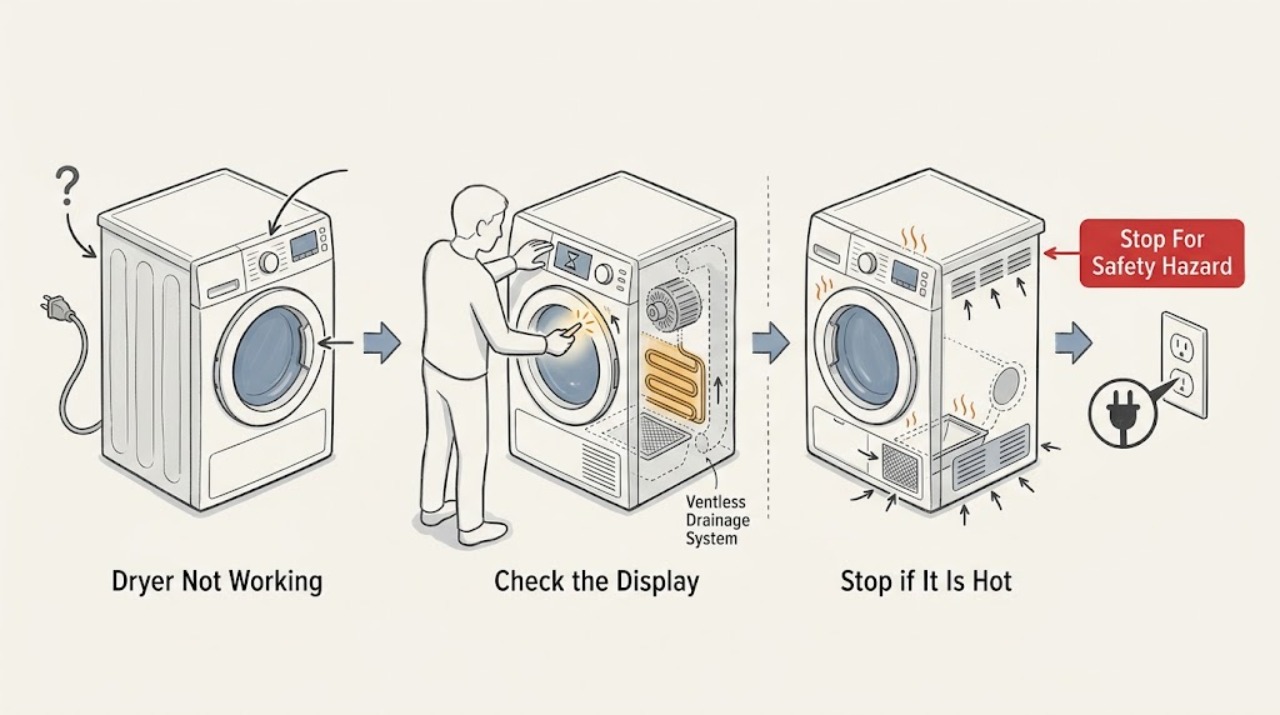
Work through in order
Diagnostic checks
Use only checks that match the exact appliance or system and its official guide.
-
Check 1
Stop the dryer and keep people clear if there is smoke, gas odor, burning or electrical smell, sparking, abnormal heat, visible damage, or a repeated breaker trip. Do not operate switches in a gas-smell area, start another cycle, or open the cabinet.
Expected result: The area is dry and free of odor, smoke, sparks, overheating, and damage, or one of those hazards is present.
Next step: For gas odor or smoke, clear the building and seek emergency help from outside. For burning or electrical smell without an active emergency, leave the dryer off and request qualified service.
Why this matters
Why: A fire, gas, or electrical hazard is a stop condition, not a normal no-start branch.
-
Check 2
From a safe position, note whether the display or drum light works, whether the drum tumbles, whether the dryer produces any warmth on a cycle that should heat, and whether it stops mid-cycle. Record the exact error code, flashing pattern, and selected cycle.
Expected result: There is no response, the panel responds but the drum does not start, the drum turns without heat, the dryer stops mid-cycle, or it runs but dries poorly.
Next step: Use the matching branch and do not repeat a cycle that produces a code, odor, smoke, overheating, or a breaker trip.
Why this matters
Why: No response points first to supply or controls. No tumble points toward door, start, motor, or service. No heat points toward cycle, supply, vent, heater, or service. Mid-cycle stopping can be a safety response to vent restriction or a fault.
-
Check 3
If the dryer has no response or will not start, check the plug, outlet, and breaker from a dry position, then confirm the door is fully closed and the model's Power and Start controls respond. Check for Child Lock, delay, or another displayed control state using the exact manual.
Expected result: The outlet or breaker is off, the door is not confirmed closed, Child Lock or a delay is active, the panel is unresponsive, or the external supply and controls appear normal.
Next step: Correct only an obvious external setting or door obstruction once. If the breaker trips again, the outlet or cord is damaged, or the panel remains unresponsive after the documented lock check, leave the dryer off and request service.
Why this matters
Why: An interrupted supply, open door, or locked panel can prevent starting. A live supply and responsive controls with no start suggest a door switch, motor, control, or other fault.
-
Check 4
If the dryer tumbles or runs but does not heat correctly, confirm that the selected cycle is intended to heat, that Eco Dry or a no-heat option is not explaining the result, and that the model type is known. For a gas model, confirm only that the gas supply has not been intentionally shut off; do not loosen or test the gas connection.
Expected result: The dryer is on Air Fluff, a low or no-heat cycle, Eco Dry, a cooling portion of a cycle, or a gas supply is off; or the cycle and supply type are appropriate.
Next step: Select a suitable cycle once and follow the manual. If heat does not return, do not continue operating the dryer; move to the filter and vent path check or request service.
Why this matters
Why: Some Samsung cycles intentionally use no or reduced heat, while a gas model requires available gas. A correct heat cycle with no heat points toward supply, vent, heater, or service.
-
Check 5
Turn the dryer off and let it cool. Clean the lint filter. On a vented model, inspect the accessible exhaust routing for a kink, crushing, poor fit, or blocked outside hood and use the model's vent-blockage test if provided. On a ventless or heat-pump model, use the manual's heat-exchanger and optional-filter cleaning guidance and check a fitted drain hose for proper drainage.
Expected result: The lint filter, exhaust path, outside hood, heat exchanger, or drain path is restricted, or the applicable path is clean and correctly routed.
Next step: Clean only user-accessible parts described by the exact model and retest once. If the path is clear but heat or normal operation does not return, arrange qualified service.
Why this matters
Why: Restricted airflow or heat exchange can reduce heat, lengthen cycles, or cause a safety shutdown. A ventless unit has a different moisture path and should not be treated as a conventional vented dryer.
-
Check 6
Only when the dryer is cool, dry, undamaged, and free of gas odor, smoke, burning smell, abnormal heat, or repeated trips, perform one manual-approved power reset and restart the documented cycle. Do not keep cycling power, defeat any safety feature, or open the cabinet.
Expected result: The dryer returns to normal operation, or it stays dead, stops again, displays the same code, has no heat, resumes abnormal motion, or trips protection.
Next step: If the fault returns, leave the dryer out of service and provide the technician with the model, symptom classification, code, cycle, supply type, vent or heat-exchanger observations, and safety history.
Why this matters
Why: A single reset can clear a transient control state. A recurring symptom or persistent no-heat/no-start condition requires diagnosis of a control, motor, heater, sensor, door, power, or gas-related fault.
Use your observations
Decision map
Find the observation that best matches what you see, then follow the next safe action.
-
PATH 01Next step
What you see
Smoke, gas odor, burning or electrical smell, sparks, abnormal overheating, visible damage, or repeated breaker trips occur.
Do this next
Stop immediately. For gas odor or smoke, clear the building and contact emergency help from outside without operating switches in the area. For electrical or burning smell, leave the dryer off and arrange qualified service.
-
PATH 02Next step
What you see
The display and lights are absent, or the panel responds but the drum does not start.
Do this next
Check the safe external supply, door closure, Child Lock, delay, Power, and Start state. If external power is correct and the dryer remains dead or will not start, request service.
-
PATH 03Next step
What you see
The drum turns but a proper heating cycle produces no warmth.
Do this next
Check the cycle and Eco Dry state, identify gas or electric type, clean the lint and applicable vent or heat-exchanger path, and verify the safe external supply. Persistent no heat needs service.
-
PATH 04Next step
What you see
The dryer starts but stops during a cycle or appears to lose power partway through.
Do this next
Record the code and check the model's vent-blockage guidance and accessible vent path. Do not bypass a safety shutdown; recurring stops or abnormal voltage and temperature indications need service.
-
PATH 05Next step
What you see
The model is ventless or heat-pump and has a heat-exchanger alert, optional filter, or connected drain hose.
Do this next
Follow the exact manual's heat-exchanger cleaning and drainage instructions. Do not add or disconnect a conventional exhaust path based on another model; request service if the alert, leak, or poor drying persists.
Helpful context
Understand the symptom
Not working is several different faults
A Samsung dryer can have no electrical response, light up but refuse to start, tumble without heat, stop partway through, or run while leaving clothes damp. Record the display, indicator lights, door state, selected cycle, whether the drum turns, whether any warmth is present, and any code or alert. That record prevents applying a vented-dryer or gas-dryer procedure to the wrong model.
Power and controls come before internal parts
A tripped breaker, loose or damaged connection, Child Lock, an unclosed door, a delay, or an unsuitable cycle can look like a dead dryer. Check these only from a dry position and use the exact model manual for button combinations. Do not remove panels or test a heater, motor, relay, thermal device, or gas connection yourself.
Air and moisture paths differ by model
A conventional vented dryer must move warm, moist air through a correctly fitted exhaust path. A ventless or heat-pump model may use a heat exchanger and a drain hose instead. Samsung also uses cycle features such as Eco Dry, Sensor Dry, Steam, and Manual Dry that change heat or run time. Match every check to the model's manual and visible hardware.
Use a clear stop boundary
Stop rather than repeatedly retrying when the dryer smells of gas, smoke, burning insulation, or electricity; sparks, overheats, or trips protection; or has a damaged cord, outlet, vent, or cabinet. If a safe external check and one manual-approved reset do not restore normal operation, arrange qualified service.
Safety boundary
Stop conditions
- Stop for smoke, gas odor, burning or electrical smell, sparks, abnormal overheating, visible damage, or repeated breaker trips.
- Do not open the cabinet, work on live wiring, test a gas connection, bypass a door or thermal safety, or keep operating after a safety shutdown.
- Do not use a damaged, crushed, disconnected, or model-inappropriate vent, and do not apply vented-dryer procedures to a ventless model.
- Do not repeatedly reset a breaker or cycle power when the same fault returns.
- If a door, control, motor, heater, sensor, power, gas, or drain fault persists after safe external checks, request qualified service.
When checks do not resolve it
Need a professional?
Request qualified Samsung or appliance service when a correct external supply and control setup do not start the dryer, the drum will not tumble, no heat remains after the cycle and vent checks, a mid-cycle shutdown repeats, a vent or heat-exchanger alert returns, or a code persists. Stop immediately for smoke, gas odor, burning or electrical smell, sparks, abnormal overheating, damaged wiring, or repeated breaker trips.
Common questions
FAQ
Why is my Samsung dryer completely dead?
Start with the safe external supply: plug, outlet, breaker, and visible cord or outlet damage. If the supply is correct but there is still no display or light, leave the dryer off and request service.
Why does my Samsung dryer turn on but not start or spin?
Check that the door is fully closed, Child Lock or a delay is not active, and the correct Start control is used for the model. A responsive panel with no tumble after these checks needs service.
What should I check if the Samsung dryer has no heat?
Confirm the cycle should heat and Eco Dry or a no-heat option is not selected. Clean the lint filter and applicable vent or heat-exchanger path; for a gas model, confirm the supply has not been intentionally shut off without touching the gas connection. Persistent no heat needs service.
Why does the dryer stop in the middle of a cycle?
A vent restriction or safety response can make a Samsung dryer appear to lose power, and a code may point to an abnormal condition. Record the code, inspect the model-appropriate vent path, and request service if the stop repeats.
When should I stop using a Samsung dryer?
Stop for smoke, gas odor, burning or electrical smell, sparks, abnormal overheating, damaged wiring, or repeated breaker trips. Do not keep cycling power or use switches in a gas-smell area; seek emergency or qualified service help from a safe location.
Read the exact guide
Official sources
- Clothes are not dry after Samsung ventless dryer cycleSamsung Electronics · Samsung ventless dryer heat exchanger, drain hose, cycle, load, filter, and gas-model applicability
- Clothes are not dry after using Samsung dryerSamsung Electronics · Samsung dryer heat, cycle, Eco Dry, lint filter, vent blockage, sensor, load, and service troubleshooting
- Samsung dryer loses power or won't turn onSamsung Electronics · Samsung dryer power, breaker, outlet, cord, mid-cycle shutoff, vent test, and service guidance
- Control buttons on Samsung dryer do not respondSamsung Electronics · Samsung dryer Power, Child Lock, model-dependent controls, and service guidance
- Samsung dryer smells or smokesSamsung Electronics · Samsung dryer gas odor, visible smoke, burning smell, electrical smell, and service safety guidance
Community feedback
Share a repair observation
Share a plain-text repair observation. Accepted observations are published automatically; this page may take a moment to update.