
On this page
Start here
Quick answer
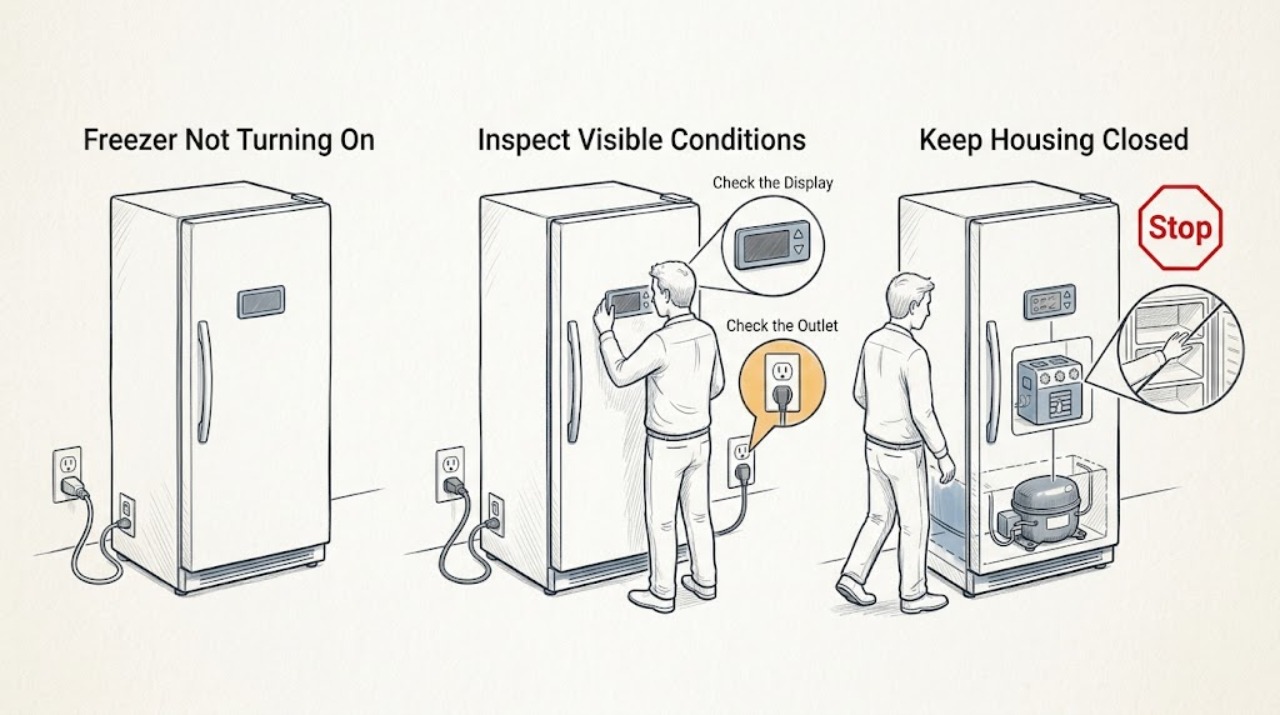
First decide whether the Samsung freezer has no electrical power or has power but is not cooling. Open the door or tap the panel, then check the breaker, outlet, GFCI, and power cord only from a dry, safe position. A blank panel may be normal when inactive or may reflect Sabbath or lock settings; an OF OF, O FF, OFF OFF, or scrolling-bars display can mean Cooling Off mode, in which the lights and fan may operate while the compressor does not cool. Stop if there is water near electrical parts, a damaged cord or outlet, smoke, burning odor, arcing, overheating, or repeated breaker trips. Protect food and request qualified service if the freezer remains without power or cooling after the model-appropriate checks.
Work through in order
Diagnostic checks
Use only checks that match the exact appliance or system and its official guide.
-
Check 1
Check the immediate safety state and protect the food: keep the freezer closed, look for water near electrical parts, and note smoke, burning odor, sparks, heat damage, a damaged cord or outlet, or a breaker that trips again.
Expected result: A dry unit with no damage can proceed to external power checks. Wet electrical areas, smoke, arcing, overheating, damaged wiring, or repeated trips indicate an unsafe fault.
Next step: Stop using the freezer. From a dry, safe position disconnect power or leave the circuit isolated, do not touch wet parts, and request qualified appliance or electrical service. If the area is safe, continue with the power-state check.
Why this matters
Why: The safety condition determines whether any further user check is appropriate. An electrical fault can remain energized even when the display is dark.
-
Check 2
Open the door or tap the control panel once, then check the interior light, panel response, fan or operating sound, and whether food or the cabinet still feels cold without holding the door open.
Expected result: Lights or a panel that wake indicate the appliance has some power; a completely dark unit with warm food points toward power loss. A lit panel with no cooling points toward a setting or cooling fault rather than a dead outlet.
Next step: If there is no response, check the breaker and outlet. If the panel works but cooling does not, inspect the display for a mode or error indication before cycling power.
Why this matters
Why: Samsung says panels may go blank when inactive, while no lights and no cooling are signs to investigate power. Sabbath mode can also suppress buttons, display, and interior lights on applicable models while cooling continues.
-
Check 3
Inspect the home's breaker and the freezer's outlet from a dry position; if the breaker is tripped, reset it once, and test the outlet with another safe appliance only after unplugging the freezer.
Expected result: A dead outlet or a breaker that will not stay on points to a household circuit or outlet problem. If the outlet works but the Samsung freezer remains dark, the appliance or its cord needs service. If the breaker trips again, do not keep resetting it.
Next step: Use a properly functioning outlet only if it is safe and suitable for the appliance and the model instructions allow it; otherwise leave the freezer unplugged and call an electrician or qualified appliance technician.
Why this matters
Why: Samsung recommends separating an outlet or circuit problem from a refrigerator fault and directs recurring trips to an electrician or service. Do not infer an internal component failure from a single tripped breaker.
-
Check 4
Examine the accessible power cord and plug for cuts, crushed insulation, looseness, scorching, or moisture, without opening the cabinet or touching wiring.
Expected result: A damaged, hot, wet, or scorched cord or plug is not safe to reconnect. An intact cord with a known-good outlet shifts suspicion toward the appliance's internal power path.
Next step: Keep the freezer disconnected and request qualified service for cord or internal power diagnosis. Never bypass grounding, use a damaged cord, or remove covers to probe live parts.
Why this matters
Why: Samsung says not to plug the refrigerator back in when the power cord is damaged and to request service if it will not power on across usable outlets.
-
Check 5
If the panel wakes but the freezer is warm, read the display for OF OF, O FF, OFF OFF, scrolling temperature bars, an error code, or a power-outage indication before changing settings.
Expected result: OF OF, O FF, OFF OFF, or scrolling bars indicates Cooling Off or Demo mode on applicable models; a voltage or communication code points to a recent power anomaly; no code leaves settings, door sealing, and cooling checks to evaluate.
Next step: Use the exact model manual to exit Cooling Off or interpret the code. Do not guess a button sequence, reconnect door harnesses, or remove panels if the code returns; request service.
Why this matters
Why: In Cooling Off mode the freezer can appear powered while the compressor is not cooling. Samsung says error codes can require service, and the sequence to exit Cooling Off varies by model.
-
Check 6
Check accessible settings and closure: confirm Cooling Off is not indicated, verify the panel is not locked, check whether Sabbath mode applies, and confirm the door closes fully without a package blocking the gasket.
Expected result: A lock icon or inactive panel can explain unresponsive controls; a Cooling Off indication explains no cooling despite lights or fan; an open door or failed gasket can let the freezer warm and create frost. In Sabbath mode, some controls and lights may remain off while cooling continues.
Next step: Follow the model-specific instructions to change a setting, remove only an obvious door obstruction, and keep the door closed. Request service if the mode returns, the seal fails, or cooling does not recover.
Why this matters
Why: A control symptom does not always mean the freezer has lost power. Samsung documents separate behavior for lock, Sabbath, and Cooling Off modes, and links door sealing to cooling performance.
-
Check 7
After a safe, model-appropriate reset or restored setting, observe whether the freezer begins cooling and whether the food remains safe; do not repeatedly power-cycle a unit with an active error, water exposure, or electrical symptom.
Expected result: A panel that returns and cooling that resumes supports a transient setting or power event. A dark panel, recurring error, warm food, abnormal noise, burning odor, or repeated trip after the reset shows the fault remains.
Next step: Keep the door shut, protect or discard food according to applicable food-safety guidance if it has warmed unsafely, and arrange qualified Samsung appliance service when the fault persists or any stop condition appears.
Why this matters
Why: Samsung notes that a cooling system may need time after a reset and directs persistent no-cooling or error conditions to support. Food safety takes priority over proving the fault by repeated tests.
Use your observations
Decision map
Find the observation that best matches what you see, then follow the next safe action.
-
PATH 01Next step
What you see
The freezer and panel are completely dark, and the outlet is dead or the breaker will not stay on.
Do this next
Leave the freezer disconnected and arrange electrical service for the circuit or outlet. Do not keep resetting the breaker or use a damaged cord.
-
PATH 02Next step
What you see
The outlet works and the cord is intact, but the freezer remains dark on a known-good suitable outlet.
Do this next
Stop external testing and request qualified Samsung appliance service for the appliance power path.
-
PATH 03Next step
What you see
The panel or lights work, but the display shows OF OF, O FF, OFF OFF, or scrolling temperature bars and the freezer is not cooling.
Do this next
Use the exact model manual to disable Cooling Off or Demo mode. Do not assume another model's button combination; request service if the mode returns.
-
PATH 04Next step
What you see
The panel is blank or unresponsive but the freezer is still cooling.
Do this next
Wake the panel and check for Sabbath or lock settings. If the display stays unresponsive after the model-appropriate reset, request service.
-
PATH 05Next step
What you see
The freezer remains warm after power and mode checks, or an error code returns.
Do this next
Keep the door closed, protect food, and request qualified service rather than opening covers or repeatedly cycling power.
-
PATH 06Next step
What you see
There is water near electrical parts, smoke, a burning smell, arcing, overheating, a damaged cord, or repeated breaker trips.
Do this next
Stop immediately. Isolate power only from a dry, safe position and obtain qualified electrical or appliance service; do not touch wet areas or continue testing.
Helpful context
Understand the symptom
A Samsung freezer that appears not to turn on may have no power, a sleeping or locked display, an enabled Sabbath setting, Cooling Off mode, or a real cooling or control fault. Start with observable behavior: do the interior lights respond, does the panel wake when tapped, do you hear normal operation, and are the food and cabinet still cold?
Samsung uses different controls across refrigerator and freezer families. Do not guess a button combination from another model. Use the exact model's user manual for mode changes, and keep all electrical inspection external and dry.
Protect food and electrical areas before testing
Keep the door closed while checking the fault. If water, condensation, or cleaning liquid is near the cord, outlet, controls, or wiring, do not touch the wet area. Smoke, burning odor, sparks, heat damage, or a breaker that trips again is a stop condition, not a reason to keep resetting the circuit.
Safety boundary
Stop conditions
- Stop immediately if water or condensation reaches the cord, plug, outlet, controls, wiring, or another electrical part.
- Stop if there is smoke, a burning odor, visible arcing, scorching, abnormal heat, a damaged cord or outlet, or a breaker or GFCI that trips again.
- Do not remove covers, probe live wiring, bypass grounding, or perform internal compressor, control-board, or sealed-system work.
- Protect the food and stop relying on the freezer if it is warming or food safety cannot be established.
- Request qualified service when the appliance remains dark on a suitable working outlet, a code returns, Cooling Off will not stay disabled, or cooling does not recover after model-appropriate checks.
When checks do not resolve it
Need a professional?
Call qualified Samsung appliance service when the freezer stays dark despite a safe working outlet and intact cord, remains warm after checking settings and Cooling Off mode, shows a recurring error, or has a control, compressor, fan, or wiring symptom. Call an electrician for a dead outlet or recurring breaker/GFCI trip. Stop immediately for water near electricity, smoke, burning odor, arcing, overheating, or a damaged cord.
Common questions
FAQ
How can I tell whether my Samsung freezer has no power?
Open the door or tap the panel once. If the lights, panel, fan, and cooling are all absent, check the breaker, outlet, GFCI, and cord from a dry position. If the freezer stays dark on a known-good suitable outlet, request service.
Why is my Samsung freezer warm while the lights still work?
Check the display for Cooling Off or Demo mode, often shown as OF OF, O FF, OFF OFF, or scrolling bars on applicable models. Use the exact model manual to exit that mode; if it is not indicated or the freezer remains warm, request service.
Is a blank Samsung freezer panel always a power failure?
No. The panel may be inactive until you tap it, or Sabbath or a lock setting may change the display and controls. If the lights are also off and the freezer is warm, investigate power; if the panel remains unresponsive after safe model-specific checks, request service.
When should I stop testing a Samsung freezer that will not turn on?
Stop for water near electricity, smoke, burning odor, sparks, abnormal heat, a damaged cord or outlet, or repeated breaker trips. Isolate power only from a dry, safe position and obtain qualified electrical or appliance service.
Read the exact guide
Official sources
- Samsung Refrigerator control panel or Family Hub screen is blankSamsung · Samsung refrigerator panel wake behavior, Sabbath mode, locks, safe reset, and service escalation
- Cooling issues with Samsung refrigerator or freezerSamsung · Samsung freezer no-cooling diagnosis, power state, Cooling Off mode, door seals, reset, and cooling observation
- Samsung refrigerator has no powerSamsung · Samsung refrigerator and freezer external power, breaker, outlet, GFCI, power cord, and service checks
- Samsung refrigerator error codesSamsung · Samsung refrigerator and freezer error interpretation, power anomalies, Cooling Off mode, self-diagnostic behavior, and service escalation
Community feedback
Share a repair observation
Share a plain-text repair observation. Accepted observations are published automatically; this page may take a moment to update.