
On this page
Start here
Quick answer
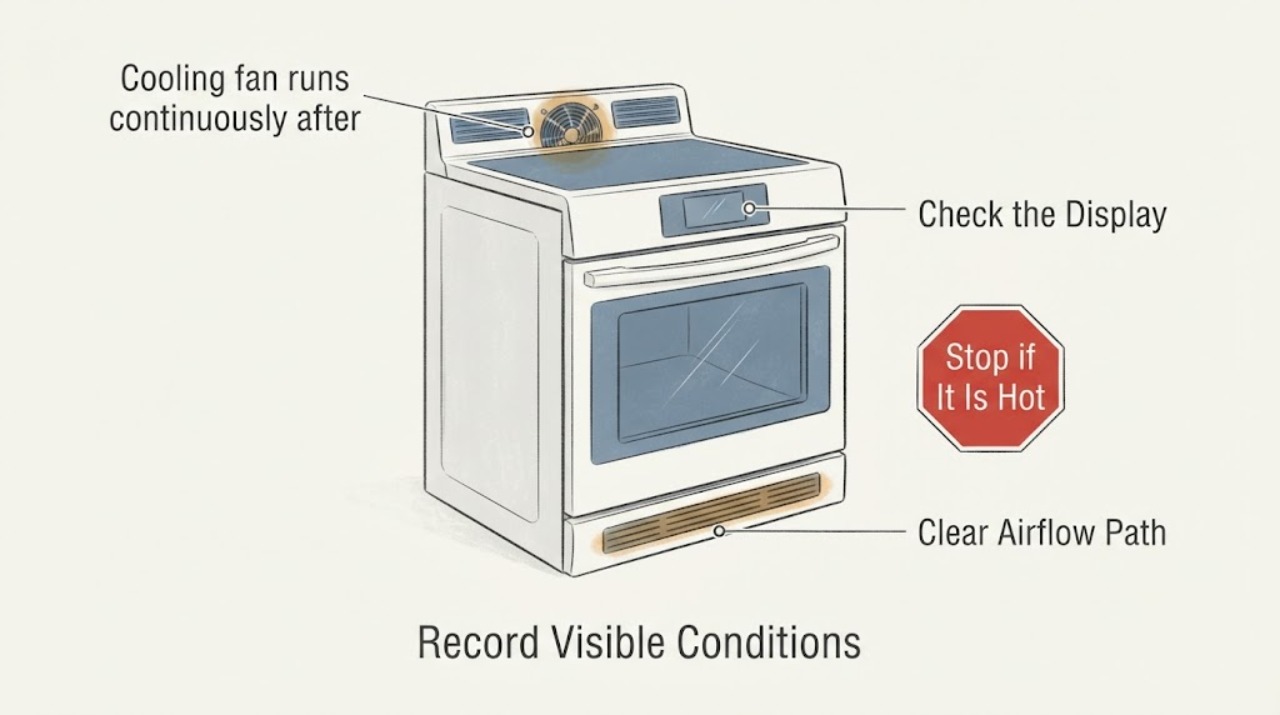
The NE58R9431SS is an electric range with Self + Steam Clean. Samsung says its hidden cooling fan runs while the electronics are hot and turns off when they are cool; the visible convection fans have a different cycling pattern. After Self Clean, judge the fan by the oven's cool-down and door-lock state rather than an arbitrary number of minutes. Do not keep throwing the breaker to make it stop. If the oven is fully cool and the cooling fan still never turns off, or Self Clean malfunctioned, arrange qualified Samsung service. Smoke, a burning or hot-electrical odor, sparking, abnormal heat, an error, or another breaker trip is an immediate stop.
Work through in order
Diagnostic checks
Use only checks that match the exact appliance or system and its official guide.
-
Check 1
From a safe distance, record when Self Clean ended, whether the display still shows a lock state, where the sound or airflow seems to originate, and whether the sound is a smooth hidden-fan airflow or a harsh mechanical noise. Do not open a hot or locked door.
Expected result: The sound comes from around the control area and is a steady airflow, or it comes from the visible rear cavity and tracks a convection mode; alternatively it is scraping, grinding, rattling, or accompanied by an error.
Next step: Continue only with the cool-down observations for smooth airflow without a safety symptom. Stop and arrange service for harsh mechanical noise, an error, smoke, odor, sparking, or abnormal heat.
Why this matters
Why: Samsung identifies two different fans: an internal cooling fan for hot electronics and a visible convection fan. A sound source and mode correlation are more useful than calling every fan a convection fan; a harsh sound or error is not a normal cool-down diagnosis.
-
Check 2
Allow the Self Clean cycle to finish and the oven to cool naturally. Watch only from outside for the lock indicator to clear and for the outer surfaces and escaping air to become cool; never force the door, defeat the lock, or reach toward a fan.
Expected result: The lock remains during the hot phase and later clears as the oven cools, or the lock/error state does not resolve normally.
Next step: If the lock or cycle behavior is abnormal, stop using the range and contact qualified service. Do not force the door or restart Self Clean.
Why this matters
Why: Samsung says Self Clean locks the door and keeps it locked until the oven is below its safety threshold; high heat and hot escaping air are expected during the cool-down. A cycle that malfunctions or cannot complete its safe unlock is a self-clean safety/service issue, not a reason to pry the door open.
-
Check 3
After the oven is fully cool and the door is unlocked, make one external observation of the fan behavior without restarting the oven or cycling the breaker. Note whether the airflow has stopped, is gradually settling, or continues at the same level; also note whether the display is normal and whether any error returns.
Expected result: The airflow fades or stops after the oven and electronics cool, or the fan continues steadily even though the oven is fully cool and unlocked.
Next step: For a fan that settles with cool-down, do not disable it. For a fan that remains on after full cool-down, stop using the affected function and request qualified Samsung appliance service; do not remove panels or bypass a thermostat.
Why this matters
Why: Samsung says the hidden cooling fan operates when the electronics are hot and turns off when they are cool. A fan that never turns off is identified by Samsung as a service condition; a breaker reset can hide the persistence but does not identify or repair its cause.
-
Check 4
With the appliance off and cool, check only safe external conditions: the range has no scorch mark or damaged control, the door closes normally, the surrounding vents are not visibly blocked, and there is no smoke, burning smell, hot-electrical odor, sparking, or repeated breaker trip. Do not inspect wiring, the rear fan, or the control assembly.
Expected result: The exterior is normal and the fan behavior settles, or a safety symptom, damaged connection, unusual heat, or breaker trip is present.
Next step: For any safety symptom, stop using the oven, keep clear, and isolate power only from a safe, dry location; obtain qualified appliance or emergency help and do not restart to test. Otherwise retain the model and timeline for service if the fan remains abnormal.
Why this matters
Why: A smooth cool-down without a safety symptom supports normal cooling behavior. Smoke, odor, sparking, abnormal heat, damage, or a repeated trip moves the issue outside user fan observation and may indicate an electrical or heating hazard.
-
Check 5
Prepare a service record with the complete model marking (including any suffix), Self Clean start and end, when the lock cleared, whether the sound was from the control area or rear cavity, whether it stopped as the range cooled, what happened after the breaker reset, and any error or safety symptom. Do not order a fan or control part from the symptom alone.
Expected result: The fan behavior is repeatable after Self Clean, the same issue returns after safe cool-down, or a different suffix/market is shown on the rating label.
Next step: Give the record and exact rating-label model to Samsung or a qualified appliance technician. Do not disassemble the rear panel, access the fan, or continue breaker resets.
Why this matters
Why: The exact NE58R9431SS product sheet confirms this is a slide-in electric range with Dual Convection and Self + Steam Clean, but internal fan and control diagnosis still requires model-specific service information. A suffix or market difference can change the applicable documentation.
Use your observations
Decision map
Find the observation that best matches what you see, then follow the next safe action.
-
PATH 01Next step
What you see
Self Clean completed, the door eventually unlocked, the sound was a smooth airflow, and it faded or stopped as the range cooled with no error or safety symptom.
Do this next
Leave the appliance undisturbed until cool and continue normal use only if no other symptom remains. Record the timeline if it recurs.
Why this path and its safety boundary
Why it matters: This pattern is consistent with Samsung's cooling-fan purpose: protecting hot electronics until they cool. It does not require disabling the fan or proving a fixed minute count.
-
PATH 02Next step
What you see
The oven is fully cool and unlocked, but the internal cooling fan continues at the same level and never turns off, even though a breaker reset previously made it stop.
Do this next
Stop using the oven and arrange qualified Samsung appliance service. Do not repeat breaker resets, open the cabinet, or bypass a thermostat or other safety control.
Why this path and its safety boundary
Why it matters: Samsung explicitly treats a cooling fan that never turns off as a request-for-service condition. The breaker event is useful history, not evidence that repeated power cycling is safe or corrective.
-
PATH 03Next step
What you see
The noise is only at the visible rear fan and follows a convection setting, or it is scraping, grinding, rattling, or distinctly louder than the quiet cycling Samsung describes.
Do this next
Do not touch the fan or remove panels. Stop the affected mode and arrange service if the abnormal sound persists or cooking performance changes.
Why this path and its safety boundary
Why it matters: This is not the same observation as a hidden cooling fan continuing after Self Clean. It may involve the convection airflow path or a mechanical issue, but the sound alone cannot identify a motor, blade, guard, or control part.
-
PATH 04Next step
What you see
Self Clean did not complete normally, the door remains locked beyond the normal hot phase, an error returns, or there is smoke, a burning/hot-electrical odor, sparking, abnormal heat, or another breaker trip.
Do this next
Stop using the range. Keep clear, isolate power only from a safe dry location if it can be done without approaching danger, and contact qualified appliance or emergency service. Do not force the door, restart the cycle, or test by resetting the breaker.
Why this path and its safety boundary
Why it matters: Samsung's Self Clean warnings treat malfunction as a qualified-service matter, and the safety symptoms exceed routine fan diagnosis.
Helpful context
Understand the symptom
Why Self Clean changes the timeline
Self Clean heats the cavity to a very high temperature. Samsung warns that the range and escaping air can remain hot, and that the door stays locked until the oven has cooled below its safety threshold. That makes a post-clean fan run a cool-down observation first, not proof that a fan part has failed. The useful cutoff is whether the oven and electronics have cooled and the fan settles, not whether a guessed timer has expired.
Do not treat a breaker reset as a repair
If the fan stopped only after the circuit breaker was thrown, record that fact for service but do not repeat the reset as a test. Samsung's fan guidance sends a fan that never turns off to its Support Center, and its Self Clean guidance sends a malfunctioning cycle to qualified service after safe power disconnection.
When checks do not resolve it
Need a professional?
Request qualified Samsung appliance service if the cooling fan never turns off after the oven and electronics are fully cool, Self Clean malfunctions or the lock does not resolve normally, the fan is scraping or grinding, an error returns, or the oven has a heating or control symptom. Treat smoke, burning or hot-electrical odor, sparking, abnormal heat, damaged power connections, and repeated breaker trips as immediate safety stops.
Common questions
FAQ
How long should the fan run after Self Clean on a Samsung NE58R9431SS?
Samsung's fan guidance ties the hidden cooling fan to electronics temperature and says it turns off when they are cool; the public guidance does not provide a universal minute cutoff for this exact situation. Use the cool-down and door-unlock state, not a guessed timer.
Should I keep resetting the breaker when the fan will not stop?
No. A breaker reset that temporarily stops the fan does not establish a repair. Record it for the technician, stop repeated resets, and request service if the fan remains on after the range is fully cool.
Is the fan running after Self Clean automatically dangerous?
Not automatically. Self Clean creates very high heat and Samsung expects a cool-down period, but smoke, burning or hot-electrical odor, sparking, abnormal heat, an error, a stuck lock, or another breaker trip requires immediate stop and professional help.
Read the exact guide
Official sources
- How to clean your Samsung ovenSamsung · Samsung oven Self Clean warnings, high-heat cool-down, door lock, and malfunction response
- Samsung oven fan is making a noise or will not turn offSamsung · Samsung oven fan guidance distinguishing the internal cooling fan from the visible convection fan
- NE58R9431SS/AA WarrantySamsung · Samsung US exact model identity for NE58R9431SS/AA service routing
- NE58R9431SS 5.8 cu. ft. Slide-In Electric Range with Dual ConvectionSamsung · Samsung NE58R9431SS US product specification and feature identity
Community feedback
Share a repair observation
Share a plain-text repair observation. Accepted observations are published automatically; this page may take a moment to update.