
On this page
Start here
Quick answer
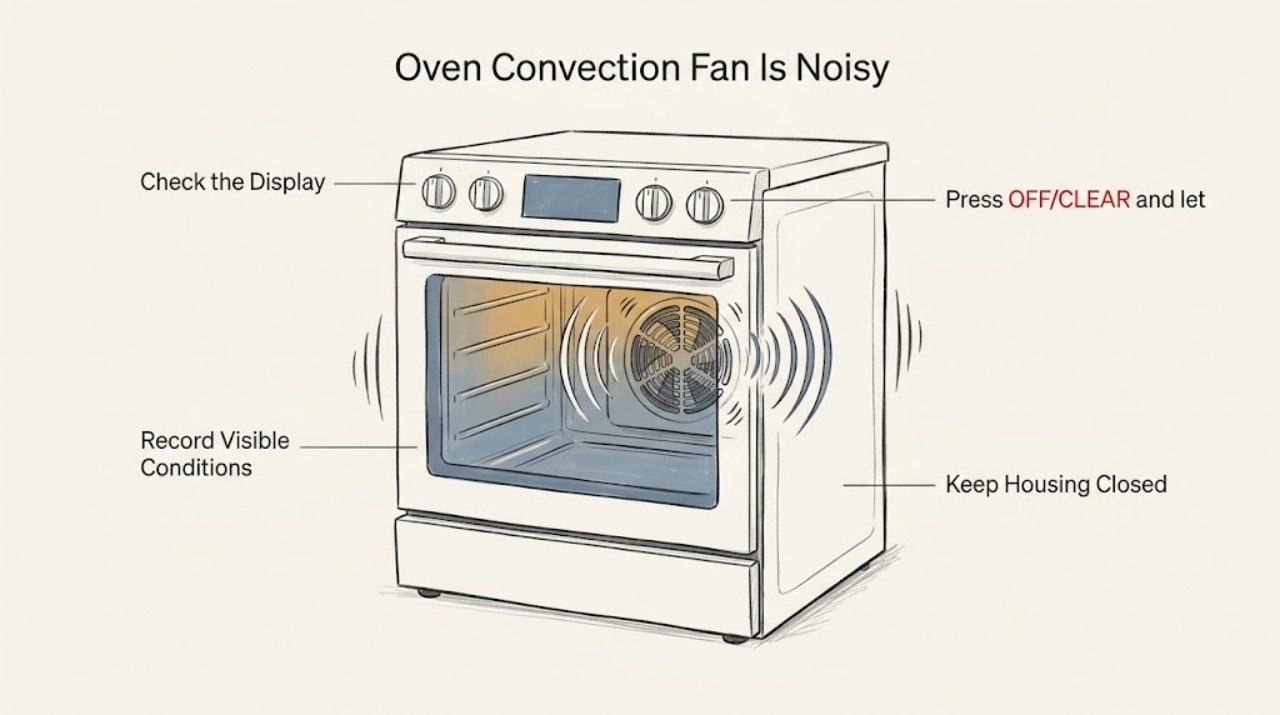
A Samsung convection fan normally makes a quiet, low hum and may turn on and off during convection cooking; the separate cooling fan can also continue after cooking while the oven cools. A new grinding, scraping, rattling, clicking, or distinctly louder sound is not something to diagnose by removing panels. First identify which fan and mode produces the sound, allow the oven to cool, and check only for safe, visible obstructions or loose cookware. If the noise is abnormal, persists when the oven is cool, the fan appears damaged, or there is smoke, a burning smell, sparking, or an electrical problem, stop using the oven and arrange qualified appliance service.
Before you begin
Safety first
- Do not open the oven cabinet, remove the rear panel, touch the fan or wiring, lubricate the motor, or restart after smoke, burning odor, sparking, unusual heat, or a repeated breaker trip.
Work through in order
Diagnostic checks
Use only checks that match the exact appliance or system and its official guide.
-
Check 1
From a safe distance, identify the sound's source and operating context. Note whether it comes from the visible rear convection fan or from the area around the control panel, whether Convection Bake or Convection Roast is selected, whether the oven is preheating or cooking, and whether the sound continues after the oven is turned off.
Expected result: The sound is a quiet low hum that cycles with convection, a blowing or whirring sound after cooking, or a new scrape, rattle, click, grind, or loud vibration that does not match the selected mode.
Next step: Continue only with the cool-oven visual checks if the sound appears normal. If it is distinctly louder or mechanical, stop using the affected mode and arrange Samsung or qualified appliance service.
Why this matters
Why: Samsung says the convection fan can run at intervals and the cooling fan can continue while components cool. A changed mechanical-sounding noise or a noise unrelated to the expected fan context is more likely to need service.
-
Check 2
Press OFF/CLEAR and let the oven cool completely before looking inside. Remove only loose racks or cookware that can be lifted out safely, and look from the front for foil, a pan, or another item contacting or obstructing the visible rear fan area; do not reach toward the blade, remove the rear cover, or probe the fan guard.
Expected result: A rack, pan, foil, spill residue, or other visible item is touching or obstructing the fan area, or the cavity is clear but the noise was a scrape, rattle, or vibration.
Next step: Remove only the loose, visible obstruction and make one supervised test after the oven is cool and correctly set up. If the noise remains, do not remove panels or keep testing; arrange service.
Why this matters
Why: A removable item can create a noise that follows fan operation, while a clear cavity with a mechanical noise makes an internal fan, mounting, blade, or motor issue more plausible. A visual check cannot confirm that an internal part is safe to repair.
-
Check 3
Compare one brief, model-approved use of regular Bake with one use of the affected convection mode, without opening the door repeatedly or placing hands near the fan. Record whether the noise begins only when the convection fan operates, whether it changes with the selected convection mode, and whether cooking performance is otherwise normal.
Expected result: Only a convection mode produces the noise, both Bake and convection produce it, the sound appears only while the cooling fan runs, or the oven also has uneven heating, a fan that does not run, or a temperature problem.
Next step: Stop the test if the noise is harsh, scraping, or accompanied by smoke, odor, sparking, or abnormal heat. Otherwise document the mode correlation and use the Samsung model support information or arrange service if it persists.
Why this matters
Why: A noise limited to convection narrows attention to the convection fan path; a noise in both modes or after cooking can involve cooling airflow or another appliance component. A cooking-performance symptom means the noise is not merely acoustic and needs model-specific diagnosis.
-
Check 4
Check whether the noise changes after the oven is turned off and allowed to cool, and whether the control display shows a fan, convection, or error icon. Do not confuse a normal cooling period with a convection fan that is grinding or a warning that returns after a reset; use the exact model manual for icon meanings.
Expected result: The blowing sound gradually stops as the oven cools, the convection icon appears only in a convection mode, a fan or error icon remains unexpectedly, or the mechanical noise continues when the oven is cool.
Next step: If the sound does not settle into the normal cooling behavior, stop using the oven and request service. Do not repeatedly power-cycle it or attempt to disable a cooling fan.
Why this matters
Why: A cooling fan that runs after cooking can be normal, while a persistent mechanical sound or recurring error is not identified by the icon alone. Model-specific controls and fan designs determine the expected sequence.
-
Check 5
Inspect only safe external conditions after the oven is cool: the door closes normally, no object is trapped at the opening, the display and controls are intact, and there is no scorch mark, smoke, burning odor, sparking, hot electrical smell, or repeated breaker trip. Record the model code, sound type, operating mode, and when the noise began.
Expected result: A safety or electrical symptom is present, the door or control area is damaged, the sound began after installation or a move, or the oven is externally normal but the noise continues.
Next step: Stop using the oven for any safety symptom and isolate power only from a safe, dry location. Otherwise provide the model and recording to Samsung support or qualified appliance service; do not open the cabinet.
Why this matters
Why: Smoke, odor, sparking, damaged controls, or repeated trips exceed a noise diagnosis and may indicate an electrical or heating hazard. A persistent abnormal noise after a normal installation check still needs an internal inspection by a qualified technician.
-
Check 6
Create a service record with the exact Samsung model, gas or electric type if known, fan location, selected mode, whether the oven was preheating or cooling, the sound description and recording, any visible obstruction, changes after removing a loose item, and any temperature or error symptom.
Expected result: The noise is unchanged after the cavity is clear and the oven is cool, returns on every affected mode, or occurs with a separate heating or control symptom.
Next step: Arrange qualified Samsung appliance service and give the record to the technician. Do not order a motor or fan by appearance or attempt to access the rear assembly yourself.
Why this matters
Why: A repeatable abnormal noise with no removable cause is consistent with a fan assembly, mounting, motor, control, or another appliance fault that cannot be confirmed safely from the cavity.
Use your observations
Decision map
Find the observation that best matches what you see, then follow the next safe action.
-
PATH 01Next step
What you see
The sound is a quiet low hum that starts and stops at expected intervals during Convection Bake or Convection Roast, with normal cooking and no safety symptom.
Do this next
Continue using the exact model instructions and monitor for a change in pitch, volume, scraping, or vibration. Request service if the sound becomes distinctly louder or mechanical.
Why this path and its safety boundary
Why it matters: Samsung identifies this operating pattern as a normal convection-fan sound for its supported oven guidance.
-
PATH 02Next step
What you see
The sound is blowing or whirring after cooking and gradually stops as the oven cools.
Do this next
Keep the cooling path unobstructed and allow the documented cool-down. Do not disable the fan; arrange service if it becomes loud, rough, or never settles after the oven is cool.
Why this path and its safety boundary
Why it matters: The internal cooling fan may be operating normally to cool oven components after use rather than indicating a failed convection fan.
-
PATH 03Next step
What you see
A rack, pan, foil, or other loose item visibly contacts the fan area and the noise stops after the item is removed from the cool oven.
Do this next
Run one supervised, model-approved test with the cavity correctly arranged. Stop and request service if the sound returns without contact or cooking performance changes.
Why this path and its safety boundary
Why it matters: The removable item was a plausible noise source, but the fan and guard still need monitoring for a returning scrape or vibration.
-
PATH 04Next step
What you see
A new scrape, rattle, grinding sound, strong vibration, or distinctly louder noise remains with a clear cavity and cool oven.
Do this next
Stop using the affected mode and arrange qualified Samsung appliance service. Do not remove panels, touch the fan, or lubricate an internal assembly.
Why this path and its safety boundary
Why it matters: An internal fan blade, mounting, motor, guard, or control problem is possible and cannot be identified by a safe visual check.
-
PATH 05Next step
What you see
The noise occurs in both regular Bake and convection, or the oven also has uneven heating, a fan that does not run, an error, or a temperature problem.
Do this next
Stop repeated tests and use the exact model support information or arrange qualified service with the mode correlation and symptoms documented.
Why this path and its safety boundary
Why it matters: The issue may involve more than the convection fan, including cooling airflow, heating, controls, or another appliance component.
-
PATH 06Next step
What you see
Smoke, burning odor, sparking, a damaged control or power connection, or a repeated breaker trip occurs.
Do this next
Stop using the oven, keep clear, isolate power only from a safe dry location, and obtain qualified appliance or emergency help. Do not restart to test.
Why this path and its safety boundary
Why it matters: This is an immediate appliance safety stop, not a routine fan-noise adjustment.
Helpful context
Understand the symptom
Convection fan versus cooling fan
Samsung ovens can have an internal cooling fan for the electronics and a convection fan at the back of the cavity. The convection fan circulates heated air and may cycle during a convection mode. The cooling fan can sound like blowing or whirring and may continue after the oven is turned off until internal parts cool. Identify the fan's location and when the sound occurs before treating it as a failed convection motor.
Noise is more useful than volume alone
A low, steady hum that follows the selected convection mode is different from a new intermittent scrape or rattle that changes with fan speed. Record the sound from a safe distance and note whether it starts at preheat, only in Convection Bake or Convection Roast, continues during ordinary Bake, or remains after the oven is cool. Samsung's model-specific guide controls because fan layouts and normal sounds vary.
Safety boundary
Stop conditions
- Do not remove the rear oven panel, touch the convection blade or guard, reach into the cavity while hot or moving, lubricate an internal motor, or dismantle the range as a noise check.
- Stop immediately for smoke, burning odor, sparking, a damaged power or control connection, unusual heat, or a repeated breaker trip. Keep clear and isolate power only from a safe dry location.
- If a scrape, rattle, grinding sound, strong vibration, or distinctly louder noise remains after the oven is cool and the cavity is clear, stop using the affected mode and arrange qualified appliance service.
Only after diagnosis
Potential parts
- convection fan motor and blade assembly
Consider only after qualified diagnosis confirms that the persistent noise comes from the convection fan assembly rather than normal cooling operation or a removable obstruction.
Fan assemblies vary by Samsung oven model and design. Confirm the exact model and technician diagnosis before selecting a part. - convection fan guard or mounting hardware
Consider only when qualified inspection confirms a damaged, loose, or misaligned guard or mounting component is causing the repeatable noise.
Guard shape and mounting hardware are model-specific and may require cabinet access. Do not choose by appearance alone. - oven cooling fan or control component
Consider only when the sound continues during cool-down or both cooking modes and qualified diagnosis identifies a cooling-fan, relay, sensor, or control fault.
Cooling and control components differ by model and can involve high-temperature or energized parts. Confirm professional diagnosis and exact fitment first.
When checks do not resolve it
Need a professional?
Arrange qualified Samsung appliance service when an abnormal convection-fan noise remains with a cool, clear cavity; the sound is scraping, grinding, rattling, or strongly vibrating; the fan fails to run or does not settle after cool-down; the oven also has an error, heating problem, or damaged control; or the sound is distinctly louder than normal. Treat smoke, burning odor, sparking, unusual heat, and repeated breaker trips as immediate safety stops.
Safety scope: Do not open the oven cabinet, remove the rear panel, touch the fan or wiring, lubricate the motor, or restart after smoke, burning odor, sparking, unusual heat, or a repeated breaker trip.
Common questions
FAQ
Is a humming Samsung convection fan normal?
A quiet, low hum that starts and stops during a convection mode can be normal. Samsung distinguishes that fan from the cooling fan, which may continue after cooking while the oven cools. A new scrape, rattle, grind, vibration, or distinctly louder hum needs service.
Why does the Samsung oven fan keep running after I turn the oven off?
The internal cooling fan may continue to cool oven components after cooking. Note whether the sound gradually settles as the oven cools; a harsh mechanical sound or a fan that never settles should be evaluated using the exact model support information.
What can I safely check when the Samsung convection fan is noisy?
Let the oven cool completely, remove only loose racks or cookware, and look from the front for a visible object contacting the fan area. Do not reach toward the blade, remove the rear panel, or attempt to lubricate or repair the motor.
What if the noise happens only in Convection Bake or Convection Roast?
That correlation points toward the convection-fan path, but it does not identify a failed part. Record the mode and sound, stop if the noise is harsh or accompanied by smoke or odor, and arrange service if the noise remains with a clear, cool cavity.
When should I stop using a noisy Samsung oven?
Stop for scraping, grinding, strong vibration, smoke, burning odor, sparking, unusual heat, damaged controls, or repeated breaker trips. Keep clear and arrange qualified appliance service; do not open the cabinet or restart to test.
Read the exact guide
Official sources
- Samsung Range FAQsSamsung · Samsung range FAQ covering normal convection and cooling fan sounds and the need to use model-specific support for unusual noise.
- Samsung oven fan is making a noise or will not turn offSamsung · Samsung oven support guidance distinguishing the visible convection fan from the internal cooling fan and describing expected low hum and cycling.
- Samsung cooktop and range: common sounds and operational noisesSamsung · Samsung range guidance for convection-fan, cooling-fan, relay, and abnormal-volume noise patterns.
- Samsung oven temperature issuesSamsung · Samsung oven temperature and operation guidance used to distinguish normal temperature cycling from a broader oven fault.
- How to use your Samsung convection ovenSamsung · Samsung convection cooking explanation and model-manual reminder for Convection Bake and Convection Roast.
Community feedback
Share a repair observation
Share a plain-text repair observation. Accepted observations are published automatically; this page may take a moment to update.