
On this page
Start here
Quick answer
Record the complete Samsung oven message before trying to clear it. Samsung uses information codes for different conditions, including a door or divider position, Demo mode, blocked vent or high temperature, power connection, communication, or a model-specific fault. Match the exact code and model to Samsung's support guide, then use only the listed ordinary step. For other codes Samsung advises turning the range off and on, then cycling the circuit breaker once if the code returns; a code that returns again needs service. Do not guess a code's meaning, repeatedly reset power, open panels, test live wiring, or continue cooking with smoke, gas odor, sparks, overheating, or loss of control.
Before you begin
Safety first
- This article covers reading the display, identifying the exact model, ordinary external checks, and one Samsung-directed power reset when permitted. A technician must handle panels, wiring, sensors, heaters, controls, door and divider switches, gas parts, and live or high-temperature diagnosis.
Work through in order
Diagnostic checks
Use only checks that match the exact appliance or system and its official guide.
-
Check 1
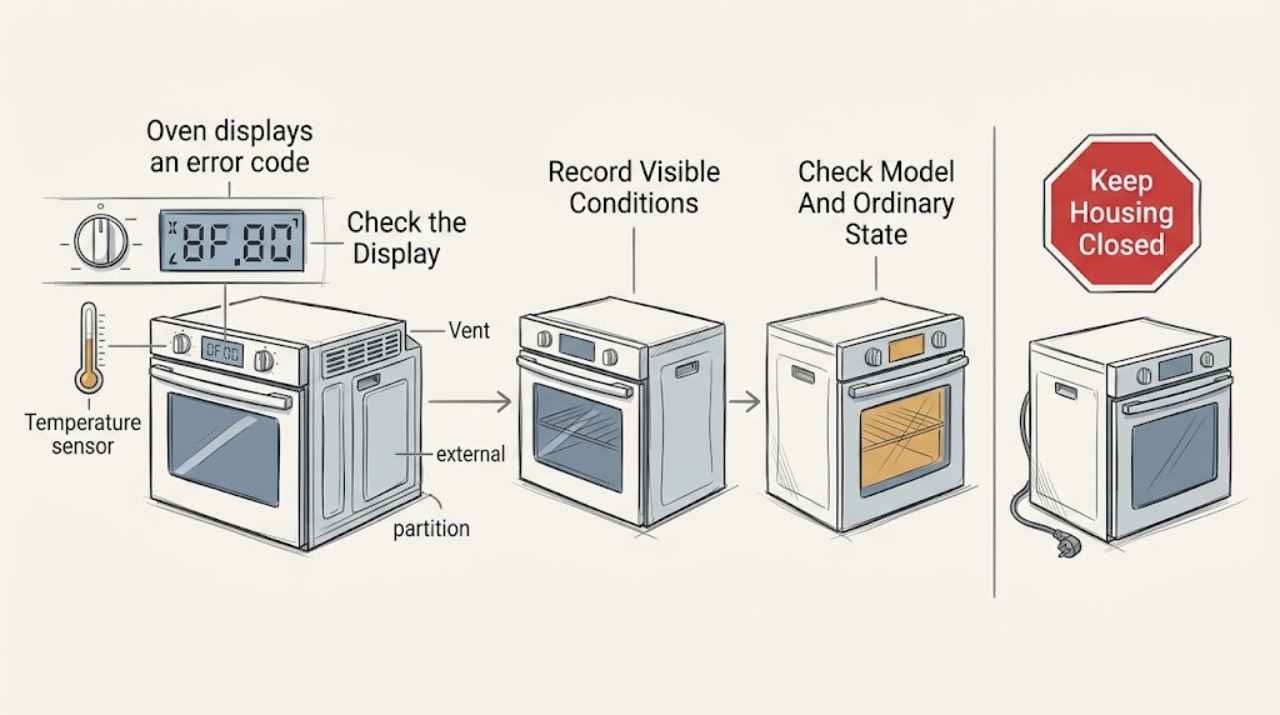
Read the display from outside the oven and record every letter, number, symbol, capitalization, beep, and operating state. Note whether the oven was preheating, cooking, self-cleaning, using a divider, or idle, and take a photo only if safe.
Expected result: The display shows a named message such as door, -dE-, -dC-, tESt, bAd LinE, C-10, or C-24; a letter-number code; an incomplete display; or a message that cannot be read fully.
Next step: Keep the oven off for any smoke, gas odor, sparks, overheating, or loss of control. Otherwise locate the exact model manual and compare the complete message with Samsung's range or wall-oven code guide.
Stop if: Do not guess at similar-looking characters, continue cooking through a safety warning, or open the control area to read a hidden label while the appliance is hot or energized.
Why this matters
Why: Samsung's code guide ties different messages to different branches such as door closure, partition position, Demo mode, power connection, test conditions, vent or temperature, and communication. An incomplete code cannot support a reliable diagnosis.
-
Check 2
Identify the Samsung model and product family from the rating label, owner manual, or Samsung model-support page. From outside, check only ordinary conditions named by the code: a fully closed door, correctly seated divider, clear rear vent, inactive cooktop during Self Clean, or a dry and unlocked panel.
Expected result: The code matches a direct Samsung branch and the visible condition is correctable, the condition is already correct but the code remains, or the model/code match is unclear.
Next step: Make only the ordinary correction named by Samsung and monitor the display. If the message remains or no direct model guidance exists, stop and arrange qualified Samsung appliance service.
Stop if: Do not force the door, reach into a hot cavity, disassemble a divider switch, remove vent covers, or spray liquid into controls.
Why this matters
Why: A correctable door, divider, vent, Demo-mode, or panel state can clear a corresponding information message. A persistent message despite the visible state, or an unclear model match, needs the exact manual or service rather than a guessed part.
-
Check 3
Follow the exact Samsung branch for the recorded code. For a partition message, install the partition as the manual directs; for Demo mode, use the model's manual; for a vent or high-temperature message, remove only an obvious external obstruction and let the oven cool; for a test-only code, verify whether a self-diagnosis was running.
Expected result: The message clears after the listed ordinary step, the message appears outside the condition Samsung describes, or it remains while the door, divider, vent, temperature, or test state is correct.
Next step: Record the result and continue only to the one reset allowed by the exact Samsung guide. Escalate a persistent or context-mismatched message to service.
Stop if: Do not bypass a door or divider switch, defeat Demo mode by undocumented settings, block or modify the vent, or operate while the oven is overheating.
Why this matters
Why: A message that clears under its documented condition supports that branch. A code outside its expected context or one that remains after the ordinary step indicates an unresolved control, sensor, temperature, power, or communication issue.
-
Check 4
If the exact Samsung guide permits a reset and no safety symptom is present, use the Power control to turn the range or oven off and on. If the code returns, turn the circuit breaker off for the interval Samsung specifies for the applicable model, then restore power once.
Expected result: The display returns to normal and the code stays clear, the code returns after power is restored, the breaker trips again, or the oven loses normal control or heating.
Next step: Leave the oven off and arrange service if the code returns, the breaker trips, or operation is abnormal. Do not keep cycling power to search for a different result.
Stop if: Do not guess a reset interval, bypass a breaker, reset power with smoke or gas odor present, or work inside the oven after power is restored.
Why this matters
Why: A one-time clear can remove a temporary control state. A recurring code, repeated protection trip, or abnormal operation supports an unresolved electronics, sensor, communication, power, or heating fault.
-
Check 5
After a successful model-directed reset, check from outside that the display is complete, controls respond, the door operates normally, and the oven has no unusual heat, smell, smoke, sound, or breaker activity. Do not run a long cooking cycle solely to test the code.
Expected result: The display stays clear and normal, the code returns during preheat or cooking, heating is absent or abnormal, or a new safety symptom appears.
Next step: Stop the affected function and arrange qualified Samsung service for recurrence, abnormal heating, loss of control, a new code, or a persistent display problem.
Stop if: Stop immediately for smoke, gas odor, sparks, exposed wiring, a damaged cord, overheating, uncontrolled heat, or another tripped breaker.
Why this matters
Why: Stable operation lowers concern for a temporary display state but does not identify the original cause. Recurrence or an operating change means the reset did not resolve the fault.
-
Check 6
Before requesting service, collect the exact model, complete code, date and mode, whether a divider, Self Clean, SmartThings diagnosis, or high-temperature condition was involved, the reset result, and any heating or safety symptom.
Expected result: The code and conditions are repeatable and documented, or the event is intermittent, incomplete, or associated with a safety or power symptom.
Next step: Arrange qualified Samsung appliance service when the message remains, returns, cannot be matched, or is paired with abnormal operation. Leave the oven off if a safety symptom is unresolved.
Stop if: Do not remove panels, inspect live terminals, replace a board or sensor from a code alone, or continue operating through a persistent fault.
Why this matters
Why: These details help Samsung or an authorized technician separate a model-specific information message from a control, sensor, temperature, communication, or power fault without unsafe owner testing.
Use your observations
Decision map
Find the observation that best matches what you see, then follow the next safe action.
-
PATH 01Safety boundary
What you see
The code directly identifies a correctable ordinary condition such as a door not closed, an incorrectly seated divider, Demo mode, a blocked external vent, or a panel state, and the visible condition is present.
Do this next
Make the documented ordinary correction once and monitor the display. Arrange service if the message remains while the condition is correct.
Why this path and its safety boundary
Why it matters: The named operating condition is more likely than a failed part, but only the exact Samsung model instructions define the correction.
Safety stop: Do not force a door, defeat a switch, remove a panel, or operate through overheating or an electrical symptom.
-
PATH 02Safety boundary
What you see
The code is not tied to an unresolved visible condition, Samsung permits a reset, and one Power or model-directed breaker cycle clears it without abnormal operation.
Do this next
Record the result and monitor one normal use. Stop and arrange service if the same or another code, heating issue, or control problem returns.
Why this path and its safety boundary
Why it matters: A temporary control or display state is possible, but clearing the code does not prove that the underlying circuit is healthy.
Safety stop: Do not repeatedly cycle power or continue if smoke, gas odor, sparks, heat loss, or uncontrolled heat appears.
-
PATH 03Safety boundary
What you see
The code remains after the Samsung step, returns after power is restored or during cooking, or no exact model entry supports a safe owner action.
Do this next
Leave the oven off and arrange qualified Samsung service with the complete code, model, context, and reset result.
Why this path and its safety boundary
Why it matters: An unresolved electronics, sensor, communication, temperature, heating, door, or power fault is more likely than a temporary display glitch.
Safety stop: Do not choose a replacement part, open panels, test live circuits, or keep resetting the breaker.
-
PATH 04Safety boundary
What you see
The message appears with smoke, gas odor, sparks, excessive heat, a tripped breaker, damaged wiring, loss of control, or a door that cannot be safely managed.
Do this next
Stop using the oven, keep clear of hot or energized areas, and use the appropriate qualified appliance, electrical, or gas-safety response.
Why this path and its safety boundary
Why it matters: The safety or power symptom takes priority over interpreting the display; an ordinary reset is not an adequate response.
Safety stop: Do not operate the oven, repeatedly restore power, investigate a gas smell with a flame, or remove covers.
Helpful context
Understand the symptom
Treat the exact display as the starting point
A Samsung oven may show a letter-and-number code, a word such as door, a Demo-mode message, a divider message, or a power or communication warning. The same general symptom can have different causes on a range, wall oven, induction model, or Flex Duo model. Preserve the exact characters and the condition in which they appeared before selecting a remedy.
Use the code's branch, not a universal reset
Samsung's support guide gives limited owner steps for selected messages: a partition may need correct seating, Demo mode needs the model's manual, a blocked vent may need to be cleared, and a general code may allow one power reset. These paths are not interchangeable. If the code is not listed, the display is incomplete, or the listed step does not resolve it, stop at the model lookup and request service.
Do not confuse a display problem with a repaired oven
Power cycling can restart the control and clear a temporary display state, but it does not prove that a sensor, communication link, heating circuit, or power connection is healthy. Samsung advises service when an error returns after the prescribed reset. A qualified technician should handle panel access, wiring, control boards, sensors, heating parts, and any gas or high-temperature diagnosis.
Safety boundary
Stop conditions
- Stop immediately for smoke, gas odor, sparks, exposed wiring, a damaged cord, overheating, uncontrolled heat, a tripped breaker, or loss of temperature, door, or control response.
- Do not open control or rear panels, test live wiring, bypass a door, divider, or safety switch, or replace a board, sensor, heater, or lock from a code alone.
- Do not repeatedly reset the Power control or breaker, force the oven door, defeat Demo or lock functions with undocumented settings, or continue cooking through a persistent fault.
- If the complete message cannot be matched to the exact Samsung model, treat it as unresolved and arrange qualified service rather than borrowing another model's remedy.
- Stop after one model-directed ordinary correction and one permitted power reset when the code returns, the oven does not operate normally, or a safety symptom appears.
Only after diagnosis
Potential parts
- oven electronic control
Consider this category only if a qualified diagnosis confirms a faulty control after power, wiring, and connected components are checked.
Confirm the exact Samsung model, control revision, connectors, and manufacturer's fit information before ordering. - oven temperature sensor
Consider this category only when the exact code and technician testing identify a failed temperature sensor or its circuit rather than a control or wiring issue.
Confirm the exact Samsung model, sensor type, connector, mounting, and manufacturer's fit information before ordering; do not live-test it as a user. - oven heating or safety component
Consider this category only after a qualified technician confirms that the code and symptom are caused by a failed heater, thermal safety device, door switch, or related circuit.
Confirm the exact Samsung model, oven position, electrical rating, safety design, and manufacturer's fit information before ordering.
When checks do not resolve it
Need a professional?
Arrange qualified Samsung appliance service when the code remains after the exact model's permitted step, returns, cannot be identified, appears with abnormal heating or control behavior, or is linked to a sensor, electronics, communication, power, vent, door, divider, or safety condition. Panel access, live electrical diagnosis, gas work, heating circuits, and safety-device repair require a technician.
Safety scope: This article covers reading the display, identifying the exact model, ordinary external checks, and one Samsung-directed power reset when permitted. A technician must handle panels, wiring, sensors, heaters, controls, door and divider switches, gas parts, and live or high-temperature diagnosis.
Common questions
FAQ
What should I do first when my Samsung oven displays an error code?
Record the complete message, including every letter, number, symbol, and beep. Note the mode and temperature state, then compare it with the exact Samsung model guide. Stop immediately for smoke, gas odor, sparks, overheating, or loss of control.
Can I reset a Samsung oven error code?
Often, but only through the Samsung path for that model and code. Samsung advises turning the range or oven off and on, then cycling the breaker once if an applicable code returns; if it returns again, arrange service. A reset does not prove a component is repaired.
What does an oven message such as door, -dE-, -dC-, or tESt mean?
Samsung uses these messages for specific conditions such as a door not closed, an incorrectly installed partition, or Demo mode on applicable models. Check the exact model guide and make only the documented ordinary correction; do not force switches or settings.
Why did the Samsung oven code disappear after a breaker reset?
Power cycling can restart the control and clear a temporary display state. Record that result and monitor one normal use; if the code or abnormal heating, control, or power behavior returns, leave the oven off and arrange service.
When should I stop using a Samsung oven with an error code?
Stop when the code remains or returns, cannot be matched to the exact model, or appears with smoke, gas odor, sparks, overheating, a tripped breaker, damaged wiring, loss of control, or abnormal heating. Panel access, live testing, gas work, and safety-component diagnosis require a qualified technician.
Read the exact guide
Official sources
- Samsung range or wall oven error codesSamsung Support · Direct Samsung US support guidance; code meanings and available steps vary by model and product family.
- Self Clean or other buttons do not light up or respond, or panel is locked on Samsung ovenSamsung Support · Official Samsung US support used for panel-state branches; button labels and functions vary by model.
- Ranges | Samsung Support USSamsung Support · Official Samsung US support hub used to identify the exact model and manual; it does not diagnose a particular code.
- Samsung range or wall oven panel is blank, blinking, or incorrectSamsung Support · Official Samsung US display guidance used for reset and control-state context, not as a universal code diagnosis.
Community feedback
Share a repair observation
Share a plain-text repair observation. Accepted observations are published automatically; this page may take a moment to update.