
On this page
Start here
Quick answer
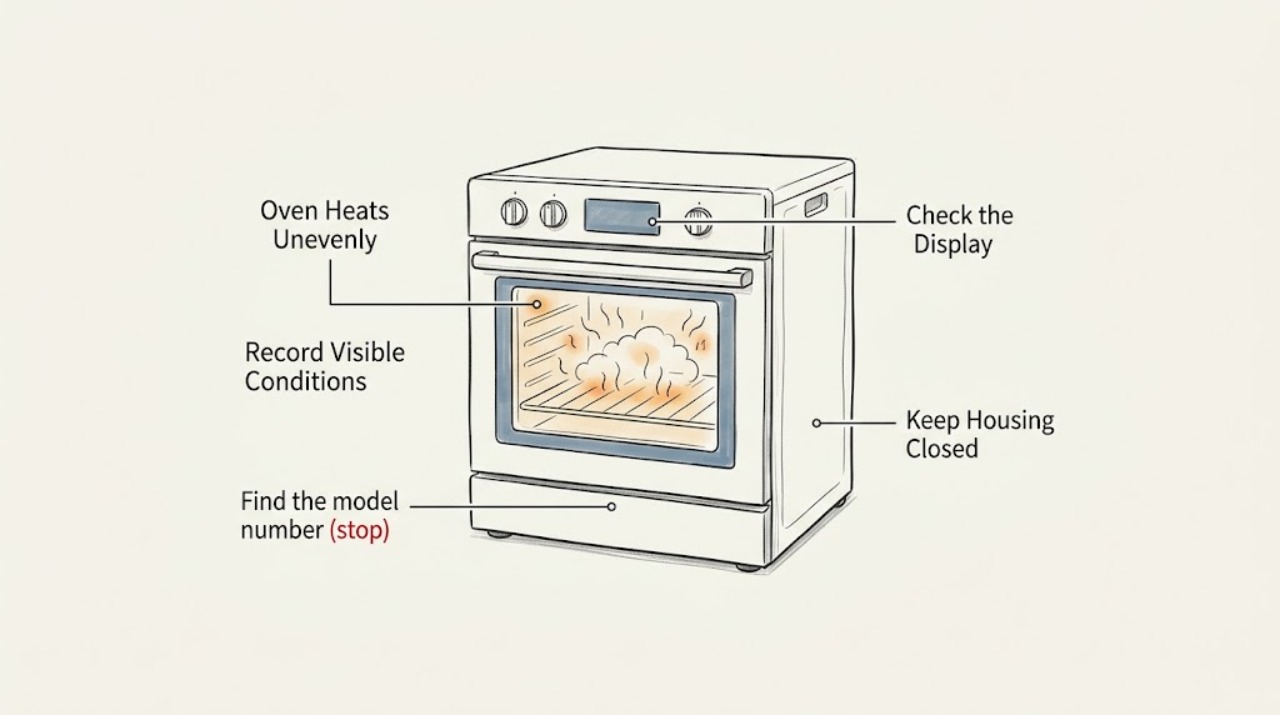
If a Samsung oven heats unevenly, first identify the pattern, then repeat a simple bake with the exact model's recommended mode, rack position, pan, full preheat, and closed door. Samsung says rack placement, airflow, settings, preheating, crowding, and calibration can affect uneven cooking, while its models differ in convection and heating features. If the same area stays hot or cool after those controlled checks, use only the model-specific calibration guidance and arrange qualified appliance service rather than opening panels or testing energized parts.
Before you begin
Safety first
- Do not open the control panel, test live components, alter gas or electrical connections, remove a door or divider by guesswork, or continue operating after smoke, sparking, gas odor, abnormal flame, or visible damage.
Work through in order
Diagnostic checks
Use only checks that match the exact appliance or system and its official guide.
-
Check 1
Write down the repeatable pattern: note whether the top, bottom, sides, corners, or center cook differently, whether the difference is browning or doneness, and whether it occurs with more than one recipe, pan, and cooking mode.
Expected result: The same cavity location repeatedly over- or undercooks, the result changes with the pan or recipe, convection differs from regular bake, or the issue was a one-time result.
Next step: Keep the test notes, identify the oven model, and repeat one simple test with only one variable changed at a time.
Why this matters
Why: A repeatable location pattern points toward an oven-performance check, while a result that follows the food, cookware, or selected mode may be a setup effect.
-
Check 2
Find the Samsung model number and read the matching manual for bake versus convection mode, rack position, divider or twin-oven requirements, preheat behavior, and temperature-calibration instructions.
Expected result: The manual specifies a different rack or mode for the food, identifies a convection or divider feature, provides a calibration setting, or does not match the controls on the oven.
Next step: Use only the instructions for the exact model. If the model cannot be identified or the manual does not match, stop before calibration or disassembly and arrange qualified appliance help.
Why this matters
Why: Samsung models vary in controls and heating features. Using a setting or calibration sequence from another model can create a misleading result and may be unsafe.
-
Check 3
Run a controlled bake after the oven is fully preheated: use one recipe-sized pan, the exact model's recommended rack, the intended mode and temperature, and the same food load. Close the door and avoid repeated checks during the bake.
Expected result: The food becomes more even after a complete preheat and closed-door bake, or the same uneven area remains.
Next step: Keep the successful preheat and closed-door routine if the result improves. If it does not, continue with pan, spacing, and airflow checks rather than repeatedly changing the temperature.
Why this matters
Why: Incomplete preheating, heat loss, incorrect rack position, or a wrong mode can make a first test look uneven. A persistent pattern under controlled conditions is more concerning but still does not identify a failed part by itself.
-
Check 4
Repeat the same bake with the pan centered and with clear space around it. Keep pan material, size, food load, rack, mode, and temperature consistent; do not block vents or cover the oven floor with foil unless the exact manual expressly allows it.
Expected result: The result changes when the pan is centered, crowding is reduced, or airflow is restored, or the same cavity location remains uneven.
Next step: Use the pan spacing and rack arrangement that produces a repeatable result. If the pattern survives a clear, centered setup, proceed to the model-specific mode and calibration guidance.
Why this matters
Why: Pan placement and restricted airflow can create local hot or cool results that mimic an oven fault. Samsung specifically points to airflow and overcrowding as uneven-cooking checks.
-
Check 5
If the oven supports convection, compare one bake in the model's convection mode with one in regular bake using the same pan and rack rules. Follow the manual if it specifies a single lower rack or automatic temperature conversion, and do not assume every Samsung model behaves the same way.
Expected result: Convection is more even, regular bake is more even, or both modes show the same hot or cool location.
Next step: Use the mode the model manual recommends for the food. If one mode remains persistently abnormal, document the comparison for a qualified technician instead of opening the oven.
Why this matters
Why: A mode-dependent result means the heat-distribution system changes the symptom, but it does not prove that the fan, heating element, sensor, or control has failed. The same pattern in both modes makes cookware and mode settings less likely.
-
Check 6
After the oven is cool, inspect from the outside for a door that does not close squarely, a visibly torn or damaged gasket, or an element with obvious blistering, breakage, or discoloration. Do not remove covers or touch wiring.
Expected result: The door seal is visibly damaged, a heating element shows obvious damage, or the door and elements look normal while the controlled uneven pattern persists.
Next step: Stop using the oven and arrange qualified appliance service for visible damage or persistent unevenness. Do not diagnose or replace an energized component from appearance alone.
Why this matters
Why: A poor seal can let heat escape, and Samsung notes that damaged heating elements can produce uneven cooking or longer preheat times. A normal visual check does not rule out an internal sensor, element, fan, control, or wiring problem.
-
Check 7
Only if the exact manual provides a temperature-offset procedure, make one model-specific calibration adjustment after the controlled test and repeat the same recipe. Do not use calibration to compensate for a localized hot spot, and do not rely on a portable thermometer placed in one cavity location as proof of a fault.
Expected result: The repeatable result improves after the manual's adjustment, remains uneven, or the model has no applicable calibration procedure.
Next step: Keep the documented setting only if the exact manual supports it and the repeat test improves. Otherwise stop making broad adjustments and arrange qualified diagnosis.
Why this matters
Why: Calibration can address a consistent overall hot or cold tendency; it cannot by itself identify a directional airflow, heating, sensor, or control fault. Samsung says temperature readings can vary with measurement location and directs inconsistent results beyond the available adjustment to further troubleshooting.
Use your observations
Decision map
Find the observation that best matches what you see, then follow the next safe action.
-
PATH 01Next step
What you see
The uneven result changes when the pan, recipe, rack, spacing, or cooking mode changes.
Do this next
Use the exact model's recommended mode and rack, center one recipe-sized pan, and compare again with one variable changed at a time.
Why this path and its safety boundary
Why it matters: The cooking setup or heat-distribution mode is influencing the result, so a failed Samsung component is not established.
-
PATH 02Next step
What you see
The top browns while the bottom remains pale, and the oven was not fully preheated or the door was opened repeatedly.
Do this next
Repeat after the complete model-specific preheat with one rack and a closed door. Escalate if the same pattern remains under controlled conditions.
Why this path and its safety boundary
Why it matters: Heat loss or an incomplete preheat is the safer first explanation than a confirmed sensor or element fault.
-
PATH 03Next step
What you see
Convection improves the bake but regular bake remains uneven, or regular bake improves while convection remains uneven.
Do this next
Confirm the exact model's mode and rack instructions, then have a technician diagnose any mode-specific fault that persists.
Why this path and its safety boundary
Why it matters: The selected heating and airflow system changes the symptom, but that result alone cannot identify a fan, element, sensor, or control failure.
-
PATH 04Next step
What you see
The same cavity location remains hot or cool with a centered pan, correct rack and mode, full preheat, minimal door opening, and no crowding.
Do this next
Use the exact model's calibration instructions once if provided, or arrange qualified appliance diagnosis. Do not open the control panel or test energized components.
Why this path and its safety boundary
Why it matters: A persistent oven performance or calibration problem becomes more plausible, although the pattern does not select a failed part by itself.
-
PATH 05Next step
What you see
The door gasket or heating element is visibly damaged, the oven shows an error, or there is smoke, sparking, abnormal flame, or a gas odor.
Do this next
Stop using the oven and arrange qualified appliance service. For active smoke, fire, or a gas odor, leave the area and contact the appropriate emergency or utility service from a safe location.
Why this path and its safety boundary
Why it matters: This exceeds a low-risk cooking-setup check and may involve electrical, gas, fire, or overheating risk.
Helpful context
Understand the symptom
Start by defining the uneven pattern
Top browning with a pale bottom, a dark corner, a pale center, or one side cooking faster are different observations. Record the food, pan, rack, mode, temperature, preheat routine, and whether the result repeats. A problem that follows one pan, recipe, or mode is not yet proof of a failed oven component.
Use the exact Samsung model instructions
Samsung ovens do not all have the same controls or heating layout. Some use convection modes or a separate convection heating element, and some models have different rack or divider requirements. Find the model number and follow its manual before changing calibration, using a divider, or considering a part.
Safety boundary
Stop conditions
- Do not open the control panel, test energized wiring or heating components, remove a divider or door by guesswork, or replace a sensor, element, fan, or control based only on uneven browning.
- Stop using the oven for smoke, sparking, a gas odor, abnormal flame, an error, visible component damage, repeated scorching, or any condition that could create fire or electrical risk. Arrange qualified appliance service; leave and call emergency or utility services from a safe location for an active gas or fire hazard.
- If the same uneven result persists after the exact model's mode, rack, pan, spacing, preheat, door, and calibration checks, stop making broad temperature changes and arrange professional diagnosis.
Only after diagnosis
Potential parts
- Samsung oven temperature sensor
Consider only after qualified diagnosis identifies a sensing fault following a repeatable uneven result and the exact model's operating and calibration checks.
Sensor design and fit vary by Samsung model. Confirm the exact model and service diagnosis before selecting a component. - Samsung oven heating element or heating assembly
Consider only when qualified service identifies a damaged or weak heating component rather than a pan, rack, airflow, mode, door, or calibration issue.
Heating assemblies differ across Samsung oven configurations and may involve electrical or gas hazards. Confirm exact model fit and professional installation requirements. - Samsung convection fan or fan-control component
Consider only for a convection-specific uneven result when qualified diagnosis confirms an airflow or control fault after the exact mode and rack procedure is followed.
Convection and control parts vary by Samsung model. Do not select a fan or control from the symptom alone or work inside an energized oven.
When checks do not resolve it
Need a professional?
Arrange qualified appliance service when uneven heating persists through a controlled single-pan test and the exact Samsung calibration guidance, when the model manual is unavailable or does not match, or when there is smoke, sparking, a gas odor, abnormal flame, an error, a damaged gasket or element, or unsafe overheating. Provide the model number, electric or gas configuration, mode, food and pan, rack position, preheat and door-opening routine, repeated result pattern, calibration setting, and any visible damage or error.
Safety scope: Do not open the control panel, test live components, alter gas or electrical connections, remove a door or divider by guesswork, or continue operating after smoke, sparking, gas odor, abnormal flame, or visible damage.
Common questions
FAQ
Why does my Samsung oven heat unevenly?
Start with the low-risk causes Samsung lists: wrong mode or rack, incomplete preheat, frequent door opening, crowded or poorly placed pans, restricted airflow, and calibration. If the same area remains uneven with the exact model's controlled test, arrange service rather than assuming a specific part has failed.
Should I use convection to fix uneven Samsung oven cooking?
Use convection only if the model supports it and the manual recommends it for the food. Samsung says the fan circulates heat and recommends a single lower rack for convection baking, but a mode change alone cannot prove that the fan or another component is faulty.
Can I calibrate a Samsung oven that cooks unevenly?
Calibration may help a consistent overall hot or cold tendency, but it will not by itself explain a persistent hot corner or directional airflow problem. Follow only the exact model's calibration procedure, repeat the same recipe, and arrange service if results remain inconsistent.
Should I replace the Samsung oven sensor or heating element?
Not from uneven browning alone. A sensor, heating element, fan, control, wiring, or door-seal problem is only a conditional possibility after setup causes are ruled out and a qualified diagnosis identifies the fault. Do not open an energized oven or choose a part without the exact model.
Read the exact guide
Official sources
- Samsung Wall Oven FAQs | Samsung USSamsung · Official Samsung US wall-oven FAQ; the uneven-cooking guidance is directly applicable to a Samsung oven, while model-specific features still require the owner's manual.
- How to use your Samsung convection ovenSamsung · Official Samsung US convection-oven guide; mode and rack details apply when the Samsung model supports the described convection features.
- Troubleshooting guide for Samsung built-in ovenSamsung · Official Samsung UK built-in-oven troubleshooting guide; the page warns that steps and images can differ by device, so the exact manual controls model-specific procedures.
- Calibrate your oven's temperatureSamsung · Official Samsung US calibration guide; the available adjustment and controls vary by exact oven model.
- Wall Ovens | Samsung Support USSamsung · Official Samsung US support hub for wall ovens, including manual lookup and repair support.
Community feedback
Share a repair observation
Share a plain-text repair observation. Accepted observations are published automatically; this page may take a moment to update.