
On this page
Start here
Quick answer
First determine whether this is a gas Samsung oven and whether the display, controls, and cooktop have power. A gas oven may fail to ignite because the control sequence, door state, gas supply, or igniter is not ready, while electric models do not use a gas burner ignition system. Do not keep trying if you smell gas, hear a delayed ignition or bang, see an abnormal flame, smoke, carbon-monoxide alarm, electrical arcing, or repeated breaker trips. If there is no hazard, record the exact model, display code, selected mode, and what happens when Start is pressed; check only ordinary-access power, lock, door, Demo Mode, and model-appropriate gas observations. One manufacturer-authorized reset may be reasonable for a control issue, but a returning fault or an ignition failure that remains after the safe checks needs qualified service.
Before you begin
Safety first
- This article supports ordinary-access observation and model-authorized controls only. Do not open the oven, adjust gas components, bypass interlocks, manually ignite the burner, test for leaks, or work on wiring.
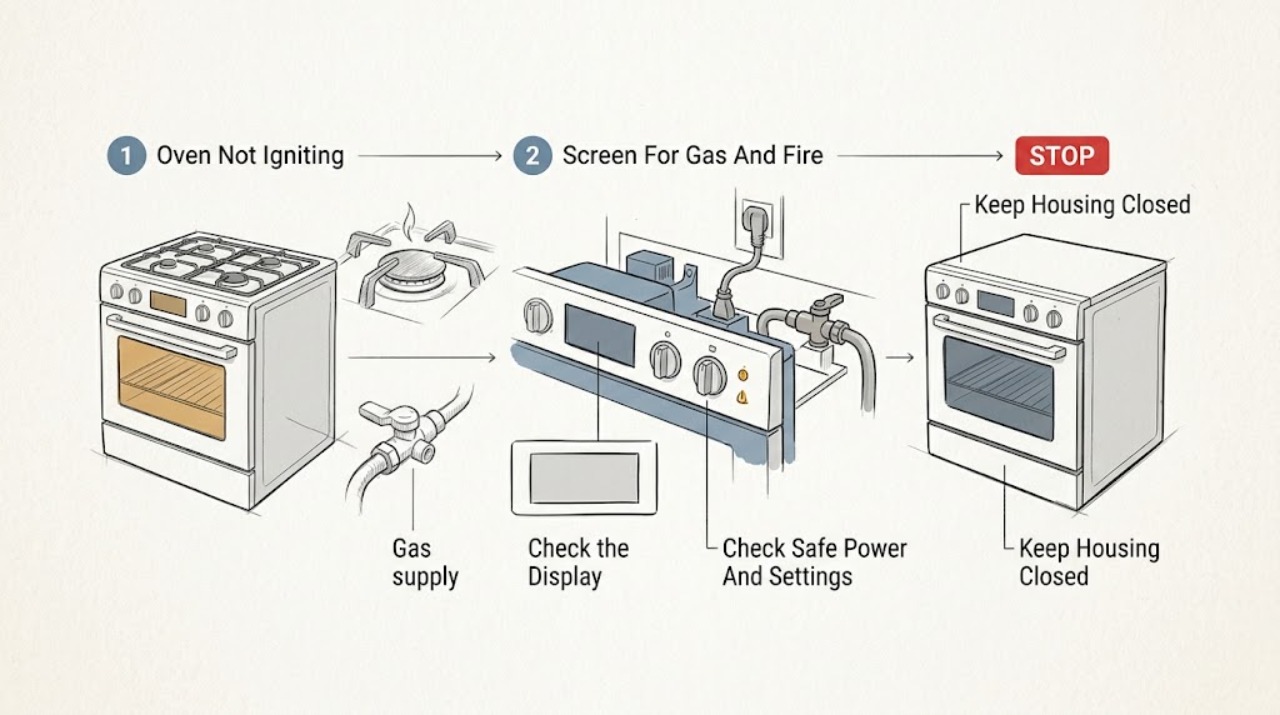
Work through in order
Diagnostic checks
Use only checks that match the exact appliance or system and its official guide.
-
Check 1
Before pressing Start again, stop and assess the area for gas odor, a delayed ignition or bang, an abnormal flame, smoke, a carbon-monoxide alarm, visible electrical arcing, a hot or damaged plug or connection, or a breaker that trips again.
Expected result: Record whether any hazard sign is present, whether the oven is gas, electric, or dual fuel, and whether the oven is hot or contains a fire or smoking material.
Next step: If a hazard is present, stop using the appliance, do not operate switches or flames, leave when needed, and contact the local gas or emergency service from a safe location. If there is a fire, keep the oven door closed and turn the oven off only if this can be done without approaching danger; arrange professional inspection.
Stop if: Do not repeat ignition attempts, smell for gas near the appliance, test for a leak, or open panels after any hazard sign.
Why this matters
Why: Any suspected gas leak, abnormal combustion, fire, smoke, carbon-monoxide warning, arcing, or repeat trip changes this from a user check to an emergency or professional safety response; it is not an ignition-adjustment problem.
-
Check 2
With the appliance cool and safe, record the model or product-family identity, fuel type, whether the display is blank or active, the selected mode and temperature, whether Start is accepted, and exactly when the cycle stops.
Expected result: Classify the symptom as no display, controls that do not respond, a lock or Demo indication, a door-related message, a cycle that starts with no ignition, ignition followed by shutdown, or an error code; save the complete code and timing in a note or photograph.
Next step: Use the exact model support page or manual for the recorded state, and keep the fuel type and stage with the service request.
Stop if: Do not remove a control panel or attempt to bypass a lock, door switch, or safety interlock to make the oven ignite.
Why this matters
Why: A blank panel points first toward power or control availability; a lock, Demo, door, or mode message can block a heating sequence; ignition followed by shutdown or an unexplained code needs model-specific interpretation rather than a generic igniter diagnosis.
-
Check 3
From ordinary access, verify that the appliance has its normal power connection, the breaker or fuse has not opened, the door is fully closed, the panel is not locked, and Demo Mode or another non-heating setting is not selected; do not remove covers.
Expected result: Note whether the display returns, a lock or Demo indicator clears through the documented control, the door closes normally, and Start begins the expected sequence; note whether the breaker opens again.
Next step: If Samsung's model instructions authorize it, perform one power reset and retry only when there is no hazard; if the problem returns, stop and provide the model, code, and observed state to a qualified technician.
Stop if: Do not repeatedly reset a tripping breaker, work on live wiring, or operate the oven with a damaged door, hot connection, smoke, or electrical odor.
Why this matters
Why: Restored display or a cleared setting supports a control-state issue. A breaker that opens again, a panel that stays blank, a door that will not close, or a mode that cannot be cleared points to service rather than more resets.
-
Check 4
Only for a gas model when the area is known safe and the exact Samsung guidance calls for it, observe whether the appliance's ordinary gas function responds; use only normal controls and do not remove parts, adjust pressure, or create a separate ignition test.
Expected result: Record whether the permitted gas observation is normal, absent, delayed, accompanied by a bang, or accompanied by a yellow or otherwise abnormal flame; also record whether the oven makes an ignition attempt without sustaining heat.
Next step: For a normal but unsuccessful observation, stop user diagnosis and arrange model-appropriate service. For absent gas response, use the safe local gas-supply or installer route; for odor, delay, bang, or abnormal flame, leave the appliance off and follow the emergency boundary.
Stop if: Do not test for leaks, adjust a regulator or valve, repeat ignition cycles, light the burner manually, or continue after gas odor, delayed ignition, a bang, or abnormal flame.
Why this matters
Why: No gas response can point toward supply or installation conditions, while an oven that still fails with the expected gas condition may have an ignition or control fault. Delay, bang, abnormal flame, or odor is unsafe combustion evidence, not a reason to try again.
-
Check 5
Compare the complete display message with the exact Samsung model's error-code and support documentation, including the stage at which it appears; do not apply a code meaning from another model or appliance.
Expected result: Record whether the message indicates a door state, Demo Mode, a power-line condition, a temperature-sensing condition, or another model-specific code, and whether it returns after the manual's one authorized reset path.
Next step: Follow the matching manual for the recorded code once; if it returns, the oven still will not ignite, or the documentation does not cover the symptom, stop and give the code, model, fuel type, and sequence to qualified service.
Stop if: Do not erase a recurring code by repeated resets, bridge a door or safety circuit, or continue a gas ignition sequence after a safety warning.
Why this matters
Why: Samsung documents different remedies for door, Demo, power-connection, temperature, and other codes. A returning or unlisted code is evidence for service, not permission to open the oven or replace an unconfirmed part.
-
Check 6
After the safe external checks, stop troubleshooting and prepare a service handoff if the oven does not ignite, the control remains blank or locked, a fault returns, the door will not close, gas response is abnormal, or the breaker trips again.
Expected result: Provide the model and fuel type, exact code, selected mode, display state, ignition or flame observation, any reset already performed, and photographs only from a safe position.
Next step: Arrange qualified Samsung appliance service or an appropriately licensed gas or electrical professional, and leave the oven unused until the cause and safe operation are confirmed.
Stop if: Do not operate an oven that has a gas odor, abnormal flame, smoke, carbon-monoxide warning, visible arc, damaged door, or repeated electrical trip while waiting for service.
Why this matters
Why: These details distinguish power, control, door, gas-supply, ignition, and model-specific faults without asking the user to make an unsafe internal diagnosis.
Use your observations
Decision map
Find the observation that best matches what you see, then follow the next safe action.
-
PATH 01Safety boundary
What you see
Gas odor, delayed ignition or bang, abnormal flame, smoke, carbon-monoxide alarm, visible arcing, hot electrical connection, or repeated breaker trip is present.
Do this next
Stop using it, avoid switches and flames, leave when necessary, and contact the appropriate emergency, gas, electrical, or appliance professional from a safe location.
Why this path and its safety boundary
Why it matters: The appliance is outside a safe user-diagnosis boundary.
Safety stop: Do not retry ignition, test for a leak, or open panels.
-
PATH 02Safety boundary
What you see
The display is blank, a lock or Demo indication is shown, Start is not accepted, or a door-related message prevents the cycle.
Do this next
Use only the exact model's documented control, door, and single-reset checks; service the appliance if the state remains or returns.
Why this path and its safety boundary
Why it matters: Power, settings, door state, or control availability may be blocking the sequence before ignition.
Safety stop: Do not bypass a lock or interlock or repeatedly reset a breaker.
-
PATH 03Safety boundary
What you see
The appliance is confirmed as gas, controls respond, there is no hazard sign, and the oven still does not establish ignition.
Do this next
Make only the exact Samsung-supported ordinary gas observation when safe, then arrange qualified service if ignition does not occur.
Why this path and its safety boundary
Why it matters: Gas supply, ignition, burner, control, or installation conditions remain possible, but the user should not distinguish them by opening the appliance.
Safety stop: Stop immediately for odor, delay, bang, abnormal flame, smoke, or any need to adjust gas components.
-
PATH 04Safety boundary
What you see
An ignition attempt occurs but the flame or heating does not continue, or the oven stops during preheat.
Do this next
Record the timing and any code, leave the appliance off if the behavior repeats, and request service.
Why this path and its safety boundary
Why it matters: A sustained heating or control fault may remain; a one-time successful spark does not establish safe operation.
Safety stop: Do not keep cycling the burner or manually relight it.
-
PATH 05Safety boundary
What you see
The appliance is electric or dual fuel and the user describes an oven that does not ignite.
Do this next
Use the exact model's no-heat and error guidance, preserving the same power and safety boundaries; do not assume a gas igniter is installed.
Why this path and its safety boundary
Why it matters: The oven side may use an electric heating element and the phrase may represent no heat, power, mode, door, or control behavior rather than a gas-ignition fault.
Safety stop: Stop for smoke, burning odor, arcing, damaged wiring, glass damage, or a repeated trip.
-
PATH 06Safety boundary
What you see
The exact error returns after the model guide's allowed reset, or the code is not covered by the available documentation.
Do this next
Keep the oven off and provide the complete code, model, fuel type, and event stage to qualified service.
Why this path and its safety boundary
Why it matters: The fault is not resolved by a user reset and needs model-specific diagnosis.
Safety stop: Do not substitute a code explanation from another model or continue operating through the warning.
Helpful context
Understand the symptom
Start with the fuel type and the hazard screen
Samsung sells gas, electric, induction, and dual-fuel appliances, and the ignition path depends on the exact model. A gas oven can have a burner and igniter; an electric oven has a heating element instead, so a phrase such as not igniting may describe a no-heat or control problem. Before touching a control, distinguish the appliance type from its rating label or model documentation. If there is gas odor, an unusual flame, delayed ignition noise, smoke, a carbon-monoxide alarm, visible arcing, or a hot or damaged power connection, stop the check, avoid switches and flames, leave the area when appropriate, and use the local emergency or utility route from a safe location. Do not test for a leak or repeatedly attempt ignition.
Separate a control problem from an ignition problem
A dark or blank display, a locked panel, Demo Mode, an unclosed door, or an oven that was left open can prevent a normal heating cycle even when the burner or element is not the root cause. Note whether the display is present, whether Start is accepted, whether a lock or Demo indication is shown, and whether the fault occurs during preheat or after the oven appears to start. The exact model and code matter; Samsung's error-code guidance does not make one code universal across every range or wall oven.
Treat gas and ignition observations as a boundary, not a repair
For a gas model with no hazard signs, ordinary observations can distinguish no gas supply from a control or ignition fault: whether the model's normal controls respond, whether a safe model-appropriate gas indication is present, and whether ignition begins and then stops. Do not remove panels, probe wiring, adjust a regulator, bypass an interlock, or keep cycling the oven. If a cooktop observation is part of the exact Samsung guidance and the gas supply is known safe, it can help establish whether gas reaches the appliance; an oven that still fails to ignite needs service rather than a pressure adjustment or improvised ignition test.
Use the exact code and model guide for the handoff
Record the complete error display, model number, fuel type, selected mode, and the stage at which the oven stops. Samsung identifies examples such as a door-related code, Demo Mode indications, an incorrect power-line indication, and temperature-related codes, but the meaning and remedy can vary by model. Follow only the matching manual or Samsung support path. A single reset of the control power may clear a transient control state; if the code returns or the oven still will not ignite, preserve the record and arrange qualified service.
Safety boundary
Stop conditions
- Stop immediately for gas odor, delayed ignition, a bang, abnormal flame, smoke, a carbon-monoxide alarm, or any suspected combustion problem; do not retry ignition or test for a leak.
- Keep the oven off for visible electrical arcing, a hot or damaged connection, burning odor, repeated breaker trips, damaged wiring, or a control that becomes hot or behaves unpredictably.
- Do not open panels, adjust gas pressure or valves, bypass a door or safety interlock, manually light the oven, or work on live wiring.
- Do not repeatedly reset a breaker or clear a recurring error; one reset is only appropriate when the exact Samsung guidance permits it and no hazard is present.
- If a fire occurs, keep the oven door closed and turn the oven off only if safe; leave and seek emergency help when the fire or smoke cannot be controlled safely.
Only after diagnosis
Potential parts
- gas oven igniter assembly
Consider this category only when the exact gas model's documented diagnosis confirms an igniter fault; not every Samsung oven is gas and a symptom alone does not identify the part.
A qualified technician must match the exact model, fuel system, connector, and manufacturer-approved repair before any part is selected. - gas burner or safety valve assembly
Consider only after qualified diagnosis confirms that the model uses the relevant assembly and that the gas or ignition fault is not instead a control, supply, or installation issue.
Do not adjust, replace, or test gas-path parts as a user repair; exact model and licensed service compatibility are required. - oven control or door-sensing assembly
Consider only if the exact model documentation and service diagnosis link the no-start or no-ignition symptom to control, door, or sensing hardware.
Confirm the exact model and safety-circuit design; do not bypass or substitute a door or interlock component.
When checks do not resolve it
Need a professional?
Arrange qualified appliance service when the Samsung oven still will not ignite after safe model-specific checks, a code returns, the panel remains blank or locked, the door will not close, the gas observation is abnormal, the flame will not sustain, the oven is electric but does not heat, or the breaker trips again. Use a licensed gas professional or electrical professional when the issue involves gas supply, combustion, wiring, or repeated electrical protection operation.
Safety scope: This article supports ordinary-access observation and model-authorized controls only. Do not open the oven, adjust gas components, bypass interlocks, manually ignite the burner, test for leaks, or work on wiring.
Common questions
FAQ
Can a Samsung electric oven fail to ignite?
An electric Samsung oven does not use a gas burner ignition system. The phrase may describe no heat, a blank or locked control, a door or mode problem, a failed heating element, or an error state. Confirm the fuel type and exact model before following gas-oven advice.
What should I do if I smell gas while my Samsung oven will not ignite?
Stop using the appliance, do not operate switches or flames, leave the area when needed, and contact the local gas or emergency service from a safe location. Do not retry ignition, test for a leak, or open the appliance.
Can Demo Mode stop a Samsung oven from igniting?
Yes, on supported models Demo Mode can prevent heating. Check the display and use only the exact model's documented way to exit Demo Mode. If the indication remains or the oven still fails, arrange service.
Should I keep resetting the breaker when the oven will not ignite?
No. A single model-authorized power reset can help with a transient control state when there is no hazard. If the breaker trips again, the display stays blank, or the fault returns, leave the oven off and arrange qualified service.
Why does the Samsung oven click but not ignite?
Clicking alone does not identify the fault. It may accompany a normal ignition attempt, but gas supply, ignition, burner, control, or installation conditions can also be involved. Do not repeat the test if there is odor, delayed ignition, a bang, or an abnormal flame; record the stage and request service.
What information should I give the Samsung oven technician?
Give the exact model and fuel type, complete error code, selected mode, whether Start was accepted, the stage of the failed ignition, display and door state, any safe gas or flame observation, and whether one documented reset changed anything.
Read the exact guide
Official sources
- Samsung Range FAQsSamsung Support · Official Samsung range FAQ; instructions and available functions vary by exact model and fuel type.
- Gas Appliance SafetyU.S. Consumer Product Safety Commission · U.S. CPSC public gas-safety guidance; local gas utility and emergency instructions control the immediate response in a particular location.
- The panel on my range or wall oven is lockedSamsung Support · Official Samsung locked-panel troubleshooting; lock indicators and unlock controls vary by model.
- The oven door is lockedSamsung Support · Official Samsung oven-door troubleshooting; lock behavior and controls vary by oven model and cycle.
- Samsung range or wall oven displays an error codeSamsung Support · Official Samsung error-code guide; codes and remedies are model-specific and must be matched to the exact appliance.
- Samsung Home Appliance Safety InformationSamsung Support · Official Samsung safety information for home appliances; emergency services and local safety requirements take precedence in an active emergency.
- The display on my range or wall oven is blank or blinkingSamsung Support · Official Samsung panel troubleshooting for supported ranges and wall ovens; electrical installation and exact model instructions control.
- The oven does not heat upSamsung Support · Official Samsung troubleshooting guide for supported Samsung ovens and ranges; exact controls and fuel applicability vary by model.
- Samsung range has an issue with the flameSamsung Support · Official Samsung flame troubleshooting for supported gas ranges; exact burner and service procedures vary by model.
Community feedback
Share a repair observation
Share a plain-text repair observation. Accepted observations are published automatically; this page may take a moment to update.