
On this page
Start here
Quick answer
Break a Samsung oven that is ‘not working’ into the actual symptom: a blank panel, a panel that will not accept a start command, no heat, a gas oven that will not ignite, an error or lock, or a cycle that stops. From a dry, safe position, check the intended power connection and breaker once, confirm the door is fully closed, verify the mode and timer settings, and check the exact model manual for Demo or Child Lock. Samsung says Demo mode can prevent heating, a door left open too long can stop heating, and gas ranges need a separate gas-pressure and cooktop-burner distinction. Do not test a gas burner with a lighter, bypass a lock, open panels, or keep resetting a tripping circuit. Stop immediately for gas odor, smoke, soot, sustained abnormal flame or heat, burning odor, sparks, a hot connection, or repeated trips. One safe, model-authorized reset may clear a temporary control state; persistent no-power, no-heat, ignition, error, or lock symptoms need qualified appliance or electrical service.
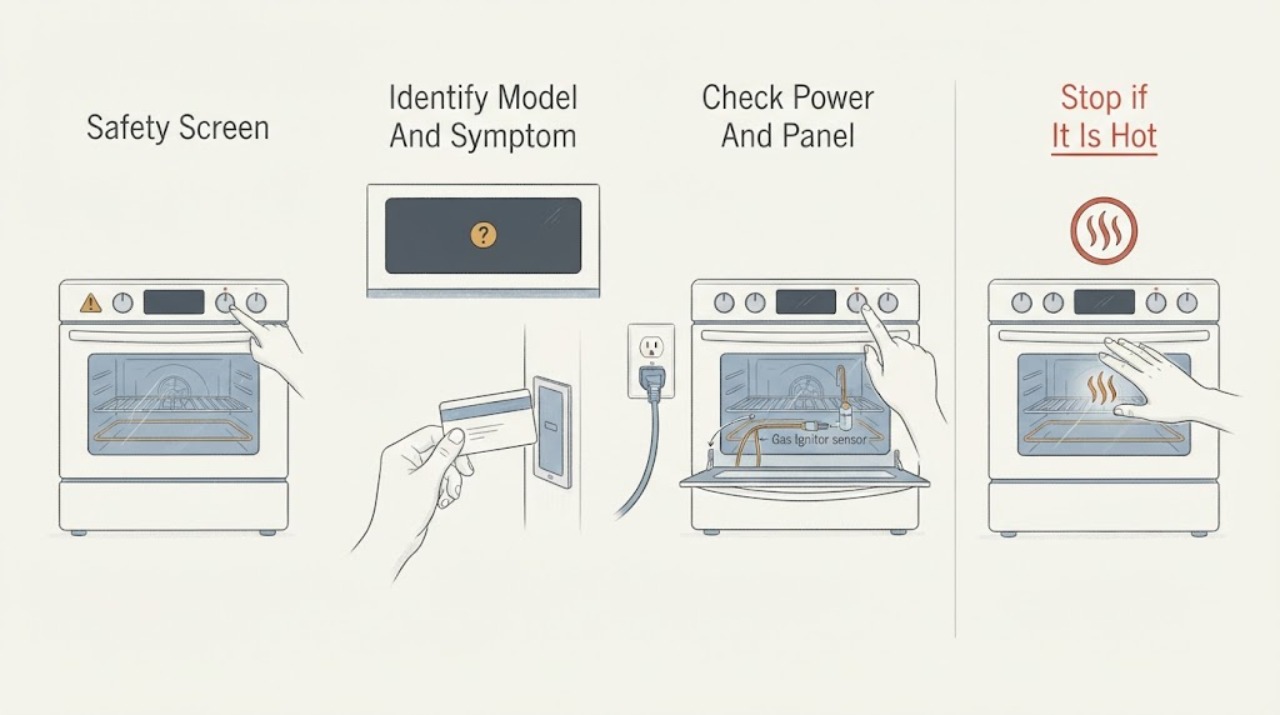
Work through in order
Diagnostic checks
Use only checks that match the exact appliance or system and its official guide.
-
Check 1
Stand on a dry, stable surface and inspect the oven, cord or receptacle, controls, door, floor, and surrounding area before touching a control or moving the appliance.
Expected result: Record gas odor or hissing, smoke, soot, abnormal flame, uncontrolled heat, burning or melting odor, spark or arc, hot or discolored connection, water near electricity, or a breaker that trips again.
Next step: If a hazard is present, stop using the oven, avoid ignition sources and electrical switching for a suspected gas event, isolate power only from a dry safe position when appropriate, and arrange qualified emergency, gas, electrical, or appliance service.
Stop if: Do not operate an oven with gas odor, smoke, abnormal flame, arc, hot connection, water at electricity, or repeated protection trips.
Why this matters
Why: These are safety events, not ordinary troubleshooting branches. A clean, cool exterior without an abnormal sign permits only external checks and does not authorize opening the appliance.
-
Check 2
Record the complete Samsung model number and identify range versus wall oven and electric versus gas configuration without removing panels; then describe exactly what ‘not working’ means.
Expected result: Record blank or lit display, accepted or rejected mode, door state, no heat, no gas ignition, error text, lock or Demo indicator, recent installation, outage, cleaning, or breaker event.
Next step: Use the matching Samsung manual and support article for the model, preserving the original display and timeline for service.
Stop if: Do not guess a code, fuel type, or component from appearance, and do not remove a cover to obtain model information.
Why this matters
Why: The model and symptom determine whether the next branch is power, controls, door, heating, gas, or an error. A broad symptom cannot identify an igniter, element, valve, relay, or board.
-
Check 3
From a dry, safe position, verify the oven or range is connected to its intended power supply and check the household breaker once; leave electrical testing to a qualified professional.
Expected result: Record a blank panel, incomplete display, normal panel, open breaker, a breaker that trips again, or a panel that returns after the circuit is restored.
Next step: If protection trips or the supply is abnormal, stop and arrange qualified electrical service. If the supply is safe but the Samsung panel remains faulty, leave the appliance off and arrange appliance service.
Stop if: Do not repeatedly reset a breaker, use an extension cord or adapter, touch a hot connection, or remove the console.
Why this matters
Why: An absent or recurring household supply problem needs electrical assessment. A safe known-good supply with a dark or faulty panel points toward appliance power entry or control diagnosis.
-
Check 4
If the panel responds, close the door fully, confirm the intended cooking mode and temperature, check for Child/Control Lock or Demo mode, and press Start once as the model manual requires.
Expected result: Record whether the door is recognized, the mode starts, the display shows tESt/tE5t/DEMO or a lock, the display returns to idle, or an exact error appears.
Next step: Follow only the matching manual's safe external procedure to clear a lock or Demo state. If Start is accepted but the oven remains inactive, record the result and continue to the correct branch.
Stop if: Do not bypass a door or lock, enter unverified service mode, force the door, or repeatedly press Start.
Why this matters
Why: Samsung says a door left open too long can shut the oven off, Demo mode prevents heating, and door or lock states can block operation. A valid mode that starts but does not heat belongs to the heating or gas branch.
-
Check 5
For an electric Samsung oven with a valid mode and no safety warning, observe one normal preheat attempt from outside with the door closed; do not remove racks, panels, or elements.
Expected result: Record whether the display advances during preheat, the oven reaches expected heat, the display remains stuck, a code appears, or there is smoke, burning odor, sparking, or abnormal heat.
Next step: If the oven remains cold after the single safe observation, leave it off and arrange qualified appliance service with the mode, display, and timing recorded.
Stop if: Do not touch an element, test live voltage, remove the oven floor, or repeat preheat after smoke, odor, arc, or a trip.
Why this matters
Why: A valid command with no heat can involve the heating elements, temperature sensor, relay, wiring, or control. The visible result cannot identify which part failed; abnormal smoke or electrical signs require immediate stopping.
-
Check 6
For a Samsung gas range only, and only when there is no gas odor, hissing, smoke, abnormal flame, or other hazard, observe whether an existing cooktop burner lights through its normal control; do not use a lighter or repeatedly start the oven.
Expected result: Record no cooktop burner ignition, normal cooktop flames with a non-igniting oven, the oven working only while a cooktop burner is lit, or weak, unstable, yellow, noisy, or delayed flames.
Next step: If cooktop burners fail or flames are abnormal, stop using the range and arrange qualified gas-supply or installation assessment. If cooktop operation is normal but the oven fails, arrange appliance service without internal testing.
Stop if: Do not leave a burner lit as a workaround, test with a match, adjust gas pressure, open a fitting, or continue after an odor, pop, burst, smoke, or soot.
Why this matters
Why: Samsung uses this pattern to separate gas supply or pressure concerns from an oven-side fault. Normal cooktop ignition does not prove the oven igniter or valve is good, and abnormal flames are not a cue to adjust the regulator.
-
Check 7
If an error code, flashing display, door warning, or lock symbol appears, photograph or transcribe it exactly with the model, mode, door state, and moment it appeared; do not repeatedly clear it.
Expected result: Record a door or partition message, Demo indicator, power-line message, temperature or sensor code, communication code, or unknown model-specific display and whether it returns after one documented correction.
Next step: Apply only a safe external instruction from the exact manual once, then arrange service if the code returns or its meaning is uncertain.
Stop if: Do not enter service mode, bypass a switch, remove a hot partition, erase a code by repeated resets, or continue cooking with a persistent fault.
Why this matters
Why: Samsung's error guidance gives different paths for door, Demo, power, temperature, and communication states. A recurring code is diagnostic evidence, not a universal part label.
-
Check 8
If ‘not working’ includes an odor or smoke, wait until the oven is cool and only inspect visible cavity residue from a safe position after the gas/electrical safety screen is clear; do not recreate the smell.
Expected result: Record first-use packaging/protective-oil context, Self Clean context, visible food or grease residue, clean cavity with recurring odor, gas-like odor, plastic/electrical smell, soot, or smoke.
Next step: Use only the model-approved cleaning or first-use guidance for a clearly matching low-risk context. Keep the oven off and arrange service for an unexplained or recurring odor.
Stop if: Do not use Self Clean to investigate a gas or electrical smell, burn packaging or plastic, use a flame to find a leak, or operate after smoke or abnormal combustion.
Why this matters
Why: Samsung identifies first-use, Self Clean, and food-residue odors as distinct contexts. A fuel-like, electrical, recurring, clean-oven, soot, or smoke condition needs the stop/service path rather than more cleaning.
-
Check 9
Only when the appliance is cool, dry, hazard-free, and its power connection is safe, perform one model-authorized power cycle; Samsung's general oven guidance uses a short breaker cycle, but the exact manual controls.
Expected result: Record whether the panel, mode, heat, and normal operation return, the same code or symptom returns, or the circuit trips again.
Next step: Attempt one normal operation only if no hazard exists. If the issue remains or returns, leave the oven off and arrange qualified appliance or electrical service.
Stop if: Do not reset after gas odor, smoke, burning smell, spark, abnormal heat, wet connection, or repeated breaker trips, and do not keep cycling power.
Why this matters
Why: A reset may clear a temporary control state but does not repair a heating, gas, lock, sensor, wiring, or power fault. A returning symptom needs service.
-
Check 10
After the safe external checks, classify the failure as power, controls/lock, electric heating, gas supply/ignition, error, odor/combustion, or an unresolved combination and prepare the service handoff.
Expected result: Include blank or lit panel, breaker result, model/fuel type, mode and temperature, door/lock state, error text, gas-cooktop result, preheat or ignition behavior, odor/smoke/soot, recent installation or outage, and reset result.
Next step: Provide the complete record to qualified Samsung appliance, gas, or electrical service and keep the oven off whenever an unsafe or recurring condition occurred.
Stop if: Do not remove panels, test live circuits or gas pressure, jumper a safety switch, open a valve or igniter area, or replace a component by symptom alone.
Why this matters
Why: The classification tells a provider whether to begin with the household circuit, control and door, electric heating, gas supply, or model-specific internal diagnosis; it does not identify a part by itself.
Use your observations
Decision map
Find the observation that best matches what you see, then follow the next safe action.
-
PATH 01Safety boundary
What you see
Gas odor or hissing, smoke, soot, delayed ignition, burst or abnormal flame, electrical arc, burning odor, hot connection, water near electricity, or repeated breaker trip is present.
Do this next
Stop using the appliance; for suspected gas avoid switches and flames, leave the area, and contact emergency or gas-safety help from a safe location. For electrical or fire signs, isolate power only when safely accessible and arrange qualified service.
Why this path and its safety boundary
Why it matters: This is a gas, combustion, fire, or electrical safety event, not a routine oven fault.
Safety stop: Do not relight, reset, search for the leak, operate a hood or switch in the suspected gas area, or re-enter to investigate.
-
PATH 02Safety boundary
What you see
The panel is blank, the supply is absent, or the breaker trips again.
Do this next
Arrange qualified electrical service for the circuit; if the safe supply is confirmed but the panel remains dark, arrange appliance service.
Why this path and its safety boundary
Why it matters: The household circuit or appliance power path must be assessed before any heating or gas diagnosis.
Safety stop: Do not repeatedly reset protection, test live voltage, use an adapter, or open the console.
-
PATH 03Safety boundary
What you see
The panel responds but Demo/lock is shown, the door is not recognized, or the mode will not start with the door closed.
Do this next
Follow the exact Samsung manual's safe external procedure once, then arrange service if the condition returns or the door cannot be recognized.
Why this path and its safety boundary
Why it matters: A control state or door safety condition is blocking operation; it does not prove a failed heater or gas part.
Safety stop: Do not bypass, tape, magnet, or force a lock or door, and do not enter unverified service mode.
-
PATH 04Safety boundary
What you see
An electric oven accepts a valid mode and temperature but remains cold or fails to preheat, with no gas or electrical safety warning.
Do this next
Leave the oven off and arrange qualified appliance service with the display, mode, preheat, and reset observations.
Why this path and its safety boundary
Why it matters: An element, sensor, relay, wiring, or control fault is possible, but external symptoms cannot identify the component.
Safety stop: Do not touch elements, remove panels, test live circuits, or repeat preheat after an abnormal sign.
-
PATH 05Safety boundary
What you see
A gas range has normal controls but the oven does not ignite; cooktop burners may be normal or may also fail.
Do this next
Use the cooktop result only as a single safe external observation; arrange gas or appliance service and do not open the gas train.
Why this path and its safety boundary
Why it matters: A shared supply/pressure condition or oven-side ignition, burner, valve, sensor, or control fault is possible.
Safety stop: Do not use a lighter, leave a burner on as a workaround, repeat ignition after gas odor, or adjust pressure.
-
PATH 06Safety boundary
What you see
No cooktop burner lights, flames are weak or unstable, the range was recently installed or converted, or the oven works only while a cooktop burner is lit.
Do this next
Stop using the range and arrange qualified gas-supply or professional installation assessment from a safe condition.
Why this path and its safety boundary
Why it matters: Samsung identifies a gas-supply or pressure/installation branch, and further ignition testing is unsafe.
Safety stop: Do not adjust regulators, alter orifices, loosen fittings, or continue with abnormal flame, smell, pop, or hissing.
-
PATH 07Safety boundary
What you see
A recurring code, door warning, Demo indicator, power-line message, or unknown flashing pattern remains after one documented external correction.
Do this next
Provide the exact code, model, mode, door state, and reset result to qualified service and leave the oven off if operation is affected.
Why this path and its safety boundary
Why it matters: The appliance needs model-specific diagnosis; a code is not a universal part label.
Safety stop: Do not repeatedly clear the code, enter service mode, bypass a switch, or continue cooking with a persistent fault.
-
PATH 08Safety boundary
What you see
The odor is clearly limited to first use, Self Clean, or a visible food spill with no fuel, electrical, smoke, soot, flame, or alarm warning.
Do this next
Follow only the model-approved first-use or cleaning guidance after cooling and ventilation. Arrange service if odor persists, returns during ordinary use, or changes character.
Why this path and its safety boundary
Why it matters: Samsung identifies these as possible normal or cleanable contexts, subject to exact model instructions; a recurring or unexplained clean-oven odor is different.
Safety stop: Do not use cleaning or Self Clean to investigate a gas or electrical odor, burn plastic, or continue with smoke or abnormal combustion.
Helpful context
Understand the symptom
‘Not working’ is several different Samsung oven problems
A blank display, a responsive display that will not start, an oven that starts but remains cold, and a gas oven that never ignites do not share the same first check. Record what the panel shows, whether the mode is accepted, whether the door is recognized, and whether any error appears. This keeps a power fault separate from a setting, heating, gas, or safety-interlock fault.
Power and settings come before internal diagnosis
Samsung recommends verifying the power connection and cycling the circuit when a panel is blank or incorrect. Samsung also identifies Demo mode, door position, and model-specific error states that can prevent heating. Use the exact manual for the model, and perform at most one safe reset after recording the symptom; a reset does not prove that an internal component is healthy.
Gas models need a separate stop boundary
On a gas range, a cooktop burner that will not ignite, an oven that works only while a cooktop burner is on, or weak or unstable flames can point toward supply or pressure conditions. Do not leave a burner lit as a workaround, use a flame to find a leak, or continue after a gas smell, delayed ignition, pop, burst, smoke, or soot. A qualified gas professional must assess the gas path.
When to stop troubleshooting
Keep the oven off for a recurring error, an unrecognized door, smoke, a burning or electrical odor, visible arcing, sustained abnormal heat, a hot connection, or a repeated breaker trip. Do not remove the oven bottom, control panel, wiring, igniter, valve, or sensor. Give service the model number and the exact branch that failed.
Safety boundary
Stop conditions
- Stop immediately for gas odor or hissing, smoke, soot, delayed ignition, a burst or abnormal flame, a CO concern, visible electrical arc, burning or melting odor, a hot connection, or a repeated breaker trip.
- Do not operate switches, controls, flames, or phones in a suspected gas area; do not use a lighter or match to test ignition or find a leak.
- Do not remove the oven floor, control panel, wiring, igniter, valve, element, sensor, or door interlock; do not test live voltage or gas pressure.
- Do not bypass, force, tape, or magnet a lock, leave a burner on as a workaround, repeatedly reset protection, or keep running an oven with a recurring error.
- Keep the appliance off for unexplained recurring odor, abnormal heat, smoke, soot, a clean-oven smell, water near electricity, or any condition that cannot be matched confidently to the exact manual.
Only after diagnosis
Potential parts
- oven heating element or ignition component
Consider only after qualified model-specific diagnosis identifies the applicable electric heating element or gas ignition component.
Confirm exact model and fuel configuration before selecting a part; do not expose or test the component as a homeowner procedure. - oven temperature sensor
Consider only if a recurring temperature symptom or code is linked to the sensor by qualified diagnosis.
Sensor identity and fit are model-specific; verify the manual and diagnostic evidence. - oven gas safety valve
Consider only when qualified testing identifies a valve or pressure-control fault after supply and ignition checks.
Gas-valve fit and fuel configuration are model-specific and require qualified gas-appliance service. - range control or relay assembly
Consider only when the panel, mode request, or multiple oven functions indicate a diagnosed control or relay fault.
A broad ‘not working’ complaint does not identify a control board; confirm exact model, revision, and diagnosis.
When checks do not resolve it
Need a professional?
Arrange qualified appliance service for a safe known-good supply with a blank panel, a responsive oven that will not start, electric no-heat, gas oven no-ignition, recurring code, unrecognized door, or unresolved Demo/lock state. Arrange qualified gas or installation service for a failed cooktop ignition, abnormal flame, recent conversion, or oven behavior tied to a cooktop burner. Arrange emergency or gas-safety help for strong or persistent gas odor, hissing, delayed ignition, burst, smoke, soot, or CO concern; arrange electrical service for a failed or repeatedly tripping circuit.
Common questions
FAQ
Why is my Samsung oven not working but the display is on?
Check that the door is fully closed, the intended mode and temperature are selected, and no Demo, Child Lock, delay, or exact error is shown. If a valid mode is accepted but the oven remains cold, leave it off and arrange qualified appliance service rather than testing internal parts.
Why is my Samsung oven completely blank?
From a dry, safe position, check the intended power connection and household breaker once. If the supply is safe but the panel remains blank, or the breaker trips again, stop and arrange qualified electrical or appliance service.
What should I do if my Samsung gas oven will not ignite?
First confirm the gas configuration and whether the cooktop burners work, but do not use a lighter or repeat ignition after gas odor, delay, a pop, burst, smoke, or abnormal flame. A normal cooktop with an oven-only failure needs appliance service; failed or abnormal cooktop ignition needs qualified gas-supply assessment.
Can Demo mode make a Samsung oven seem broken?
Yes. Samsung says Demo mode can prevent the oven and cooktop from heating. If tESt, tE5t, DEMO, or a Demo indicator appears, use the exact model manual's procedure and do not assume a heating component failed.
Should I keep resetting my Samsung oven when it is not working?
No. One safe, model-authorized power cycle can clear a temporary control state, but a returning code or symptom needs diagnosis. Never reset after gas odor, smoke, burning smell, spark, abnormal heat, water near electricity, or a repeated breaker trip.
Read the exact guide
Official sources
- Samsung oven temperature issuesSamsung · Samsung ovens and ranges with a broad no-working or no-heat symptom; verify exact model and fuel
- Samsung range or wall oven error codesSamsung · Samsung ovens and ranges when a code, warning, lock, or Demo state accompanies a not-working symptom
- What can you do when the burner of your Samsung gas cooktop does not ignite or has other ignition issuesSamsung Canada · External cooktop observation for Samsung gas ranges; Canada page and exact range manual control final applicability
- Samsung SupportSamsung · Samsung ovens when exact model documentation or support is required
- Samsung range or wall oven panel is blank, blinking, or incorrectSamsung · Samsung ovens with a blank, blinking, incomplete, or unresponsive panel
- Odor or smoke from Samsung ovenSamsung · Samsung ovens when ‘not working’ includes an odor or smoke concern
Community feedback
Share a repair observation
Share a plain-text repair observation. Accepted observations are published automatically; this page may take a moment to update.