
On this page
Start here
Quick answer
Treat a Samsung NE58F9710WS oven that is genuinely overheating, will not stop heating, or produces smoke, scorching, or an unsafe hot surface as a stop-use condition. Do not keep preheating or run a high-temperature test to see whether it settles. First record the complete display exactly: Samsung's official range guide uses dE or -dE- for an improperly installed Flex Duo partition, while C-24 is the separate code for a temperature rising faster than normal; the task's lowercase de metadata does not prove either meaning. The NE58F9710WS is a Flex Duo electric range, but the complete model suffix and market still matter. Only when the range is cool and safe should you check from outside whether the Smart Divider is present, fully seated, or pressing its rear switch as the exact manual requires. A stable but consistently high or low baking temperature can be a calibration or measurement issue, but calibration cannot make uncontrolled heat safe. If the oven continues heating after the setting is canceled, the panel loses control, the temperature keeps rising, the code returns outside a divider condition, or there is smoke, fire, burning odor, damaged wiring, or a breaker trip, leave it off and arrange qualified Samsung electric-range service. Do not open panels, enter service mode, measure live voltage, bypass the divider or door, or select a heating part from dE alone.
Before you begin
Safety first
- Do not open the range, remove the rear or control panels, enter service mode, perform live voltage or continuity tests, bypass the door or Smart Divider switch, or continue powered tests through uncontrolled heat. If power must be removed, use the breaker only from a dry, safely accessible position; do not approach a fire, exposed conductor, or severely hot appliance.
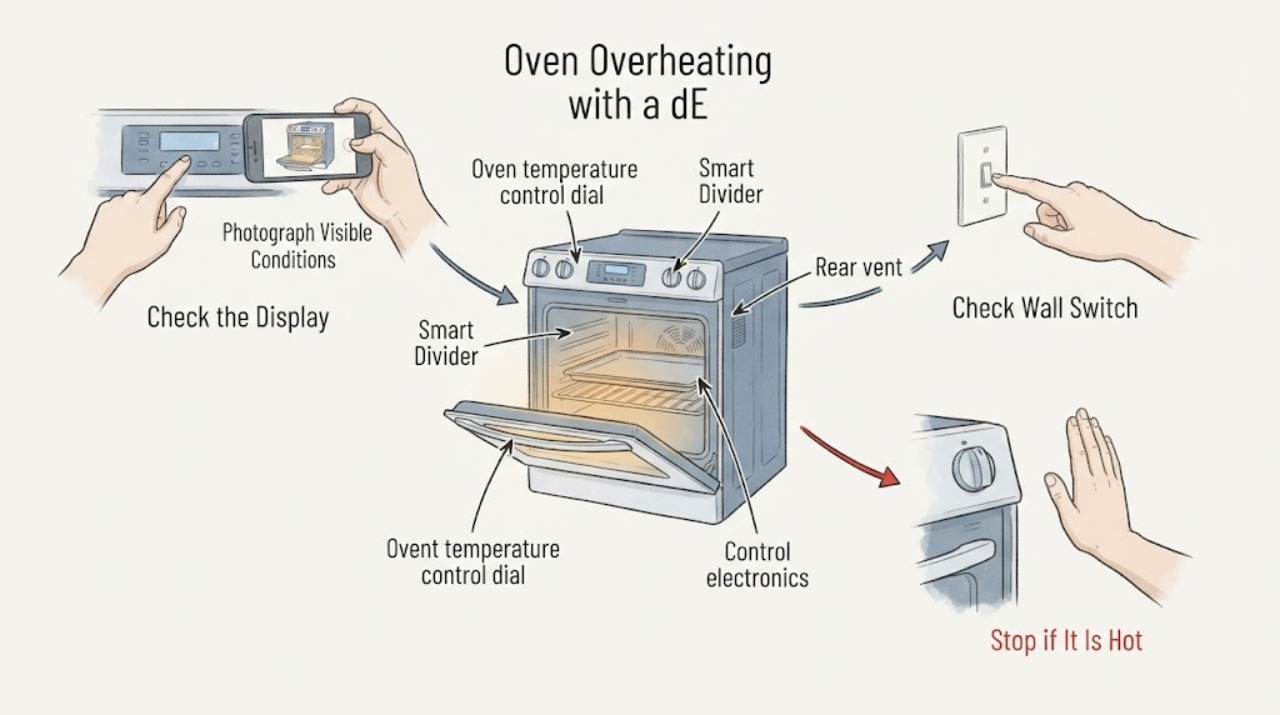
Work through in order
Diagnostic checks
Use only checks that match the exact appliance or system and its official guide.
-
Check 1
Stop cooking and press the model's cancel/off control once from a safe position. Keep the door closed if opening it would expose you to dangerous heat, and keep children, paper, and other combustibles away. Do not touch the elements, racks, divider, door glass, or control area.
Expected result: The oven stops and only normal residual heat remains, or an element continues heating, the temperature keeps rising, the display will not cancel, or smoke/odor/scorching appears.
Next step: For any continuing or rising heat, leave the oven off and isolate power only from a dry, safely accessible disconnect; arrange qualified electric-range service. If there is fire or heavy smoke, leave the area and use emergency help.
Stop if: Stop immediately for smoke, flames, burning odor, sparks, melted controls, damaged wiring, a breaker trip, or a door that cannot be safely closed.
Why this matters
Why: Normal cycling can leave surfaces hot after a cycle, but continuing heat after cancellation or loss of control is an uncontrolled-heating symptom, not a normal calibration difference.
-
Check 2
Read and photograph the display from outside only, including capitalization, hyphens, d/C shape, symbols, and whether the range was in single-cavity Bake, Twin Cooking, Self Clean, Sabbath, or another mode. Confirm the full rating-label model suffix without moving a hot range or opening any cover.
Expected result: The display clearly shows dE or -dE-, shows C-24, shows another code, or only the task record says de while the appliance display is different or unreadable.
Next step: Use the exact model's manual and the matching Samsung code entry. If the code is incomplete, recurs in an unrelated mode, or is paired with uncontrolled heat, stop use and arrange service instead of choosing a component.
Stop if: Do not guess dE, dC, C-24, or another character; do not enter service mode or keep cooking while a safety warning is active.
Why this matters
Why: Samsung uses dE/-dE- for a partition installation condition and C-24 for an unusually fast temperature rise. A task metadata value or a similar-looking display character cannot safely substitute for the complete code and model/market match.
-
Check 3
Only after the range is fully cool and de-energized, check the Smart Divider from the front without disassembling anything. If dE/-dE- is actually displayed, compare the divider's seating and the rear switch area with the exact NE58F9710WS manual; do not force the divider or press a hidden switch.
Expected result: The divider is installed in a supported twin-oven position and fully seated, the divider is absent but something may press its switch, or the divider condition is correct while dE returns and the oven is overheating.
Next step: Make only the documented, low-risk seating correction once if the appliance is cool. If dE remains, returns outside twin cooking, or any high-temperature symptom continues, leave the range off and request service.
Stop if: Stop if the cavity is hot, the divider is bent or jammed, the rear switch cannot be viewed safely, or correction would require removing panels or applying force.
Why this matters
Why: Samsung's Flex Duo guidance ties dE/-dE- to partition installation, including a divider that is not pushed fully in or a rear switch being pressed when the divider is absent. A correct divider state does not explain uncontrolled heat and does not turn dE into an overheat code.
-
Check 4
For a stable temperature complaint with no continuing heat, compare the set temperature, cooking mode, cavity configuration, rack position, food result, and the thermometer method already used. Do not start a new high-temperature run or place a probe in the oven solely to verify an extreme reading.
Expected result: The oven is only consistently a little high or low while it cycles normally, the reading varies widely or was taken with an unverified thermometer, or the oven overshoots and continues rising after cancellation.
Next step: For a stable offset, consult the exact manual before any calibration and use only its allowed range. For overshoot, active elements after cancel, smoke, or a dangerously hot case, keep the oven isolated and arrange service; do not calibrate or repeat the test.
Stop if: Stop if the temperature is rising without a selected cycle, food or cabinetry is scorching, or the control panel/door is too hot to approach safely.
Why this matters
Why: Samsung explains that ovens cycle above and below the set point and that consumer thermometers may not track those changes accurately. A modest stable offset may be a model-supported calibration question; an uncontrolled overshoot is a safety/service question.
-
Check 5
Document the exact model suffix, displayed code, selected mode, whether the divider was fitted, cancel response, temperature timeline, and any smoke, odor, breaker, door, or control symptom for service. Keep the range out of use while an overheating or unresolved code remains.
Expected result: The code clears once after the documented divider correction or power step with no abnormal heat, or it returns, appears outside the documented condition, or is accompanied by loss of control or excessive heat.
Next step: Request qualified Samsung electric-range service for recurrence, unexplained dE, C-24 with continued overheating, an unresponsive panel, or any active heating after cancel. Do not keep resetting the breaker or substitute a board, sensor, relay, or element based on the display alone.
Stop if: Do not restore power for another test if there is smoke, fire, damaged wiring, exposed conductors, water near electricity, or a breaker that will not remain on.
Why this matters
Why: A one-time clear can remove an information or control state, but it does not prove the heating, sensing, or safety circuits are healthy. Recurrence or a mismatch between code and symptom requires a model-specific diagnosis.
Use your observations
Decision map
Find the observation that best matches what you see, then follow the next safe action.
-
PATH 01Next step
What you see
The display is not showing a verified dE/-dE- or C-24, the oven cycles normally around its set point, and the temperature concern is a modest, repeatable offset without uncontrolled heat.
Do this next
Use the exact NE58F9710WS manual before making any permitted calibration adjustment; if the cooking result remains wrong, request service. Do not use calibration to address active runaway heat.
Why this path and its safety boundary
Why it matters: A calibration or measurement issue is more plausible than a code-defined divider or fast-rise event. Samsung says normal oven cycling can make a consumer thermometer appear inconsistent.
-
PATH 02Next step
What you see
The complete display is dE or -dE-, the range is cool, and the divider is absent, not fully seated, or pressing the rear partition switch.
Do this next
Use the exact model manual to seat or remove the divider once without force. If the message remains or any high-temperature symptom exists, leave the range off and arrange service.
Why this path and its safety boundary
Why it matters: Samsung identifies this code as a partition installation condition on Flex Duo electric and dual-fuel ranges, not as a generic overheating code.
-
PATH 03Next step
What you see
The complete display is C-24, the vent at the back of the cooktop is covered or partially blocked, and there is no smoke or uncontrolled heat after the oven is turned off.
Do this next
When safe, remove only an obvious external obstruction and let the oven cool as Samsung directs. If C-24 returns, the vent is clear, or the oven continues heating, stop use and request service; do not dismantle the vent or test live circuits.
Why this path and its safety boundary
Why it matters: Samsung says C-24 means the temperature sensor detected a faster-than-normal rise and generally associates it with a blocked or partially blocked vent. This is distinct from dE.
-
PATH 04Next step
What you see
The oven continues heating after cancel, the display or controls will not stop it, the temperature keeps rising, or excessive heat is paired with smoke, odor, scorching, sparks, or a breaker event.
Do this next
Do not run another cycle, reset repeatedly, open panels, or touch hot parts. Isolate power only from a safe position and arrange qualified electric-range service; use emergency help for fire or smoke.
Why this path and its safety boundary
Why it matters: This is an uncontrolled heating or electrical safety condition. Neither dE nor a calibration setting is sufficient to explain away the hazard.
-
PATH 05Next step
What you see
The code returns after a documented divider correction or one permitted reset, appears in a mode where the divider condition does not fit, or the model suffix/market cannot be matched to the available guidance.
Do this next
Keep the range off and provide the complete label, code photo, mode, divider state, reset result, and overheating timeline to qualified Samsung service. Do not choose a replacement part from dE or de alone.
Why this path and its safety boundary
Why it matters: The message is unresolved or context-mismatched; it may involve control, sensing, communication, heating, or safety circuitry, but the display does not identify a part.
Helpful context
Understand the symptom
The Samsung NE58F9710WS is a Flex Duo electric range, so the oven can operate as one cavity or as two cavities separated by the Smart Divider. That makes a displayed dE message a divider-position branch, not an automatic explanation for an oven that is too hot. Samsung's guide lists C-24 separately for a temperature rising faster than normal. A report of overheating therefore needs two parallel checks: make the appliance safe first, then identify the exact display and operating condition.
A thermometer reading that is modestly different from the set point can reflect normal element cycling or an inaccurate household thermometer. It is not the same as an element that remains energized after cancellation, a temperature that continues rising, or a surface that is dangerously hot. Do not continue high-temperature testing, reset repeatedly, or access the control and heating circuits yourself.
When checks do not resolve it
Need a professional?
Use qualified Samsung-compatible electric-range service for active heat after cancellation, a persistent or context-mismatched dE/C-24 message, an unresponsive panel, a suspected temperature-control fault, or any internal electrical diagnosis. Use emergency help for fire or heavy smoke and qualified electrical help for unsafe supply wiring or breaker behavior.
Safety scope: Do not open the range, remove the rear or control panels, enter service mode, perform live voltage or continuity tests, bypass the door or Smart Divider switch, or continue powered tests through uncontrolled heat. If power must be removed, use the breaker only from a dry, safely accessible position; do not approach a fire, exposed conductor, or severely hot appliance.
Have this ready
- Provide the exact rating-label model and suffix, serial number if safely visible, the complete display including hyphens and capitalization, cooking mode, Smart Divider position, cancel response, temperature reading method and timeline, vent condition, and any smoke, odor, scorch, spark, door, wiring, or breaker history.
Common questions
FAQ
Does dE mean the Samsung NE58F9710WS oven is overheating?
Not by itself. Samsung's range guide uses dE or -dE- for an improperly installed Flex Duo partition. Samsung lists C-24 separately for a temperature rising faster than normal. An actual uncontrolled high-temperature symptom takes priority over interpreting either display.
What should I do if dE appears on this Flex Duo range?
When the range is cool and safe, compare the Smart Divider's position and seating with the exact NE58F9710WS manual. Samsung says the divider should be pushed fully in when installed, or nothing should press the rear partition switch when it is absent. Do not force the divider or remove panels.
Is a thermometer reading above the set temperature proof of runaway heating?
No. Samsung explains that ovens cycle above and below the set point and that household thermometers may not track those changes accurately. A reading that keeps rising after cancel, active elements after cancel, smoke, or scorching is a different stop-use condition and should not be tested again.
Can I calibrate the oven if it runs hot?
Only consider calibration for a stable, modest offset after the oven is otherwise operating normally and after checking the exact model manual. Calibration is not a remedy for an element that stays on, a temperature that keeps rising, smoke, or a control that will not cancel.
Can I open the range to check the temperature sensor or control board?
No. The sensor, elements, controls, wiring, and safety devices are technician-level work. Leave the range off, isolate power only if safe, and arrange qualified Samsung electric-range service rather than performing live or internal tests.
Read the exact guide
Official sources
- Samsung range or wall oven error codesSamsung US Support · Samsung US code guide used to distinguish dE/-dE- partition messaging, C-24 fast temperature rise, and service boundaries; exact model instructions still control.
- NE58F9710WS Flex Duo Slide-in Electric Range Specification SheetSamsung Electronics America · Exact US model-family specification sheet for NE58F9710WS; it establishes the electric Flex Duo identity and Smart Divider but does not define the task's de metadata.
- What is the meaning of the error codes displayed on your Samsung range or wall ovenSamsung Canada Support · Canada guidance cross-checking the dE/dC partition branch; page explicitly says settings/options may differ by country, so it is not used to invent US button sequences.
- Samsung oven fan is making a noise or will not turn offSamsung US Support · Used only when fan behavior accompanies the overheating report; it distinguishes normal fan cooldown from a fan that never turns off.
- Samsung oven temperature issuesSamsung US Support · General Samsung oven guidance used to separate stable calibration/measurement issues from uncontrolled heating; it does not assign a component to NE58F9710WS.
- NE58F9710WS/AA | Samsung SupportSamsung Canada · Exact NE58F9710WS/AA support page; it lists the model's manual and warns that available settings/options may differ by country.
- Self Clean or other buttons do not light up or respond, or panel is locked on Samsung ovenSamsung US Support · Samsung range/oven control-response guidance used for a panel that will not cancel or respond during an overheating complaint.
Community feedback
Share a repair observation
Share a plain-text repair observation. Accepted observations are published automatically; this page may take a moment to update.