
On this page
Start here
Quick answer
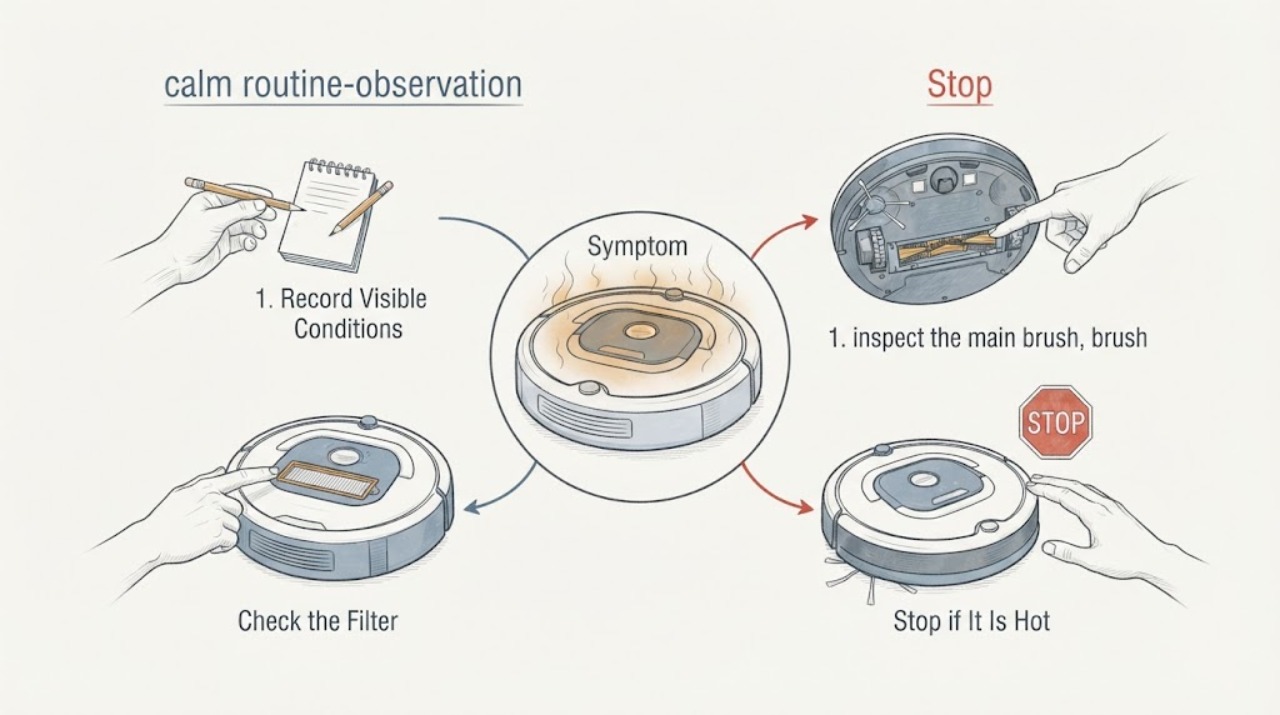
If a Samsung robot vacuum becomes unusually hot, stops during cleaning, or reports an overheating or motor problem, stop the cleaning task and let the robot cool naturally before inspecting it. Empty the dustbin, clean the fine-dust filter only as the exact model manual permits, remove hair and debris from the main brush, side brush, wheels, and accessible air paths, and check that the charging pins and station are clean and dry. Reassemble every part fully before one supervised test. Do not open or modify the battery, bridge charging contacts, or continue using the robot if there is a burning smell, smoke, swelling, liquid intrusion, repeated overheating, or abnormal charging. Arrange qualified Samsung service for those conditions or for overheating that returns after cleaning.
Work through in order
Diagnostic checks
Use only checks that match the exact appliance or system and its official guide.
-
Check 1
Stop the cleaning task, switch the Jet Bot off using its accessible power control, and move it to a clear, nonflammable area only if it can be handled safely. Let the robot cool naturally before touching the underside or removing a bin. Note whether the heat occurred during cleaning, while docked, or during charging, and record any voice message, LED color, or app alert.
Expected result: The robot cools and has no odor or visible damage; it heats during cleaning; it heats while charging; or it remains hot, smells burnt, smokes, swells, or leaks.
Next step: For any smoke, burning odor, swelling, liquid, or abnormal charging, stop use and arrange qualified service. If the robot cools without those signs, continue with the dustbin, filter, brush, and wheel checks while it remains powered off.
Why this matters
Why: Heat during cleaning makes airflow, dust, brush, wheel, or motor load worth checking. Heat during charging makes the battery, contacts, adapter, or station more concerning. Persistent heat, smoke, odor, swelling, or liquid is a safety boundary rather than a cleaning problem.
-
Check 2
Remove the dustbin according to the exact model instructions, empty it, and inspect the fine-dust filter for a packed layer of dust. Clean or wash the filter only if the model manual says it is washable, and let every washed part dry completely before reinstalling the bin and filter.
Expected result: The dustbin is full; the filter is visibly restricted; the filter is clean and dry; or a washed part is still damp.
Next step: Empty the bin and clean the filter using model-specific instructions, then dry all washable parts completely. Do not run the robot with a missing, damp, damaged, or incorrectly seated filter; continue to the brush and wheel inspection only after reassembly is secure.
Why this matters
Why: A full bin or restricted filter reduces the air path and can make the motor work harder and heat up. Moisture in a filter or bin can cause malfunction and is not safe to return to the robot. A clean, dry airflow path makes a brush, wheel, charging, battery, or internal fault more likely if overheating returns.
-
Check 3
With the robot powered off, inspect the main brush, brush cover, side brush, roller, and both driving wheels for hair, thread, or other material. Remove only accessible debris using the model's supplied cleaning tool or the exact manual procedure, and confirm each cover and brush is seated correctly before turning the robot over again.
Expected result: Hair or thread is wrapped around a brush or wheel; a brush cover is not latched; the brush and wheels turn freely when the robot is off; or debris cannot be removed without force or deeper disassembly.
Next step: Clear accessible debris and reinstall the parts exactly as shown for the model, then let the robot perform only a short supervised test. If the brush, wheel, or cover is damaged or debris remains trapped, stop and request authorized Samsung service.
Why this matters
Why: A wrapped brush or wheel increases mechanical load and can explain heat during cleaning. A loose cover or incorrectly seated brush can cause drag or malfunction. Debris that needs force, a damaged brush, or a seized wheel is beyond a safe routine clean.
-
Check 4
Inspect the robot's sensor windows and the docking station's charging contacts without using liquid on electronics. Unplug the station before cleaning its contacts, wipe the contacts with a dry cloth, confirm the station is level and stable, and check that the robot sits squarely with its charging pins touching.
Expected result: The contacts are dusty or misaligned; the dock rocks or the robot repeatedly leaves the dock; charging is normal and the contacts are clean; or the robot becomes hot only while docked or charging.
Next step: Correct only accessible dirt or alignment and observe one charge cycle. If heat returns during charging, charging repeatedly starts and stops, or the station or battery shows damage, stop charging and arrange qualified service.
Why this matters
Why: Poor contact or an unstable station can cause repeated charging attempts and abnormal charging behavior. Clean, aligned contacts with heat only during charging make a battery, adapter, station, or charging-control fault more concerning; do not infer a battery failure from warmth alone.
-
Check 5
After the robot is cool, dry, correctly assembled, and free of accessible obstructions, check its status in SmartThings if supported and follow only a model-specific reset or voice-guide instruction. Run one supervised cleaning test on a clear floor, and stop immediately if the robot heats quickly, stops again, or reports a main-system, battery, brush, wheel, or sensor fault.
Expected result: The robot completes a short test without unusual heat; it overheats again after cleaning; a red LED or voice message returns; or the app reports a battery or main-system problem.
Next step: Keep the robot out of use and contact Samsung support or an authorized service center for recurring overheating, battery or system alerts, or failure after cleaning. Provide the model, timing, LED or voice message, charging behavior, and the checks already completed.
Why this matters
Why: A normal supervised test after a clean and cool-down makes a temporary airflow or obstruction issue more likely, but it does not prove the internal system is healthy. Recurring heat or a repeated system, battery, or sensor alert needs service rather than more resets.
Use your observations
Decision map
Find the observation that best matches what you see, then follow the next safe action.
-
PATH 01Next step
What you see
The robot cools after stopping, the dustbin or fine-dust filter is packed, and no burning odor, swelling, liquid, or charging damage is present.
Do this next
Clean the bin and filter according to the model manual, dry all washable parts completely, and run one short supervised test. Stop and request service if the heat returns.
Why this path and its safety boundary
Why it matters: Restricted airflow is a plausible cause of the heat or early stop. Samsung's vacuum guidance links a full bin or blocked suction path with overheating, and Jet Bot maintenance guidance supports cleaning the bin and filter.
-
PATH 02Next step
What you see
Hair, thread, or debris is wrapped around the main brush, side brush, roller, or wheel, and the robot heats during movement.
Do this next
Power the robot off, remove accessible material with the model's cleaning procedure, and confirm the cover is latched. Arrange authorized service if the part is damaged, seized, or cannot be cleared safely.
Why this path and its safety boundary
Why it matters: Mechanical drag can increase motor load during cleaning. A brush or wheel obstruction is more likely than a battery-only explanation when the heat follows movement and the obstruction is visible.
-
PATH 03Next step
What you see
The robot becomes hot while docked or charging, the charging contacts are dirty or misaligned, or charging repeatedly starts and stops.
Do this next
Unplug the station before cleaning accessible contacts, correct only the documented alignment issue, and observe one charge attempt. Stop charging and request service for recurring heat, a damaged battery, liquid, odor, or abnormal charging.
Why this path and its safety boundary
Why it matters: The charging path needs attention. Contact or station problems can prevent stable charging, while recurring heat after clean, aligned contacts raises concern about the battery, adapter, station, or charging control.
-
PATH 04Next step
What you see
The robot remains unusually hot, overheats again after its bin, filter, brush, wheel, and charging checks, or reports a repeated battery or main-system problem.
Do this next
Stop using and charging the robot, keep it away from flammable materials, and arrange qualified Samsung service. Do not open or modify the battery, bridge charging contacts, or continue resetting the robot.
Why this path and its safety boundary
Why it matters: This is a professional service boundary. The remaining possibilities include an internal motor, battery, charging, or control fault that cannot be identified safely from the outside.
Helpful context
Understand the symptom
Overheating is a symptom, not a confirmed failed part. A full dustbin, restricted filter, tangled brush, blocked wheel, poor charging contact, or a fault in the battery or motor can produce heat or an early stop. The exact model matters because Jet Bot and Jet Bot Combo cleaning parts and controls differ, so use the model manual for any step that does not match the accessible parts on your robot.
Keep the robot away from flammable materials while it cools, and keep it out of service for smoke, a burnt odor, visible battery swelling, liquid around the robot or station, or abnormal charging. Do not open the battery or make changes to the charging contacts; those conditions require qualified service.
Only after diagnosis
Potential parts
- Samsung Jet Bot fine-dust filter
Consider this only if the exact model manual identifies the filter as replaceable and the installed filter remains damaged, clogged, or unable to be cleaned after the overheating check.
Confirm the complete model code and Samsung's fit information; Jet Bot filter designs and cleaning rules vary by model. - Samsung Jet Bot brush assembly
Consider this only if the exact model brush is damaged or remains mechanically abnormal after accessible hair and debris removal.
Match the exact model and use the model manual; overheating alone does not establish that the brush assembly has failed.
When checks do not resolve it
Need a professional?
Arrange qualified Samsung service when the robot overheats again after the dustbin, filter, brush, wheel, sensor, and charging checks; when a battery or main-system alert returns; or when it becomes hot during charging. Stop use and charging for smoke, a burning smell, visible swelling, liquid intrusion, abnormal charging, or damaged contacts, and keep the robot away from flammable materials. Provide the model code, timing of the heat, LED or voice message, charging behavior, and the maintenance steps completed. Do not open or modify the battery or bridge charging contacts.
Common questions
FAQ
Why does my Samsung robot vacuum get hot and stop during cleaning?
Start with a full dustbin, restricted fine-dust filter, tangled brush, blocked wheel, or another obstruction that makes the motor work harder. Stop the robot, let it cool, clean accessible parts according to the exact model manual, and run one short supervised test. Recurring heat or any burning odor, swelling, smoke, or battery concern requires service.
Can I keep using a Samsung Jet Bot after it overheats once?
Only after it has cooled completely, the bin, filter, brush, and wheels have been checked, all washable parts are dry, and there are no electrical warning signs. Follow the model-specific instructions and make one supervised test. If it heats again or reports a system or battery problem, stop using it and request service.
What if my Samsung robot vacuum overheats while charging?
Stop charging and inspect only the accessible station and charging pins after unplugging the station. The contacts should be clean, dry, aligned, and stable, and the robot should sit correctly on the dock. If heat or repeated charging interruptions continue, do not open the battery or keep retrying; arrange qualified Samsung service.
Read the exact guide
Official sources
- How to clean your Bespoke Jet Bot Combo and Clean StationSamsung Support · Samsung Bespoke Jet Bot Combo sleep mode, Clean Station unplugging, filter, dustbin, sensor, brush, roller, wheel, and charging-area cleaning guidance.
- Jet Bot will not chargeSamsung Support · Samsung Jet Bot charging outlet, docking station placement, dry charging-pin cleaning, alignment, and service guidance.
- Bespoke Jet Bot Combo voice says there is a problemSamsung Support · Samsung Bespoke Jet Bot Combo voice, LED, SmartThings, sleep-mode, obstruction, brush, wheel, sensor, battery, and main-system troubleshooting.
- How to clean and maintain your Samsung Jet BotSamsung Support UK · Samsung Jet Bot dustbin, fine-dust filter, main brush, side brush, sensor, and wheel cleaning and maintenance.
- Samsung Jet Stick suddenly stops during cleaningSamsung Support · Samsung vacuum overheating safety guidance: full dustbin, blocked suction path, cooling before reuse, and service when operation does not recover; used here as manufacturer thermal-safety context rather than a Jet Bot model claim.
- Vacuums | Samsung Support USSamsung Support · Samsung Jet Bot support page for model-resource lookup, user manual access, troubleshooting, and repair requests.
Community feedback
Share a repair observation
Share a plain-text repair observation. Accepted observations are published automatically; this page may take a moment to update.