
On this page
Start here
Quick answer
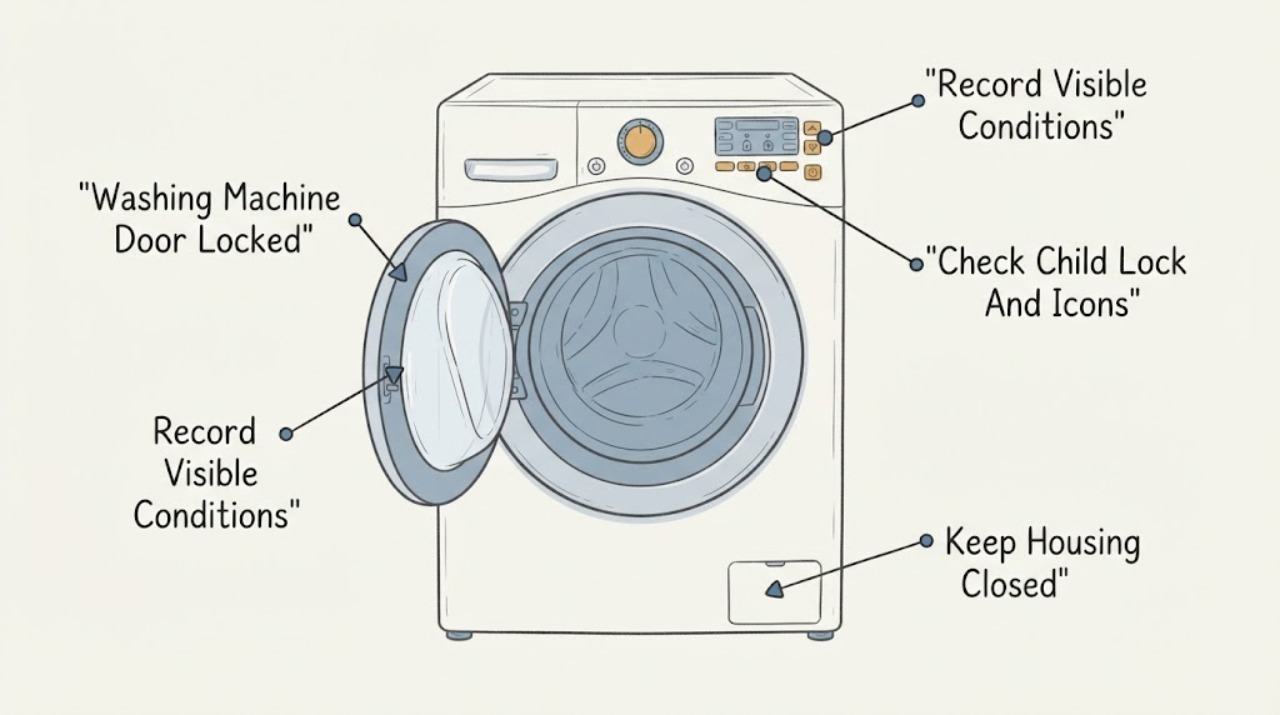
Do not pull a locked Samsung washer door. The lock normally stays engaged while a cycle is running or while water is detected, because opening it could release water. First note whether the cycle has ended, whether the door-lock icon is lit, and whether water remains visible. Wait for the cycle to finish and for the lock light to go out; on some models, a paused load needs about a minute and a top-load washer that lost power can need several minutes. Check Child Lock and the exact model's code. If a front-load washer contains water, use only the model-approved emergency drain method after the water has cooled, then turn the washer off and back on once. If the door remains locked, the latch or door is damaged, water will not drain, the washer leaks, or there is a burning smell, smoke, hot water, or electrical damage, stop and arrange qualified service.
Before you begin
Safety first
- This article covers observation, labeled controls, waiting, and a model-approved emergency drain only. A qualified professional must handle internal lock, latch, sensor, pump, control, wiring, water, and electrical work.
Work through in order
Diagnostic checks
Use only checks that match the exact appliance or system and its official guide.
-
Check 1
From a dry, safe position, read the display and door-lock indicator, note whether the cycle timer has ended or is paused, and look through the window or lid only for an obvious water level; do not pull the door or lid.
Expected result: Record one state: cycle still running, cycle complete but lock light on, paused after water entered, washer off after power loss, water visible, or no visible water.
Next step: Follow the matching check below and preserve the exact display text, icon, model, and washer type.
Stop if: Stop for leaking water, hot water or steam, a wet plug or outlet, smoke, burning smell, sparks, or a door or lid that is damaged or unstable.
Why this matters
Why: A running or recently paused cycle can keep the lock engaged normally. Visible water points to the drain-safety path, while no visible water with a persistent lock points toward Child Lock, a latch or lock sensor, a control state, or a model-specific fault.
-
Check 2
If the cycle is complete or paused without a hazard, use Start/Pause or the model's cancel control exactly as labeled, then wait for the lock light to turn off and for the mechanism to click; do not force the handle.
Expected result: The lock releases after the cycle drains, releases after the documented pause interval, remains locked with no water visible, or the washer is a top-load model that lost power.
Next step: If the lock remains on, check Child Lock and the exact code; if water is present in a supported front-load model, use the emergency-drain branch.
Stop if: Do not pull, pry, wedge, or strike the door or lid, and stop for a damaged latch, hinge, glass, frame, or water escaping from the seal.
Why this matters
Why: Samsung says the lock can take a short time to disengage after draining; a paused washer may wait about one minute, and some top-load models may take up to five minutes after power loss. A persistent lock after the safe wait is not a reason to pry the door.
-
Check 3
Read the panel for a smiling lock, CL, key, padlock, or other lock icon and compare the labeled Child Lock buttons with the exact Samsung manual; use only the documented button combination and keep hands away from water.
Expected result: The Child Lock indicator clears, flashes temporarily, remains active, or the panel shows a different code or no response.
Next step: If Child Lock clears, wait for the lock indicator and water-safety state to clear before opening; if it does not, record the code and continue to the drain or service branch.
Stop if: Do not defeat the Child Lock, hold a latch or interlock, or keep operating the panel when it is wet, cracked, hot, or electrically abnormal.
Why this matters
Why: Samsung says Child Lock disables most buttons and can lock the door on some front-load models; button combinations vary by model, and restarting does not necessarily disable the feature. A different code needs the model-specific error guide rather than a guessed reset.
-
Check 4
For a front-load model with water still inside, wait for recently hot water to cool, turn the washer off, and follow the exact manual or Samsung emergency-drain procedure at the pump-filter area using a stable container; do not open the filter or hose while hot water is present or while the area could contact electricity.
Expected result: The emergency hose drains water, no water comes out, the model has no emergency hose, the drain path is blocked, or water leaks beyond the container.
Next step: When draining is complete, turn the washer off and back on once as Samsung describes, then check whether the lock releases; if not, stop and request service.
Stop if: Do not handle hot water, spill water near the plug, remove a filter with pressure behind it, use sharp tools, or continue when the hose, cap, filter, floor, or electrical connection is damaged or wet.
Why this matters
Why: Samsung says front-load doors stay locked when water is detected and that supported models can drain through the emergency hose before a power restart. Older models may not have that hose. A blocked or leaking drain path requires service rather than forcing the door.
-
Check 5
Record the complete code or blinking-light pattern and compare it with the exact Samsung model guide; visually check only that no garment or object is caught at the visible door seal and that the door or lid appears aligned, without removing the lock assembly.
Expected result: The code is a door error, a water-level or leak error, a no-drain indication, a voltage or power-failure indication, or an unlisted code that returns.
Next step: Use the documented external check for that exact code once; arrange service if the latch is damaged, the code persists, or the washer cannot safely drain.
Stop if: Do not bypass the door lock, run with a damaged seal, repeatedly reset a power error, or touch internal wiring or the control enclosure.
Why this matters
Why: Samsung identifies door codes as a failure to detect a closed and locked door, while water-level, leak, no-drain, and voltage codes require different paths. Some code meanings vary by model, so a code alone does not prove that the lock is the failed part.
-
Check 6
Only after the water is removed or absent, the washer is dry, and there is no damage or burning symptom, restore power once using the model-approved method and observe whether the lock releases; do not repeat the restart as a test.
Expected result: The door unlocks normally, the lock remains on, the same code returns, the washer will not power up, or the breaker trips again.
Next step: Leave the washer unused and request service, providing the model, washer type, water level, code, Child Lock state, and every safe step already taken.
Stop if: Do not repeat resets, open panels, bypass the lock, or continue after a leak, hot water, smoke, burning smell, sparks, damaged cord, or breaker trip.
Why this matters
Why: A successful restart can clear a temporary control state. A persistent lock, recurring code, no-power state, or repeated trip points to a latch, drain, sensor, control, or electrical fault that requires qualified diagnosis.
Use your observations
Decision map
Find the observation that best matches what you see, then follow the next safe action.
-
PATH 01Safety boundary
What you see
The cycle is running, water was recently supplied, or the washer is paused before draining completes.
Do this next
Finish or cancel the cycle using the labeled controls, wait for the lock indicator to turn off, and do not pull the door.
Why this path and its safety boundary
Why it matters: The lock is likely performing its water-containment safety function.
Safety stop: Stop for leaking water, steam or hot water, smoke, burning smell, sparks, or a wet electrical connection.
-
PATH 02Safety boundary
What you see
A Child Lock or smiling-lock icon is lit or flashing, and the washer is otherwise dry and not showing an immediate hazard.
Do this next
Use the exact model's labeled two-button procedure; restarting alone may not disable Child Lock, and the door may remain locked until the cycle and water state are safe.
Why this path and its safety boundary
Why it matters: Child Lock can disable controls and lock the door on some Samsung front-load models.
Safety stop: Do not defeat the feature, hold an interlock, or operate a wet or damaged panel.
-
PATH 03Safety boundary
What you see
A front-load washer still contains water after the cycle will not complete.
Do this next
Allow hot water to cool and use the exact model's emergency drain procedure if present, then perform one documented power restart.
Why this path and its safety boundary
Why it matters: Samsung keeps the door locked to prevent a spill; the next decision is safe draining, not forced opening.
Safety stop: Stop for hot water, water near electricity, uncontrolled flow, a blocked or damaged hose, or a model without a documented safe drain path.
-
PATH 04Safety boundary
What you see
A door error persists, the latch cannot engage, laundry is caught, or the door, lid, seal, or frame is visibly damaged.
Do this next
Stop using the washer and request qualified Samsung appliance service; provide the exact code and a photo of the visible condition.
Why this path and its safety boundary
Why it matters: The washer cannot verify a safe closed state or the physical door system may be damaged.
Safety stop: Do not pry, force, tape, wedge, or bypass the lock or latch.
-
PATH 05Safety boundary
What you see
The cycle is complete, the tub appears empty, Child Lock is not active, and the lock remains after the documented wait and one restart.
Do this next
Leave the washer unused and request service rather than opening the door by force or removing the lock assembly.
Why this path and its safety boundary
Why it matters: A lock sensor, latch, control state, or related fault is more plausible than normal water containment.
Safety stop: Stop for a stuck control, unusual heat, smell, noise, smoke, sparks, or a damaged electrical connection.
-
PATH 06Safety boundary
What you see
There is a leak, hot water or steam, burning smell, smoke, sparks, a hot plug or outlet, exposed wiring, or a breaker trip.
Do this next
Keep clear, avoid contact with water and electricity, use the appropriate emergency or qualified service path from a safe position, and do not resume the cycle.
Why this path and its safety boundary
Why it matters: Safety takes priority over recovering laundry; this is not a routine door-unlock condition.
Safety stop: Do not touch wet electrical parts, reset a breaker, open panels, force the door, or run another test.
Helpful context
Understand the symptom
A locked door is often a safety state
Samsung washers use the door lock to keep water inside during a cycle. The correct next step changes with the washer type, cycle state, and water level: a normal end-of-cycle wait is different from a front-load washer holding water, a Child Lock state, or a latch that cannot report a secure closure. Keep the exact model number and any display code before changing settings.
Do not turn a water problem into a flood or electrical problem
If water is present, allow recently heated water to cool and keep the area around the plug and controls dry. Do not force the door, reach through a gap, or remove panels. Use an emergency drain only when the exact model provides that procedure and the appliance can be handled without contact with water and electricity.
Safety boundary
Stop conditions
- Do not pull, pry, wedge, strike, or force a Samsung washer door or lid, and do not bypass, tape, or hold the lock or latch.
- Allow recently heated water to cool before using any documented drain procedure; stop for hot water, steam, uncontrolled flow, or water near the plug, outlet, or controls.
- Do not remove internal panels, open the lock assembly, handle internal wiring, or reset a breaker repeatedly.
- Stop immediately for a leak, burning smell, smoke, sparks, a hot or damaged cord or outlet, exposed wiring, repeated breaker trips, or a door, lid, glass, seal, hinge, or frame that is damaged or unstable.
- Stop after one model-approved restart when the lock, code, no-power state, or water problem returns; arrange qualified service.
Only after diagnosis
Potential parts
- door-lock or latch assembly
Consider this category only if qualified diagnosis confirms that the door is aligned, the tub is safe to open, and the model-specific lock or latch fails to report a secure state.
Confirm the exact model and revision with Samsung or a qualified technician; do not infer fit from a similar washer or bypass the safety function. - drain pump or pump filter component
Consider this category only if qualified diagnosis confirms that the washer retains water because the model-specific drain system is blocked or its pump does not operate after safe external checks.
Confirm exact model, pump design, filter arrangement, and water-safety procedure before any replacement; do not open a pressurized or hot drain path. - door-lock sensor or control component
Consider this category only when a qualified diagnosis confirms a persistent lock indication with an empty tub and intact door hardware after the documented reset.
Confirm exact model and service procedure; a recurring door code does not by itself identify a replaceable component.
When checks do not resolve it
Need a professional?
Request qualified Samsung appliance service when the door stays locked after the cycle has ended, water is gone, Child Lock is cleared, and one model-approved restart has failed; when a door or latch is damaged; when the washer will not drain or has no documented safe drain path; or when an error code returns. Use the appropriate emergency or qualified electrical and water-service path for leaks, hot water near electricity, smoke, sparks, burning smell, damaged connections, or repeated breaker trips.
Safety scope: This article covers observation, labeled controls, waiting, and a model-approved emergency drain only. A qualified professional must handle internal lock, latch, sensor, pump, control, wiring, water, and electrical work.
Common questions
FAQ
Why is my Samsung washing machine door locked after the cycle?
The washer may still detect water, may need a short delay after draining, or may have Child Lock, a door error, or a latch problem. Wait for the lock light to turn off, record the icon or code, and use the exact model's safe drain path if water remains. Do not force the door.
How long should I wait before opening a Samsung washer door?
Wait until the cycle has ended, water has drained, and the lock indicator turns off. Samsung notes that a paused load can need about one minute and some top-load models can need up to five minutes after a power loss. Model instructions control if the delay is different.
Can Child Lock keep a Samsung washer door locked?
Yes. Samsung says Child Lock can lock the door on some front-load models and the button combination varies by model. Use only the labeled combination in the manual. Turning power off does not necessarily disable Child Lock, and water or an unfinished cycle can keep the door locked.
How do I unlock a Samsung front-load washer with water inside?
Do not pull the door. Let recently hot water cool, keep water away from electrical connections, and follow the exact model's emergency-drain procedure near the pump-filter area if the model provides one. After the water stops, Samsung describes turning the washer off and back on once. Request service if it still will not unlock or drain.
What does a Samsung washer door error mean?
Samsung uses door-error indications when the washer does not detect a closed and locked door. Check only that visible laundry is not caught and the door appears aligned, then use the model guide. A persistent code or damaged latch needs service; do not bypass the lock.
When is a locked Samsung washer an urgent safety problem?
Stop immediately for a leak, hot water or steam, burning smell, smoke, sparks, a hot or damaged plug or outlet, exposed wiring, or a repeated breaker trip. Keep clear of water and electricity, do not reset or retest, and use the appropriate emergency or qualified service path from a safe position.
Read the exact guide
Official sources
- Samsung washing machine buttons won't workSamsung Support US · Samsung washing-machine control troubleshooting; button availability varies by model and cycle.
- Use Child Lock on your Samsung washing machine and dryerSamsung Support US · Samsung washing-machine and dryer Child Lock guide; controls vary by model and panel.
- Samsung washing machine will not start or fill with waterSamsung Support US · Samsung washing-machine guidance covering front-load and top-load behavior; exact model instructions control.
- Samsung washing machine information and error codesSamsung Support US · Samsung washer error and icon guide; code meanings can vary by model.
- Samsung washing machine will not drainSamsung Support US · Samsung washer drain guide for front-load and top-load models; access and filter steps vary by model.
Community feedback
Share a repair observation
Share a plain-text repair observation. Accepted observations are published automatically; this page may take a moment to update.