
On this page
Start here
Quick answer
First decide whether the Samsung washer has no display at all or has a lit display that will not start a cycle. With no hazard present, check the correct Power control for the model, the visible power cord and outlet, the household breaker, and whether a surge protector is involved. If the panel lights but the washer will not start, check Child Lock, a damp panel, the selected cycle, the closed door or lid, an unfinished drain, and any exact error code. Samsung says these behaviors vary by model; use the model manual rather than borrowing button combinations. Only when the washer is dry, stable, and free of leaks, smoke, burning smell, arcing, or repeated breaker trips, power-cycle it once as Samsung documents. If it remains dead, will not start, or the fault returns, stop and request qualified service.
Before you begin
Safety first
- This article supports ordinary-access observation and one model-documented restart only. Electrical diagnosis, internal control or motor work, lock bypass, pump or drain access, and component replacement belong to qualified service.
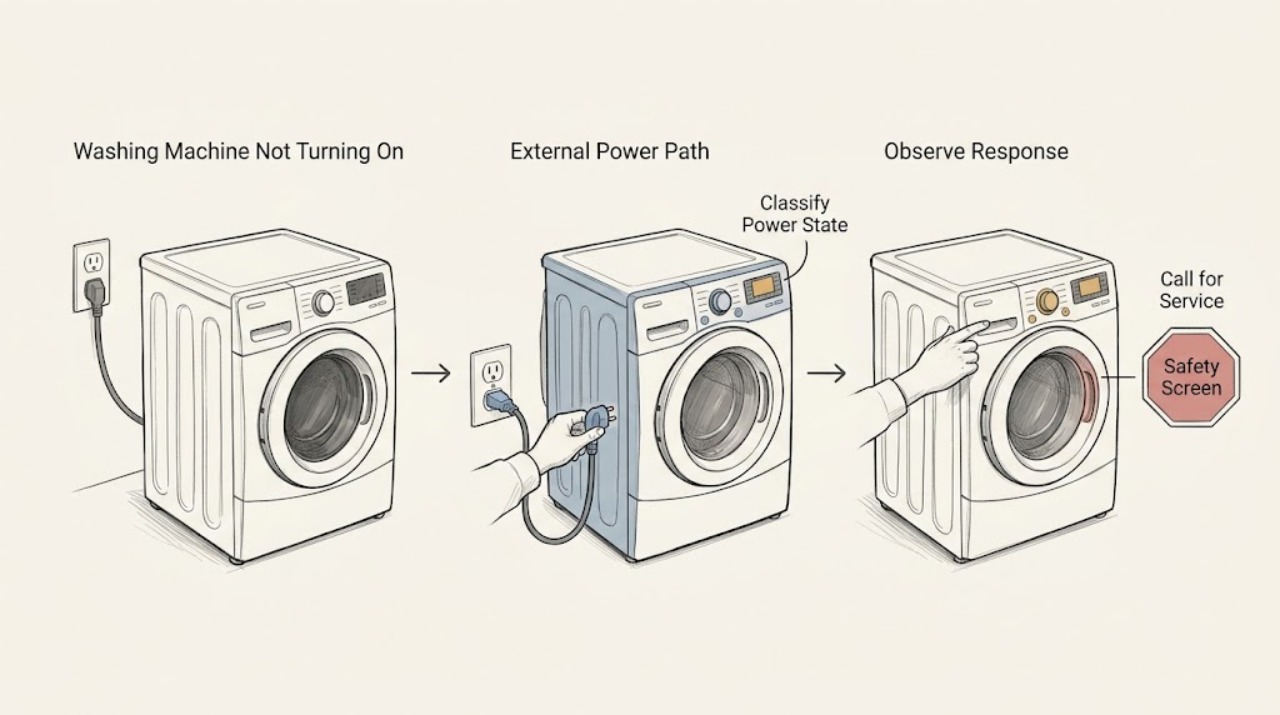
Work through in order
Diagnostic checks
Use only checks that match the exact appliance or system and its official guide.
-
Check 1
Stop using the washer from a safe position and screen for hazards before pressing Power or changing the circuit.
Expected result: Look and listen only from ordinary access for standing water near the plug or controls, a burning smell, smoke, arcing, a hot or discolored outlet or cord, a damaged cord, unusual heat, or a breaker that has opened.
Next step: Keep the washer off and request qualified electrical or appliance help when a hazard is present. If there is no hazard, record whether the display is blank or lit and continue with the correct panel check.
Stop if: Do not touch wet electrical equipment, operate a damaged cord, continue after smoke or arcing, or repeatedly reset a breaker.
Why this matters
Why: These signs can make a no-start condition an electrical, water-contact, or fire risk; the correct response is not repeated starting or resetting. If none is present, low-risk power and control identification can continue.
-
Check 2
Press only the model-appropriate Power control once and classify the result as a completely blank panel, a panel with lights or a code, or a FlexWash panel that may be using the other washer's control.
Expected result: Record whether any display, icon, chime, or blinking light appears; on a two-panel model, note which section responds. Photograph any message before attempting another control.
Next step: For a blank panel, inspect the accessible cord, outlet, and breaker. For a lit panel, skip to the Child Lock, cycle, door or lid, and error-code checks.
Stop if: Do not remove the console, move a hard-wired or stacked unit, or open an electrical enclosure to find the correct Power path.
Why this matters
Why: A blank panel supports an external power path check. A lit panel means the washer has some power and should be investigated as a start, lock, setting, drain, or error condition rather than treated as a dead outlet.
-
Check 3
If the panel is blank, inspect the visible power cord, plug, outlet, breaker position, and use of any surge protector without opening covers or touching wiring.
Expected result: Record whether the plug is fully seated, the cord is visibly intact, the outlet has ordinary power when checked by a safe external method, the breaker is open, or the washer is connected through a surge protector; also note heat, discoloration, water, or damage.
Next step: Restore only an obvious, safe external connection and use the exact installation guidance. If the washer remains blank, or any connection is damaged, inaccessible, hot, wet, or repeatedly trips, keep it off and request service.
Stop if: Do not use an extension lead, bypass grounding, open an outlet or junction box, measure live wiring, or repeatedly reset the circuit.
Why this matters
Why: A loose plug, unavailable outlet, open breaker, or surge-protector path can explain no display. A damaged or hot connection, an outlet that remains dead, or a breaker that trips again points to qualified electrical or appliance service rather than a washer reset.
-
Check 4
If the panel is lit but controls do not respond or a cycle will not begin, check the visible Child Lock indicator and allow a damp control surface to dry from ordinary access.
Expected result: Record whether the Child Lock icon is lit or flashing, whether the panel has moisture, whether some buttons respond, and whether the control knob or cycle selection changes after the surface is dry.
Next step: Use the exact model manual's documented Child Lock sequence and cycle-option chart. If the lock cannot be identified or the panel remains unresponsive after drying and the documented sequence, request service.
Stop if: Do not spray liquid into the panel, insert objects, bypass Child Lock, or remove the console to reach controls.
Why this matters
Why: Samsung says Child Lock can prevent starting and can also lock the door on some models; moisture can affect panel response. A control that works only on certain cycles may reflect an unavailable option rather than a failed panel.
-
Check 5
For a lit panel that will not start, check that the correct cycle is selected, Start or Hold to Start is being used as the manual describes, and the door or lid is fully closed without slamming or force.
Expected result: Record whether the washer shows a door-lock icon, whether the door or lid closes normally, whether a previous cycle is paused or still draining, whether water remains inside, and whether an exact error code or blinking light appears.
Next step: Follow only the exact model's safe cancel, drain, or start instruction. If the lock, latch, hinge, lid, or drain state remains abnormal, preserve the code and request service.
Stop if: Do not pry the door, defeat the lock, reach into moving parts, or open a door or lid against water, heat, or a damaged latch.
Why this matters
Why: A Samsung washer can wait for a closed and locked door or lid, a completed drain, or a model-specific start gesture. Water inside a front loader can keep the door locked; a code or damaged latch changes this into a service decision.
-
Check 6
If the washer shows a code or blinking-light pattern, record the exact characters, model, program stage, and whether the message appeared before starting or after an interruption.
Expected result: Compare the complete display with the exact Samsung manual or washer error-code guide, noting whether the code concerns door, water, drain, voltage, motor, communication, or another model-specific condition.
Next step: Perform only the matching low-risk check in the exact documentation. If the code is unlisted, ambiguous, recurring, or accompanied by a hazard, stop and provide the record to qualified service.
Stop if: Do not borrow another model's code table, order a part from a code alone, or repeatedly start the washer to reproduce the display.
Why this matters
Why: Samsung uses different codes across models; even similar characters can have different meanings. A code is a branch to its own documented check, not proof that a particular board, motor, lock, or pump should be replaced.
-
Check 7
Only when the washer is cool, dry, stable, and free of leaks or electrical warning signs, perform one Samsung-documented power cycle, then try the normal Power and Start sequence once.
Expected result: Unplug the washer or use its accessible circuit as the exact model instructions allow, wait the documented interval, restore power, and record whether the display returns, the panel responds, the door or lid locks normally, and a normal cycle begins.
Next step: Stop troubleshooting and request qualified service with the model, power-state result, code or blinking pattern, cycle stage, door or lid state, and reset result.
Stop if: Do not repeat the power cycle, use a surge protector or extension lead as a workaround, or continue operation after smoke, burning smell, arcing, water contact, or a breaker trip.
Why this matters
Why: A power cycle can reboot a transient control state but does not prove that a fault is repaired. A blank panel, returned code, repeated no-start, or new trip after the cycle supports service rather than another reset.
Use your observations
Decision map
Find the observation that best matches what you see, then follow the next safe action.
-
PATH 01Safety boundary
What you see
Water is near electrical parts, the cord or outlet is hot or damaged, there is smoke, burning smell, arcing, unusual heat, or a breaker has opened.
Do this next
Keep the washer off, avoid wet electrical contact, and request qualified electrical or appliance help from a safe position.
Why this path and its safety boundary
Why it matters: This is a safety and qualified-service boundary, not an ordinary no-start diagnosis.
Safety stop: Do not touch wet equipment, keep resetting the breaker, or try another cycle.
-
PATH 02Safety boundary
What you see
The panel remains completely blank after the correct Power control is used.
Do this next
Inspect only visible external power connections and request service when the connection is damaged, inaccessible, dead, or the washer remains blank.
Why this path and its safety boundary
Why it matters: External power, cord, outlet, breaker, or model-specific supply is the first decision point.
Safety stop: Do not open panels, move a hard-wired or stacked appliance, or test exposed wiring.
-
PATH 03Safety boundary
What you see
The display is lit but Child Lock is shown or controls do not respond.
Do this next
Dry the surface and use the exact model manual's Child Lock sequence; request service if the panel stays unresponsive.
Why this path and its safety boundary
Why it matters: The washer may be intentionally locked, damp at the panel, or using a model-specific control state.
Safety stop: Do not bypass the lock or remove the console.
-
PATH 04Safety boundary
What you see
The door or lid does not close or lock normally, a lock indicator remains on, water remains inside, or a cycle is paused or draining.
Do this next
Use only the exact model's documented cancel or drain procedure and wait for the lock state to release; request service if the state persists.
Why this path and its safety boundary
Why it matters: The washer may be preventing start to contain water or protect the user; a damaged latch or unresolved drain state needs service.
Safety stop: Do not pry or force the door or lid, reach into the washer, or bypass the safety lock.
-
PATH 05Safety boundary
What you see
A code or blinking-light pattern is visible.
Do this next
Record the complete display and stage, follow only the matching model documentation, and request service for an unlisted or recurring code.
Why this path and its safety boundary
Why it matters: The exact code and model determine the branch; similar codes are not interchangeable across Samsung washers.
Safety stop: Do not substitute a part or code interpretation from another model.
-
PATH 06Safety boundary
What you see
The washer powers up and starts normally after one safe, documented power cycle, with no hazard and no returning code.
Do this next
Monitor the next normal use without repeated testing and keep the model, prior symptom, and reset result in the appliance record.
Why this path and its safety boundary
Why it matters: A transient control state may have cleared, but the reset does not establish that the underlying cause is repaired.
Safety stop: Stop if the symptom or code returns, the breaker opens, the washer leaks, or any electrical or burning sign appears.
-
PATH 07Safety boundary
What you see
The washer remains blank, will not start after the documented checks, or the same condition returns after one reset.
Do this next
Request qualified Samsung appliance service and provide the exact model, panel state, code or blinking pattern, cycle stage, door or lid state, power observations, and reset result.
Why this path and its safety boundary
Why it matters: The public checks have not established a safe user repair; internal power, controls, lock, motor, drain, or other model-specific diagnosis may be required.
Safety stop: Do not keep cycling power, bypass safety features, or open the washer to diagnose internal parts.
Helpful context
Understand the symptom
Start by separating no power from no start
A washer with a blank display and a washer whose display lights but will not begin a cycle need different checks. FlexWash and other two-panel models can have more than one Power control, while a lit panel can still be held by Child Lock, a door or lid safety state, a selected-cycle restriction, moisture, or an error. Record which panel responds and whether any icon, blinking light, chime, or code appears before changing settings.
Check visible power without opening the machine
Samsung's power guidance points to the cord, outlet, household circuit, and surge-protector arrangement for a washer that will not turn on. Inspect only from ordinary access. A damaged or hot cord, a discolored outlet, water near the plug, or a breaker that opens again is not a reset opportunity; keep the washer off and use qualified electrical or appliance service.
A lit panel can still be intentionally preventing a cycle
If the display is on, the washer may be waiting for Child Lock to be disabled, for a damp panel to dry, for a prior cycle to finish draining, or for the door or lid to close and lock. Some options are unavailable in particular cycles. Use the exact model manual for the Child Lock buttons and cycle requirements; do not bypass the lock or force the door.
Use one restart as a boundary, not a cure
Samsung describes power-cycling as a way to reboot the washer, not as an automatic repair. When the washer is cool, dry, stable, and free of safety signs, follow the model instructions to unplug it or turn off its circuit, wait the documented interval, and restore power once. If the same symptom returns, preserve the exact display and stage and arrange service instead of repeating the cycle.
Safety boundary
Stop conditions
- Stop immediately for standing water near electrical parts, smoke, burning smell, arcing, unusual heat, a damaged or hot cord or outlet, or a breaker that opens again.
- Do not open electrical covers, measure live wiring, move a hard-wired or stacked washer, bypass grounding, or use an extension lead as a workaround.
- Do not pry or force the door or lid, bypass Child Lock or the door interlock, or reach into a washer against water, heat, or a moving part.
- Do not repeatedly reset the breaker, power-cycle the washer, or restart a cycle to reproduce the fault.
- Request qualified service for a persistent blank display, recurring code, damaged cord, unresponsive panel, abnormal lock or drain state, or any suspected internal electrical, motor, pump, or control fault.
When checks do not resolve it
Need a professional?
Request qualified Samsung appliance service when the display remains blank after safe external checks, the panel stays unresponsive, Child Lock or a door or lid lock cannot be resolved using the exact model manual, a code is unlisted or returns, the washer will not start after one documented power cycle, or any leak, smoke, burning smell, arcing, damaged power connection, or repeated breaker trip is present.
Safety scope: This article supports ordinary-access observation and one model-documented restart only. Electrical diagnosis, internal control or motor work, lock bypass, pump or drain access, and component replacement belong to qualified service.
Common questions
FAQ
Why is my Samsung washing machine completely blank?
First confirm you used the correct Power control, especially on FlexWash or other multi-panel models. If the display stays blank, inspect only the visible plug, cord, outlet, breaker, and surge-protector arrangement. A damaged or hot connection, water contact, repeated breaker trip, or persistent blank display needs qualified service.
Why does my Samsung washer have power but not start?
A lit panel can still be blocked by Child Lock, a damp panel, a cycle-specific unavailable setting, a door or lid that has not locked, an unfinished drain, or an error code. Check the exact model manual and do not force or bypass the door or lid lock.
Can Child Lock stop a Samsung washer from starting?
Yes. Samsung says Child Lock can prevent controls from responding and can lock the door on some models. Look for the Child Lock icon and use only the button sequence in the manual for the exact washer; restarting the machine is not a substitute for disabling the feature.
Should I reset a Samsung washing machine that will not turn on?
Only when the washer is dry, stable, and free of leaks, smoke, burning smell, arcing, heat, and breaker problems. Follow Samsung's exact power-cycle instructions once, then observe the normal Power and Start sequence. If the symptom returns, stop resetting and request service.
When should I stop troubleshooting a Samsung washer?
Stop for water near electrical parts, smoke, burning smell, arcing, unusual heat, a damaged cord or outlet, or a breaker that opens again. Also request service for a persistent blank panel, recurring code, damaged latch, unresolved lock or drain state, or no start after the documented checks.
Read the exact guide
Official sources
- Install a Samsung washing machine in your homeSamsung · Samsung US washer installation guidance; the installed model and local requirements control the actual connection.
- Samsung washing machine will not start or fill with waterSamsung · Samsung US washing-machine start and lock troubleshooting; front-load, top-load, and model features differ.
- Samsung Washer FAQ | Product, Shipping & Support | Samsung USSamsung · Samsung US washer FAQ; exact settings and behavior depend on model and manual.
- How to reset your Samsung washing machineSamsung · Samsung US washer reset guidance; a power cycle may clear a transient state but does not establish a repair.
- Samsung washing machine information and error codesSamsung · Samsung US washer error-code reference; code meanings can vary by model and require the exact user manual.
- Power issues with Samsung washing machineSamsung · Samsung US washing-machine power troubleshooting; exact controls and installation requirements vary by model.
- Samsung washing machine buttons won't workSamsung · Samsung US washer control-panel guidance; Child Lock buttons and available options vary by model.
- Use Child Lock on your Samsung washing machine and dryerSamsung · Samsung US Child Lock guidance; button combinations and door behavior vary by washer model.
- Washers | Samsung Support USSamsung · Samsung US washer support index used to locate the exact model documentation and support path.
Community feedback
Share a repair observation
Share a plain-text repair observation. Accepted observations are published automatically; this page may take a moment to update.