
On this page
Start here
Quick answer
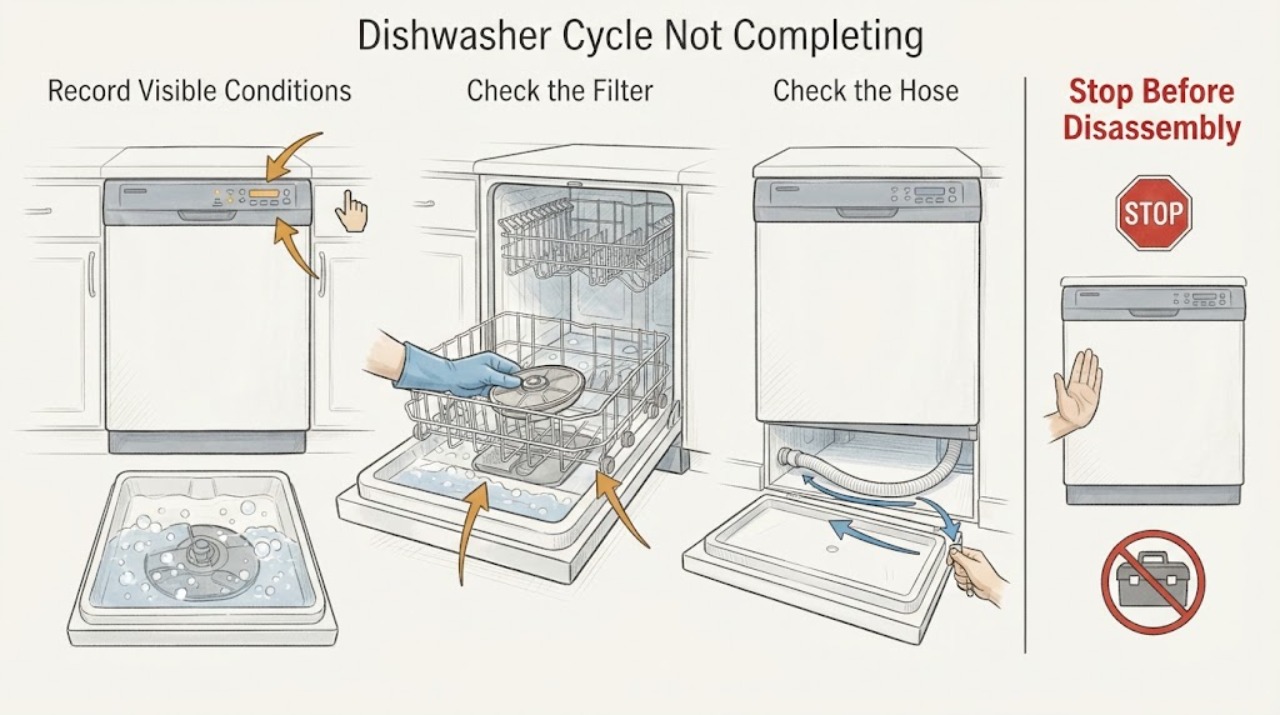
When a Siemens dishwasher does not complete a cycle, first record where it stops, whether water remains in the tub, whether a display code is present, and whether the controls still respond. Standing water makes the drain path the first useful check: switch the appliance off and isolate power before accessing the filter or pump area, then inspect the filter, pump area, and visible drain hose for blockage, foreign objects, kinks, or a loose reconnection. Siemens says a blocked filter, pump, or drain hose can prevent drainage and recommends a short cycle to test the result. If an exact code appears, identify the dishwasher's E-Nr and use the matching Siemens manual; E24/F24 can indicate a blocked pump on supported models, but that code meaning should not be generalized to every display. Stop and arrange qualified service for a leak, damaged wiring, burning smell, repeated breaker trips, hot standing water, a recurring stop after the drain path is clear, or any unresolved code.
Work through in order
Diagnostic checks
Use only checks that match the exact appliance or system and its official guide.
-
Check 1
Record the stop point before changing the controls: write down the selected program, the displayed time or code, whether the dishwasher is silent or still running, whether water is visible in the tub, and whether the controls respond to a normal button press.
Expected result: The dishwasher stops with water in the tub, stops with an error code, pauses with no water and working controls, or loses its display and response.
Next step: Follow the matching action below and preserve the exact display text for the manual or service technician. Do not infer a pump or control failure from the word ‘stuck’ alone.
Why this matters
Why: Water left behind makes a drainage restriction more likely; a code narrows the investigation only when interpreted for the exact model; a no-water stop shifts attention toward program sequence, inlet, door sensing, or power/control behavior; a dead display needs power and service guidance rather than repeated starts.
-
Check 2
If water remains in the tub, switch the dishwasher off and disconnect it from power before accessing the filter or pump area. Remove the lower rack and clean the filter as the model manual shows; inspect the accessible pump area for food, glass, labels, or other foreign objects, and refit the filter correctly.
Expected result: The filter is coated with debris, the pump area contains a foreign object, the pump cover or filter cannot be refitted, or the area is clear and correctly reassembled.
Next step: Use gloves for sharp debris, keep hands out of the pump area while power is connected, and continue to the visible hose check and a short test cycle. Stop if the pump cover is damaged or cannot be safely returned to its documented position.
Why this matters
Why: Debris or a badly seated filter can restrict drainage and can explain why the program never reaches its normal end. A clear, correctly reassembled path makes a hidden pump, hose, sensor, or control problem more likely if water still remains.
-
Check 3
Inspect the visible drain hose and its connections without dismantling the appliance: look for a kink, twist, crushed section, blockage at the accessible connection, or a hose that has come loose. Correct only an obvious routing or reconnection problem allowed by the manual.
Expected result: The hose is kinked or twisted, a connection is visibly loose, a blockage is accessible, or the hose path looks clear.
Next step: Restore the hose to the documented routing, do not force a hidden blockage through the hose, and run the quickest available cycle or drain test specified for the model to see whether water leaves normally.
Why this matters
Why: Siemens identifies a kinked, twisted, or blocked drain hose as a cause of water not leaving the appliance. A clear hose combined with a clean filter and pump area makes repeated incomplete cycles less likely to be a simple external drain obstruction.
-
Check 4
Run one short, model-approved test after the drain path has been reassembled: observe whether the dishwasher fills, washes, drains, and reaches its end indication rather than judging only by the first few minutes.
Expected result: The test drains and completes, drains but stops again, leaves water behind, or never fills/starts the expected sequence.
Next step: Use the observed result to choose the branch below. If the same failure returns after the documented external checks, stop testing and arrange service with the program, code, water level, and checks already recorded.
Why this matters
Why: A completed test supports a temporary or cleared drain restriction. Repeated water left behind points to a continuing drain-path or drain-pump problem; a no-fill or mid-program stop with no residual water points toward the inlet, door, program, power, or control branch and is not fixed by repeatedly cleaning the filter.
-
Check 5
For a displayed code, photograph the complete message and locate the dishwasher's E-Nr on the rating plate or sticker before looking up instructions. Read the matching Siemens manual or code page rather than applying a reset sequence copied from another model.
Expected result: The code is E24/F24, another documented code, or no code is shown; the E-Nr is available or cannot be read.
Next step: For E24/F24, perform only the documented drain-path checks and switch off the appliance and close the water tap if the issue remains. For any persistent or different code, give the exact code and E-Nr to Siemens support or a qualified technician.
Why this matters
Why: Siemens' E24/F24 guidance says the code may indicate a blocked pump, but that interpretation is scoped to that code family. A different code or an unreadable E-Nr leaves the cause model-specific; absence of a code does not rule out a mechanical or program fault.
-
Check 6
Check the service boundary before another cycle: look externally for a leak, hot standing water, a damaged cord or plug, burning smell, smoke, sparking, repeated breaker trips, or a display that stays dead. Do not remove covers or probe live wiring.
Expected result: A leak, heat, electrical warning, or repeated failure is present, or the dishwasher is dry, cool, electrically quiet, and completes after the documented check.
Next step: For any safety warning, switch off the appliance, close the water tap where accessible, isolate power if it can be done safely, and arrange qualified appliance service. Keep the dishwasher out of use until the cause is assessed.
Why this matters
Why: A safety warning can make continued operation unsafe. A clean external result and one completed cycle may close the immediate symptom, while recurrence indicates an underlying fault that external cleaning cannot establish or repair.
Use your observations
Decision map
Find the observation that best matches what you see, then follow the next safe action.
-
PATH 01Next step
What you see
The cycle stops with visible water in the tub, and the filter, pump area, or drain hose shows debris, a foreign object, a kink, or a loose connection.
Do this next
With power isolated, clean and refit the filter, correct only the obvious hose issue allowed by the manual, and run the shortest documented drain or test cycle. If water remains, book service for the drain system or pump.
Why this path and its safety boundary
Why it matters: The observed pattern makes a drain restriction more likely than a generic program failure; Siemens specifically connects these drain-path conditions with water not leaving the dishwasher.
-
PATH 02Next step
What you see
The dishwasher stops with E24 or F24, or another exact code appears after the drain path is checked.
Do this next
Use the E-Nr to open the matching Siemens documentation; for persistent E24/F24, switch off and close the water tap as Siemens directs, then arrange qualified service. Do not substitute a reset or part based only on a similar-looking code.
Why this path and its safety boundary
Why it matters: E24/F24 is a Siemens-specific example that can indicate a blocked pump, while another code cannot be interpreted safely without the exact manual. A recurring code means the external check did not resolve the fault.
-
PATH 03Next step
What you see
No water remains, no code is displayed, and the dishwasher stops at the same program stage or never reaches the expected fill, wash, or end indication while the controls still respond.
Do this next
Check only the external conditions and model-documented program/door instructions, then provide the repeated stage and E-Nr to service if the stop recurs. Avoid repeated forced restarts.
Why this path and its safety boundary
Why it matters: This makes a simple drain blockage less likely and leaves program-sequence, inlet, door-sensing, power, or control causes open. The symptom does not identify which internal component failed.
-
PATH 04Next step
What you see
A leak, hot water remains, electrical odor or damage appears, the breaker trips again, or the dishwasher is unresponsive after a safe power isolation.
Do this next
Stop use, close the water tap, isolate power only if safe, and arrange qualified appliance service. Tell the technician what happened before the appliance was isolated.
Why this path and its safety boundary
Why it matters: The symptom has crossed the safe user-check boundary; continued cycling could worsen water or electrical damage.
Helpful context
Understand the symptom
A cycle that does not complete can stop for different reasons. The useful first split is not the brand alone: note the program, remaining time or display state, whether the pump is audible, whether water is left in the tub, and whether the door and controls still respond. Siemens lists programme-sequence errors, water not running in, and water left in the appliance as separate dishwasher troubleshooting situations, so those observations determine the next safe check.
Use the following checks in order. They are intended to identify the failed path without opening the appliance or replacing a part on a guess. A clean drain path does not prove that the inlet valve, door sensing, controls, heater, or circulation system is healthy; it only changes which branch should be investigated through the exact manual or by a qualified technician.
When checks do not resolve it
Need a professional?
A technician may need to test the drain pump, hose routing, inlet system, door sensing, heater, sensors, or controls after the safe external checks. Supply the exact E-Nr, program, display code, point in the cycle, whether water remained, and what happened during the short test.
Common questions
FAQ
Why does my Siemens dishwasher stop before the cycle ends with water inside?
Residual water makes a restriction in the filter, pump area, or drain hose the first useful path to inspect. Isolate power before accessing those areas, refit the filter correctly, and use one short documented test. If water remains after the path is clear, the drain pump or another fault needs service.
Does E24 mean the drain pump is definitely broken?
No. Siemens says E24/F24 may indicate a blocked pump. Check the model-specific drain guidance first; a recurring code after those checks needs service, and the E24 meaning should not be applied to a different code or model without its manual.
Can I keep restarting a Siemens dishwasher that does not complete its cycle?
Use a reset or cancel procedure only when the exact Siemens manual documents it for your E-Nr. One documented short test can show whether a cleared drain restriction was resolved; repeated forced restarts are not a substitute for service when the stop returns or a safety warning appears.
What information should I have ready for Siemens support?
Have the E-Nr, selected program, displayed code or remaining time, the exact point where the cycle stops, whether water is left in the tub, and the results of the filter, pump-area, hose, and short-cycle checks. Siemens provides the E-Nr-based manual lookup for the correct documentation.
Read the exact guide
Official sources
- User ManualsSiemens Home Appliances · Use for model-specific dishwasher program, reset, code, access, and safety instructions after reading the E-Nr from the rating plate or sticker.
- Dishwsher is not drainingSiemens Home Appliances · Use for Siemens dishwashers when a cycle stops with water remaining or drainage is suspected; exact access and reassembly instructions remain model-specific.
- E24 error on my dishwasherSiemens Home Appliances · Only applies when the dishwasher actually displays E24/F24 or the exact Siemens documentation confirms the same code family; it is not a generic cycle-not-completing diagnosis.
Community feedback
Share a repair observation
Share a plain-text repair observation. Accepted observations are published automatically; this page may take a moment to update.