
On this page
Start here
Quick answer
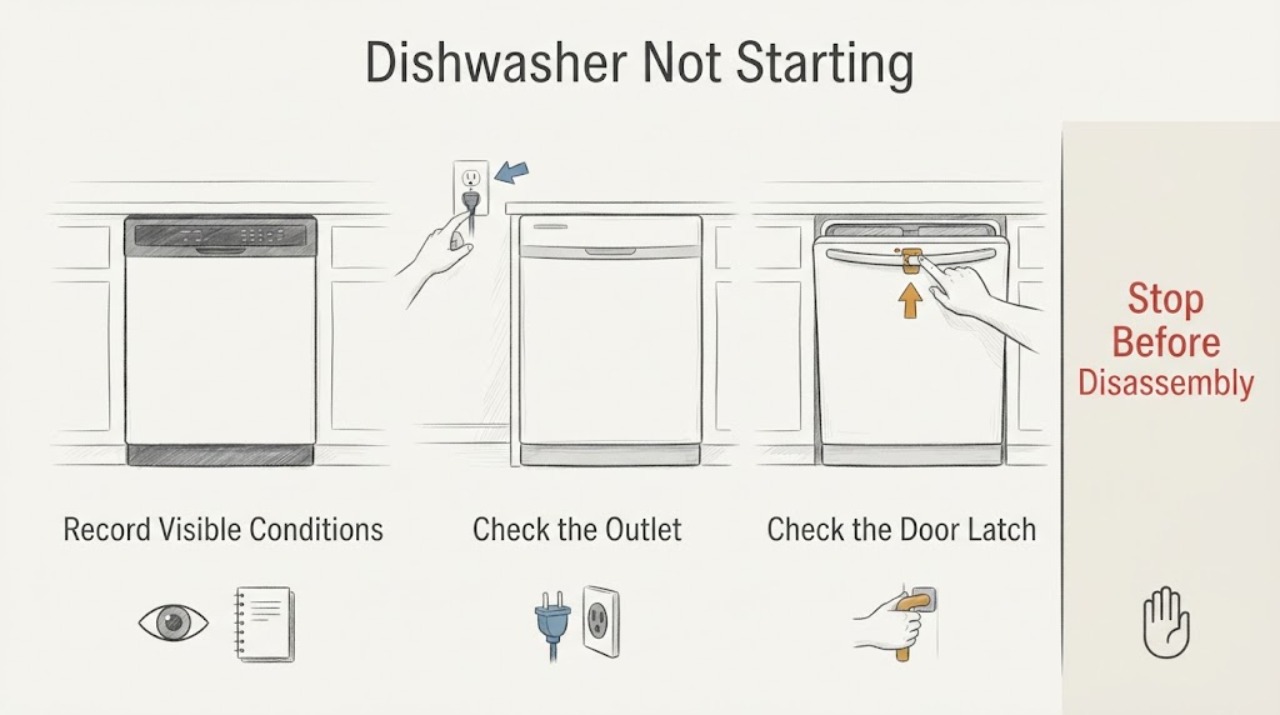
When a Siemens dishwasher will not start, first separate a dark control panel from a panel that lights but will not begin a cycle. With no lights, check the plug, the outlet, and the household fuse or residual-current device. With lights on, close the door firmly so the latch can engage, then check that the water supply is open and the inlet and drain hoses are not visibly kinked. A water-tap symbol or persistent no-start after these external checks needs the model-specific Siemens manual or qualified service. Do not repeatedly reset a tripping circuit, use a damaged cord, or remove panels to test the door lock or control board.
Work through in order
Diagnostic checks
Use only checks that match the exact appliance or system and its official guide.
-
Check 1
Record the dishwasher's exact model from its rating plate and make one normal start attempt while observing the control panel. Note whether every light is dark, the display is lit but the cycle does not begin, a water-tap or other error symbol appears, the door springs back open, or the machine starts and then stops.
Expected result: The panel is completely dark, the panel is lit, the door does not latch, a water indication is shown, or the display reports another model-specific condition.
Next step: Follow the matching check below and keep the model code and exact symbol available. Do not apply a reset or part diagnosis from the words not starting alone.
Why this matters
Why: Siemens publishes different guidance for a dishwasher with no power and one with power. The visible state determines whether the first useful check is electrical supply, the door, or water inlet; an unverified symbol should not be assigned a generic meaning.
-
Check 2
If no Siemens dishwasher lights are on, make sure the mains plug is fully seated and test the same outlet with a lamp or another safe appliance. Check the household fuse or residual-current device for that circuit and consider whether another appliance caused an overload.
Expected result: The outlet is dead, the fuse or residual-current device has tripped, the plug or cord is visibly damaged, or the outlet works but the dishwasher remains completely dark.
Next step: Restore household power only when the circuit is safe and the cause is understood. Do not use a damaged cord, repeatedly reset a protective device, or open the appliance; contact an electrician for a recurring circuit fault or Siemens service when the outlet is working but the panel stays dark.
Why this matters
Why: A dead outlet or tripped protective device explains a no-light condition outside the dishwasher. A working outlet with a dark dishwasher leaves an appliance-side power or control fault unresolved.
-
Check 3
If the panel is lit, close the dishwasher door firmly and check that no rack, dish, or trim is preventing the latch from engaging. Confirm that the door stays closed when you release it, then select the program and use the model's documented Start control once.
Expected result: The door latches and the cycle begins, the door will not stay latched, or the door latches but the dishwasher still does not start.
Next step: Remove only the visible loading obstruction and make one supervised start attempt. If the latch, hinge, or door fit is damaged, or the cycle remains idle with a closed door, stop before adjusting or replacing the lock and request service.
Why this matters
Why: Siemens states that an open door prevents a powered dishwasher from starting. A door that latches but still leaves the cycle idle is not explained by the visible door check and may require model-specific control or fault diagnosis.
-
Check 4
Check the external water path when the display shows a water-tap indication, the dishwasher hums without filling, or the program will not begin. Confirm the dishwasher water valve is open, inspect the accessible cold-water fill and waste-water hoses for kinks or visible damage, and check for water around the connections.
Expected result: The water valve is closed, a hose is kinked, a hose or connection is damaged or leaking, the water path looks normal, or the water-tap indication remains.
Next step: Open a clearly closed valve or straighten a visible kink only if the connection remains dry and secure. If a filter inspection requires disconnecting a hose, turn off the water tap first and follow the exact Siemens model instructions; stop for leaks or persistent indication and arrange qualified service.
Why this matters
Why: Siemens identifies a closed supply, kinked or blocked hose, low water pressure, and an inlet filter blockage as possible water-inlet conditions. A normal external path does not prove that the internal inlet system is working.
-
Check 5
If the machine still will not start after the external power, door, and water checks, record the model, display symbols, whether the pump or inlet makes any sound, and whether the problem began after a leak, outage, installation, or moved appliance. Do not remove the base, door panel, or electrical covers to continue testing.
Expected result: The cycle starts after one external correction, the same no-start condition remains, the circuit trips again, or water is present where it should not be.
Next step: Monitor one normal cycle after a safe correction. Otherwise stop use and give Siemens service the exact model, code or symbol, power state, door behavior, water observations, and any leak or trip history instead of ordering a part by symptom.
Why this matters
Why: A corrected outlet, latch, or supply condition makes an external cause more likely. Persistent no-start, repeated electrical trips, or water in an unsafe location requires diagnosis of internal electrical, door-safety, pump, or water-protection systems.
Use your observations
Decision map
Find the observation that best matches what you see, then follow the next safe action.
-
PATH 01Next step
What you see
Every dishwasher light is dark and the same outlet also fails a lamp test, or the household fuse or residual-current device has tripped.
Do this next
Address the safe household power issue or call an electrician for a recurring trip. If the outlet works but the dishwasher remains dark, request Siemens service rather than opening the appliance.
Why this path and its safety boundary
Why it matters: The immediate problem is an external supply or circuit condition, so a dishwasher component has not been established.
-
PATH 02Next step
What you see
The dishwasher display is lit, but the door springs back, will not latch, or a rack or dish visibly prevents closure.
Do this next
Clear the visible loading obstruction and close the door once. If the latch or fit remains abnormal, stop and arrange service for the door assembly rather than forcing or bypassing it.
Why this path and its safety boundary
Why it matters: The door-safety interlock is a more likely start barrier than a confirmed motor or control failure; Siemens will not start the cycle with an open door.
-
PATH 03Next step
What you see
The panel is lit and a water-tap indication appears, the dishwasher does not fill, or the supply valve or inlet hose is closed or kinked.
Do this next
Restore only a safe external supply condition, check for leaks, and make one supervised start attempt. If the indication remains or water pressure and filter work are needed, close the tap when instructed and use qualified service.
Why this path and its safety boundary
Why it matters: The start failure is consistent with a water-inlet condition. A visible correction can restore operation, but a clear hose does not rule out an internal inlet or protection fault.
-
PATH 04Next step
What you see
The outlet works, the display is lit, the door latches normally, and the visible water path is open and undamaged, but the program still will not start or the circuit trips again.
Do this next
Stop repeated start attempts and request Siemens service with the model and observations. Stop immediately for smoke, burning odor, sparks, active leaks near electrical parts, a hot cord, or a recurring trip.
Why this path and its safety boundary
Why it matters: The ordinary external checks have not identified the cause. Possible internal door-safety, control, water-protection, or other appliance faults need model-specific diagnosis.
Helpful context
Understand the symptom
A Siemens dishwasher that will not start may have no electrical supply, or it may be powered but refusing to begin because the door is not latched or water cannot enter. The same symptom does not identify a failed pump, inlet valve, or control board. Read the display and observe the machine before choosing the next check, and use the exact model manual for any symbol or program-specific instruction.
When checks do not resolve it
Need a professional?
Arrange qualified Siemens service when the dishwasher remains unable to start after the correct external power, door, and water-inlet checks; when the door will not latch; when a water indication persists with the supply available; when the circuit trips again; or when diagnosis would require removing panels, testing live wiring, bypassing the door or water-safety system, or accessing the pump, control, or base. Provide the exact model, display symbols, power state, door behavior, water and hose observations, and any leak or outage history. Use Siemens manuals and service channels for model-specific repair and parts information.
Common questions
FAQ
Why is my Siemens dishwasher not starting even though the display is on?
Check that the door closes and latches without a rack or dish in the way, then check the external water supply and hoses for a closed valve or visible kink. Siemens identifies the door and water inlet as start barriers on a powered dishwasher. If both are normal and the cycle remains idle, use the exact model manual or request service.
What should I check when my Siemens dishwasher has no lights?
Confirm the plug is fully seated, test the outlet with a lamp, and check the household fuse or residual-current device. A dead outlet points to the household circuit. If the outlet works but the dishwasher panel remains dark, stop before opening the appliance and arrange Siemens service.
Can a kinked water hose stop a Siemens dishwasher from starting?
Yes. Siemens lists a closed supply, a kinked or blocked inlet or waste-water hose, low water pressure, and an inlet-filter blockage among water-path checks. Straighten only a visible kink when the connection stays safe and dry; turn off the tap before any hose or inlet-filter work, and use service if the water indication persists.
Should I replace the Siemens dishwasher door lock or control board because it will not start?
No. The no-start symptom alone does not identify a part. First record whether the panel is dark, whether the door latches, and whether a water indication or supply problem is present. If the external checks do not restore a cycle, let qualified service identify the failed component and the model-compatible repair.
Read the exact guide
Official sources
- Customer support for your home applianceSiemens Home Appliances · Siemens appliance support, dishwasher manuals, troubleshooting, repair service, spare parts, and safety notices.
- Spülmaschine geht nicht anSiemens Hausgeräte · Siemens dishwasher no-start troubleshooting for no-power, outlet, fuse, door-latch, water-inlet, and service conditions.
- Dishwasher is not getting waterSiemens Home Appliances · Siemens dishwasher water-supply, hose, water-pressure, inlet-filter, leak, and service guidance.
Community feedback
Share a repair observation
Share a plain-text repair observation. Accepted observations are published automatically; this page may take a moment to update.