
On this page
Start here
Quick answer
A Siemens dryer that never reaches the end of a cycle is often reacting to a load or programme mismatch, a coated moisture sensor, restricted fluff or condenser airflow, or a full condensate path. Heat-pump and sensor programmes can change their displayed time while they measure moisture; a timed programme behaving differently is useful evidence, not a reason to bypass a safety control. Record the model and any exact display code, clean only user-accessible filters and the sensor as the manual allows, check the condensate container or drain path, and stop using the dryer for smoke, burning smell, abnormal heat, damaged wiring, or repeated electrical trips.
Work through in order
Diagnostic checks
Use only checks that match the exact appliance or system and its official guide.
-
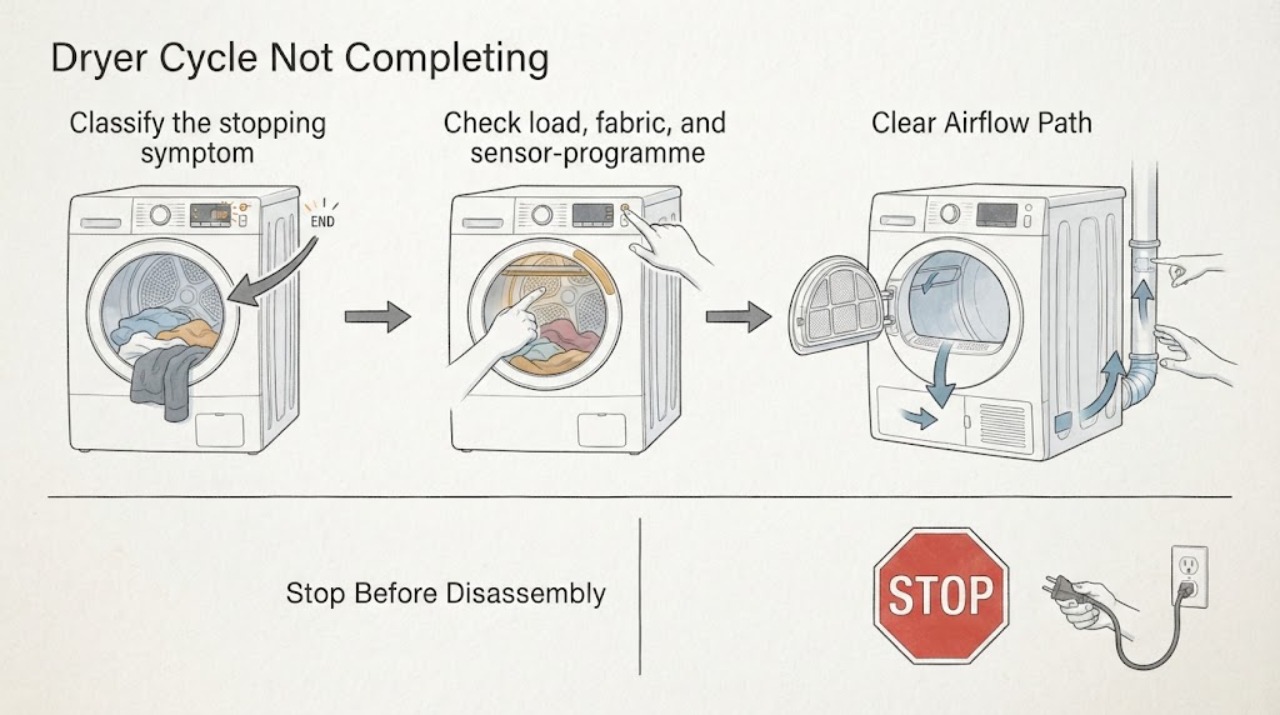
Classify the stopping symptom and programme type
With the dryer off, write down the exact programme, selected dryness level, load fabric, displayed time, any water or filter symbol, and the full error message if one is shown. Record whether the drum stopped while clothes were still wet, whether the timer kept changing, or whether the machine ended normally but the load felt warm and damp.
Expected result: A changing time on a sensor or heat-pump programme points to moisture evaluation, while a water-tank indicator, filter symbol, door message, or named error creates a different branch. A normal end with warm laundry is not the same symptom as an abrupt stop with an error.
Next step: If an exact code or door/water symbol is present, use the manual for the model before trying another programme. If the timer only extends or the load remains damp without a code, continue with the load and sensing checks.
Why this matters
Why: The Siemens support path is model-specific and includes drying time, filter, water level, door function, programme sequence, and error-display categories. The symptom and model determine which manual instructions apply.
-
Check load, fabric, and sensor-programme behavior
Remove a few items if the drum is full, separate heavy towels from light synthetics, shake out tangled items, and select a programme whose fabric and load limits match the manual. On a cool machine, wipe the accessible metal moisture-sensing surfaces inside the drum with a soft cloth as the manual permits; do not scrape, sand, or spray into the drum.
Expected result: If a smaller, well-spread load completes or the displayed time settles after items are separated, load distribution or the chosen programme was affecting the moisture reading. If every suitable load stays damp or the sensor programme extends unusually while a timed programme heats, sensing or airflow remains suspect.
Next step: Use the programme table for the exact model and compare one modest, compatible load. If the same symptom returns with a correct load, move to filters and ventilation rather than repeatedly adding heat or selecting a hotter setting.
Why this matters
Why: Siemens notes that overloading, programme choice, warm laundry, and residue on the moisture sensor can make results seem damp or cause the programme to judge moisture poorly. Sensor drying is allowed to adapt rather than follow a fixed clock.
-
Restore the user-accessible air path
Switch off, unplug only if the plug and area are dry and safe, and wait for the dryer to cool. Remove and clean the accessible fluff filter(s) using the model instructions, let any washed filter dry fully, and check that the room air inlet, rear or front grille, and external exhaust path are not covered. For a condenser or heat-pump model, clean only the condenser or heat-exchanger area the manual identifies as user accessible; do not remove covers or insert tools into the fan path.
Expected result: A heavy lint mat, blocked grille, damp filter, or visibly restricted condenser area can reduce airflow and make a cycle run long or end without a dry result. If the accessible path is clear but the airflow is weak, the machine overheats, or the fan makes a scraping sound, the issue is not a simple filter reset.
Next step: Reassemble only the user-accessible filters exactly as shown and try one supervised compatible load. If the dryer still runs long, stops hot, or reports a filter fault with clean filters, stop and arrange service for the air path or temperature system.
Why this matters
Why: Siemens links clean fluff filters and clear ventilation with drying performance and directs users to the exact manual for condenser care. Heat-pump and self-cleaning designs do not all expose the same parts or use the same cleaning interval.
-
Check condensate container and drain routing
For a condenser or heat-pump dryer without a permanent drain, remove the condensate container only when the appliance is stopped and cool, empty it, and refit it fully. If a drain hose is installed, inspect only its visible routing for a kink, loose connection, or rise that conflicts with the model instructions. Where the manual provides a removable container filter, rinse and refit that filter as directed; do not drink or reuse the collected water.
Expected result: A full container or a container that is not seated can make the dryer stop before drying is complete. A dirty container filter or restricted drain can lengthen drying, while a leak, repeated water warning, or water near electrics is a stop condition.
Next step: After safe emptying and refitting, run one small supervised load. If the water warning returns quickly, the container does not seat, the visible hose leaks, or the pump appears to run without moving water, stop and request qualified service; do not open the pump housing.
Why this matters
Why: Siemens states that condensation goes to the container when no drain hose is connected, that a full container can turn the dryer off before the cycle ends, and that the container filter supports the condensation-water path.
-
Verify the door and capture any code without bypassing it
Close the empty drum door gently and check that no fabric is caught in the seal or latch area. Start the selected programme once and observe whether the door indication clears, the drum begins turning, and the message returns. Photograph or transcribe the full code, including letters, digits, and alternating symbols, along with the E-Nr/model number; do not bridge or hold the door switch closed.
Expected result: A door that is not fully latched can prevent a start or interrupt a cycle. A repeatable code, door-function message, or programme-sequence error after the latch area is clear is evidence for the model-specific service path rather than a generic filter fault.
Next step: Follow only the exact model manual for one permitted reset or door check. If the code returns, the latch feels loose, or the dryer stops mid-cycle again, leave it off and provide the code and model to qualified service.
Why this matters
Why: Siemens model support pages expose separate categories for door function, error display, filter, water level, and programme sequence. Codes and reset behavior are not universal across all Siemens dryer generations.
-
Separate a power or overheating stop from a drying result
Without opening the appliance, inspect the plug, cord, socket face, and nearby floor for visible damage or moisture. Note whether the stop occurs when heat starts, when the motor turns, or at random, and whether the breaker or residual-current device trips. Do not repeatedly reset the protective device or use an extension lead to continue the test.
Expected result: A single household supply event may leave a programme paused, but repeated trips, a hot or discolored connection, burning odor, smoke, arcing, or a cabinet that is abnormally hot indicates an electrical, motor, heater, or airflow safety fault. A clean stop with no hazard and a normal display is a different branch.
Next step: For any repeated trip, heat damage, odor, smoke, or moisture at the connection, stop using the dryer and arrange qualified appliance or electrical service. Only if the supply is stable and no hazard is present should you continue with the model-specific non-invasive checks.
Why this matters
Why: A cycle that does not complete because protection operated must not be treated as a timer or sensor problem. The exact fault cannot be identified safely from an external observation, especially when model wiring and heater arrangements differ.
-
Use one supervised confirmation run, then decide on service
After the safe checks, load a small, compatible batch, select the documented programme, and stay nearby for one complete run. Record the start condition, whether heat and drum motion are normal, whether the displayed time changes, when the container or filter indication appears, and whether the cycle reaches its end without an error.
Expected result: A complete run with an appropriate load supports a setup, sensing, or maintenance cause. A repeat failure with clear filters, a clear condensate path, a sound latch, and stable power points toward a sensor, pump, fan, heater, control, or door-lock fault that needs diagnosis.
Next step: Stop testing after a repeat failure or any safety symptom. Give service the E-Nr/model, programme, load, exact code, time behavior, filter and container findings, and the point in the cycle where it stopped.
Why this matters
Why: A single controlled run can confirm that the symptom changed after a user-level correction, but it cannot prove which internal part failed. Model-specific manuals and Siemens service categories distinguish these systems.
Use your observations
Decision map
Find the observation that best matches what you see, then follow the next safe action.
-
PATH 01Safety boundary
What you see
The displayed time changes or extends on a sensor or heat-pump programme, but there is no error and the drum continues moving.
Do this next
Run one correct, modest load after the user-level checks; escalate if the same extension or damp result occurs with clear airflow and a suitable load.
Why this path and its safety boundary
Safety stop: If the appliance stops abruptly, shows a code, or loses drum motion, use the error, door, power, or condensate branch instead.
-
PATH 02Safety boundary
What you see
The programme reaches an end but the load is warm and still damp.
Do this next
Compare one compatible small load; do not keep selecting hotter settings if airflow, heat, or safety behavior is abnormal.
Why this path and its safety boundary
Safety stop: A sudden stop with a water, door, or error indication is not explained by warm-laundry feel alone.
-
PATH 03Safety boundary
What you see
The fluff filter, grille, condenser area, or external exhaust path is visibly restricted.
Do this next
Retest once under supervision and stop if the restriction returns quickly or the dryer becomes unusually hot.
Why this path and its safety boundary
Safety stop: Do not assume an internal blockage or fan fault is absent; weak airflow, overheating, or a scraping fan still requires service.
-
PATH 04Safety boundary
What you see
A water-container indicator appears or the condensate container is full before the cycle ends.
Do this next
Escalate for a recurring warning, leak, or pump symptom rather than opening the condensate system.
Why this path and its safety boundary
Safety stop: If water leaks or the cycle stops without a water indication, use the door, code, load, or power branches.
-
PATH 05Safety boundary
What you see
The door indication remains active or the same code returns after the door area is clear and the permitted model reset is completed.
Do this next
Never defeat the latch or repeat a reset indefinitely; model-specific code meaning and parts must be confirmed by the manual or technician.
Why this path and its safety boundary
Safety stop: If the door latches and no code returns, continue only with the load, airflow, and condensate checks relevant to the dryer type.
-
PATH 06Safety boundary
What you see
The dryer trips protection, has a hot or damaged connection, smells burned, emits smoke, arcs, or becomes abnormally hot.
Do this next
Do not run the dryer unattended after an electrical or heat event, even if it later appears to complete.
Why this path and its safety boundary
Safety stop: Continue only with non-invasive user checks while monitoring the first confirmation run.
Helpful context
Understand the symptom
First decide what “not completing” means. Is the displayed time extending on a sensor or heat-pump programme, does the dryer stop with damp clothes, does it stop when a water indicator appears, or does it stop with an error? Note the programme, load type, model number, display message, and whether the drum and fan were still moving. Siemens support pages list dryer problems by model, and their programmes, symbols, filters, and cleaning intervals can differ between condenser, heat-pump, and older vented designs.
Safety boundary
Stop the programme and let the appliance cool if there is smoke, a burning or melted-plastic smell, an unusually hot plug or cabinet, visible cord damage, water near the electrical connection, arcing, or a breaker that trips again. Do not keep resetting a breaker, run the dryer unattended to reproduce a fault, remove panels, defeat a door switch, or probe live wiring. If a gas-fired model smells of gas, leave the area and use the local gas-emergency route from a safe location; do not relight or test it.
Safety boundary
Stop conditions
- Stop using the dryer for smoke, flames, burning or melted-plastic odor, arcing, visible cord or plug damage, repeated breaker trips, or a connection that becomes hot or discolored.
- Stop for water near the electrical connection, a leak that reaches wiring, an abnormal scraping or stalled fan, or a cabinet that becomes abnormally hot.
- Do not remove panels, open the heater, pump, motor, fan, control, or wiring area; do not defeat a door switch or use a temporary connection.
- If a gas-fired model smells of gas, do not relight or operate switches; leave the area and contact the appropriate emergency or qualified gas service from a safe location.
Only after diagnosis
Potential parts
- moisture sensor or sensor harness
Consider this category only if the exact model manual and a qualified diagnosis identify a sensing fault after load, sensor-surface, and airflow checks.
Confirm the complete Siemens E-Nr/model and appliance type; a sensor for a condenser, heat-pump, or older dryer is not assumed interchangeable. - condensate container filter or pump assembly
Consider this category only when a qualified technician confirms restricted water movement, a pump fault, or a damaged container component after safe emptying and visible hose checks.
Container, filter, pump, and hose arrangements vary by model and drain installation; verify the exact E-Nr before any part decision. - door latch or door-switch assembly
Consider this category only when the door is correctly aligned and a qualified diagnosis confirms that the latch or switch is causing the interruption.
Do not bypass a door switch; verify the exact Siemens model and use qualified installation.
When checks do not resolve it
Need a professional?
Arrange qualified Siemens appliance service when a cycle repeatedly fails after a correct load and user-accessible care, when a code or door fault returns, when a condensate warning or leak persists, or when airflow, heating, fan, pump, sensor, or control behavior is abnormal. Use a qualified electrician for a damaged supply or repeated electrical trip; use the appropriate gas professional for a gas-fired model with a gas symptom.
Common questions
FAQ
Why does my Siemens dryer keep adding time instead of finishing?
A sensor or heat-pump programme can change its displayed time while it evaluates moisture. Check the load and programme, separate tangled items, clean the allowed sensor surface and fluff filters, and confirm airflow. If a correct small load still runs unusually long or stays damp, arrange model-specific service.
Can a full water container stop a Siemens dryer before the cycle ends?
Yes. Siemens explains that condensation goes to the container when no drain hose is connected and that a full container can turn the dryer off before drying is complete. Empty and refit it when cool; a recurring warning or leak needs service.
How do I tell whether the load or the dryer is at fault?
Try one modest load that matches the exact programme and fabric guidance. If that load completes after sensor, filter, and condensate care, setup was likely involved. If the same interruption occurs with clear user-accessible paths and stable power, preserve the code and model details for service.
Should I keep resetting a Siemens dryer that stops mid-cycle?
No. One model-permitted reset may be useful after a documented power event, but repeated stops, a returning code, a door or water warning, heat damage, burning odor, smoke, or a trip require the dryer to remain off and be assessed by a qualified professional.
Do all Siemens dryers use the same filter and condenser cleaning steps?
No. Siemens support distinguishes model families and directs users to the exact manual. Condenser, heat-pump, self-cleaning, and older designs can expose different user-care points, so do not remove a cover or wash a component unless the model instructions say to do so.
Read the exact guide
Official sources
- Model WT36V385/12: User manuals, spare parts, accessories | Siemens HomeSiemens Home · Siemens iQ300 tumble dryer model support and model-specific troubleshooting categories
- Comment bien utiliser un sèche-linge ? Programme, entretien et nettoyageSiemens Home · Siemens tumble dryer programmes, load, fluff filters, condenser, moisture sensors, ventilation, and maintenance
- Condensate container: How to empty it the right way | Siemens HomeSiemens Home · Siemens tumble dryer condensate container and container-filter guidance
- Model WT55010/04: User manuals, spare parts, accessories | Siemens HomeSiemens Home · Siemens tumble dryer model support, error displays, filters, door function, programme sequence, and drying-time troubleshooting
Community feedback
Share a repair observation
Share a plain-text repair observation. Accepted observations are published automatically; this page may take a moment to update.