
On this page
Start here
Quick answer
Treat a Siemens dryer error display as model-specific. Photograph the complete code or message, record the E-Nr model number, programme stage, whether the drum is hot or turning, and whether the display returns after a restart; do not assign a code meaning from another Siemens dryer. From ordinary safe access, check that the door is closed, the lint filter and visible air path are not blocked, and the condensate container or drain route is in the state required by your model. A single reset is reasonable only when the dryer is cool, dry, free of burning smell or smoke, and the exact manual permits it. If the code returns, the door will not latch, the drum will not turn, the filter or condensate warning stays on, the appliance overheats, the household fuse trips, or there is smoke, a hot electrical smell, or visible damage, stop using the dryer and arrange Siemens or qualified appliance service.
Before you begin
Safety first
- This article supports ordinary-access observation and one exact-model restart only when the dryer is cool and safe. Do not open panels, work on energized wiring, bypass door or thermal protection, reach into moving or hot parts, tip the dryer, or continue after smoke, burning odor, water near electricity, severe heat, or repeated fuse trips.
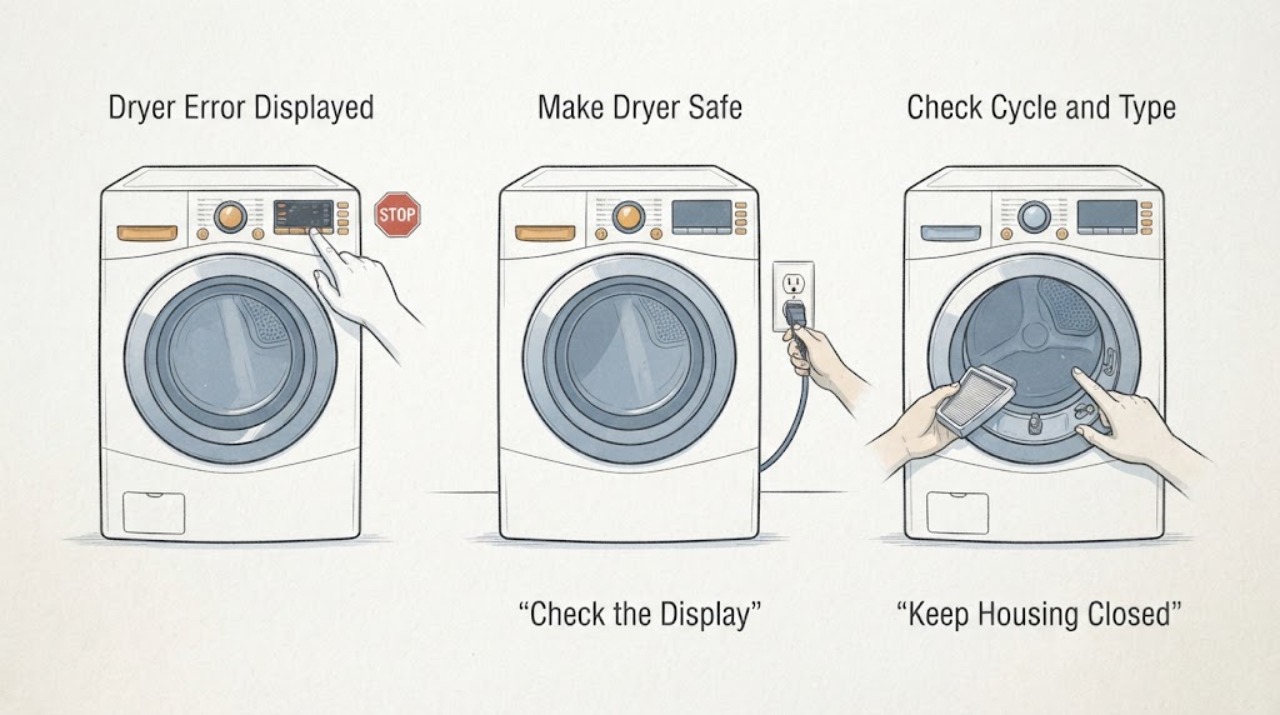
Work through in order
Diagnostic checks
Use only checks that match the exact appliance or system and its official guide.
-
Check 1
Stop the programme and inspect the dryer and surrounding area from a safe position without opening panels or reaching into a hot drum.
Expected result: Record whether there is smoke, a burning or hot electrical smell, unusual heat, a damaged cord or outlet, visible arcing, water around the appliance, a domestic fuse trip, or a drum that is still moving or dangerously noisy.
Next step: Leave the dryer off and arrange appropriate electrical, fire, water, or qualified appliance service from a safe location when any hazard is present; otherwise photograph the display before pressing more controls.
Stop if: Do not operate the dryer, touch a wet plug or outlet, open the cabinet, or continue testing after smoke, burning odor, arcing, severe overheating, or repeated power trips.
Why this matters
Why: Smoke, burning odor, visible damage, water near electricity, severe heat, arcing, or repeated fuse trips is a safety event and not a routine error-code lookup. A cool, dry dryer with no damage can proceed to documentation.
-
Check 2
Photograph the complete display and write down the exact error code, text, symbols, audible signal, flashing indicators, programme name, and point in the programme where it appeared.
Expected result: Classify the display as a complete code, an error-display category, a filter or condensate warning, a door message, a power or fuse symptom, a programme-sequence fault, or an incomplete or unreadable message.
Next step: Keep the photograph and notes unchanged, and use the complete E-Nr to select the matching Siemens support and manual information before any reset.
Stop if: Do not guess the meaning from a different model, erase the display by repeated cycling, or enter an unlisted diagnostic mode.
Why this matters
Why: A complete code and stage can be matched to the correct manual. A partial code or category-only warning cannot identify a failed component, and the same characters may have different meanings on different Siemens E-Nr models.
-
Check 3
Read the complete Siemens E-Nr from the rating plate or door area from ordinary safe access and identify whether the dryer is a heat-pump, condenser, or vented design only when the label or manual states it.
Expected result: Record the full E-Nr including its revision suffix, the appliance location, the dryer type, whether a condensate drain hose is fitted, and whether the manual for that exact model is available.
Next step: Select the exact Siemens product-support record and manual using the E-Nr; if the label cannot be read without moving or dismantling the appliance, provide a photo and request service.
Stop if: Do not pull out a built-in dryer, remove covers, or touch hot, wet, or damaged areas to reach the rating plate.
Why this matters
Why: Siemens says the E-Nr is needed to identify the appliance and retrieve correct information. Filter, condensate, heat-exchanger, door, and reset instructions can differ by model and dryer design.
-
Check 4
With the dryer cool and stopped, close the door normally and inspect the user-accessible lint filter, door opening, and visible air inlet for lint, clothing, or an obstruction; clean only the locations identified by the exact manual.
Expected result: Record whether the door latches cleanly, the filter is seated and visibly blocked, the air inlet is obstructed, the filter warning clears, or the warning remains despite a clean and correctly seated filter.
Next step: Restore the filter and door only as the manual directs and retry once if the dryer is otherwise safe; if the door will not latch or the warning persists, leave the dryer off and arrange service.
Stop if: Do not run with the filter removed, push tools into the heat exchanger or air path, force the door, or open the cabinet.
Why this matters
Why: A door that is not confirmed closed can prevent a programme from running. Lint restriction can reduce airflow and increase drying stress, while a persistent warning after the user-accessible check points to a sensor, filter housing, airflow, or model-specific fault rather than permission to dismantle the dryer.
-
Check 5
For a condenser or heat-pump model, inspect the condensate container, its indicator, and any clearly visible drain hose from ordinary access; do not remove a hose or reach into a pump while water is present.
Expected result: Record whether the container is full, the container is seated, a connected drain hose is kinked or disconnected, a condensate warning is lit, or the water path appears normal but the warning remains.
Next step: Empty or reseat the container and correct only an obvious visible hose route issue according to the exact manual; if the warning returns, water does not move, or a leak appears, stop and request service.
Stop if: Do not spill water near electrical parts, detach water-filled hoses, tip the dryer, or disassemble the condensate system.
Why this matters
Why: Siemens explains that condensation collects in a container when no drain hose is connected and that a full container can stop drying. A seated empty container or clear visible hose with a persistent warning points to a concealed restriction, float, pump, sensor, or control issue.
-
Check 6
Compare the selected programme, door state, child lock or delay indicators, and power or fuse status with the exact model manual without opening the electrical installation.
Expected result: Record whether the dryer is waiting for a delayed start, locked, paused between stages, unable to start, showing a domestic-fuse symptom, or losing power when heat or drum movement is requested.
Next step: Clear only a model-documented delay or lock state and verify the labeled supply from a dry, safe position; if power does not stay on or the control is unresponsive, leave the dryer off and call qualified service.
Stop if: Do not repeatedly reset a tripping fuse, remove an outlet cover, bypass a door interlock, or test energized wiring.
Why this matters
Why: A control state or interrupted supply can look like an error display, while a fuse symptom or power loss points to an electrical or appliance fault. The Siemens model support categories explicitly separate domestic-fuse trips, programme sequence, door function, and other error displays.
-
Check 7
Only when the dryer is cool, dry, and free of hazard, follow the exact Siemens manual's restart or reset instruction once; do not improvise a service-mode sequence.
Expected result: Record whether the display clears, the same code returns immediately, a different code appears, the door remains locked, or the appliance trips power when a programme starts.
Next step: If the code returns or the dryer behaves abnormally, leave it off and give the technician the code, E-Nr, programme stage, and reset result. If it clears, proceed only to the exact manual's controlled observation.
Stop if: Do not repeat resets, remove covers, bypass a safety device, or restart after smoke, burning smell, water contact, severe heat, or a fuse trip.
Why this matters
Why: A clear display after one permitted reset may indicate a transient control state, but it does not prove that a sensor, filter system, condensate pump, door interlock, or control is healthy. A returning code or power interruption is an unresolved fault.
-
Check 8
If the reset cleared the message and the exact manual allows it, run one short, appropriate programme with a normal load while remaining nearby and observing the display, door, lint path, condensate behavior, heat, and drum movement.
Expected result: Record whether the dryer starts, the error returns at startup or after heating, the drum turns normally, airflow and condensate behavior remain normal, or the dryer becomes excessively hot, noisy, smoky, or electrically unstable.
Next step: Stop the programme and arrange qualified service for any abnormal result; if the cycle remains normal, keep the original code record and monitor rather than repeatedly resetting.
Stop if: Stop immediately for smoke, burning smell, excessive heat, visible damage, unusual electrical noise, water leakage, or a fuse trip.
Why this matters
Why: A stable cycle supports a transient or resolved user-state issue but does not validate a hidden component. A returning error or abnormal heat, smell, sound, leak, or power event requires service.
-
Check 9
For a persistent, returning, unknown, or model-unmatched error, leave the dryer off and prepare a complete service record instead of selecting a replacement part.
Expected result: Provide the complete E-Nr and revision, exact code and photo, dryer type, programme and stage, door state, filter and condensate observations, reset result, power behavior, temperature, sounds, leaks, and any safety symptoms.
Next step: Contact Siemens support or a qualified appliance technician for model-specific diagnosis and keep the dryer out of service until it is declared safe.
Stop if: Do not open panels, make live electrical measurements, bypass door or thermal protection, or replace a part from a cross-model code list.
Why this matters
Why: The Siemens support flow uses the E-Nr to narrow the correct information and distinguishes error display, filter, condensate, door, drum, fuse, and programme-sequence problems. A code alone does not establish a failed sensor, control, pump, heater, or door assembly.
Use your observations
Decision map
Find the observation that best matches what you see, then follow the next safe action.
-
PATH 01Safety boundary
What you see
Smoke, burning or hot electrical smell, visible arcing, severe overheating, water near electricity, damaged power, or repeated fuse trips is present.
Do this next
Stop using the dryer, move away, and arrange appropriate emergency, electrical, water, or qualified appliance service from a safe location.
Why this path and its safety boundary
Why it matters: The error display is secondary to an immediate fire, electrical, heat, or water hazard.
Safety stop: Do not touch wet electrical parts, operate controls, or retry the dryer.
-
PATH 02Safety boundary
What you see
The code is incomplete or unreadable, the E-Nr is missing, or the display does not match the selected Siemens model record.
Do this next
Photograph the display, obtain the complete E-Nr from safe access, and use the exact manual or service route; keep the dryer off if it cannot be characterized.
Why this path and its safety boundary
Why it matters: There is not enough identity information to assign a safe code meaning or component.
Safety stop: Do not apply a code definition from another Siemens dryer.
-
PATH 03Safety boundary
What you see
The door will not close or latch normally, a door warning remains, or the dryer stops when door confirmation is expected.
Do this next
Inspect only the visible seal and latch area for clothing or obstruction, close the door normally once, and request service if confirmation remains absent.
Why this path and its safety boundary
Why it matters: A door interlock or alignment condition can prevent a safe programme start or continuation.
Safety stop: Do not force, tape, or bypass the door interlock.
-
PATH 04Safety boundary
What you see
The filter indicator is lit or flashing, the lint filter is visibly blocked, or drying stops with restricted airflow symptoms.
Do this next
Clean and reseat only the filter locations specified for the exact E-Nr, then retry once if safe; arrange service if the warning returns or heat becomes abnormal.
Why this path and its safety boundary
Why it matters: The user-accessible filter or air path may be restricting operation, but a persistent warning can involve a sensor or concealed path.
Safety stop: Do not push tools into the heat exchanger or operate without the required filter.
-
PATH 05Safety boundary
What you see
The condensate container warning is active, the container is full or not seated, or the visible drain route is kinked or disconnected.
Do this next
Empty or reseat the container and correct only an obvious visible hose route issue as the exact manual permits; call service if the warning returns, water leaks, or the path is concealed.
Why this path and its safety boundary
Why it matters: Condensation may not be leaving the dryer; Siemens notes that a full container can stop drying when no drain hose is connected.
Safety stop: Do not detach water-filled hoses, tip the dryer, or spill water near electrical parts.
-
PATH 06Safety boundary
What you see
The display is blank, power is lost when the programme starts, or the domestic fuse trips.
Do this next
Check only the labeled supply from a dry, safe position and leave the dryer off if power does not stay on; arrange qualified electrical or appliance service.
Why this path and its safety boundary
Why it matters: The supply or an appliance electrical fault needs attention; it is not evidence that the display code identifies a particular part.
Safety stop: Do not repeatedly reset a tripping fuse or open electrical enclosures.
-
PATH 07Safety boundary
What you see
One model-approved reset clears the message and a controlled observation remains normal.
Do this next
Keep the exact code and E-Nr record, use the dryer normally only while it remains stable, and stop if the message or abnormal behavior returns.
Why this path and its safety boundary
Why it matters: A transient control state is plausible, but the reset does not prove that hidden components are healthy.
Safety stop: Do not repeat resets as preventive maintenance.
-
PATH 08Safety boundary
What you see
The same or a new error returns after reset, the dryer stops during heating, the drum will not turn, or an abnormal warning persists.
Do this next
Leave the dryer off and request model-specific service with the complete record.
Why this path and its safety boundary
Why it matters: The fault is unresolved and could involve a model-specific door, airflow, condensate, sensor, drive, heater, power, or control path.
Safety stop: Do not open panels, bypass protection, or replace a part from a generic code list.
Helpful context
Understand the symptom
Record the code before trying to clear it
A Siemens dryer error is useful evidence only when the complete display and appliance identity are preserved. Photograph every character, symbol, flashing indicator, and alternating message, then record the E-Nr, programme, time in the cycle, drum temperature, and whether the dryer was empty or loaded. The Siemens support page uses the E-Nr to select the correct appliance information and separates error display, filter, door, drum, fuse, and programme-sequence categories.
Cleanable airflow and water-path checks are model dependent
Lint restriction, a full condensate container, or a blocked condensate filter can interrupt a cycle, but heat-pump, condenser, and vented dryers do not share the same service points. Check only the filter, container, and visible hose or air inlet that your manual identifies. Do not push tools into the heat exchanger, dismantle the cabinet, or treat a persistent warning as proof that a pump, sensor, or control board has failed.
A reset is a test result, not a repair
If the dryer is cool and safe, follow the exact manual's restart or reset instruction once. Observe whether the same code returns at startup, when the programme begins, or after heating and condensation begin. A clear display with a normal short observation may be a transient state; a returning code or abnormal heat, noise, smell, or power behavior needs service rather than repeated resets.
Only after diagnosis
Potential parts
- lint filter or filter housing
Consider this only when the exact E-Nr manual and qualified diagnosis confirm a damaged or non-sealing filter or housing after ordinary cleaning is ineffective.
Verify the complete E-Nr and revision before any replacement; a filter warning alone does not prove a part failure. - condensate pump or water-level sensor
Consider this only after the container and visible drain route are correct and a technician confirms a concealed condensate-path fault.
Dryer type and E-Nr determine compatibility; do not dismantle or order a pump from a warning alone. - door latch or door interlock
Consider this only when the exact model diagnosis confirms that the door cannot be safely confirmed closed after visible obstructions are excluded.
Confirm E-Nr and revision; never bypass the interlock or run with an unsecured door. - moisture or temperature sensor
Consider this only when the exact error and qualified tests identify a sensor or sensor circuit after filter, condensate, programme, and power checks pass.
Do not infer sensor failure or fit from a generic display; verify the model-specific service information. - electronic control module
Consider this only when model-specific diagnosis rules out the door, airflow, condensate, sensor, motor, heater, and supply paths and identifies the control.
Confirm the complete E-Nr and revision before replacement; an error display alone is not a control-board diagnosis.
When checks do not resolve it
Need a professional?
Safety scope: This article supports ordinary-access observation and one exact-model restart only when the dryer is cool and safe. Do not open panels, work on energized wiring, bypass door or thermal protection, reach into moving or hot parts, tip the dryer, or continue after smoke, burning odor, water near electricity, severe heat, or repeated fuse trips.
Common questions
FAQ
What should I record when a Siemens dryer shows an error?
Photograph the complete display, record the E-Nr and revision, programme and stage, whether the drum was hot or turning, and any filter, condensate, door, power, smell, noise, or leak symptom. The exact model identity matters before interpreting a code.
Can I use another Siemens dryer's error-code list?
No. Siemens support uses the E-Nr to identify the appliance, and model pages can expose different codes and categories. Match the complete code and E-Nr to the exact manual or support record instead of transferring a meaning from another dryer.
Could a full condensate container cause a Siemens dryer error?
It can stop a condenser or heat-pump dryer from continuing when condensation has nowhere to go. Check the container and visible drain route only as the exact manual permits. A returning warning, leak, or concealed water-path issue needs service.
Should I keep resetting a Siemens dryer error?
No. If the dryer is cool and safe, use the exact model's restart or reset instruction once, then observe the result. A returning code, power trip, abnormal heat, smoke, burning smell, or door or drum problem means the dryer should remain off for service.
Does a filter warning always mean I need a new filter?
No. First clean and reseat only the user-accessible filter locations named by the exact manual. If the warning remains or airflow and heat are abnormal, a concealed path, sensor, housing, or control may need qualified diagnosis; do not dismantle the dryer.
Read the exact guide
Official sources
- Model WT47W430IL/05: User manuals, spare parts, accessoriesSiemens Home Appliances · Opened Siemens support page for model WT47W430IL/05; its E-Nr and category list demonstrate the model-specific workflow and must not be treated as a universal code table for every Siemens dryer.
Community feedback
Share a repair observation
Share a plain-text repair observation. Accepted observations are published automatically; this page may take a moment to update.