
On this page
Start here
Quick answer
Do not diagnose a Siemens washing-machine display from a code found on another model. Photograph or write the complete code or symbol, model number, and the stage when it appeared: before filling, during washing, during heating, during drain, or during spin. Siemens' official error guide separates a key symbol, tap symbol, door-lock codes, inlet codes, drain codes, heating faults, leak detection, excess foam, and load-balance messages. Some messages are normal status or imbalance notifications, while others require a water shutoff, a safe reset, or service. If there is active leaking, water near electrical parts, a burning smell, smoke, arcing, repeated electrical trips, hot water, or violent movement, stop immediately and do not keep resetting or opening the machine. For a dry, stable machine with no hazard, perform only the model-approved external checks and one documented reset; if the same code returns or is not listed, leave the appliance off and arrange Siemens or qualified appliance service.
Before you begin
Safety first
- This article covers only exact-code identification and ordinary-access checks described by the model manual. Do not bypass locks, open panels, probe live parts, tilt the machine, remove pump or valve covers, or run a wet or electrically abnormal appliance.
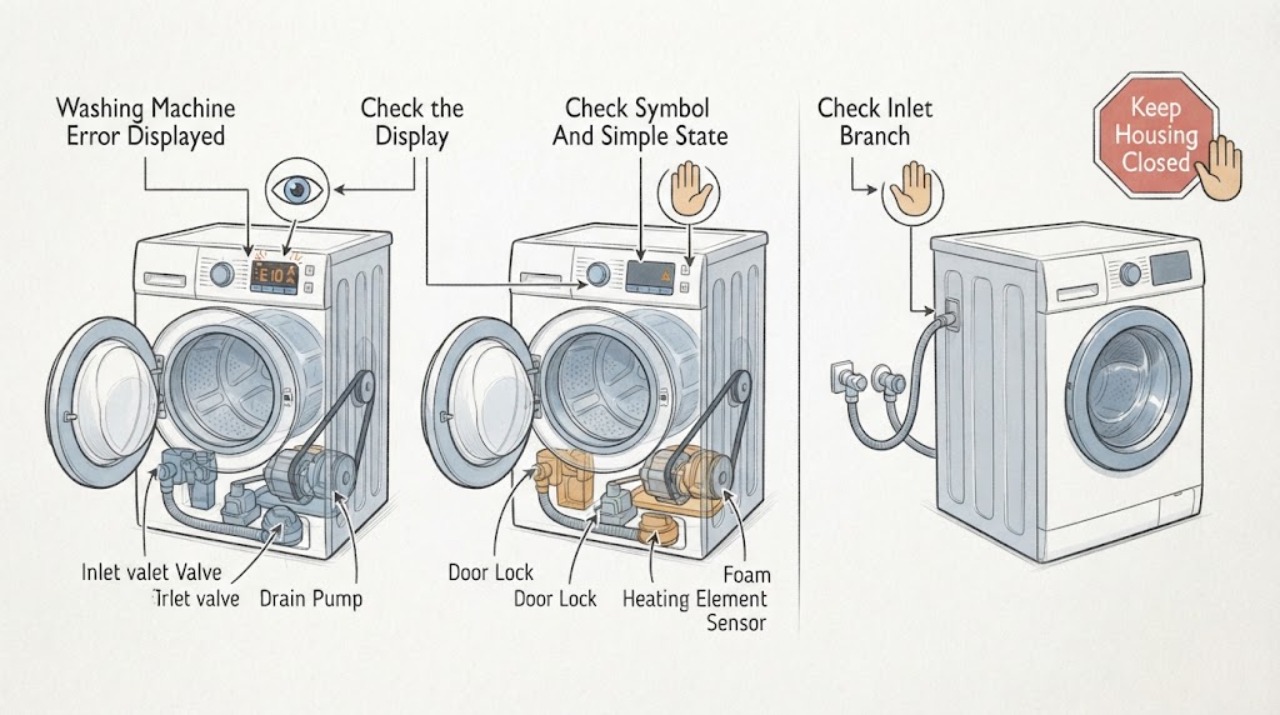
Work through in order
Diagnostic checks
Use only checks that match the exact appliance or system and its official guide.
-
Check 1
Stop the programme if it is safe to do so and record the complete Siemens model number, exact code or symbol, flashing pattern, programme, and stage when it appeared; do not guess from a partial display.
Expected result: The display shows a specific E or F message, key/tap/door/foam symbol, alternating end message, or an unlisted code; note whether it occurred before fill, during wash, heating, drain, or spin.
Next step: Use the exact model manual and the Siemens error list to identify the matching branch. If the code is incomplete, unlisted, or keeps returning, keep the machine off and arrange service rather than guessing.
Stop if: Stop immediately for smoke, burning odor, sparks, hot electrical parts, active leaking, water near electrics, violent movement, or repeated power trips.
Why this matters
Why: The message is the starting branch. Siemens assigns different meanings to inlet, drain, door, foam, balance, leak, heat, pressure, and sensor conditions, so a similar-looking code from another model can lead to the wrong action.
-
Check 2
With the machine stable and dry, compare a visible key, tap, door, foam, or start symbol with the exact Siemens manual and note whether the display is reporting a lock, supply, drain, foam, or programme state.
Expected result: A key symbol indicates child lock in the Siemens guide; a tap symbol points to water pressure or a kinked or blocked supply hose; a door symbol or E16/F16/E34 points to door locking; a foam symbol points to excess detergent or foam.
Next step: Follow only the matching model instructions: check the visible door closure for trapped laundry, the external inlet hose and tap for a supply problem, or detergent usage for foam. Do not bypass the child lock or door interlock.
Stop if: Stop for a door that cannot close safely, hot water, water escaping, damaged hoses, a wet control area, or any need to bypass a lock or remove covers.
Why this matters
Why: These are different user-visible conditions, not one generic electronics fault. The symbol tells you which external observation is relevant and which actions do not belong in the diagnosis.
-
Check 3
For a tap symbol, E17/F17, or E29, inspect only the accessible water tap and inlet hose for an open supply, a kink, visible damage, or an obvious blockage; use the model instructions for any authorized filter cleaning.
Expected result: The tap has weak or no flow, the hose is kinked or damaged, the inlet filter is obstructed where the manual permits cleaning, or the supply appears normal and the code persists.
Next step: Correct only a clearly closed tap or accessible kink if safe, dry, and permitted; do not disconnect pressurized fittings unnecessarily. If the hose is damaged, the code returns, or water enters unexpectedly, close the tap and request service.
Stop if: Stop for an active leak, burst or cracked hose, uncontrolled water, water near an outlet or cord, or any need to open the inlet valve or machine cabinet.
Why this matters
Why: Siemens associates these messages with impaired water supply or inlet conditions. A normal-looking tap does not prove the inlet valve, sensor, or internal wiring is healthy.
-
Check 4
For E18/F18, E23, a drain symbol, or a programme stopped with water inside, first keep the machine stable and disconnect power only from a dry, safe control point; inspect the visible drain hose and surrounding floor without reaching into standing water or opening the pump cover.
Expected result: The drain hose is kinked or visibly blocked, water is in the base or on the floor, the pump area is wet, or the hose path appears clear but the code remains.
Next step: For a safe, dry, accessible hose issue, follow the model manual's drain guidance. For E23, active water, water in the base, or a persistent code, turn off the supply tap, keep the machine out of service, and request service; do not run another drain test.
Stop if: Stop for standing water near electrics, active leaking, a hot wash water hazard, a damaged hose, or any need to tilt, dismantle, or reach into the machine.
Why this matters
Why: Siemens links E18/F18 with a blocked or kinked drain path and E23 with leaking or water in the base. A visible hose issue is different from an internal pump, seal, sensor, or concealed leak.
-
Check 5
For a door code, foam symbol, or E32/E33 message, observe the cool, stopped machine: check only for laundry caught in the door, excessive visible foam, or an obviously uneven load, and do not force the door or restart a violent spin.
Expected result: The door is not latched, laundry is trapped, foam is excessive, or the drum load is uneven; alternatively the door, foam, and load look normal but the message returns.
Next step: Only when the machine is cool, stopped, and safe, remove a clearly trapped item, reduce detergent on a future load according to the manual, or redistribute the load as Siemens instructs. If the door will not lock, foam persists, or the code returns, request service.
Stop if: Stop for a locked door with hot water or pressure, broken glass or seal, uncontrolled foam or leaking, violent drum movement, metal grinding, or a need to bypass the interlock.
Why this matters
Why: Siemens identifies door-lock conditions, excess foam, and load imbalance as separate causes. E32 can be an unbalanced-load interruption rather than a failed motor, but a recurring code with a normal load needs diagnosis.
-
Check 6
For heating, sensor, pressure, motor, electronic, or unlisted codes, note the programme stage and make one model-approved power-off and restart only if the manual explicitly permits it and no water or electrical hazard is present.
Expected result: The code clears and the machine remains stable; or it returns, the machine does not heat or drain, the drum does not move, the display freezes, or power trips again.
Next step: If the code returns or the appliance behaves abnormally, leave it off and arrange qualified Siemens appliance service. Provide the exact code and stage; do not open the cabinet, test live parts, or repeat resets.
Stop if: Stop for repeat codes, no heat with an overheating warning, smoke, burning odor, sparks, repeated electrical trips, hot wiring, or any need for internal electrical or motor testing.
Why this matters
Why: Siemens lists some heating-time, sensor, pressure-sensor, and other faults as not user-correctable, and recurring messages require service. A cleared display does not prove the underlying fault is gone.
Use your observations
Decision map
Find the observation that best matches what you see, then follow the next safe action.
-
PATH 01Next step
What you see
E23, water in the base, active leaking, or water near the cord, outlet, or electrical parts is present.
Do this next
Turn off the supply tap immediately if it is safe to reach, keep clear of wet electrical areas, do not run or open the machine, and request qualified service.
-
PATH 02Next step
What you see
A tap symbol, E17/F17, or E29 points to water supply or inlet flow.
Do this next
Check the accessible tap and hose for flow, kinks, or visible damage as the model permits. If the code remains or the hose leaks, close the tap and request service.
-
PATH 03Next step
What you see
E18/F18 or a drain-related message appears and water remains in the appliance.
Do this next
Inspect only the visible drain path when dry and safe, following the exact manual. Persistent water, leakage, or a recurring code requires service without another drain test.
-
PATH 04Next step
What you see
A key, door, foam, or imbalance message appears, including E16/F16, E32, E33, or E34.
Do this next
Use the model guidance for child lock, door closure, detergent amount, or load redistribution only while the machine is stopped and safe. Do not force or bypass the door lock; recurring messages need service.
-
PATH 05Next step
What you see
A heating-time, unexpected-heating, pressure, sensor, motor, electronic, or unlisted code returns after the model-approved reset.
Do this next
Keep the machine off and arrange qualified service. Do not cross-reference another model's code or perform internal electrical, heating, motor, or sensor tests.
Helpful context
Understand the symptom
Read the message before touching the machine
A Siemens display can show a letter-and-number code, a key, tap, door, or foam symbol, or a status light. The same broad symptom can involve filling, draining, locking, heating, balance, or a sensor, and the meaning can vary by model family. Record exactly what is visible, including punctuation, a leading letter, a slash, alternating text, and whether it appeared before or during a particular stage. A photograph prevents a nearly identical code from being remembered incorrectly.
Use a code as a decision point, not a parts diagnosis
Siemens' list maps some messages to a user-visible check, such as a door that is not locked, a kinked inlet or drain hose, excess foam, or an uneven load. Other messages point to heating, pressure, sensor, or electronic faults that are not ordinary cleaning tasks. Do not buy a pump, lock, valve, heater, or board from the code alone; confirm the model and the technician's diagnosis first.
Water and electricity change the safe stopping point
If the display accompanies active leaking or water in the base, turn off the supply tap as Siemens directs and keep clear of wet electrical areas. Do not reach through standing water, remove covers, or test an appliance that has water near its cord, outlet, or electrical parts. If there is smoke, burning odor, arcing, a hot plug, or repeated electrical tripping, stop without another reset and obtain qualified help.
A reset is limited and model dependent
The Siemens error guide gives short power-off and restart instructions for some messages and says recurring messages need service. A reset can clear a transient state; it cannot prove that a pump, inlet, heater, lock, motor, or control is healthy. Follow the exact manual, use one safe reset at most, and stop if the message returns, the machine trips power, or the symptom becomes unsafe.
Give the technician the event sequence
A useful handoff includes the full model number, exact display text or symbol, programme, stage, water level, door state, supply and drain observations, detergent amount, load condition, and what happened after any model-approved reset. Note whether the message appeared once or returned immediately. Do not reproduce a leak, violent spin, electrical trip, heating fault, or unexplained noise just to create a recording.
Safety boundary
Stop conditions
- Active leaking, water in the base, standing water near an outlet or cord, or water contacting electrical parts: close the supply tap if safely reachable, keep clear, and do not run or open the machine.
- Smoke, burning odor, sparks, arcing, hot wiring or plug, repeated electrical trips, or a machine that overheats: stop immediately and obtain qualified emergency or appliance help.
- Hot water, a locked door with water inside, broken glass or seal, violent drum movement, metal grinding, or uncontrolled foam: stop and do not force the door or restart the programme.
- Do not bypass a door or child lock, tilt or dismantle the machine, probe live wiring, open the cabinet, remove a pump or valve, or repeat resets to make a code disappear.
- A code that returns, an unlisted code, or a heating, sensor, pressure, motor, or electronic fault that the exact manual does not resolve is a service boundary.
Only after diagnosis
Potential parts
- door lock or door seal
Only consider this category if the exact code, visible door condition, and qualified diagnosis confirm a lock or seal fault after safe checks.
Confirm the complete Siemens model and approved fit information; do not bypass the interlock or substitute an unverified seal. - inlet valve or supply component
Only applicable after a model-specific inlet code and a technician confirm that the external tap and hose are not the cause.
Verify model compatibility and water-safety requirements before any replacement; do not open pressurized or energized connections. - drain pump or drain component
Only applicable after a recurring drain code and qualified diagnosis of an internal drain fault, not merely because water remains once.
Confirm the complete model and diagnosis before ordering; internal pump work should be performed by qualified service.
When checks do not resolve it
Need a professional?
Request Siemens or qualified appliance service when a code returns after the exact model procedure, is not listed for the model, or points to heating, pressure, sensor, motor, electronic, door-lock, or internal leak faults. Stop immediately and use qualified emergency help for smoke, burning odor, arcing, repeated electrical trips, or unsafe water contact.
Safety scope: This article covers only exact-code identification and ordinary-access checks described by the model manual. Do not bypass locks, open panels, probe live parts, tilt the machine, remove pump or valve covers, or run a wet or electrically abnormal appliance.
Common questions
FAQ
Can I use a Siemens washing-machine error list from another model?
Use the exact model manual first. Siemens publishes common symbols and codes, but display formats and remedies can differ. Record the complete code and model before choosing a branch.
What does E23 mean on a Siemens washing machine?
The opened Siemens guide associates E23 with a leak or water in the base and says to turn off the supply tap immediately when a leak is suspected. Keep the machine out of service if water is near electrical parts and arrange service.
Is E32 always a failed motor?
No. Siemens describes E32 as an unbalanced-load interruption in the relevant guide. Redistribute a safe, cool load only as the model permits; a recurring message, violent movement, or grinding needs service.
What should I do for E18 or F18?
Siemens associates E18/F18 with a blocked or kinked drain path. Inspect only the accessible hose as the exact manual allows. If water remains, the code returns, or there is leaking or electrical exposure, stop and request service.
Should I reset a Siemens washing machine after an error appears?
Only when the machine is stable, dry, hazard-free, and the exact manual lists a reset for that message. Make one documented attempt at most. A returning or unlisted code is a service boundary, not a reason to keep resetting.
Read the exact guide
Official sources
- Error codes and symbolsSiemens Home Appliances · Siemens official washing-machine error and symbol guide with code meanings, safe user checks, and service boundaries
- Support for Siemens washing machinesSiemens Home Appliances · Siemens official support hub listing error-display, filling, draining, leaking, heating, door, foam, spin, and electrical troubleshooting categories
Community feedback
Share a repair observation
Share a plain-text repair observation. Accepted observations are published automatically; this page may take a moment to update.