
On this page
Start here
Quick answer
When a Speed Queen dryer displays an error, stop guessing from the code alone. Photograph or write the exact characters, note the model and serial number, identify whether the machine is residential or commercial and gas or electric, and record the cycle stage and symptoms. Use the manual for that exact model: Speed Queen's document portal is model-number based, and its published guides differ by product family. As one model-specific example, an older Speed Queen guide says `Er, ro` means the motor overload protector cycled and directs the owner to clear it with Start/Pause once, then remove the dryer from use if the code returns; that meaning must not be transferred to another model. Before any reset, stop for gas odor, smoke, a burning smell, unusual heat, arcing, a repeated trip, or a wet appliance. If the code returns or the dryer has a safety symptom, arrange authorized service rather than opening panels or testing live parts.
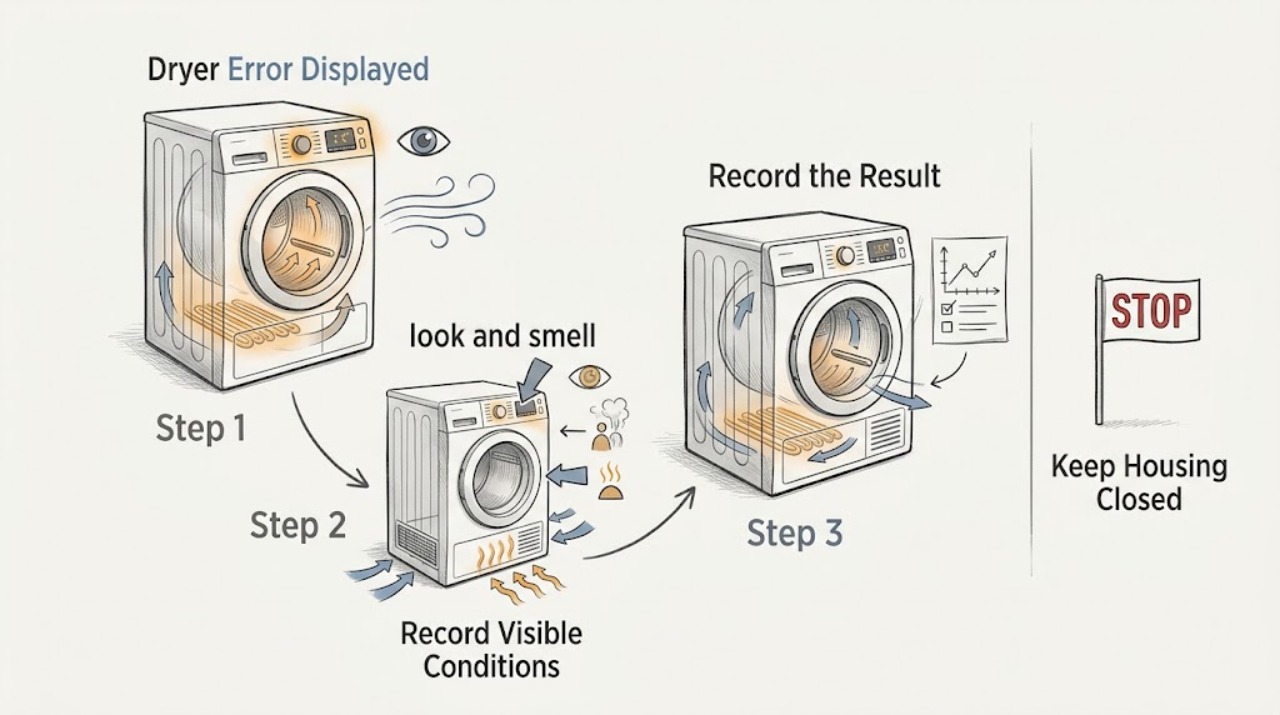
Work through in order
Diagnostic checks
Use only checks that match the exact appliance or system and its official guide.
-
Check 1
Before clearing the display or restarting the dryer, look and smell from a safe position for gas odor or hissing, smoke, burning or melted material, an unusually hot cabinet, sparks or arcing, a wet electrical area, damaged cord, or a breaker that has tripped again.
Expected result: Any gas, smoke, heat-damage, water, electrical, or repeated-trip warning is present.
Next step: Stop using the dryer. For suspected gas, leave without operating switches or creating a flame and contact local gas or emergency services from outside. For smoke, arcing, water, or electrical damage, keep clear and arrange qualified help.
Stop if: Do not press reset repeatedly, touch wet equipment, run a hot cycle, or remove a panel.
Why this matters
Why: The immediate issue is a gas, fire, shock, or water-ingress hazard, not an ordinary code interpretation problem.
-
Check 2
Write the error exactly as displayed, including whether characters alternate, and record the full model number, serial number, residential or commercial status, gas or electric type, selected program, and the point in the cycle when it appeared.
Expected result: The identity and operating context are complete, or the model, serial, or code cannot be read.
Next step: If the identity is incomplete, stop at visible checks and obtain the rating-plate information before interpreting the code. Use the exact model in Speed Queen's manual portal and keep the original display record for service.
Why this matters
Why: Speed Queen documentation and code meanings are model-dependent; a code from one control platform cannot safely be decoded using another guide.
-
Check 3
Open the exact model's user guide and compare the recorded code character-for-character; check the guide's stated product scope before applying its meaning, particularly if the dryer is commercial, stacked, or an older control version.
Expected result: The code is defined for this exact model, is defined only for a different model family, or is not found.
Next step: Follow only the documented user action for the exact model. If no match exists, preserve the display photo and arrange authorized service with the model, serial, code, and cycle stage.
Why this matters
Why: A documented code can provide a model-specific next step. An unmatched code must remain unresolved rather than being assigned a generic component or fault.
-
Check 4
Check the door, cycle, and temperature selection from the control panel: make sure the loading door is fully closed, the cycle is not in Cooling or Cool Tumble, Extended is not the only active phase, and the temperature is not set to No Heat when the symptom includes no heat.
Expected result: The code clears and the dryer runs, or the door/selection is normal but the code or symptom remains.
Next step: Correct only a clearly misselected setting using the exact guide, then observe one supervised cycle. If the code returns or the dryer remains abnormal, stop and arrange service.
Why this matters
Why: Speed Queen's opened guide distinguishes a heat portion from cooling and extended phases and lists no-heat selection as a cause of a dryer that does not heat; these controls still vary by model.
-
Check 5
With the dryer off and cool, clean and replace the lint filter, then look at the accessible exhaust hose and exterior weather hood for a visible kink, blockage, crushed section, or flap that cannot move freely; do not disassemble the dryer.
Expected result: The filter or external exhaust path is obstructed, or the path is clear but the code, overheating, or poor heating remains.
Next step: Correct only an accessible lint or hose obstruction with the dryer disconnected as directed by the manual. If the code persists, the cabinet overheats, or internal cleaning is needed, stop using the dryer and request qualified service.
Stop if: Do not operate without the lint filter, reach into the exhaust housing, remove panels, or use a heat cycle to test a suspected airflow hazard.
Why this matters
Why: Restricted airflow can contribute to heat, drying, or safety faults. Speed Queen's guide treats exhaust inspection and lint-filter maintenance as routine, while tool-based disassembly is qualified-service work.
-
Check 6
For an electric model only, inspect the accessible laundry-room breaker or fuses once and compare the result with the exact installation guide; for a gas model only, confirm the user-accessible equipment and main gas valve state without moving the dryer or touching gas tubing.
Expected result: A protective device is open, the gas valve is closed, the supply appears normal, or the code returns after a normal supply state.
Next step: Make at most one safe correction when there is no hazard and the exact guide permits it. If a breaker trips again, the gas supply cannot be confirmed, or the code remains, leave the dryer off and arrange qualified service.
Stop if: Do not test live terminals, alter wiring, move the dryer to inspect a gas connection, or relight or adjust gas components.
Why this matters
Why: Electric dryers may use more than one supply protection device, while gas dryers still need electrical power and an open gas supply. A normal accessible supply does not rule out an internal fault.
-
Check 7
If the exact manual documents a user reset for the recorded code, perform that reset once with the dryer empty and cool, then observe whether the same code returns during a short supervised cycle; do not reset an internal limit or protection device unless the model's instructions explicitly make it a user step.
Expected result: The display clears and stays clear, or the same code returns, a new code appears, or abnormal heat, smell, noise, or electrical behavior occurs.
Next step: If the code returns or any abnormal symptom appears, remove the dryer from use and arrange authorized service with the full record. A single model-specific example, `Er, ro`, is documented as a motor-overload condition in the opened guide and requires service if it returns.
Stop if: Do not repeatedly clear the code, bypass a thermal or door protection, or continue cycling a dryer that overheats or smells of burning.
Why this matters
Why: A one-time documented reset can clear a transient control state. A recurring code or safety symptom indicates an unresolved fault and should not be masked by repeated resets.
Use your observations
Decision map
Find the observation that best matches what you see, then follow the next safe action.
-
PATH 01Next step
What you see
Gas odor or hissing, smoke, burning smell, arcing, wet electrical area, abnormal heat, or repeated breaker trip
Do this next
Stop immediately. Leave for suspected gas without operating switches and seek gas or emergency help from outside; otherwise keep clear and obtain qualified appliance or electrical service.
-
PATH 02Next step
What you see
The model, serial number, product class, fuel type, or exact display cannot be established
Do this next
Do not decode the code from a different guide. Photograph the display and rating plate and arrange support using the exact identity.
-
PATH 03Next step
What you see
The code is documented for the exact model and has a user reset
Do this next
Follow that reset once only and observe a short supervised cycle; if the code returns, remove the dryer from use and request service.
-
PATH 04Next step
What you see
The dryer is in Cooling, Cool Tumble, Extended, or No Heat rather than a heating phase
Do this next
Select a model-approved heated cycle and temperature, then observe one cycle; persistent errors or no heat require service.
-
PATH 05Next step
What you see
The lint filter or accessible exhaust path is blocked or kinked
Do this next
Clean or correct only the accessible path with the dryer off and cool. If internal cleaning or overheating remains, stop and call a qualified service person.
-
PATH 06Next step
What you see
The code is unknown, recurs, or appears with poor heating, motor symptoms, or another abnormal behavior
Do this next
Remove the dryer from use and provide service with the display record, model, serial, product class, fuel type, cycle stage, and checks already performed.
Helpful context
Understand the symptom
An error display is an identity problem first
The same-looking dryer family can have different controls and codes across generations, fuel types, residential products, stacked units, and commercial equipment. Record the complete display exactly, including punctuation or alternating characters, before pressing anything. Keep the model and serial information with the record; Speed Queen's documentation portal uses the model number and its support site has separate residential and commercial paths.
What can be checked without opening the dryer
User-level checks are limited to the display, door, cycle and temperature selection, lint filter, visible exhaust path, accessible breaker or fuse, and safe observations. A guide may mention a reset, but it does not authorize removing a panel, measuring live voltage, opening a gas path, or replacing a component. A recurring code is evidence for service, not proof of a particular part.
Only after diagnosis
Potential parts
- control board or display control
Only consider this category after the exact model's recurring code or qualified testing points to the control system; an error display alone does not identify a board.
Confirm the full model and serial information and manufacturer fit data before ordering; control replacement is electrical service work. - temperature sensor or limit thermostat
Only consider this category if model-specific diagnostics or qualified testing identify a temperature-feedback or limit fault after airflow and settings are checked.
Do not reset or bypass a thermal device based on a generic code; confirm exact model compatibility and have qualified personnel install it. - heating element or gas ignition component
Only consider the applicable category after confirming whether the dryer is electric or gas and qualified diagnosis identifies a heating or ignition fault.
Electric and gas heating parts are not interchangeable; confirm exact model, fuel type, and approved fit information before any service. - door switch
Only consider this category if the exact model's door-sensing behavior and qualified testing point to a failed switch rather than a misclosed or obstructed door.
Confirm exact model compatibility and do not bypass the door interlock.
When checks do not resolve it
Need a professional?
Have this ready
- The full model and serial numbers, residential or commercial product class, gas or electric type, exact code including alternating characters, selected cycle and temperature, cycle stage, door and airflow observations, and what happened after any documented single reset.
Common questions
FAQ
Can I use another Speed Queen manual to interpret the error code?
No. Record the exact code, model, serial number, product class, fuel type, and cycle stage, then use the matching model documentation. A code such as `Er, ro` is only an example from one opened residential guide and is not a universal Speed Queen meaning.
What should I check if the error appears with no heat?
Check the model-approved cycle and temperature, the cooling or no-heat state, lint filter and accessible exhaust path, and the applicable electric supply or gas valve without opening the dryer. A recurring code, overheating, burning smell, gas odor, or another abnormal symptom requires service.
When should I stop resetting a Speed Queen dryer?
Follow a documented user reset once only. Stop if the code returns, the cabinet overheats, the dryer smells of burning, smoke or arcing appears, a breaker trips again, or gas is suspected; leave a suspected gas situation without operating switches and seek help from outside.
Read the exact guide
Official sources
- User's GuideSpeed Queen by Alliance Laundry Systems · Model-specific guide only; it covers a particular electric/gas residential dryer family and must not be used to decode another platform's error code.
- Speed Queen | SupportSpeed Queen by Alliance Laundry Systems · Official support hub with product support and service paths; use the model and serial information for the applicable route.
- CPSC Urges Flood Victims to Take Steps to Prevent CO Poisoning, Electrocution, Explosion and FiresU.S. Consumer Product Safety Commission · General safety guidance: do not touch wet plugged-in equipment and leave immediately if gas is smelled or heard leaking.
- Speed Queen | Manuals & DownloadsSpeed Queen by Alliance Laundry Systems · Official documentation portal; the model number is required and residential and commercial products use separate document paths.
Community feedback
Share a repair observation
Share a plain-text repair observation. Accepted observations are published automatically; this page may take a moment to update.