
On this page
Start here
Quick answer
Treat a Speed Queen washer error as a model-specific diagnostic message, not as a universal code list. Photograph the complete code or LED pattern, record the model and serial information, and note the cycle stage when it appeared. Use the Speed Queen manual for that exact model before clearing anything. Published Speed Queen guides show that different platforms use different messages: a front-load guide includes door, drain, fill, overflow, pressure, unbalanced-load, power-failure, and oversudsing states, while a top-load guide uses LED blink categories for board, water, drain, leak, and pressure faults. Make only safe external checks for a closed lid or door, visible hose kink, or load imbalance when the machine is dry and stable. Stop for a leak, water near electricity, smoke, burning smell, sparking, violent movement, or a repeated electrical trip, and use qualified service.
Before you begin
Safety first
- This article supports model identification and ordinary external observation only, plus one model-approved clear action when the washer is dry and free of hazards. It does not authorize internal electrical, water, motor, pump, lock, or control work.
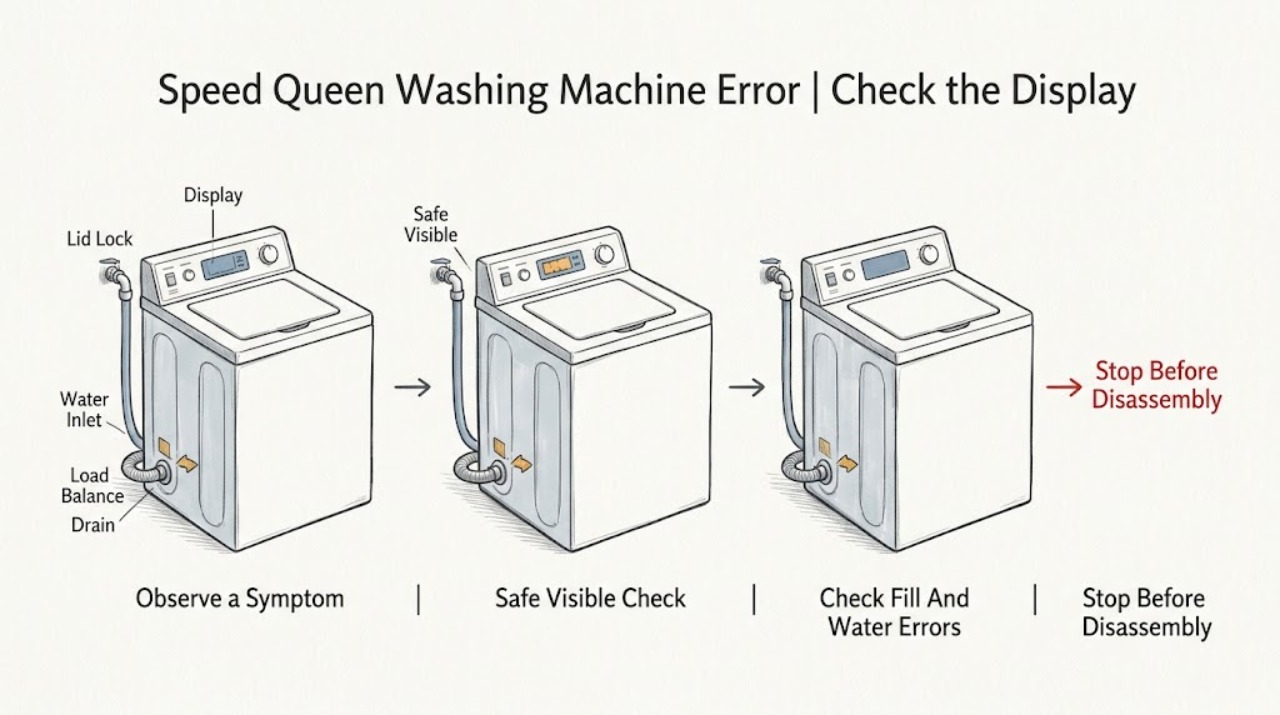
Work through in order
Diagnostic checks
Use only checks that match the exact appliance or system and its official guide.
-
Check 1
From a dry, stable position, photograph the entire Speed Queen display or LED panel and record the model number, serial information, selected cycle, cycle stage, load type, and what happened immediately before the message.
Expected result: Classify the indication as a complete digital code, a letter-and-number pair, a blinking LED pattern, a door or lid indicator, a water or drain indicator, or an unresponsive panel; count blink groups only as the manual describes.
Next step: Use the recorded model in Speed Queen's manual portal, then compare the complete code and stage with the exact guide before clearing or restarting the washer.
Stop if: Stop without touching the machine for a leak, water near electricity, smoke, burning smell, sparks, exposed wiring, a hot connection, or violent movement.
Why this matters
Why: The code family and exact model determine the applicable interpretation. A digital code from one front-load platform cannot be used to decode a different front-load, top-load, or stacked platform, and an LED pattern must not be guessed from its appearance.
-
Check 2
With the washer off and safe to approach, check only the visible door or lid, gasket or strike area, and control-lock indicator for an obstruction, caught clothing, an open latch, or an active lock; do not force the door or lid and do not reach into a moving or water-filled tub.
Expected result: Record whether the door or lid closes fully, a lock light or door message remains, controls accept input, and the exact guide identifies the message as a door-open, door-unlocked, door-not-locked, or control-lock state.
Next step: Remove only a visibly caught item or modest excess load without force, close the door or lid as the manual shows, and use the model's documented clear or Start control once. Request service if the indication remains.
Stop if: Do not pry the door or lid, bridge the switch, insert tools into the lock, or attempt to open it against retained water or heat.
Why this matters
Why: A door or lid state can stop filling, tumbling, or spinning as a safety interlock. A persistent lock indication after the manual's permitted clearing action suggests latch, lock, alignment, or control service rather than a generic code reset.
-
Check 3
For a fill, no-water, or water-level indication, inspect from ordinary access whether the household hot and cold taps are open and the visible fill hoses are kinked, crushed, or leaking; do not loosen a hose or open an inlet assembly.
Expected result: Record whether both taps have expected household flow, hoses are visibly clear, water enters at all, the code is a digital fill or no-flow message, or the model reports a water or pressure LED category.
Next step: Correct only a clearly closed tap or safe visible hose bend, then follow the exact guide's single clearing step. Leave the washer off and request plumbing or appliance service for weak flow, leaks, overflow, or a returning indication.
Stop if: Do not disconnect a pressurized hose, clean a hidden screen, handle water near an outlet, or continue if water is escaping or the floor is unstable.
Why this matters
Why: A closed tap or visible hose problem can explain a fill indication. A normal visible supply with a returning fill, overflow, or pressure message can involve inlet screening, a valve, pressure sensing, or control and needs model-specific service; a code alone does not identify a part.
-
Check 4
For a drain, water-still-present, overflow, or leak indication, leave the washer off, observe the visible drain hose and receptacle for a kink or overflow, and note whether water is in the tub, under the appliance, or near the electrical connection; do not tilt the washer or open a pump trap without the exact manual and safe water conditions.
Expected result: Record whether water remains after the cycle, the drain path is visibly obstructed, the machine has overflowed, a leak is active, or the control reports a drain, water-drain, overflow, or water-leak category.
Next step: Close the water taps for an active leak, let hot water cool, and follow only the model-approved residual-water procedure. Request appliance service for inaccessible water, a leak, overflow, or a recurring drain indication.
Stop if: Do not open a hot or pressurized filter, reach into the pump, tilt or move the appliance, or reconnect power while water is near electrical parts.
Why this matters
Why: Retained water or a visible drain-path issue can explain a drain code, while a base leak, overflow, or pressure indication can require service. A top-load LED category and a front-load digital code are not interchangeable, and water near electricity is an immediate stop.
-
Check 5
For an unbalanced-load, oversudsing, pause, or cycle-stage indication, leave the controls and load unchanged long enough to identify the exact state, then inspect only the visible load distribution and detergent amount when the machine is stopped and safe.
Expected result: Record whether the drum or tub is tightly packed, a single heavy item is present, the load is visibly uneven, excess suds are present, or the manual describes the state as a normal pause, limited spin, or suds-removal routine.
Next step: Redistribute or reduce the load and use only the model's documented clear or spin action once. Use the manual's detergent guidance and request service when the code returns with a correctly loaded machine.
Stop if: Do not reach into a moving tub, add chemicals to counter suds, force a spin, or continue after violent movement, burning odor, smoke, or electrical trouble.
Why this matters
Why: An unbalanced load can limit spin, and oversudsing can extend or alter a cycle, but neither explains every error. A normal pause should not be mistaken for control failure; a recurring load or suds indication after the model's permitted correction needs further service guidance.
-
Check 6
Apply only the exact manual's clearing instruction for the captured code, such as the documented Power or Cancel control or a stated short power-off interval, and make no more than one normal restart when the washer is dry and free of hazard symptoms.
Expected result: Record whether the code clears, returns unchanged, changes to another code, the controls stay locked, or the washer trips protection or shows a new leak, odor, heat, or movement problem.
Next step: Leave the washer off and give the model, serial information, full code or blink pattern, cycle stage, photos, and clearing result to Speed Queen or qualified service.
Stop if: Do not repeat resets, start empty test cycles, enter service modes, open panels, bypass safety switches, or keep restoring a tripping circuit.
Why this matters
Why: A cleared one-off state does not prove the underlying cause is gone. A recurring, unlisted, board, pressure, leak, overflow, or electrical indication needs the exact model and qualified diagnosis; a new hazard supersedes all code handling.
Use your observations
Decision map
Find the observation that best matches what you see, then follow the next safe action.
-
PATH 01Safety boundary
What you see
A complete digital code is visible and the model, serial information, cycle, and stage have been recorded.
Do this next
Use the Speed Queen manual portal and follow only the matching model table, then perform at most the documented single clear action when safe.
Why this path and its safety boundary
Why it matters: The exact model guide controls the code meaning and clearing method; similar-looking messages can represent different faults on different platforms.
Safety stop: Stop for a leak, water near electricity, smoke, burning smell, sparks, violent movement, or a repeated electrical trip.
-
PATH 02Safety boundary
What you see
The machine uses LED blinks, the pattern is incomplete, or the code is not listed in the identified manual.
Do this next
Record the blink sequence exactly as the manual defines it, retrieve the correct guide by model, and request service for an unlisted or recurring indication.
Why this path and its safety boundary
Why it matters: A guessed translation can send the diagnosis down the wrong path; top-load guides group board, water, drain, leak, and pressure states differently from digital front-load tables.
Safety stop: Do not infer a code from a different model or keep cycling the machine to make the lights repeat.
-
PATH 03Safety boundary
What you see
The code or indicator identifies a door open, door unlocked, door not locked, lid, or control-lock condition.
Do this next
Check visible closure and caught clothing without force, use the exact model clear or lock-control instruction once, and arrange service for a persistent indication.
Why this path and its safety boundary
Why it matters: The safety interlock may be preventing fill, tumble, spin, or programme progress; a latch or control fault remains possible if the visible closure is correct.
Safety stop: Do not pry, bridge, or defeat a door or lid switch, and do not force access with water in the tub.
-
PATH 04Safety boundary
What you see
The model-specific table identifies a fill, no-water, pressure, drain, water-present, overflow, or leak state.
Do this next
Perform only safe visible tap, hose, drain-receptacle, and water-location observations. Close taps for an active leak and request plumbing or appliance service for persistent, inaccessible, or unsafe conditions.
Why this path and its safety boundary
Why it matters: The next decision is supply versus drain versus water-level sensing, but a code does not establish which valve, pump, sensor, or board has failed.
Safety stop: Do not disconnect hoses, open a hot filter, tilt the washer, or reconnect power near standing water.
-
PATH 05Safety boundary
What you see
The guide identifies an unbalanced load, oversudsing, limited spin, or normal cycle pause.
Do this next
Redistribute or reduce the load, follow the detergent and clear instructions for the exact model, and make one permitted restart when safe.
Why this path and its safety boundary
Why it matters: The control may be protecting the washer or running a normal routine rather than failing; recurring states still need the model's instructions.
Safety stop: Do not reach into a moving tub, add mixed chemicals, force spin, or continue after violent movement, smoke, odor, or heat.
-
PATH 06Safety boundary
What you see
The code or LED category identifies a board, communication, pressure-sensor, repeated power, sparking, or electrical-trip condition.
Do this next
Leave the washer disconnected when safe, preserve the code and event stage, and request qualified appliance service or an electrician for the supply fault.
Why this path and its safety boundary
Why it matters: This is beyond a generic user reset; internal controls, sensing, wiring, or water-related electrical damage may be involved.
Safety stop: Do not open panels, test live parts, replace internal fuses, bypass protection, or repeatedly restore power.
Helpful context
Understand the symptom
The complete code and model matter more than the word error
Speed Queen uses both digital messages and LED blink patterns across different washer families. A display such as Er, dL, Er, FL, Er, dr, Er, PS, Er, ub, PF, or Er, SL belongs to the guide for a particular platform; a top-load machine may instead identify a water, board, leak, or drain category by the number of blinks. Do not transfer a meaning or reset interval from another model. Capture the full code, indicators, model, serial information, cycle, and stage first.
Use the manual's action and clearing method
The official Speed Queen manual portal searches by model number. Some published guides tell the owner to clear a state with the Power or Cancel control, an open door, or a short unplug interval, while other faults direct the owner to service. These are model-specific examples, not a universal reset recipe. If the washer is wet, leaking, hot, sparking, or repeatedly trips protection, do not perform a reset or start another cycle.
Separate door, water, drain, load, and control branches
A door or lid code can prevent a safe start; a fill code points toward supply, hose, or inlet screening; a drain or overflow code points toward retained water and the drain path; an unbalanced-load code can limit spin; and a pressure, board, or communication indication may need service. The same visible symptom can have different meanings on top-load and front-load platforms, so the model-specific table controls.
Electrical and water hazards end user diagnosis
Do not continue testing a washer that leaks, has water at an electrical connection, smells burned, sparks, moves violently, or trips a breaker or other protection device. From a dry safe position, leave the machine off and isolate water or power only when it can be done without touching wet or damaged equipment. A qualified appliance professional or electrician should assess the cause before reuse.
Safety boundary
Stop conditions
- Stop immediately for an active leak, water near an electrical connection, smoke, burning smell, sparks, exposed wiring, a hot plug or outlet, violent movement, or a breaker or other protection device that trips again.
- Do not bypass a door or lid lock, open panels, test live parts, replace internal fuses, or enter a service mode.
- Do not disconnect a pressurized fill hose, open a hot or water-filled pump trap, tilt or move the washer, or reconnect power near standing water.
- Do not use a code or LED pattern from a different Speed Queen model, repeat resets, or run empty test cycles to force a message to clear.
- For a gas smell in the room or any combustion appliance nearby, leave the area and contact the local emergency or gas authority from a safe location; do not create an ignition source.
Only after diagnosis
Potential parts
- door or lid lock assembly
Consider this category only when the exact model guide and qualified diagnosis show that visible closure is correct but a lock or latch state persists.
Confirm the full model and manufacturer fit information; do not bypass the interlock or infer compatibility from a code alone. - water inlet valve or hose screen assembly
Consider this category only after safe visible supply checks and qualified diagnosis link a recurring fill or no-water state to the appliance assembly.
Confirm the exact model, water-protection arrangement, and manufacturer fit information; do not open a pressurized connection. - drain pump or drain assembly
Consider this category only when retained water or a recurring drain or overflow state remains and qualified service identifies the drain assembly.
Confirm the exact model and assembly configuration; residual or hot water may be present and this is not a blind user replacement. - control or pressure-sensing module
Consider this category only after a model-specific diagnosis identifies a board, communication, or pressure-sensing fault.
Confirm the exact model, revision, programming requirements, and manufacturer fit information; do not test or replace an energized module.
When checks do not resolve it
Need a professional?
Request Speed Queen or qualified appliance service when the model-specific code is unlisted or returns after its permitted single clearing action, a door or lid remains locked, a fill, drain, overflow, leak, pressure, board, or communication state persists, or the washer will not operate after safe external checks. Use an electrician for a dead or damaged outlet, hot connection, wiring concern, or repeated circuit trips. Provide the model, serial information, complete code or blink pattern, cycle and stage, photos, water location, and clearing result.
Safety scope: This article supports model identification and ordinary external observation only, plus one model-approved clear action when the washer is dry and free of hazards. It does not authorize internal electrical, water, motor, pump, lock, or control work.
Common questions
FAQ
How do I identify a Speed Queen washer error?
Record the full digital message or exact LED blink pattern, model and serial information, selected cycle, and stage. Use the official Speed Queen manual portal with the model number. Do not decode the indication from a different Speed Queen platform.
What does an Er, dL or door-related Speed Queen message mean?
On the published front-load guide used as an example, dL indicates a door-lock state, but the applicable meaning depends on the exact model and cycle. Check visible closure and caught clothing without force, follow that model's clearing instruction once, and request service if the state persists.
Can a fill, drain, or overflow code be fixed by a reset?
A reset may only be one part of the exact model's procedure. First record whether water is entering, remaining, or leaking, and inspect only visible taps, hoses, and the drain receptacle when safe. Do not open a hot filter, disconnect a pressurized hose, tilt the washer, or reconnect power near water.
Why does my Speed Queen washer show lights instead of a code?
Some Speed Queen top-load platforms use LED blink categories rather than a digital code. Count the pattern as the exact manual defines it and compare the model-specific table. Board, water, drain, overflow, pressure, and leak categories should not be inferred from a different model.
When should I stop troubleshooting a Speed Queen washer error?
Stop for a leak, water near electricity, smoke, burning smell, sparks, exposed wiring, violent movement, a hot connection, or a repeated electrical trip. Leave the washer off and isolate water or power only from a dry safe position when possible, then use qualified appliance or electrical service.
Read the exact guide
Official sources
- Speed Queen | Manuals & DownloadsSpeed Queen · Official Speed Queen support portal; the model number is required to retrieve the correct washer documentation.
- User's GuideSpeed Queen / Alliance Laundry Systems · One published Speed Queen top-load guide used as a platform example; LED counts and meanings must be read from the exact model guide.
- User's GuideSpeed Queen / Alliance Laundry Systems · One published Speed Queen front-load guide used as a model-family example; its codes and clearing steps must not be generalized to other models.
Community feedback
Share a repair observation
Share a plain-text repair observation. Accepted observations are published automatically; this page may take a moment to update.