
On this page
Start here
Quick answer
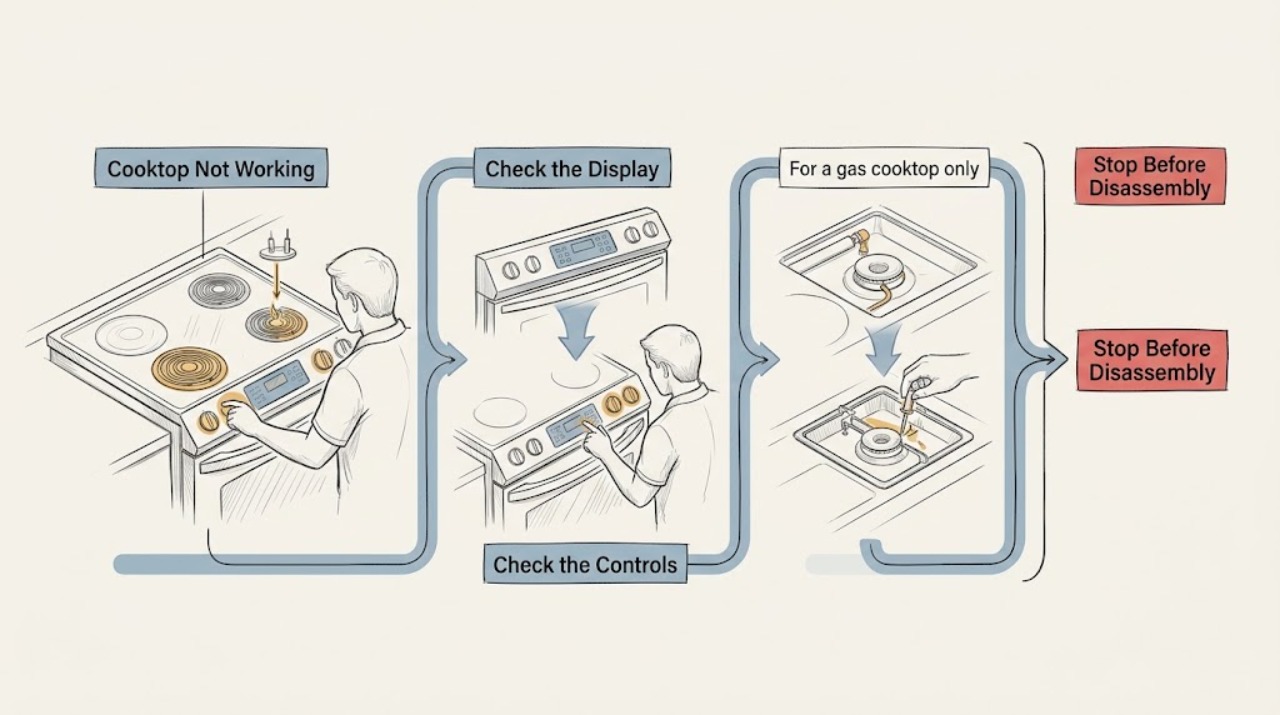
A Thermador cooktop that is not working must first be identified as gas, electric, induction, or an unknown configuration. Check only external controls and power: confirm the main switch and accessible breaker or fuse, note whether the display is dark or shows an error, and make sure the cooking zone or gas control is actually selected. For gas models, stop for gas odor, persistent clicking, or a flame that will not light; for electric or induction models, stop for broken glass, water entering controls, overheating, arcing, or a repeated breaker trip. Do not open the appliance or dismantle a gas or high-voltage cooktop. Use the exact Thermador manual and arrange authorized service when the safe checks do not restore operation.
Work through in order
Diagnostic checks
Use only checks that match the exact appliance or system and its official guide.
-
Check 1
Identify whether the cooktop is gas, conventional electric, or induction from its controls and manual. With the surface cool and safe, note whether the display is dark, shows an error, or responds but does not heat.
Expected result: The panel is dark, the panel shows an error, or the controls respond but the selected zone or burner does not heat.
Next step: Continue with the matching power, gas, electric, or induction check below and record the exact display text or code.
Why this matters
Why: A dark panel points toward power or main-switch issues; an error points to model-specific diagnostics; a responsive but cold zone requires a fuel- or zone-specific branch.
-
Check 2
Check the main switch and accessible household breaker or fuse without removing an electrical-panel cover. If there is no gas odor, water, smoke, or heat damage, confirm the appliance's accessible plug or connection condition only with the circuit safely disconnected.
Expected result: The main switch is off, a fuse or breaker has tripped, or the supply appears normal but the cooktop remains dark or unresponsive.
Next step: Correct only an obvious external switch or supply state once. If the breaker trips again or the cooktop remains dead, leave it de-energized and call an electrician or authorized servicer.
Why this matters
Why: A supply interruption can stop every zone, while normal power with no response suggests a cooktop control or internal fault; a breaker that trips again can indicate overload or short-circuit protection.
-
Check 3
For a gas cooktop only, and only when there is no gas odor, confirm the selected knob is fully in the intended ignition position and that the burner cap and burner head are correctly seated and dry after cooling. Do not open the gas line or regulator.
Expected result: The burner cap is misaligned or wet, the igniter is damp or dirty, the gas supply is off, or the burner still clicks without lighting.
Next step: Turn the control fully off. After the appliance is cool, perform only the manual-approved external drying or cleaning; if clicking persists, stop and arrange authorized service.
Why this matters
Why: Thermador identifies cap position, moisture, igniter condition, gas supply, and drafts as causes of ignition or intermittent-sparking problems, but persistent clicking can require service.
-
Check 4
For a conventional electric cooktop, select one zone and confirm the control is on while keeping hands and cookware clear of a suspected damaged surface. Do not touch or remove the element, and do not continue if the glass is cracked or the zone is visibly arcing.
Expected result: The indicator or element remains completely cold, an error appears, or the glass or wiring shows damage.
Next step: Turn the cooktop off and disconnect the circuit if safe. Keep it out of use and call an authorized servicer or electrician for damage, an error, or an unresolved cold zone.
Why this matters
Why: A single cold zone with power can indicate a zone or control fault; a damaged surface or arcing is a safety boundary rather than a cleaning or reset issue.
-
Check 5
For an induction cooktop, remove cookware from the control area and note the exact error code or flashing indicator. Check only the model manual for a documented response such as allowing an overheated zone to cool or correcting cookware placement; do not place cookware on a visibly damaged surface.
Expected result: The display identifies overheating, hot cookware near controls, demo mode, incorrect supply voltage, an extended time limit, or an unlisted fault.
Next step: Remove the heat source and let the appliance cool when the manual says to do so. If the code returns, the glass is cracked, water entered the controls, or the code is unlisted, keep the cooktop off and call service.
Why this matters
Why: Thermador uses different codes for thermal protection, demo mode, voltage, and time limits; a code that returns or is not listed requires support rather than guessed parts.
-
Check 6
Inspect the surface and controls from outside for spilled water, a cracked glass panel, wet or stuck touch controls, smoke, burning odor, scorch marks, or unusual buzzing. Do not use liquids, tools, or a scraper near energized controls, and do not run a gas burner to dry the appliance.
Expected result: Water has entered the controls, glass is cracked, a control is stuck, or there is smoke, odor, heat damage, buzzing, or arcing.
Next step: Turn the cooktop off, disconnect power only if safe, keep gas off if applicable, and arrange qualified appliance or electrical service. Use emergency services for smoke or fire.
Why this matters
Why: Moisture, mechanical damage, and electrical warning signs can make further operation unsafe and can damage controls or expose live parts.
-
Check 7
Record the energy type, model number, display code, affected zone or burner, breaker behavior, control response, and whether the problem began after cleaning or a spill. Use Thermador's model-specific manual and authorized service route before considering any component replacement.
Expected result: The cooktop remains partly or completely nonfunctional after the matching external checks, or the manual does not resolve the code.
Next step: Leave the cooktop out of use and provide the recorded observations to an authorized Thermador servicer or qualified electrician/gas professional.
Why this matters
Why: The remaining possibilities include a concealed control, heating element, induction power module, ignition, wiring, gas, or safety fault that cannot be safely isolated from the outside.
Use your observations
Decision map
Find the observation that best matches what you see, then follow the next safe action.
-
PATH 01Next step
What you see
Every control and zone is dark, and the breaker, fuse, or main switch is off.
Do this next
Correct the obvious external state once; if it trips again or the cooktop remains dead, call an electrician or authorized servicer.
Why this path and its safety boundary
Why it matters: The first issue is an external power or main-switch interruption.
-
PATH 02Next step
What you see
The controls are powered but a zone or burner remains cold.
Do this next
Use the matching gas, electric, or induction check and the exact manual; do not interchange procedures between energy types.
Why this path and its safety boundary
Why it matters: A zone-specific heating, induction, ignition, cookware, or control branch is involved.
-
PATH 03Next step
What you see
A gas burner clicks without lighting, keeps sparking, or has an uneven flame.
Do this next
Turn the knob off, stop repeated attempts, and call authorized service if the safe external drying or positioning check does not correct it.
Why this path and its safety boundary
Why it matters: Cap position, moisture, igniter condition, draft, gas supply, or a service fault may be involved.
-
PATH 04Next step
What you see
An induction display shows a listed thermal, demo, voltage, cookware, or time-limit condition.
Do this next
Follow only the listed manual action, such as removing heat from controls or allowing the zone to cool; call service for a returning or unlisted code.
Why this path and its safety boundary
Why it matters: The cooktop may be protecting itself or reporting a model-specific operating state.
-
PATH 05Next step
What you see
There is gas odor, persistent sparking, cracked glass, water in controls, smoke, arcing, abnormal heat, or a repeated breaker trip.
Do this next
Stop operation, disconnect power or gas only if safe, keep clear, and call qualified service or emergency responders for smoke or fire.
Why this path and its safety boundary
Why it matters: The issue has crossed the safety boundary.
Helpful context
Understand the symptom
“Not working” is not one diagnosis on a Thermador cooktop. A completely dark control panel, a powered panel with no heat, a gas burner that clicks without a flame, and an induction zone that shows an error each point to a different branch. Start by identifying the energy type and the exact observation; do not assume that a gas burner procedure applies to an induction surface or vice versa.
Keep checks external and stop before removing the glass, control panel, burner base, or wiring. Thermador's own troubleshooting pages direct users to manuals and service for model-specific faults. A cooktop with gas odor, persistent sparking, cracked glass, liquid in the controls, smoke, arcing, overheating, or a repeated trip is not a reset-and-retry situation.
When checks do not resolve it
Need a professional?
Call an authorized Thermador servicer or qualified electrician/gas professional when the cooktop remains nonfunctional after the correct external checks, an error code returns, a breaker trips again, or a zone or burner remains cold. Stop immediately for gas odor, persistent sparking, cracked glass, water in controls, smoke, arcing, abnormal heat, or a burning odor.
Common questions
FAQ
Why is my Thermador cooktop completely dead?
Check the main switch and accessible breaker or fuse once, without opening a panel. If power is available but the cooktop remains dark, or the breaker trips again, leave it off and call an electrician or authorized servicer.
What should I do if a Thermador gas burner keeps clicking?
Turn the knob fully off and stop repeated ignition attempts. After the cooktop is cool and there is no gas odor, check only the manual-approved external cap and igniter position or moisture. Persistent clicking, sparking, or gas odor requires qualified service.
What does an error code mean on a Thermador induction cooktop?
It depends on the exact code and model. Thermador lists separate responses for overheating, hot cookware near controls, demo mode, supply voltage, and automatic time limitation. Follow only the listed manual action; call support for an unlisted or returning code.
Read the exact guide
Official sources
- Troubleshooting | Gas Cooktops & Rangetops Support | ThermadorThermador · Thermador gas cooktop troubleshooting and gas safety
- Troubleshooting | Electric Cooktops Support | ThermadorThermador · Thermador electric cooktop troubleshooting
- Cleaning & Care | Gas Cooktops & Rangetops Support | ThermadorThermador · Thermador gas cooktop burner and igniter care
- Error Codes | Induction Cooktops Support | ThermadorThermador · Thermador induction cooktop error and protection states
- Troubleshooting| Ranges Support| ThermadorThermador · Thermador appliance troubleshooting routing
- Cleaning & Care - How to Remove Food Debris | Electric Cooktops Support | ThermadorThermador · Thermador electric cooktop surface safety and cleaning
Community feedback
Share a repair observation
Share a plain-text repair observation. Accepted observations are published automatically; this page may take a moment to update.