
On this page
Start here
Quick answer
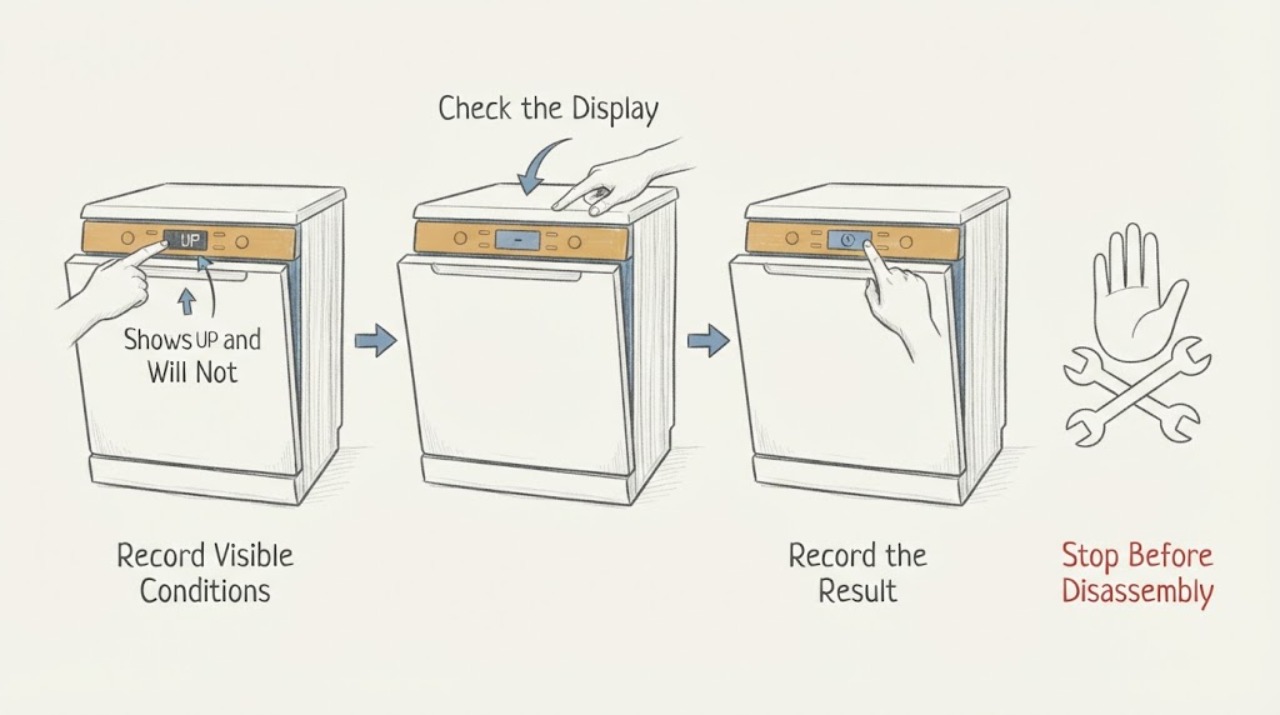
On the Thermador DWHD650WFP family, UP is not an error code. Thermador's official dishwasher error-code page defines UP as an indication that the dishwasher software has been updated and says to press any program button to clear the message. Press one program button once and observe whether UP clears. If a cycle can then be selected, use the exact DWHD650WFP owner's instructions for normal starting. If UP stays on, another code appears, or the dishwasher still will not start after the message clears, stop treating UP as the fault: use the model-specific manual or contact Thermador service. Do not invent a fault-code meaning, repeatedly reset the breaker, enter service mode, or open the dishwasher to diagnose an internal control.
Work through in order
Diagnostic checks
Use only checks that match the exact appliance or system and its official guide.
-
Check 1
Read the display carefully and record whether it shows exactly UP, another letter/number combination, or a blank display. Record the complete rating-plate model, including any DWHD650WFP suffix, before applying instructions from a manual.
Expected result: The display is exactly UP and the model suffix is known, or another code/blank display is present or the suffix is missing.
Next step: Continue to the UP-clear action only when the display is exactly UP. For another code, a blank display, or an unknown suffix, use the matching Thermador support path instead of treating it as UP.
Why this matters
Why: Thermador defines UP as a software-update indication rather than an error code. Other displays follow different documentation, and the DWHD650WFP family has multiple suffix-specific support entries.
-
Check 2
With the dishwasher in its normal powered state and the display showing UP, press one program button once, as Thermador's code page instructs. Do not enter service mode or repeatedly cycle the breaker as a substitute for this documented action.
Expected result: UP clears and normal program selection returns, or UP remains or a different message appears.
Next step: If UP clears, proceed only with the normal cycle-selection and starting instructions in the exact DWHD650WFP suffix manual. If it remains or another code appears, stop and use Thermador support.
Why this matters
Why: Thermador says that pressing any program button clears the software-update indication. A message that remains or changes is no longer explained by the UP definition alone.
-
Check 3
If UP clears, consult the exact DWHD650WFP suffix owner's manual for the normal cycle-start and reset procedure. Check only the user-visible controls and door position described by that manual; do not assume a generic button sequence or open the control area.
Expected result: A cycle can be selected and starts normally, or the cycle cannot be selected or the dishwasher still does not start after UP clears.
Next step: Use the suffix-matched manual once. If the appliance still cannot select or start a cycle, request Thermador service rather than repeating resets or guessing a latch, board, pump, or software fault.
Why this matters
Why: Thermador's dishwasher troubleshooting page says reset instructions belong in the owner's manual and notes that an incomplete previous cycle can prevent a new cycle from being selected. It does not identify a component failure from UP.
-
Check 4
If UP remains, another code appears, or the dishwasher still will not start after the documented UP-clear action and exact-manual check, record the display, model suffix, whether controls respond, and whether the door closes normally. Keep the dishwasher out of further troubleshooting and contact Thermador support.
Expected result: The message or no-start condition persists after the model-matched user step, or the display changes to a different code.
Next step: Provide the complete model suffix and display behavior to Thermador service. Do not remove panels, measure live circuits, enter technician service mode, or order a part from UP alone.
Why this matters
Why: The official UP definition no longer covers the observed condition. Thermador's error-code page directs owners to customer support when the code is not resolved or is not listed.
Use your observations
Decision map
Find the observation that best matches what you see, then follow the next safe action.
-
PATH 01Next step
What you see
The display is exactly UP and one program button clears it.
Do this next
Use the complete DWHD650WFP suffix manual for normal cycle selection and start. Stop if another code or no-start condition remains.
Why this path and its safety boundary
Why it matters: The official message has been cleared; UP itself was not a fault-code diagnosis.
-
PATH 02Next step
What you see
UP remains after one program button is pressed, or the display changes to another message.
Do this next
Record the exact model suffix and display and contact Thermador support. Do not guess an error-code meaning or repeat breaker resets.
Why this path and its safety boundary
Why it matters: Thermador's UP definition does not explain a persistent or different display condition.
-
PATH 03Next step
What you see
UP clears but no cycle can be selected or the dishwasher still does not start.
Do this next
Use the DWHD650WFP suffix-matched manual once, then request service if the no-start condition remains. Do not open the controls or infer a latch, board, pump, or software failure.
Why this path and its safety boundary
Why it matters: The no-start condition is separate from the documented UP message. Thermador's general troubleshooting directs owners to the exact owner's manual for reset and cycle-selection instructions.
-
PATH 04Next step
What you see
The rating plate does not show the complete suffix or the display is not clearly UP.
Do this next
Stop model-specific troubleshooting and obtain the complete E-Nr/model suffix and a clear display description for Thermador support.
Why this path and its safety boundary
Why it matters: The available message definition and manual path cannot be safely narrowed to the observed condition.
Helpful context
Understand the symptom
Thermador's official code table separates UP from error codes: UP means the dishwasher software has been updated, and the documented user action is to press any program button to clear it. That is different from proving that the appliance has a failed pump, latch, board, or other component.
The supplied model is DWHD650WFP without a suffix. Thermador's product lookup shows DWHD650WFP/01, /13, /14, and /15 support entries, so retain the complete rating-plate suffix when opening the owner's manual or requesting service. Do not transfer a reset sequence from another dishwasher family.
When checks do not resolve it
Need a professional?
When UP remains after pressing one program button, another display code appears, or the dishwasher still will not start after the exact manual's user step., Before opening the control area, entering service mode, testing live wiring, or replacing a latch, board, pump, or other part., When the complete DWHD650WFP model suffix cannot be confirmed from the rating plate.
Common questions
FAQ
Is UP an error code on the Thermador DWHD650WFP?
No. Thermador's official dishwasher code table says UP is not an error code; it indicates that the dishwasher software has been updated.
How do I clear UP?
Press any program button once, as Thermador's official error-code page instructs. If UP does not clear, stop using generic resets and contact Thermador support with the complete model suffix.
What if UP clears but the dishwasher still will not start?
That is a separate no-start condition. Use the exact DWHD650WFP suffix owner's manual for normal cycle selection and reset instructions once; request service if the condition persists.
Can I treat UP as a failed control board or door latch?
No. UP alone is documented only as a software-update indication. Thermador does not support identifying a board, latch, pump, or other component from this message alone.
Read the exact guide
Official sources
- Troubleshooting | Dishwashers Support | ThermadorThermador · Opened the official Thermador dishwasher troubleshooting page. Used for the rule that reset instructions belong to the owner's manual and that an incomplete previous cycle can prevent new cycle selection. It is not used to redefine UP or to diagnose an internal component.
- Error Codes | Dishwashers Support | ThermadorThermador · Opened the official Thermador dishwasher error-code page. It explicitly defines UP as not an error code and instructs the user to press any program button to clear it. It is not used to infer an internal fault when the no-start condition persists.
- Thermador support results for DWHD650WFPThermador · Opened the official Thermador model lookup. It lists DWHD650WFP/01, /13, /14, and /15 separately; it is used only to preserve suffix scope and select matching documentation, not to infer a code meaning.
- Customer Support, Service, Repair & Parts | ThermadorThermador · Opened the official Thermador services page. Used only for escalation to Thermador support when the documented UP action does not resolve the no-start condition; no contact detail is emitted as commercial metadata.
- Service Assistance - DWHD650WFP/01Thermador · Opened the exact DWHD650WFP/01 support page. It confirms the family identity and exposes user manual, short instructions, installation, and owner-support paths. It is used to show why the full suffix must be matched, not to transfer /01-specific controls to /13, /14, or /15.
- Search for Owner Manuals | ThermadorThermador · Opened Thermador's official owner-manual lookup. Used to require the complete E-Nr/model suffix from the rating label before applying model-specific instructions.
Community feedback
Share a repair observation
Share a plain-text repair observation. Accepted observations are published automatically; this page may take a moment to update.