
On this page
Start here
Quick answer
Do not diagnose a Thermador freezer alert from a generic error-code list. First photograph or copy the exact code, symbol, punctuation, model number, alarm timing, and freezer temperature or food condition. Thermador states that refrigeration controls and functions vary by model and provides separate guidance for the freezer temperature, door and alarm controls, water filter, ice maker, and power state. Use the exact owner manual and Thermador refrigeration support page to classify the message. A door or temperature alarm may follow an open door or a warm compartment; a filter symbol may require the documented filter procedure; an ice-maker message may involve the bin, water, filter, or freezer temperature. Allow only one model-documented confirmation or reset when no hazard is present. If the code returns, the freezer is warming, water reaches electrical parts, or there is burning odor, smoke, overheating, damaged wiring, or a repeated power trip, protect the food and arrange qualified Thermador service.
Before you begin
Safety first
- This article covers exact-code capture, ordinary controls, accessible door and filter observations, and one model-documented confirmation only. It does not authorize electrical work, refrigerant or sealed-system work, water-line disconnection, internal panel access, sensor bypass, or repeated powered testing.
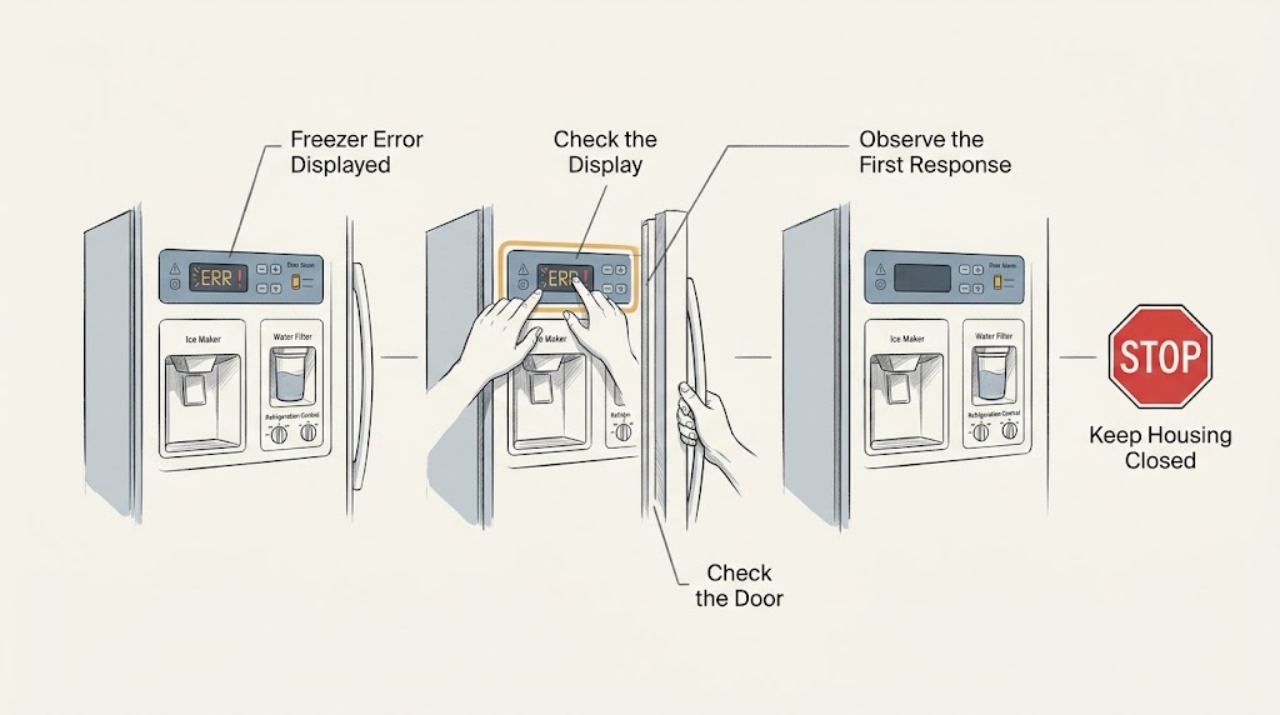
Work through in order
Diagnostic checks
Use only checks that match the exact appliance or system and its official guide.
-
Check 1
Photograph the Thermador display and copy the exact error text, code, icon, punctuation, and alarm pattern; record the model number and whether the message appears at startup, after a door opening, during ice making, after a power event, or continuously.
Expected result: Record whether the freezer has normal lights and cooling, whether one section or all sections is affected, the displayed temperature or setpoint, the condition of stored food, and any leak, unusual noise, or service indicator.
Next step: Use the model number to open the matching Thermador owner manual and refrigeration support guidance before pressing reset or changing settings.
Stop if: Stop for smoke, burning odor, sparks, abnormal heat, water near electrical parts, a damaged cord, food warming rapidly, or a repeated breaker trip.
Why this matters
Why: The exact code and timing determine which Thermador model guide applies. A door alarm, filter symbol, ice-maker alert, power symptom, and service message require different next steps; an approximate code is not safe evidence.
-
Check 2
Match the model number to Thermador's owner-support and manual resources, then identify whether the displayed item is a temperature alarm, door alarm, filter reminder, ice-maker message, power state, special mode, or service indicator.
Expected result: Record the manual's exact explanation and the documented acknowledgment or correction procedure; note whether the control panel responds normally and whether the message clears without altering unrelated settings.
Next step: Follow only the matching manual's ordinary control instruction once, then return to the temperature and alarm check; request service if the message is not covered or immediately returns.
Stop if: Do not enter an unknown service menu, force a control, bridge a switch, open the console, or copy a code interpretation from a different Thermador model.
Why this matters
Why: Thermador says refrigeration controls and functions vary by model. A procedure for one product family may not clear an alert on another and may conceal a persistent cooling or control fault.
-
Check 3
From ordinary access, confirm that the freezer door or drawer closes fully, nothing blocks the gasket, the temperature setting is appropriate for the model, and a documented vacation, Sabbath, showroom, or section-off mode is not active.
Expected result: Record whether the door alarm stops after closure, the gasket has a visible tear or gap, the display shows a warm-temperature alert, one compartment is disabled, or the freezer is warming despite a normal setpoint.
Next step: Correct only an accessible obstruction or documented mode, close the door, and allow the manual's recovery period; protect food and arrange service if the alert or warm condition persists.
Stop if: Do not force hinges, remove the gasket, bypass a door switch, leave the door open for repeated checks, or keep operating with water damage or severe frost.
Why this matters
Why: A door or temperature alarm may reflect an open or blocked door, a damaged gasket, a disabled section, a mode, or a real cooling issue. The setpoint alone does not prove that stored food is at a safe temperature.
-
Check 4
If the display or lights are absent, check only the external power state from a dry, safe position and use the matching Thermador manual to confirm the appliance is on; do not remove covers or touch wiring.
Expected result: Record whether the outlet or dedicated supply appears available, the breaker has opened, the display is dark or frozen, the code returns at startup, or other appliances in the room also lack power.
Next step: Follow one model-documented power recovery only when no hazard is present; if power is absent, a breaker opens again, or the display remains abnormal, arrange qualified electrical or Thermador service.
Stop if: Do not repeatedly reset the breaker, use an extension cord, access a junction box, probe live wiring, or restore power after smoke, water exposure, heat, or arcing.
Why this matters
Why: A power failure or control state can produce an alert or stop cooling, while a returning message after normal external power points toward a control, sensor, or refrigeration issue.
-
Check 5
If the message concerns a water filter or ice maker, use the exact manual to inspect the accessible filter seating, external water line, ice bin, and documented ice-maker state without disconnecting fittings or reaching into a powered mechanism.
Expected result: Record whether the filter symbol is flashing, the filter is fully seated, the line is visibly kinked, the bin is correctly inserted, ice is jammed, the maker is enabled, and whether the freezer is warm; note any leak.
Next step: Perform only the manual's filter, bin, or control correction once; arrange qualified appliance or plumbing service for a leak, uncertain water pressure, hidden line, recurring alert, or required internal access.
Stop if: Do not disconnect tubing, pull out a built-in unit, bypass a bin sensor, force an ice jam, use a sharp tool, or operate with water near electrical parts.
Why this matters
Why: Thermador identifies filter installation, valve position, kinked lines, water pressure, freezer temperature, ice-maker enablement, and built-in bin detection as possible model-specific clues. A water or ice alert does not establish that the refrigerator or freezer cooling system is healthy.
-
Check 6
Assess whether the freezer is maintaining normal food preservation using the model's temperature guidance and a suitable food-temperature method, while minimizing door openings and not relying on the displayed setpoint alone.
Expected result: Record whether food remains firmly frozen, the temperature result is stable or rising, the alert clears but cooling remains abnormal, the compressor or fan behavior is unusual, or only the ice maker is affected.
Next step: Protect or relocate food according to local food-safety guidance and arrange qualified Thermador service when cooling is not stable or the message returns.
Stop if: Stop repeated measurements and operation for smoke, burning odor, overheating, sparks, water near electrical parts, a damaged cord, or a repeated power trip.
Why this matters
Why: A cleared alert does not prove that cooling has recovered. Warm or rising food temperature, abnormal runtime, or one section not cooling indicates a broader fan, sensor, control, or refrigeration concern.
-
Check 7
Only when the manual documents it and no safety symptom is present, acknowledge or reset the message once using the model's normal control procedure, then observe the appliance without opening panels.
Expected result: Record whether the code clears, the alarm stops, normal cooling resumes, the same code returns, or a different warning appears; do not repeat the reset to force continued operation.
Next step: Stop further attempts and provide the technician the exact code, model, alarm timing, temperature and food condition, door and water observations, and reset result.
Stop if: Do not repeatedly cycle power, bypass a sensor or safety switch, replace a control, handle refrigerant, or continue using the freezer after a hazard or returning fault.
Why this matters
Why: A one-time confirmation can distinguish a transient notification from a persistent fault, but it cannot prove a sensor, board, fan, compressor, water valve, or sealed system is sound.
Use your observations
Decision map
Find the observation that best matches what you see, then follow the next safe action.
-
PATH 01Safety boundary
What you see
The display shows a door or temperature alarm and the freezer was open, blocked, newly loaded, or otherwise warmer than usual.
Do this next
Restore closure, remove only an accessible obstruction, confirm the documented setting, minimize openings, and allow the model's recovery period.
Why this path and its safety boundary
Why it matters: The alert may be responding to door closure or a temporary temperature rise, but a persistent warm condition is a cooling problem.
Safety stop: Protect food and request service if the alarm returns, the gasket is damaged, or the freezer remains warm.
-
PATH 02Safety boundary
What you see
The displayed item is a water-filter symbol, water-related alert, or an ice-maker message.
Do this next
Use only the exact manual's accessible filter, bin, or control procedure; service any leak, hidden line, pressure concern, or recurring message.
Why this path and its safety boundary
Why it matters: The model may need a correctly seated filter, an open external supply, an un-kinked line, a correctly inserted ice bin, or a documented ice-maker setting.
Safety stop: Do not disconnect fittings, bypass a sensor, force ice, or operate with water near electrical parts.
-
PATH 03Safety boundary
What you see
The freezer has no display or lights, the message appears after a power event, or the unit does not respond.
Do this next
Check external power safely and follow one model-documented recovery only when no hazard is present; arrange electrical or appliance service if it persists.
Why this path and its safety boundary
Why it matters: A power supply, on or off state, or control issue may be involved; the exact model determines the normal recovery procedure.
Safety stop: Do not repeatedly reset a breaker, access wiring, or restore power after smoke, water exposure, arcing, or overheating.
-
PATH 04Safety boundary
What you see
The code is not listed for the exact model, the display is ambiguous, or the same message returns after one documented confirmation.
Do this next
Stop experimentation and arrange Thermador or qualified service with the exact code, model, temperature, timing, and prior action.
Why this path and its safety boundary
Why it matters: The fault cannot be safely inferred from another Thermador model or a generic list and may involve a sensor, control, fan, compressor, or sealed system.
Safety stop: Do not enter service diagnostics, replace parts by code alone, open panels, or keep running a freezer with a returning fault.
-
PATH 05Safety boundary
What you see
The message is accompanied by warming food, rising temperature, unusual runtime, severe frost, or only one section cooling.
Do this next
Keep the door closed, protect food, and arrange qualified Thermador service rather than focusing only on clearing the message.
Why this path and its safety boundary
Why it matters: The alert may be a symptom of a broader cooling, airflow, defrost, fan, sensor, or sealed-system issue.
Safety stop: Stop for smoke, burning odor, abnormal heat, a severe leak, sparks, water near electrical parts, or a repeated power trip.
-
PATH 06Safety boundary
What you see
Water reaches electrical parts, wiring is damaged, the cabinet overheats, smoke or burning odor appears, sparks occur, or the breaker trips again.
Do this next
Stop using the appliance, move away from the hazard, protect food only from a safe position, and contact appropriate emergency, electrical, plumbing, or appliance service.
Why this path and its safety boundary
Why it matters: The condition is an immediate safety boundary, not a display-reset problem.
Safety stop: Do not touch wet parts, open panels, restore power for another test, handle refrigerant, or use the appliance.
Helpful context
Understand the symptom
Start with the exact message and the freezer condition
A symbol, a filter reminder, a door or temperature alarm, and a service message do not mean the same thing. Record the message exactly as shown and note whether the freezer is still cold, whether the alarm began after a door opening or power event, and whether one section or the whole appliance is affected. Do not substitute a code from a similar Thermador model.
Model-specific controls matter
Thermador's controls resource covers built-in refrigeration, freestanding refrigeration, and under-counter products with different settings and functions. Cooling modes, Sabbath or vacation behavior, alarm controls, ice-making settings, and filter reminders can vary. Use the model number and owner's manual before acknowledging, clearing, or resetting an alert.
Protect food and stop at the safety boundary
If the freezer is warming or the alert is paired with a leak, water near electrical parts, burning odor, smoke, excessive heat, damaged wiring, or a repeated breaker trip, food preservation and personal safety take priority. Keep the door closed as much as practical, protect food according to local food-safety guidance, and leave internal electrical, water, refrigeration, and control work to a qualified professional.
Safety boundary
Stop conditions
- Copy the exact code and model before acting; do not apply a code meaning or reset sequence from another Thermador model.
- Stop for warming food, rising freezer temperature, persistent alarms, severe frost, water near electrical parts, a damaged cord, smoke, burning odor, abnormal heat, sparks, or a repeated breaker trip.
- Do not open electrical or sealed-system panels, touch wiring, handle refrigerant, replace a control, or bypass a door, ice-bin, sensor, or other safety switch.
- Do not disconnect water fittings, move a built-in appliance, force an ice jam, use sharp tools, or operate with a leak.
- Allow only one model-documented confirmation or power recovery when no hazard is present; a returning message requires service rather than repeated resets.
- Use Thermador's exact owner manual and refrigeration support resources for model-specific controls, alarms, filters, ice maker, and error procedures.
When checks do not resolve it
Need a professional?
Arrange Thermador or qualified appliance service when the code is unknown for the exact model, returns after one documented confirmation, accompanies a warm freezer or food-safety concern, or points to a fan, sensor, control, compressor, sealed system, ice-maker, water, or defrost fault. Use qualified electrical or plumbing service for persistent power or water-line problems. Treat smoke, burning odor, sparks, severe overheating, water near electrical parts, and repeated breaker trips as urgent safety conditions.
Safety scope: This article covers exact-code capture, ordinary controls, accessible door and filter observations, and one model-documented confirmation only. It does not authorize electrical work, refrigerant or sealed-system work, water-line disconnection, internal panel access, sensor bypass, or repeated powered testing.
Common questions
FAQ
Should I search a generic list for my Thermador freezer error code?
No. Copy the exact code, symbol, punctuation, model, timing, and temperature first. Thermador says refrigeration controls and functions vary by model, so use the exact owner manual and official refrigeration support page.
What if a Thermador freezer shows a water-filter symbol?
Use the exact manual to confirm the documented filter type, seating, and activation procedure. Thermador also identifies a closed valve, kinked line, or old or blocked filter as possible water-path clues. Do not disconnect fittings or operate with a leak.
Can a door or temperature alarm explain a Thermador freezer message?
It can. Check whether the door was left open, an item blocks closure, the gasket is damaged, a section is disabled, or the freezer is warming. Correct only accessible documented conditions and service a returning alarm or warm freezer.
What should I do after a single reset clears the code?
Record the code and reset result, then monitor normal cooling and food condition without repeated resets. A cleared message does not prove the fault is repaired; arrange service if the code returns or cooling remains abnormal.
When is a Thermador freezer error an emergency?
Stop for smoke, burning odor, sparks, abnormal heat, water near electrical parts, a damaged cord, severe leak, or a repeated breaker trip. Protect food from a safe position and contact appropriate emergency, electrical, plumbing, or appliance service.
Read the exact guide
Official sources
- Owner Support Resources | Quick LinksThermador · Thermador official owner-support hub; use the exact model to select manuals, filters, error information, and servicer resources.
- How to Use the Controls & SettingsThermador · Thermador official controls guidance across refrigeration product families; displayed functions and control sequences vary by model.
- Refrigerator Troubleshooting | Problems & SolutionsThermador · Thermador official refrigeration support; exact product model and owner manual control the applicable procedure.
Community feedback
Share a repair observation
Share a plain-text repair observation. Accepted observations are published automatically; this page may take a moment to update.