
On this page
Start here
Quick answer
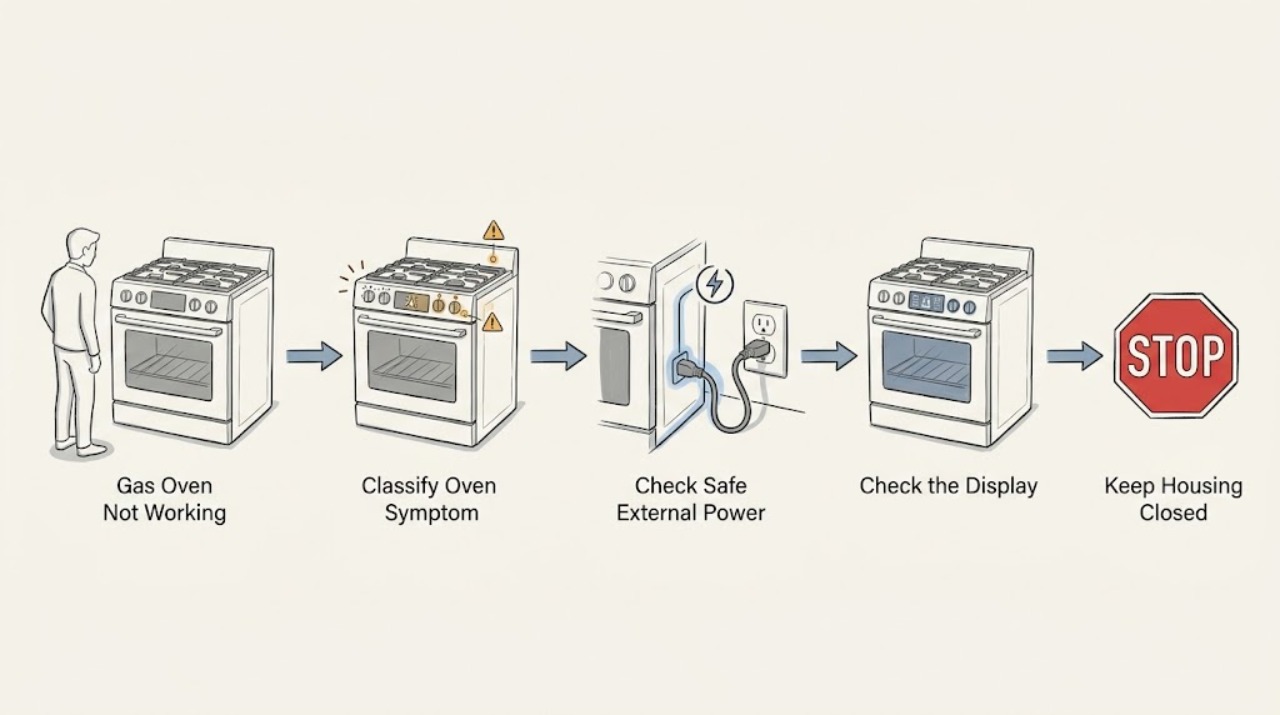
Treat a Thermador gas oven that is not working as one of three different symptoms: no display or response, a display that accepts no cooking command, or a selected mode that does not ignite or heat. First record the model and exact display message, then make only ordinary external checks from a dry, stable position. Confirm the mode and Start command from the model manual, check for a visible control or door-lock state, and check accessible electrical supply without opening the range. Do not remove panels, test gas pressure, move the appliance, relight a failed burner repeatedly, or work on the igniter or gas valve. If you smell gas, hear escaping gas, see an abnormal flame, delayed ignition, smoke, arcing, a hot connection, or repeated circuit trips, stop immediately, leave the area when necessary, and contact emergency or qualified service from a safe location.
Before you begin
Safety first
- This article supports ordinary external observation and one model-permitted reset only when no gas, combustion, electrical, water, or heat hazard is present. It does not authorize gas-path work, range movement, panel removal, live testing, ignition testing, or safety-device bypass.
Work through in order
Diagnostic checks
Use only checks that match the exact appliance or system and its official guide.
-
Check 1
From a dry, stable position with the oven off, observe the display, selector, interior light, indicators, audible response, and any visible flame or smoke; record whether the oven is completely unresponsive, lit but not accepting a mode, or selected but not igniting or heating.
Expected result: Record the exact model or rating-plate information, display text or code, selected mode, door position, and whether the symptom occurs in bake, broil, or every oven mode; do not open panels or reach into the burner area.
Next step: Photograph the display and rating plate, then follow the matching branch. Do not select another gas mode if there is a gas odor, abnormal flame, smoke, arcing, or unusual heat.
Stop if: Stop immediately for a gas smell or escaping-gas sound, smoke, flame outside the normal burner area, arcing, a hot or damaged plug, or water contacting electrical equipment.
Why this matters
Why: A blank display directs the first safe check to external electrical supply. A lit panel with no start directs the check to controls, timer or lock state, and the door. A selected mode with no heat directs service toward ignition, gas, sensing, or control diagnosis rather than a simple power complaint.
-
Check 2
If the display is completely dark and there is no gas odor, smoke, water, or visible damage, check only the accessible power connection from a dry position: confirm the plug is seated if accessible, an accessible switch is on, and the cable and outlet show no scorching, looseness, crushing, or heat damage.
Expected result: Record whether another low-risk appliance works at the same outlet, whether a circuit protection device is off, and whether the Thermador display returns without moving the range or opening it.
Next step: Use a qualified electrician for a dead or damaged outlet, cable, or circuit. Arrange Thermador or appliance service when the safe supply is present but the display remains dark.
Stop if: Do not touch wet equipment, remove an outlet cover, handle damaged wiring, move the range to inspect its gas connector, or keep restoring a tripping circuit.
Why this matters
Why: A dead outlet or switched-off circuit points to the installation supply. A known-good supply with a dark oven points to an appliance-side fault. A warm, wet, scorched, loose, or repeatedly tripping connection is an electrical service boundary.
-
Check 3
If the panel is lit, use the model-specific manual to confirm the oven is not in a display, timer, Sabbath, self-clean, or lock state; select the intended oven mode and temperature, close the door gently, and use the documented Start control once.
Expected result: Record whether the setting remains visible, the timer or lock indicator clears, the door closes and latches normally, the display begins a preheat state, or a code or beep rejects the command.
Next step: Use only the exact Thermador manual for the model to change a user setting. If the lock persists, the door is misaligned, the display rejects every mode, or the oven remains unresponsive, stop and request qualified service.
Stop if: Do not force the door, defeat a latch, insert tools into a lock, enter the burner area, or use a self-clean cycle as a test when the oven has a gas odor, smoke, or abnormal heat.
Why this matters
Why: A mode or lock state can make a working control panel appear unresponsive. A door that cannot close or latch can prevent a safe gas-oven start. A valid setting that is rejected or a code that returns points to model-specific controls or service.
-
Check 4
If a normal mode is accepted and there is no safety symptom, observe one start attempt from outside the oven without opening panels: note whether the display indicates preheat, whether normal ignition sounds occur, whether heat begins, and whether the oven stops or reports a code.
Expected result: Classify the result as no ignition response, ignition followed by no sustained heat, heat that cycles normally, heat that remains uncontrolled, delayed ignition or a loud boom, or an error message.
Next step: Stop the oven and provide the exact result, mode, model, and code to qualified Thermador service. Do not repeat ignition attempts to compare modes or open the door to inspect a hidden burner.
Stop if: Stop immediately for gas odor, delayed ignition, a boom, yellow or unstable flame, flame outside the intended burner area, smoke, arcing, or heat that continues after the controls are off.
Why this matters
Why: No ignition response or no sustained heat can involve the ignition, gas, sensing, control, or installation path and needs qualified diagnosis. Normal cycling can be expected as temperature is regulated. Uncontrolled heat, delayed ignition, a boom, abnormal flame, smoke, or an error is not a user-level adjustment.
-
Check 5
If the display shows an E-code or other message, record every character and indicator, the model, and the operating state before using any reset that the exact Thermador manual permits; do not clear the message by repeated power cycling.
Expected result: Record whether the message disappears after the single documented reset, returns immediately, changes to another code, or leaves the oven unresponsive.
Next step: Leave the oven off and provide the exact code and model to Thermador or qualified service when the message returns, is unlisted, or accompanies a failed heat cycle.
Stop if: Do not repeatedly reset, enter service menus, test live wiring, replace a fuse, or continue a gas ignition cycle after a fault.
Why this matters
Why: A one-off message may clear after the model-approved reset, but a recurring or unlisted code may require technician assistance. A code plus a gas, smoke, heat, or electrical symptom takes the immediate-safety path regardless of whether it clears.
-
Check 6
After the external observations, decide whether the next step belongs to an electrician, gas-qualified appliance professional, or Thermador service; keep the oven off and in place while preserving the model, code, and symptom record.
Expected result: Classify the unresolved issue as supply or breaker, control or door, ignition or heating, gas odor or abnormal flame, or internal wiring or component fault.
Next step: Give the service professional the E-Nr. or model, display photos, selected mode, timing of the failure, and whether other appliances or circuits were affected. Do not move the range or remove any cover.
Stop if: Do not open the oven or range, disconnect gas fittings, inspect a connector by moving the appliance, bypass a safety device, or perform live or combustion testing.
Why this matters
Why: Supply faults belong with electrical service; gas-path, ignition, burner, sensing, and internal controls require qualified appliance work. A gas odor or combustion warning is an urgent safety issue rather than a repair appointment to test later.
Use your observations
Decision map
Find the observation that best matches what you see, then follow the next safe action.
-
PATH 01Safety boundary
What you see
The Thermador gas oven has no display or response, with no gas odor, smoke, water, or visible electrical damage.
Do this next
Perform the safe external supply observation once, then use an electrician for a supply fault or qualified appliance service for a known-good supply with a dark display.
Why this path and its safety boundary
Why it matters: The first distinction is the external electrical supply; the gas burner should not be investigated while the control system is dark.
Safety stop: Stop for wet or scorched equipment, a damaged plug or cable, a hot connection, sparks, or repeated circuit trips.
-
PATH 02Safety boundary
What you see
The display is lit, but selecting a mode and using Start does not begin the oven programme.
Do this next
Check the model-specific display, timer, lock, door, mode, and Start state once, then arrange service for a persistent rejection or code.
Why this path and its safety boundary
Why it matters: A user setting, timer, lock, door-latch, or control condition may be blocking a safe start; this is not proof of a failed gas supply.
Safety stop: Do not force or bypass the door latch, use hidden service controls, or continue if there is a gas, smoke, heat, or electrical warning.
-
PATH 03Safety boundary
What you see
A normal oven mode is accepted, but there is no ignition response, no sustained heat, or repeated failure to preheat.
Do this next
Stop repeated ignition attempts and request qualified Thermador or gas-appliance service with the mode, model, and timing record.
Why this path and its safety boundary
Why it matters: The ignition, gas, sensing, control, or installation path may need qualified diagnosis; the symptom does not identify a safe replacement part.
Safety stop: Stop immediately for gas odor, delayed ignition, a boom, abnormal flame, smoke, arcing, or uncontrolled heat.
-
PATH 04Safety boundary
What you see
An E-code or other message returns after the single model-approved reset, or the code is not listed for the appliance.
Do this next
Leave the oven off and provide the exact display, model, mode, and safety symptoms to Thermador or qualified service.
Why this path and its safety boundary
Why it matters: The fault remains unresolved and needs the exact model and code; repeated resets can hide a control, ignition, sensing, or electrical problem.
Safety stop: Do not repeat resets, enter service menus, open panels, or continue heating to see whether the code clears.
-
PATH 05Safety boundary
What you see
Gas is smelled or heard, ignition is delayed or explosive, the flame is abnormal, combustion produces smoke, or the oven will not stop heating.
Do this next
Stop using the oven. Leave the area or building as appropriate without operating switches or creating an ignition source, and contact emergency or gas authorities from a safe location; arrange qualified inspection before reuse.
Why this path and its safety boundary
Why it matters: This is an immediate gas, fire, or combustion hazard, not a normal no-start branch.
Safety stop: Do not relight, turn knobs repeatedly, use a match, operate electrical equipment, move the range, or search for a leak.
-
PATH 06Safety boundary
What you see
A breaker trips again, there is arcing, smoke, burning odor, water near the connection, a hot plug, or damaged wiring.
Do this next
Stop using the appliance and isolate power only from a dry safe position when this can be done without contact with damaged equipment; use qualified electrical or appliance service.
Why this path and its safety boundary
Why it matters: The electrical or water hazard takes priority over diagnosing the oven symptom.
Safety stop: Do not touch wet equipment, restore power repeatedly, open covers, test live parts, or use the gas oven while the hazard remains.
Helpful context
Understand the symptom
Define what not working means before testing anything
A blank display and a lit display that refuses to start are different paths. A mode that starts but produces no heat is different again: the controls may be operating while the gas ignition or temperature system is not. Write down what happens after a single normal selection, including whether the display changes, an igniter sound is heard, heat begins, or a code appears. Never use a gas smell or an abnormal flame as a reason to continue testing.
Gas and electrical safety limits come first
A gas oven also needs electrical power for its controls and ignition, but a homeowner should not open the range or test live parts. CPSC warns that moving a gas appliance can damage an older connector and says a suspected gas leak requires leaving immediately without operating electrical equipment. Keep the appliance in place and use qualified service for gas-path, ignition, wiring, or internal control work.
Controls, door state, and mode selection can mimic a failed oven
Thermador models differ in display, timer, Sabbath or other modes, door-latch behavior, and Start controls. Read the exact manual for the model rather than assuming a control sequence from another range. A darkened display can be a display setting on some models, while a door remaining in a self-clean or latch state can block normal operation; neither condition authorizes bypassing the lock.
Do not guess at a gas component from a symptom
No ignition, weak heat, a code, and a breaker trip can arise from different parts or installation conditions. A burner, igniter, valve, sensor, control, supply, or wiring diagnosis requires the model and qualified testing. Use the observations below to choose the service path, not to select an unverified replacement part.
Safety boundary
Stop conditions
- Stop immediately for a gas smell, escaping-gas sound, delayed ignition, a boom, abnormal or unstable flame, smoke, carbon-monoxide concern, or heat that continues after the controls are off.
- Do not operate switches or create an ignition source during a suspected gas leak; leave from a safe route and contact emergency or gas authorities from outside the hazard area.
- Do not move the gas range to inspect a connector, remove panels, disconnect gas fittings, test live wiring, or bypass a door, flame, or temperature safety device.
- Stop for arcing, a hot or scorched plug, damaged cable, water near electrical parts, or repeated circuit trips; do not restore power repeatedly.
- Do not repeatedly relight, change gas settings, run self-clean as a diagnostic, or replace an igniter, valve, sensor, or control without exact model-specific qualified diagnosis.
Only after diagnosis
Potential parts
- gas-oven igniter assembly
Consider this category only when a qualified diagnosis identifies an ignition fault for the exact Thermador model after safe external checks.
Confirm the complete model and manufacturer fit information; do not infer compatibility from appearance or attempt live ignition testing. - gas safety valve assembly
Consider this category only when qualified service confirms a model-specific gas-valve fault; no-start or no-heat symptoms alone do not identify the valve.
Gas-path parts require exact model verification and qualified installation; do not disconnect fittings or adjust gas settings. - oven temperature sensor
Consider this category only when a qualified diagnosis links incorrect sensing or a related code to the exact model and the oven's heating behavior.
Confirm the exact model, sensor specification, and manufacturer fit information; do not test the sensor in an energized appliance. - oven control module
Consider this category only after a known-good external supply is confirmed and qualified diagnosis identifies an appliance-side control fault.
Confirm the exact model, revision, programming requirements, and manufacturer fit information; internal control work is not a user test.
When checks do not resolve it
Need a professional?
Request qualified Thermador or gas-appliance service when the safe external supply is present but the display stays dark, the panel rejects a valid mode, the door or lock state persists, the oven accepts a mode but does not ignite or heat, an error returns, or an internal component is suspected. Use an electrician for a dead or damaged outlet, cable, plug, or recurring circuit trip. Treat gas odor, escaping gas, delayed ignition, abnormal flame, smoke, combustion concern, or uncontrolled heat as an immediate safety issue and do not reuse the oven until it has been assessed.
Safety scope: This article supports ordinary external observation and one model-permitted reset only when no gas, combustion, electrical, water, or heat hazard is present. It does not authorize gas-path work, range movement, panel removal, live testing, ignition testing, or safety-device bypass.
Common questions
FAQ
Why is my Thermador gas oven completely unresponsive?
Separate a blank display from a lit panel that will not start. If the area is dry and there is no gas or smoke concern, observe the accessible plug, switch, outlet, and circuit state once without moving the range or opening it. A dead supply needs electrical service; a known-good supply with a dark oven needs qualified appliance service.
Why does the Thermador display work but the gas oven not start?
A timer, lock, mode, door-latch, or Start-control state can prevent a selected programme from beginning. Use the exact model manual, check the visible display and door state, and make one normal selection. Do not defeat the latch or continue if gas odor, smoke, abnormal heat, or electrical damage is present.
What if my Thermador oven has a display but no heat?
Record the mode, preheat behavior, ignition response, flame behavior, and any code from outside the appliance. No ignition or no sustained heat can involve the gas ignition, burner, sensing, control, or installation path. Do not repeatedly relight, change gas settings, or open the range; request qualified gas-appliance service.
Should I reset a Thermador gas oven error?
Only use a reset that the exact Thermador manual or official error guidance permits, and only when there is no gas, smoke, heat, water, or electrical hazard. Record the complete message first. If it returns or is not listed, leave the oven off and provide the model and code to qualified service rather than repeating resets.
What should I do if I smell gas while the Thermador oven is not working?
Stop using the oven and leave the area or building as appropriate without operating switches or creating an ignition source. Contact emergency or gas authorities from a safe location and do not move the range, search for a leak, relight the burner, or return the oven to service until qualified inspection clears it.
Read the exact guide
Official sources
- Certain Older Gas Connectors May Be DangerousU.S. Consumer Product Safety Commission · CPSC consumer safety guidance for gas appliances; it does not diagnose a Thermador model or replace local emergency and gas-service instructions.
- Error Codes | Ovens Support | ThermadorThermador · Official Thermador oven error-code guidance; exact codes and available reset behavior depend on the appliance model.
- Oven Troubleshooting for Ranges | Support | ThermadorThermador · Official Thermador guidance for ovens in Thermador ranges; feature availability and controls vary by model.
Community feedback
Share a repair observation
Share a plain-text repair observation. Accepted observations are published automatically; this page may take a moment to update.