
On this page
Start here
Quick answer
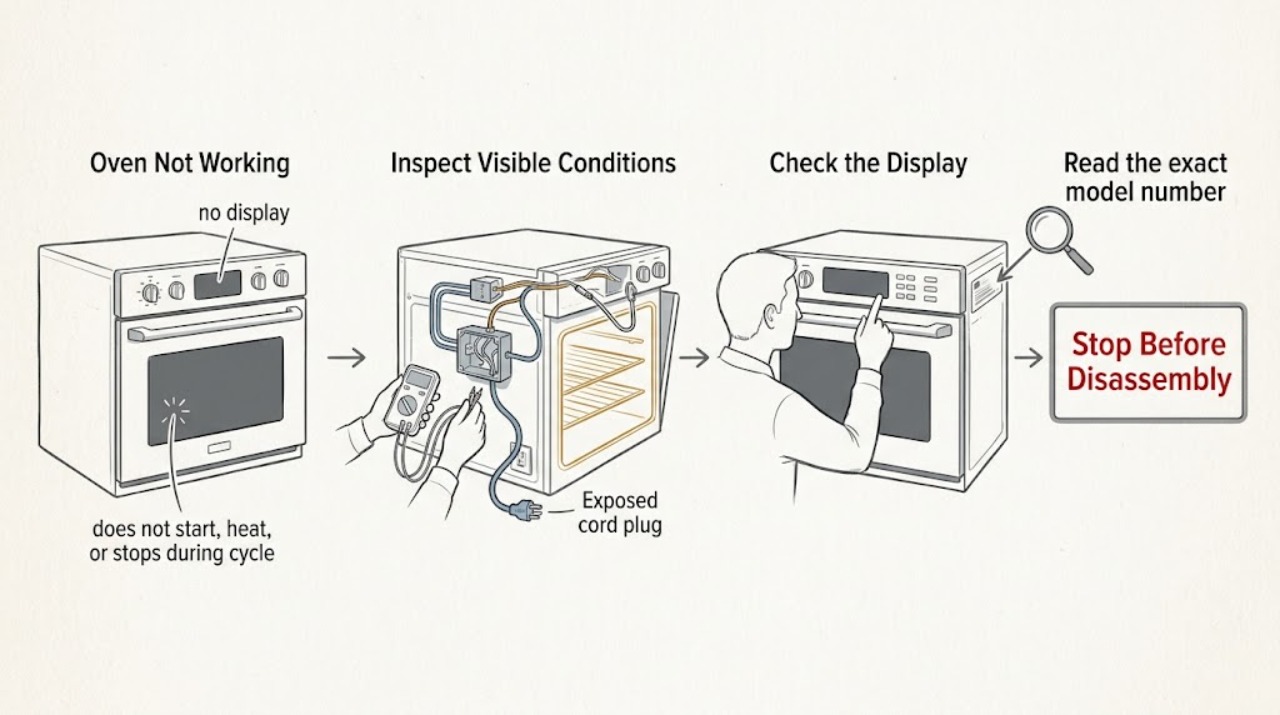
Treat Thermador Oven Not Working as several different symptoms: a dead display, a powered control that will not start, a cycle that starts without heat, or a cycle that stops with a message. Check for smoke, a burning odor, gas odor, abnormal flame, arcing, a damaged door, or repeated breaker trips before touching any control. Then identify the exact model and whether it is electric, gas, dual-fuel, steam, or another configuration, confirm a documented mode and start sequence, and record any code exactly. Use only one reset that the model manual or Thermador support authorizes; a persistent fault, uncontrolled heating, or any gas or electrical warning needs qualified service.
Work through in order
Diagnostic checks
Use only checks that match the exact appliance or system and its official guide.
-
Check 1
Observe the oven from outside before pressing controls: check the display, interior light, breaker or fuse status, door and glass, and any smell, smoke, flame, arcing, or heat at the electrical connection.
Expected result: The display is dead, the circuit has tripped, the connection is hot or damaged, or there is gas odor, smoke, burning odor, abnormal flame, or visible arcing.
Next step: Stop. Do not keep resetting the circuit or opening the appliance. If gas may be present, avoid flames and electrical switches, leave when needed, and contact emergency or qualified gas assistance from a safe location. Leave a suspected electrical fault isolated and arrange qualified service.
Why this matters
Why: This is a supply or safety boundary, not a routine control-setting problem. Repeated resets or ignition attempts can increase the hazard.
-
Check 2
Read the exact model number and identify the appliance configuration, then use Thermador's manual lookup to retrieve the matching owner and installation instructions.
Expected result: The label identifies a wall oven, range, gas or dual-fuel appliance, electric appliance, steam oven, or speed-oven configuration, and the manual lists the available modes and controls.
Next step: Follow only the matching manual for the remaining external checks and any authorized reset. If the model or configuration is uncertain, stop at safe observations and request service rather than guessing.
Why this matters
Why: The configuration determines whether gas ignition, electric elements, steam functions, special locks, or different control sequences are relevant. A mode or part from another model cannot be assumed.
-
Check 3
With the oven empty and the door closed, select a documented heating mode for the model, set a temperature, and complete the required Start or confirmation step while watching the display for an active cycle or preheat indication.
Expected result: The controls respond and the cycle begins, the selected mode is a low-heat or non-preheat function, the Start step was not completed, or the display remains idle despite the correct sequence.
Next step: Correct the setup once and allow the model's normal preheat behavior without repeatedly opening the door. If it remains idle or cold, continue to the door and code checks, then stop repeated testing.
Why this matters
Why: A wrong mode, omitted confirmation, or normal mode behavior can look like a fault. If a documented heating mode is active but the cavity stays cold, the problem is more likely in power, control, sensing, or the model-specific heating system.
-
Check 4
Inspect the closed door externally for an obstruction, an unlatched or bent hinge, damaged glass, or a visibly displaced seal; do not force the door or remove its panels.
Expected result: The door cannot close or latch normally, the glass or hinge is damaged, the seal is displaced, or the oven is in a self-clean or other locked state shown in the manual.
Next step: Stop using the oven if the door cannot close securely or is damaged. Wait for an automatic cooling or lock release only as the manual directs; do not force, bypass, or dismantle the latch. Arrange qualified service if it persists.
Why this matters
Why: The door can affect heat retention and safety interlocks. A damaged or misaligned door must not be treated as a temperature-setting issue.
-
Check 5
Record any display message or code exactly, including letters, numbers, punctuation, and the point in the cycle when it appears; compare it with the exact Thermador manual or official error page.
Expected result: A code returns after the permitted acknowledgement or reset, or the code is not listed for the exact model.
Next step: Turn the oven off and arrange qualified service with the complete code, model, fuel type, and cycle stage. Do not keep clearing the message or continue a heating cycle to see whether it changes.
Why this matters
Why: Thermador treats a continuing oven code as a fault that may need technician assistance. Similar-looking codes must not be interpreted across unrelated models or appliance types.
-
Check 6
If no hazard is present, perform at most one reset specifically authorized by the exact manual or Thermador support, then run one supervised documented mode to check whether the oven starts, heats, and responds to cancellation.
Expected result: The reset restores operation, the oven stays cold or intermittent, or it continues heating after cancellation or displays a fault again.
Next step: If operation is not restored, stop and arrange qualified appliance service. If heating will not stop or there is smoke, abnormal flame, gas odor, burning odor, arcing, or a trip, switch it off if safe, isolate power or fuel only when safely accessible, and stop using it.
Why this matters
Why: A one-off control state may have cleared, but a repeat failure points to a supply, control, sensor, electric heating, gas ignition, burner, or other model-specific fault. Heating that does not stop is an immediate safety issue.
Use your observations
Decision map
Find the observation that best matches what you see, then follow the next safe action.
-
PATH 01Next step
What you see
Gas odor, delayed ignition, abnormal flame, smoke, burning odor, arcing, damaged wiring, repeated trips, or uncontrolled heating is present
Do this next
Do not test again or dismantle the appliance. Avoid flames and electrical switching when gas may be present, leave when needed, and seek emergency or qualified service help from a safe location.
Why this path and its safety boundary
Why it matters: Immediate safety stop
-
PATH 02Next step
What you see
The display and controls are completely dead or the circuit protection has tripped
Do this next
Do not repeatedly reset. Keep a damaged or repeatedly tripping circuit off and arrange qualified electrical or appliance service.
Why this path and its safety boundary
Why it matters: Power path or electrical fault is possible
-
PATH 03Next step
What you see
The display works but a correct documented mode will not start
Do this next
Verify the exact manual's mode, temperature, Start, door, and lock requirements once; service the oven if it remains unresponsive.
Why this path and its safety boundary
Why it matters: Start sequence, mode, lock, door, or control state may be blocking operation
-
PATH 04Next step
What you see
A cycle starts but the oven remains cold or heats weakly
Do this next
Stop after one supervised check and arrange qualified service with the model and fuel configuration.
Why this path and its safety boundary
Why it matters: Heating, sensing, power, gas ignition, or control fault is possible after setup is confirmed
-
PATH 05Next step
What you see
The oven warms but seems slow, or the user sees warm air or steam at the vent
Do this next
Keep the door closed during preheat, remove only items the manual says are unnecessary, and compare with the exact model guidance. Escalate if performance remains abnormal or codes return.
Why this path and its safety boundary
Why it matters: Some behavior may be normal or mode-dependent
Helpful context
Understand the symptom
What not working means here
A completely dark oven, a lit display that ignores Start, a heating mode that stays cold, and a code that stops a cycle are different paths. Begin by observing the display and controls, then the selected mode and door, before considering a component. Thermador has wall ovens, ranges, and model-specific modes, so a generic instruction can be wrong for the appliance in front of you.
Confirm the model before interpreting the fault
Read the model number from the appliance rating label and retrieve its Thermador manual. Identify whether the oven is electric, gas, dual-fuel, steam, or a speed-oven configuration. Only the exact documentation can establish which modes, locks, reset steps, error meanings, and heating components apply.
Separate normal behavior from a failure
Warm air or steam from a vent can be part of cooling, and preheating takes longer at higher temperatures or when the door is opened. Some cooking modes do not use the same preheat behavior. A failure is more credible when a documented heating mode never warms, a code returns, the oven cannot start after a correct setup, or the appliance keeps heating after cancellation.
Safety comes before a second test
Do not continue testing if there is gas odor, delayed ignition, an abnormal flame, smoke, a burning or melting smell, visible arcing, a hot electrical connection, repeated trips, or a door that will not close safely. Avoid flames and electrical switching when gas may be present, leave if the odor is strong or persistent, and seek emergency or qualified help from a safe location.
Safety boundary
Stop conditions
- Stop immediately for gas odor, delayed ignition or booming, abnormal flame, smoke, burning or melting odor, suspected combustion trouble, or visible arcing.
- Stop immediately for repeated breaker trips, a hot or damaged connection, exposed wiring, uncontrolled heating, or any control that will not stop the oven.
- Do not repeatedly reset a breaker, ignite a burner, test for a gas leak, probe live wiring, or remove oven panels.
- Do not operate the oven if the door cannot close securely or its glass, hinge, latch, or seal is damaged.
- Stop after one safe setup check and one manual-authorized reset if the oven remains unusable, cold, intermittent, or unsafe; arrange qualified service.
Only after diagnosis
Potential parts
- electric heating element
Relevant only for a confirmed electric configuration after a qualified diagnosis links the no-heat symptom to the element or its circuit.
Confirm the complete model and configuration and use the manufacturer's fit information before selecting any component. - gas igniter or burner assembly
Relevant only for a confirmed gas or dual-fuel configuration after qualified diagnosis of the ignition or burner system.
Do not attempt gas-system repair or select a component from a generic symptom; use model-specific qualified service. - temperature sensor or control component
Consider only when qualified testing connects persistent no-start, no-heat, or temperature behavior to that model-specific component.
Verify the exact model, revision, and manufacturer's fit information before any replacement.
When checks do not resolve it
Need a professional?
Arrange qualified Thermador appliance service when the appliance remains dead or unresponsive, a documented cycle remains cold, a code returns, the door or latch is damaged, or electric, gas, sensor, control, or heating faults are suspected. Use emergency or qualified gas assistance first for a strong or persistent gas odor or combustion concern.
Common questions
FAQ
Why is my Thermador oven not working even though the display is on?
A lit display does not prove that a heating cycle has started. Verify the exact mode, temperature, Start sequence, door, lock, and model configuration once. If a documented mode remains cold or idle, arrange qualified service.
What if my Thermador oven has no display at all?
Observe the breaker or fuse and the appliance connection without opening the oven. Do not repeatedly reset a tripping circuit or touch a hot or damaged connection; leave it isolated and arrange qualified service.
Can a Thermador oven be working normally while it preheats slowly?
Sometimes. Thermador says preheat time varies with temperature, and opening the door or using extra racks can extend it. Compare one controlled test with the exact manual; persistent or worsening delay needs service.
Should I replace an element or igniter when a Thermador oven does not heat?
Do not choose a part from the symptom alone. Identify the exact electric, gas, or dual-fuel model and have a qualified technician test the model-specific heating system.
What should I do when a Thermador oven displays an error?
Record the complete code and when it appears. Follow only the exact manual or official support instruction once; if the code returns, turn the oven off and arrange service.
When is a Thermador oven problem an emergency?
Treat gas odor, delayed ignition, abnormal flame, smoke, burning odor, arcing, repeated trips, exposed wiring, or heating that will not stop as an immediate stop condition. Avoid unsafe testing and seek emergency or qualified help from a safe location.
Read the exact guide
Official sources
- Find Owner ManualsThermador / BSH Home Appliances · Official Thermador manual lookup used to identify exact controls, modes, locks, codes, fuel configuration, and authorized reset steps.
- Ranges - Error CodesThermador / BSH Home Appliances · Official Thermador error-code page used for exact code recording, permitted acknowledgement or reset, and escalation when a code returns.
- Range Oven FeaturesThermador / BSH Home Appliances · Official Thermador feature page used to distinguish documented cooking modes and model-dependent preheat behavior.
- Oven TroubleshootingThermador / BSH Home Appliances · Official Thermador support page used for preheat, door, vent, lock, and service-boundary context; exact model instructions take precedence.
- Appliance Information - Single Wall Oven | ME301WS/01Thermador / BSH Home Appliances · Official Thermador product-service page used as an example of model documentation and service resources; it is not a claim about the user's exact model.
Community feedback
Share a repair observation
Share a plain-text repair observation. Accepted observations are published automatically; this page may take a moment to update.