
On this page
Start here
Quick answer
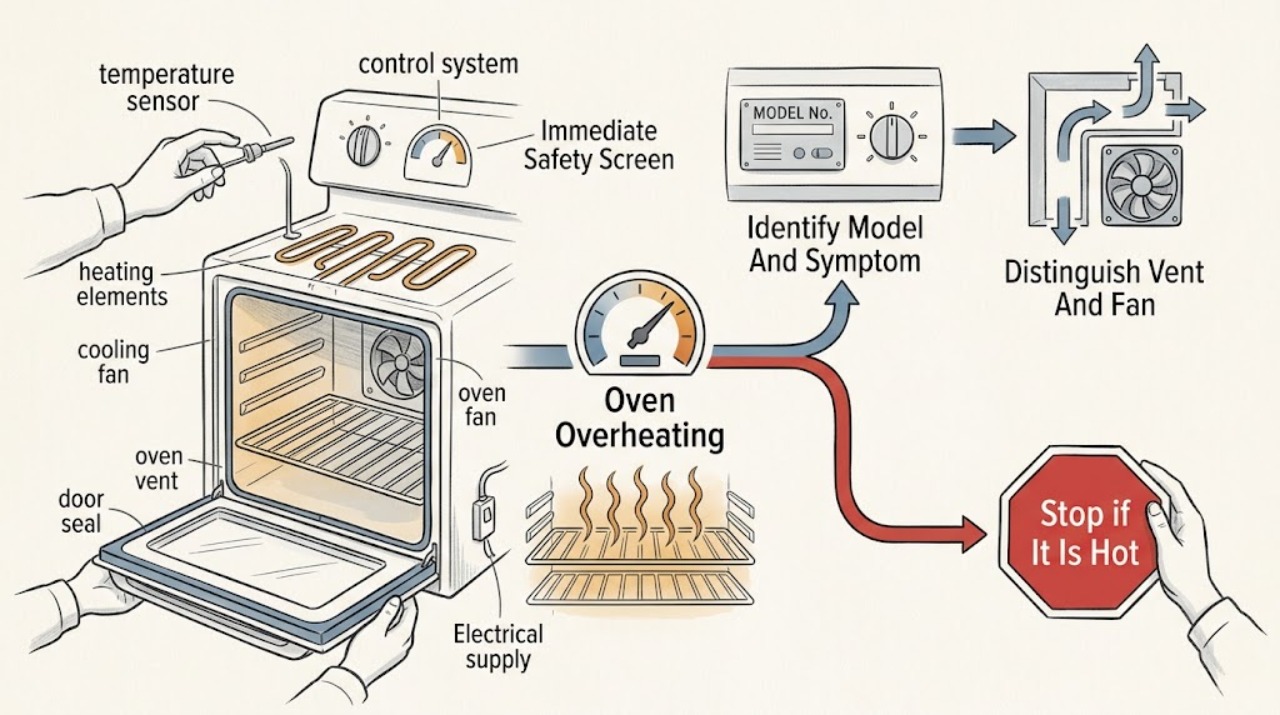
First decide whether you are seeing normal heat management or an unsafe overheat. Warm air or steam at the vent, a cooling fan that continues after cooking, and heating elements cycling on and off can be normal; Thermador says the oven vent must not be blocked, and an identified Thermador manual notes that its temperature gauge is only a reference. If food consistently burns at a confirmed setting, the oven keeps heating after it should stop, the control area becomes unusually hot, an error code appears, or there is smoke, a burning or electrical odor, arcing, damaged wiring, or a repeated protection trip, stop using the oven. From a cool, dry position, record the exact model, mode, set temperature, timing, display, and what happens after switching off. Check only the visible vent, door, seal, settings, and household supply; do not open panels or test live wiring. Use the exact model manual for any calibration or reset, and arrange qualified service when the oven continues to overshoot, will not stop heating, shows a recurring code, or has any safety symptom.
Work through in order
Diagnostic checks
Use only checks that match the exact appliance or system and its official guide.
-
Check 1
Stop cooking and look from a safe, dry position at the oven, controls, surrounding cabinet, plug or isolator if safely visible, and the room; do not touch a hot or damaged surface.
Expected result: Record smoke, flame outside the burner area, arcing, a burning or electrical odor, melted or discolored controls, a hot cord or receptacle, damaged glass, a repeated breaker trip, or heat spreading to nearby materials.
Next step: Stop using the oven. If it is safe to do so from a dry position, switch it off at the control and isolate its supply; keep clear and arrange qualified appliance or electrical service. For a gas smell, do not operate switches or create a flame and leave the area according to local emergency guidance.
Stop if: Do not open the door to investigate a fire, touch wet or hot electrical parts, repeatedly reset a tripped protection device, or run another test.
Why this matters
Why: These signs are a fire, shock, gas, or uncontrolled-heating hazard rather than a temperature-calibration problem.
-
Check 2
When the oven is cool, record the complete Thermador model or E-Nr, whether it is a range or wall oven, and whether the symptom affects bake, convection, broil, steam, or more than one mode.
Expected result: Record the mode, set temperature, preheat indication, elapsed time, food result, display message, and whether the oven heats with the door closed or after the control is turned off.
Next step: Use the exact model manual and Thermador support page for the recorded mode. Preserve the exact display text or code rather than paraphrasing it.
Stop if: Do not apply a procedure, code interpretation, temperature offset, or part number from another Thermador model.
Why this matters
Why: Model and mode determine which elements, fan, gauge, calibration, timer, and fault rules apply; a problem in one mode is not automatically a whole-oven failure.
-
Check 3
During a safe, normal cycle or after it ends, observe the accessible oven vent and listen for the cooling fan without blocking the opening or placing hands in the hot-air stream.
Expected result: Record warm air or steam at the vent, fan operation during or after cooking, the time the fan stops, and whether the sound is a normal airflow sound or a new grinding, scraping, or electrical sound.
Next step: Keep the vent and surrounding clearances open. If the fan behavior differs from the exact manual, the oven remains excessively hot after shutoff, or the sound is abnormal, stop and arrange service rather than opening the fan housing.
Stop if: Do not cover the vent, insert tools, remove a vent panel, or continue a hot cycle when smoke, odor, arcing, or dangerously hot surrounding material is present.
Why this matters
Why: Thermador identifies warm vent air, steam, and cooling-fan operation as normal in applicable models. A blocked vent or a fan that does not provide the model's expected cooling can contribute to excessive heat; an abnormal sound can indicate a service issue.
-
Check 4
With the oven cool and no hazard present, compare the selected mode, temperature, preheat state, start command, delayed-start setting, and oven timer with the exact manual; distinguish an oven timer from a kitchen timer.
Expected result: Record whether the oven is in broil, self-clean, convection, steam, Sabbath, or another special mode, whether a delayed or timed cycle is active, and whether the display responds correctly to changes.
Next step: Correct only an unambiguous setting using the model instructions. If a mode cannot be exited, the controls do not respond, or heating continues after an authorized stop command, isolate the oven when safe and arrange service.
Stop if: Do not use self-clean as a diagnostic test, repeatedly change modes on an actively overheating oven, or attempt to defeat a control lock or safety interlock.
Why this matters
Why: Special modes and timers can change which elements cycle and when heating stops. Thermador's manual distinguishes a kitchen timer that does not control heating from an oven timer that can stop heating after its programmed period.
-
Check 5
When the appliance is cool, inspect the visible vent opening and nearby cabinetry for foil, cookware, towels, grease buildup, or an installation obstruction; do not remove covers or reach inside.
Expected result: Record whether the vent is clear, partially covered, visibly damaged, unusually sooty, or surrounded by heat damage.
Next step: Remove only a loose external object that can be lifted without tools and while the oven is cool. If the vent itself is obstructed, damaged, or the surrounding area is heat-damaged, keep the oven off and arrange qualified service.
Stop if: Do not scrape inside the duct, use compressed air, dismantle the vent, or operate with a blocked or heat-damaged opening.
Why this matters
Why: Thermador warns that covering the vent can make the oven overheat. Heat damage or a damaged vent is not a user-cleaning problem and can indicate a ventilation or appliance fault.
-
Check 6
After complete cooling, inspect the door glass, hinges, latch, frame, and gasket from the outside for a gap, distortion, torn seal, trapped debris, or a door that does not close evenly.
Expected result: Record whether the door closes squarely, the gasket is intact and seated, hot air escapes at one unusual point, or the latch or glass is damaged.
Next step: Clean only accessible cool surfaces as permitted by the manual. If the gasket, hinge, latch, or glass is damaged or the door cannot close correctly, stop use and arrange service.
Stop if: Do not bend hinges, remove the door, wedge the door closed, or operate with cracked glass or a damaged seal.
Why this matters
Why: A door or seal problem can change heat distribution and expose nearby surfaces to heat, but it does not by itself prove that the control or heating element is overdriving.
-
Check 7
If there is no active hazard and the exact manual permits a temperature check, record temperature behavior using only a suitable method that does not require touching live or hot parts; otherwise skip measurement.
Expected result: Record whether the reading is stable near the expected range, consistently biased high, rapidly overshoots, or continues rising after the control should stop heating. Treat the built-in gauge as a reference where the manual says it is one.
Next step: Follow the exact manual only for an allowed calibration offset after confirming the oven is otherwise safe. Stop and arrange service for runaway or persistent overshoot; do not make live electrical measurements.
Stop if: Do not place hands, probes, foil, or improvised sensors near energized elements, open a panel, or keep testing an oven that smokes, arcs, smells abnormal, or remains on after shutoff.
Why this matters
Why: A stable, repeatable bias may be a model-supported calibration question. Rapid overshoot, uncontrolled rise, or heating that persists after shutoff points toward a sensor, relay, control, element, or related fault requiring diagnosis.
-
Check 8
Photograph or transcribe the exact display code, symbols, and state from a safe position, along with the mode and time it appeared; do not enter a service mode to generate another code.
Expected result: Record whether the display shows an E plus a number, a lock or temperature message, a blank display, or no code at all, and whether the same message returns after the oven is off.
Next step: Use the exact model's error-code guidance. If the code persists, the control is unresponsive, or the fault is accompanied by overheating, keep the oven off and arrange service.
Stop if: Do not guess a code meaning, repeatedly clear it to continue cooking, or access internal controls to force a diagnostic result.
Why this matters
Why: Thermador's error-code guidance treats an E plus a number as a fault code and says a persistent code needs the oven turned off and service. A blank display can instead indicate a supply or control problem.
-
Check 9
Only when the oven is cool, dry, free of smoke or odor, and the exact Thermador support instruction or manual authorizes it, perform one safe control reset; isolate power only from a dry, safe location.
Expected result: Record whether the display returns normally, the code returns, the oven begins heating without a command, or the original overshoot continues.
Next step: Stop after one unsuccessful authorized reset and provide the result to qualified service. Do not use a reset to continue operating an oven with a safety symptom.
Stop if: Do not reset after a protection trip caused by smoke, arcing, burning odor, damaged wiring, or active overheating, and do not remove a cover to reach a reset.
Why this matters
Why: A one-time recovery can clear a transient control state, but a returning code or uncontrolled heating indicates a persistent fault rather than a successful repair.
-
Check 10
Keep the oven out of use and prepare a concise service report containing the model, configuration, mode, set temperature, timing, preheat behavior, temperature observations, vent and fan behavior, door and seal condition, exact code, shutoff behavior, and every safety symptom.
Expected result: Service is indicated when the oven repeatedly runs too hot, continues heating after shutoff, cannot hold temperature, shows a recurring code, has an abnormal fan or vent, or has damaged door, controls, wiring, or surrounding material.
Next step: Arrange qualified Thermador appliance service; involve a qualified electrician when the household supply, receptacle, isolator, wiring, or protection device is implicated. Keep the oven isolated until assessed.
Stop if: Do not remove panels, bypass thermal protection, replace a sensor or element without model-specific diagnosis, or continue cooking to reproduce a dangerous fault.
Why this matters
Why: A temperature sensor, relay or control, heating element, cooling fan, vent system, door assembly, or household supply fault remains possible; the symptom alone cannot safely select a part.
Use your observations
Decision map
Find the observation that best matches what you see, then follow the next safe action.
-
PATH 01Safety boundary
What you see
Smoke, fire, arcing, burning or electrical odor, melted controls, damaged wiring or glass, dangerously hot surrounding material, gas odor, or a repeated protection trip is present.
Do this next
Stop using the oven and isolate it only from a dry safe position if possible; keep clear and arrange the appropriate qualified emergency or appliance service.
Why this path and its safety boundary
Why it matters: This is an immediate fire, shock, gas, or uncontrolled-heating risk, not a calibration issue.
Safety stop: Do not operate switches near a gas odor, open the door to investigate a fire, touch hot or wet electrical parts, or restore power for another test.
-
PATH 02Safety boundary
What you see
Only warm air or steam exits the vent, the cooling fan runs as described by the model manual, and no smoke, abnormal odor, damage, or uncontrolled heat is present.
Do this next
Keep vents clear, allow the oven to cool, and continue only within the exact manual's normal operating instructions.
Why this path and its safety boundary
Why it matters: Vent heat and post-cooking fan operation can be normal heat management.
Safety stop: Stop if the air becomes smoky, the fan sound changes sharply, surfaces become dangerously hot, or the heat continues beyond the model's expected cooling behavior.
-
PATH 03Safety boundary
What you see
The heating element cycles on and off while the oven approaches and maintains the selected setting, with no persistent overshoot or safety symptom.
Do this next
Record the mode and food result. If the result is consistently biased and the model supports it, consult the manual's calibration guidance.
Why this path and its safety boundary
Why it matters: Cycling can be how the control maintains temperature; a continuously glowing element is not required for heating.
Safety stop: Do not treat visible cycling as permission to ignore smoke, a stuck-on element, a code, or heat that continues after shutoff.
-
PATH 04Safety boundary
What you see
The oven completes a cycle and is consistently too hot or the food is repeatedly overdone, but no element remains on after shutoff and no hazard is present.
Do this next
Verify the model, mode, setting, and safe measurement method, then use only model-authorized calibration guidance or arrange service if the bias persists.
Why this path and its safety boundary
Why it matters: A setting, mode, rack position, measurement method, door seal, sensor, or calibration offset may be involved; the evidence does not identify one part.
Safety stop: Do not compensate for runaway heating by lowering the set point, changing an offset repeatedly, or continuing when controls or nearby materials overheat.
-
PATH 05Safety boundary
What you see
The oven continues heating after the control should stop, overshoots rapidly, or an element stays active after the cycle is cancelled.
Do this next
Stop using it, isolate the supply from a dry safe position if possible, and arrange qualified appliance service with the mode and shutoff behavior recorded.
Why this path and its safety boundary
Why it matters: A sensor, relay, control, mode state, or related component may be failing and the oven cannot be considered safe to operate.
Safety stop: Do not repeat the cycle, enter service mode, bypass thermal protection, or open a panel to prove which component is stuck.
-
PATH 06Safety boundary
What you see
The accessible vent is covered, airflow is restricted, the opening is damaged, or nearby cabinetry shows heat damage.
Do this next
Remove only a loose external obstruction when cool and safe. Keep the oven off and arrange service for a damaged vent, installation restriction, or heat damage.
Why this path and its safety boundary
Why it matters: Thermador warns that an obstructed vent can cause overheating; damage requires assessment rather than more cooking.
Safety stop: Do not dismantle the vent, insert tools, cover it with foil, or operate while the clearance remains uncertain.
-
PATH 07Safety boundary
What you see
The door does not close squarely, the gasket is torn or displaced, glass is cracked, or heat escapes at a damaged or unusual point.
Do this next
Stop using the oven and arrange service; provide a cool external photo only if safe and useful.
Why this path and its safety boundary
Why it matters: The door assembly can alter heat containment and create a burn or glass hazard, while the underlying control fault remains unknown.
Safety stop: Do not remove the door, bend hinges, wedge it shut, or continue with cracked glass or a damaged seal.
-
PATH 08Safety boundary
What you see
An E-number or other fault returns, the display is unresponsive, the oven enters an unexplained lock state, or it heats without a valid command.
Do this next
Record the exact code and model, follow one authorized support reset only if safe, then keep the oven off and arrange service if the condition persists.
Why this path and its safety boundary
Why it matters: Thermador's error-code guidance treats a persistent E-number as a service condition; the display or control state needs model-specific diagnosis.
Safety stop: Do not guess the code, repeatedly clear it, or continue cooking after uncontrolled heating or a recurring fault.
-
PATH 09Safety boundary
What you see
The oven still overheats after settings, vent, door, and one model-authorized recovery check, or the safe cause cannot be established from outside.
Do this next
Keep the oven isolated and arrange qualified Thermador appliance service with the complete record.
Why this path and its safety boundary
Why it matters: A concealed sensor, control, element, fan, vent, wiring, or supply fault remains possible and cannot be safely isolated by symptom alone.
Safety stop: Do not remove panels, make live measurements, bypass protection, select a replacement part, or operate it for another confirmation cycle.
Helpful context
Understand the symptom
Normal heat is not the same as runaway heat
An oven can feel hot outside, release warm air or steam, and run its cooling fan after the controls are turned off. Heating elements can also cycle rather than remain continuously bright. Thermador's troubleshooting guidance treats vent heat and cycling as expected in the applicable operating modes. Overheating is more concerning when the food result is repeatedly far too dark at a verified setting, the oven remains actively heating after it should stop, the display reports a fault, or heat reaches controls and surrounding materials abnormally. Record the symptom before changing settings.
Model identity changes the safe answer
Write down the complete Thermador model or E-Nr from the rating label before using a manual. Thermador's owner-manual lookup is the authoritative route for model-specific modes, temperature behavior, calibration, error handling, and access limits. A manual for one range model can illustrate a vent or fan behavior without proving that every Thermador oven has the same gauge, heating layout, or user-accessible component.
Temperature calibration is not a repair for runaway heating
Some Thermador modes provide a calibration offset for a consistent baking bias, while the troubleshooting page says the owner's manual determines whether and how that feature applies. Calibration should be considered only after the oven is otherwise safe and stable. It is not appropriate when the oven continues heating, an element cannot switch off, a fault code recurs, or the control area is overheating.
Keep the vent and cooling path clear
Do not cover or obstruct the oven vent. Warm air and steam during or after cooking can be normal, and a cooling fan may continue after the oven is turned off. A blocked vent, a fan that has stopped when the model calls for cooling, or a new grinding or electrical sound changes the risk assessment. Only inspect accessible clearances from a cool, dry position; internal fan and duct work are service work.
What to give the technician
A useful handoff includes the exact model, fuel or electrical configuration, selected mode, set temperature, preheat behavior, independent temperature observation if safely obtained under the manual, food result, door and seal condition, vent and fan behavior, error code, whether heating continues after off, protection trips, and any odor, smoke, arcing, or unusually hot surface. This is more useful than naming a replacement part from the symptom alone.
Safety boundary
Stop conditions
- Stop immediately for smoke, fire, arcing, gas odor, burning or electrical odor, melted controls, damaged wiring or glass, dangerously hot surrounding material, or a repeated protection trip.
- Do not block the oven vent, cover it with foil, operate with heat-damaged clearance, or open a vent or fan housing to investigate airflow.
- Do not continue cooking when the oven heats after cancellation, overshoots rapidly, an element remains on after shutoff, or a recurring fault code appears.
- Do not open panels, make live electrical measurements, bypass thermal protection or interlocks, or choose a sensor, relay, fan, or element from the symptom alone.
- Do not use self-clean, repeated resets, lower set points, or repeated test cycles to compensate for or reproduce an unsafe overheat.
Only after diagnosis
Potential parts
- temperature sensor or probe
Consider only when model-specific diagnosis confirms a sensor or probe is reporting temperature incorrectly and the oven's settings and supply are sound.
Confirm the complete Thermador model or E-Nr and the technician's diagnosis; do not substitute a sensor based only on overcooked food. - electronic control or relay assembly
Consider only when qualified diagnosis finds a control or relay that commands heating incorrectly or fails to stop it.
Confirm exact model, revision, and electrical configuration; this is not a user reset or a safe live-test component. - cooling fan motor or fan assembly
Consider only when the exact model calls for cooling and qualified diagnosis confirms a failed, obstructed, or abnormal fan assembly.
Confirm model-specific fan layout and fitment; keep the oven isolated and do not remove the fan housing. - heating element assembly
Consider only when the exact model and a qualified diagnosis identify a damaged element or element-control fault; persistent heating can instead be a relay or control problem.
Confirm model, mode, element position, and voltage before any replacement; do not access or test an energized element.
When checks do not resolve it
Need a professional?
Arrange qualified Thermador appliance service when the oven consistently runs too hot, continues heating after cancellation, cannot hold temperature, displays a recurring code, has an abnormal fan or vent, or has a damaged door, seal, control, wiring, or surrounding material. Call promptly for smoke, arcing, burning or electrical odor, gas odor, melted controls, hot connections, damaged glass, a repeated protection trip, or any heat near combustible material. Use a qualified electrician when the household supply, receptacle, isolator, wiring, or protection device is implicated.
Common questions
FAQ
Why does my Thermador oven feel too hot even when it is working normally?
Warm air or steam from the vent, element cycling, and a cooling fan that continues after cooking can be normal for the applicable model. Keep the vent clear and compare the behavior with the exact manual. Smoke, abnormal odor, rapid overshoot, heat damage, or heating after cancellation is not normal operation and needs service.
Can a blocked Thermador oven vent cause overheating?
It can. Thermador warns not to obstruct the oven vent because covering it can cause the oven to overheat. Inspect only the accessible opening after the oven is cool. Do not dismantle the vent; arrange service for a damaged opening or heat-damaged cabinetry.
Can I calibrate a Thermador oven that runs hot?
Some models and modes support a temperature calibration offset, but the exact owner's manual controls whether it applies. Consider it only for a stable, repeatable bias with no safety symptom. It is not a remedy for an element that stays on, rapid overshoot, smoke, a recurring code, or controls that overheat.
What does an E-number mean on a Thermador oven?
Thermador's error-code guidance uses an E plus a number to identify a fault code. Record the exact code and model. If it returns after the permitted reset or the oven is overheating, turn the oven off and arrange service rather than repeatedly clearing the message.
Should I keep using a Thermador oven that continues heating after I turn it off?
No. If the oven remains actively heating after cancellation, isolate it from a dry safe position if possible and arrange qualified service. Do not open panels, bypass protection, or run another cycle to reproduce the symptom.
Read the exact guide
Official sources
- Find Owner ManualsThermador · All Thermador ovens when verifying exact temperature, vent, fan, mode, calibration, or error behavior
- Ovens - Error CodesThermador · Thermador ovens displaying E-codes or other listed fault messages
- Ranges - TroubleshootingThermador · Thermador range and oven owners selecting model-specific troubleshooting
- Oven TroubleshootingThermador · Thermador ovens and range ovens; exact model manual controls model-dependent behavior
- Use and Care Manual PRD364WDGU, PRD304WHU, PRD364WIGUThermador · Use as a model reference while confirming the user's exact Thermador model
Community feedback
Share a repair observation
Share a plain-text repair observation. Accepted observations are published automatically; this page may take a moment to update.