
On this page
Start here
Quick answer
Treat a Toshiba washing-machine error display as model- and region-specific until you record the complete code, model, washer type, and the stage when it appeared. Toshiba's official support explains that C- or E-style displays may indicate a stopped operating condition or a fault, and that an E plus a number should be treated as a fault requiring the appliance to be switched off and service arranged when it persists. Before any reset, photograph the display and note whether it appeared during filling, draining, spinning, or startup. From safe ordinary access, check only the visible lid or door, water tap and hose, drain hose, load balance, and stable installation when those checks match the exact manual. Do not guess a code from another model, bypass the lid lock, reach into a moving or water-filled machine, test live wiring, or continue after leaking water, a hot cord, burning smell, smoke, abnormal noise, or repeated tripping.
Before you begin
Safety first
- This article supports documentation, ordinary-access visual checks, and one manual-authorized reset only. It does not authorize live electrical testing, cabinet disassembly, lock bypass, forced door opening, tilting a loaded machine, or internal water-path work.
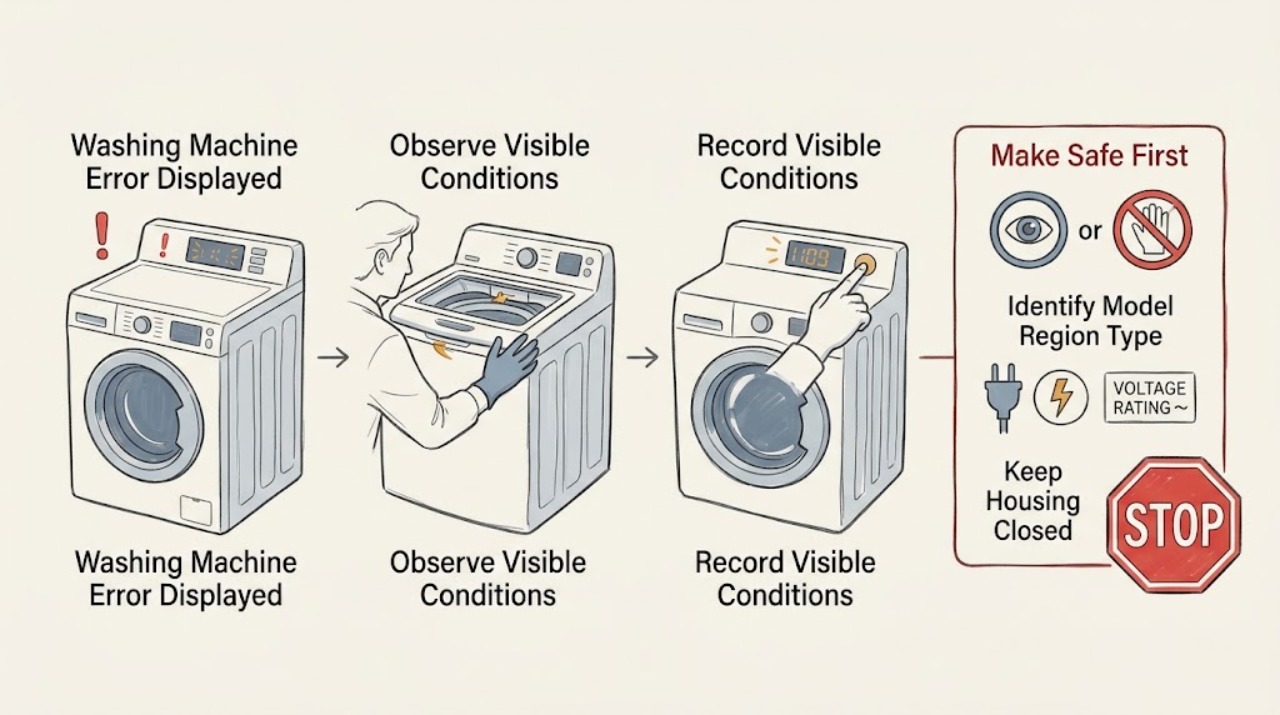
Work through in order
Diagnostic checks
Use only checks that match the exact appliance or system and its official guide.
-
Check 1
Stop the washer and, from a dry safe position, note whether there is leaking water, a hot power cord or plug, burning smell, smoke, abnormal noise, exposed damage, a moving machine, or a circuit that has tripped; if the manual and conditions permit, press the normal stop or power control.
Expected result: The display is a quiet fault with no hazard signs, or the error is accompanied by water, heat, odor, smoke, unusual sound, severe vibration, or electrical symptoms.
Next step: For a hazard, isolate water or power only from a safe dry location and arrange qualified service. Otherwise photograph the display and record the machine state before resetting.
Stop if: Do not touch wet electrical equipment, reach into a moving tub, hold a tripped breaker on, or continue after smoke, burning smell, hot cord, leaking water, or severe vibration.
Why this matters
Why: A quiet display fault can be documented and checked at the user-accessible level. Water, overheating, smoke, unusual noise, walking, or electrical symptoms make continued testing unsafe and can indicate more than a simple code-clearing condition.
-
Check 2
Photograph and transcribe every displayed character, digit, dash, alternating message, flashing lamp, and beep pattern before switching the washer off or clearing the display.
Expected result: The message is a complete C-style or E-style code, a text status, a lid or drain indicator, an unlabelled lamp pattern, or only a partial/uncertain display; note whether it appeared at startup, filling, washing, draining, or spinning.
Next step: Keep the photo and written sequence with the model and region. Do not borrow an explanation from another Toshiba model or a different appliance category.
Stop if: Do not repeatedly power-cycle the washer before recording the display, and do not claim a code meaning that the exact documentation does not support.
Why this matters
Why: The exact code and stage are the evidence needed to select the correct manual path. A partial code or guessed translation cannot establish whether the problem concerns a lock, water path, imbalance, motor, sensor, or control.
-
Check 3
Read the model or shape number from the rating label or owner documents without removing panels, and record the country or region, top-load or front-load design, washer-dryer status, and control layout.
Expected result: The model, region, washer type, and control layout are confirmed, or one of them cannot be obtained without moving, opening, or disassembling the appliance.
Next step: Use Toshiba's model-specific manual search or provide the identity and code to Toshiba service. If the label cannot be safely reached, stop at the information already available.
Stop if: Do not move a heavy washer alone, remove a cover, disconnect wiring, or disassemble the cabinet to obtain a model number.
Why this matters
Why: Toshiba's official manual catalog is organized by washing-machine family and model, while its FAQ warns that some remedies do not apply to every model. Confirmed identity supports the correct code list; unknown identity makes code interpretation unsafe.
-
Check 4
With the washer stopped, inspect the visible lid or door for clothing, debris, a mis-seated latch, or an obstruction at the lock area; close it normally without pressing, bypassing, or manually releasing the safety lock.
Expected result: The lid or door closes normally and the lock indicator responds, an obstruction is visible, the lock remains open, or the door/lid or hinge is damaged.
Next step: Remove only a loose visible obstruction without tools, close the lid or door normally, and follow the exact manual's single retry or reset instruction. Arrange service if the lock does not respond.
Stop if: Do not force the lid or door, insert tools into the lock, defeat an interlock, or open the door against residual water or a running drum.
Why this matters
Why: A model's safety interlock may prevent filling or spinning when the lid or door is not recognized as closed. A visible obstruction may be removable from ordinary access; a damaged or unresponsive lock needs service rather than a bypass.
-
Check 5
If the code appeared while filling and the exact manual lists it, confirm from ordinary access that the water tap is open, the inlet hose is not visibly kinked, and there is no leak at the hose connection; do not remove an inlet screen unless the manual explicitly makes it a user check.
Expected result: The tap is closed, supply is interrupted or weak, the hose is kinked, a visible connection leaks, the inlet screen is identified as blocked by the manual, or the visible supply appears normal.
Next step: Restore only a closed tap or visible kink if safe, dry any drip, and follow the exact manual's authorized retry. If the supply looks normal or a leak persists, leave the washer off and request service.
Stop if: Stop for a burst hose, uncontrolled water, water contacting electrical parts, a connection that will not shut off, or any need to access internal valves or wiring.
Why this matters
Why: A closed tap, supply interruption, kink, or permitted inlet restriction can prevent the expected water level and trigger a model-specific alarm. A normal visible supply shifts suspicion to the inlet valve, sensor, control, or another stage and is not permission to open the cabinet.
-
Check 6
If the code appeared during draining, observe the external drain hose for a visible kink, immersion, blockage at its end, or a hose position contrary to the exact manual; do not reach into a water-filled tub or remove an internal pump cover unless the manual explicitly authorizes that procedure.
Expected result: The hose is kinked, its end is immersed or blocked, wastewater remains in the tub, the external path looks normal, or water leaks while the washer tries to drain.
Next step: Correct only a plainly visible external hose position if safe and permitted, then use the exact manual's one retry. If water remains, leaks, or the external path is normal, arrange service without tilting the washer.
Stop if: Do not tilt a loaded washer, open a filter against hot or pressurized water, put hands into stagnant water, or continue when wastewater reaches electrical equipment or the floor.
Why this matters
Why: Toshiba documentation identifies abnormal hose placement or blockage as possible draining causes on applicable models. Residual water with a normal external path points toward a pump, filter, control, or deeper drain issue that needs model-specific handling.
-
Check 7
If the error appeared during spinning, observe whether the load is bunched on one side, the drum is overloaded, the washer is visibly rocking, or the floor and feet are unstable; do not put hands into a moving drum.
Expected result: The load is visibly unbalanced or excessive, the machine is unstable, or the load and installation appear normal while the error returns.
Next step: Stop the cycle, wait for the drum to stop, redistribute or reduce the load only as the exact manual allows, and use one authorized retry. Arrange service if the machine walks, bangs, or repeats the error.
Stop if: Stop for walking, violent vibration, metal impact, a damaged floor, leaking water, smoke, or a repeated error with a normal load and stable installation.
Why this matters
Why: Toshiba manuals for applicable models associate abnormal spin with a lid condition, one-sided or excessive load, and an unstable or inclined installation. A normal load and stable cabinet shift suspicion to a lock, drive, sensor, or control fault.
-
Check 8
Only after the exact model manual or Toshiba FAQ authorizes it for the recorded display, perform one normal reset or Start/Hold action; do not use undocumented button combinations, bypasses, or repeated breaker cycles.
Expected result: The display clears and the washer remains normal, the same code returns, a different code appears, or the reset cannot be completed as documented.
Next step: Record the before-and-after display and stage. If the code returns, the washer stops again, or the reset is not documented for this model, switch it off, unplug only from a dry safe position, and arrange service.
Stop if: Do not repeat resets, continue a full cycle to force a result, bridge a lid/door lock, or open the electrical cabinet.
Why this matters
Why: A cleared display may indicate a transient operating condition but does not prove the lock, water path, drain, motor, or control is healthy. A recurring or changing code requires the recorded evidence to be escalated.
-
Check 9
Prepare a service record with the complete code and photos, model or shape number, region, top- or front-load type, cycle and stage, water status, door/lid state, load and stability observations, recent move or power event, reset result, and all safety symptoms.
Expected result: The record separates a visible lid, inlet, drain, load, or power condition from a recurring/unknown code or an internal service symptom; or key identity information remains unknown.
Next step: Provide the record and photos through Toshiba's official support or service route and keep the washer out of service when the fault returns or any hazard was observed.
Stop if: Do not order a control board, pump, lock, sensor, motor, or other part from an unverified code, and do not disassemble the washer to confirm a suspected part.
Why this matters
Why: A complete timeline lets Toshiba or a qualified technician choose the correct manual and test path without guessing across models. Unknown identity or a recurring error is itself a service boundary.
Use your observations
Decision map
Find the observation that best matches what you see, then follow the next safe action.
-
PATH 01Safety boundary
What you see
The washer leaks, the cord or plug is hot, there is burning smell or smoke, abnormal electrical behavior, violent movement, or water near electrical equipment.
Do this next
Stop using the washer, isolate water and power only from a safe dry location, keep people away, and arrange qualified appliance/electrical service.
Why this path and its safety boundary
Why it matters: The condition is a safety or mechanical boundary, not a normal code-clearing task.
Safety stop: Do not reproduce the error, touch wet electrical equipment, hold a breaker on, or continue a cycle after a hazard sign.
-
PATH 02Safety boundary
What you see
The complete display, model/shape number, region, machine type, and operating stage are confirmed.
Do this next
Use the exact documentation to check only the visible condition that matches the stage, then perform at most one authorized reset.
Why this path and its safety boundary
Why it matters: The applicable Toshiba manual and support instructions can be selected without cross-model guessing.
Safety stop: Stop if the code is not listed for the exact model, returns after the authorized step, or the washer remains abnormal.
-
PATH 03Safety boundary
What you see
The code is partial, the model or region is unknown, or the machine type and stage cannot be confirmed.
Do this next
Photograph the display and rating label from safe access and ask Toshiba support or a qualified technician to identify the correct manual path.
Why this path and its safety boundary
Why it matters: The display cannot safely determine a lock, water, drain, load, motor, sensor, or control fault.
Safety stop: Do not borrow a code explanation from another model, market, brand, or appliance category.
-
PATH 04Safety boundary
What you see
The exact manual identifies a visible lid, tap, hose, drain, load, or stability condition, and it is corrected without force or hazard.
Do this next
Perform only the manual's single retry or reset and observe the same stage; record the result.
Why this path and its safety boundary
Why it matters: The washer may have stopped to protect the operating sequence, but the condition is not proven resolved until one authorized retry completes normally.
Safety stop: Stop if the code returns, the washer leaks, the lock does not respond, water remains, or vibration becomes severe.
-
PATH 05Safety boundary
What you see
The error returns after the permitted check/reset, another code appears, or the exact documentation does not list the display.
Do this next
Switch the washer off, unplug only from a dry safe position when appropriate, close the water tap if the manual or conditions call for it, and arrange Toshiba or qualified appliance service.
Why this path and its safety boundary
Why it matters: A persistent or unverified fault needs model-specific service; repeated resets can hide the timeline or leave a hazard energized.
Safety stop: Do not run another cycle, bypass the lock, open panels, or replace parts based only on a code.
Helpful context
Understand the symptom
Do not interpret a Toshiba code without the model and region
Toshiba publishes washing-machine manuals and troubleshooting information by product family and model. The same letter or number can have different meanings on a top-load, front-load, or washer-dryer model, and support instructions can vary by market. Record the complete display, model or shape number, region, washer type, and operating stage before deciding whether a user check applies.
Start with visible interlocks and water paths
A washer may stop because the lid or door is not safely closed, water cannot enter, water cannot drain, or the load cannot balance for spin. These are observations rather than proof of a failed part. Check only what the exact manual permits from ordinary access and avoid opening covers, bypassing the lock, or reaching into a moving or water-filled tub.
A reset is a documented step, not a repair
Some Toshiba manuals describe a Start/Hold or power action to clear a displayed alarm after the underlying visible condition is checked. That action is model-specific. Use it once only when the exact manual authorizes it; if the error returns, the machine stops again, or the code is not covered, preserve the evidence and arrange service.
Safety boundary
Stop conditions
- Stop immediately for leaking water near electrical equipment, a hot power cord or plug, burning smell, smoke, arcing, violent vibration, walking, abnormal metal noise, or a repeated circuit trip.
- Do not reach into a moving or water-filled tub, bypass a lid or door lock, open electrical covers, test live wiring, or tilt a loaded washer.
- Do not guess an unfamiliar code, transfer an explanation from another model or region, or repeatedly reset the washer before recording the display.
- Stop water-path checks for uncontrolled flow, a burst hose, a connection that will not isolate, hot or contaminated water, or water spreading across a floor.
- Arrange qualified service when the exact code is unlisted, the model or region is unknown, the code returns after one authorized step, or a visible check does not resolve the fault.
When checks do not resolve it
Need a professional?
Arrange Toshiba or qualified appliance service when the complete code returns after one model-authorized check or reset, is not listed for the exact model and region, the model cannot be identified safely, the lid or door lock remains abnormal, water will not enter or drain, the washer walks or bangs, or the display is accompanied by leaking water, hot cord, burning smell, smoke, or electrical symptoms. Use appropriate emergency services for an immediate fire, electrical, or flooding hazard.
Safety scope: This article supports documentation, ordinary-access visual checks, and one manual-authorized reset only. It does not authorize live electrical testing, cabinet disassembly, lock bypass, forced door opening, tilting a loaded machine, or internal water-path work.
Common questions
FAQ
What should I do first when a Toshiba washer shows an error?
Stop safely, photograph the complete display, and record the model, region, machine type, and cycle stage. Check only the visible condition that the exact manual associates with that stage; do not start by guessing the code or repeatedly resetting.
Can I use a Toshiba error-code list from another model?
No. Toshiba's FAQ warns that some remedies do not apply to every model, and its manual catalog is organized by product family and model. Treat an unfamiliar or partial code as unresolved until the exact documentation is found.
What visible checks are reasonable for a Toshiba washing-machine error?
When the exact manual supports them, inspect the lid or door, water tap and visible inlet hose, external drain hose, load balance, and machine stability from ordinary access. Do not bypass locks, open panels, reach into a moving tub, or perform live electrical checks.
Should I reset the washer if the error clears?
Only perform one reset or Start/Hold action when the exact manual authorizes it for the recorded display. If the error returns, a different code appears, or the washer remains abnormal, switch it off and arrange service.
When is a Toshiba washer error unsafe to troubleshoot?
Stop for leaking water near electricity, a hot cord or plug, burning smell, smoke, violent vibration, walking, abnormal metal noise, a repeated circuit trip, or water that cannot be isolated. Keep the machine off and use qualified appliance, electrical, plumbing, or emergency service as appropriate.
Read the exact guide
Official sources
- 洗濯機・衣類乾燥機 取扱説明書Toshiba Lifestyle Products & Services Corporation · Toshiba Lifestyle official manual catalog; exact regional model documentation controls the instructions.
- AW-T08DU1400LM+AW-T08DU1600LM_UserManual.pdfToshiba Lifestyle Products & Services Corporation · Official Toshiba manual for the named AW-T08DU1400LM/AW-T08DU1600LM models only; examples must not be generalized to an unidentified model.
- [C**]や[E**]などが表示される | よくあるご質問 | 東芝ライフスタイル株式会社Toshiba Lifestyle Products & Services Corporation · Toshiba Lifestyle official FAQ for washing machines; the page is Japanese and model-specific remedies must be confirmed for the user's region and model.
- 洗濯機・衣類乾燥機 お客様サポート | サポート | 東芝ライフスタイル株式会社Toshiba Lifestyle Products & Services Corporation · Toshiba Lifestyle Japan official laundry support hub; regional support and model documentation can differ.
Community feedback
Share a repair observation
Share a plain-text repair observation. Accepted observations are published automatically; this page may take a moment to update.