
On this page
Start here
Quick answer
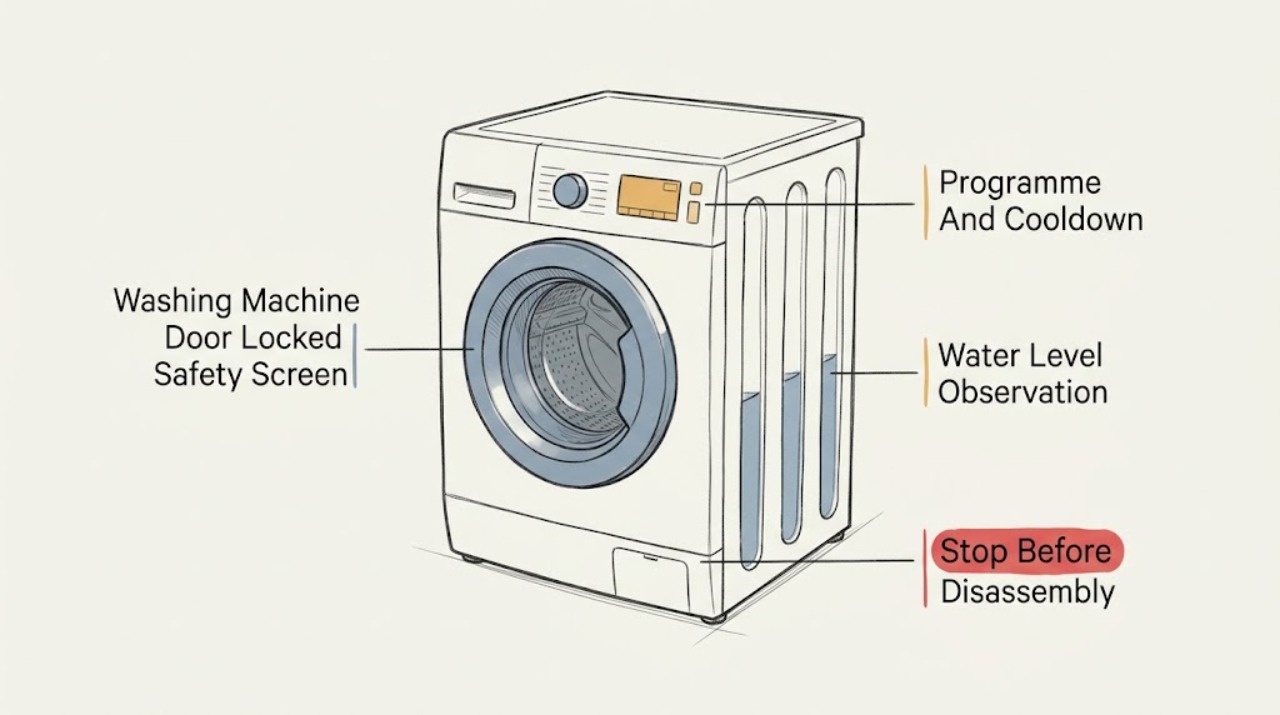
A washing-machine door normally stays locked while the drum is rotating, water remains inside, or the lock is cooling just after a programme ends. Wait for the exact model's normal release period, then check the display for a key or padlock and whether water is visible in the drum. If water remains, use only the model manual's safe drain procedure; do not open the door onto a full drum. Some machines have an emergency release, but it is model-specific and must be used only after power is isolated, the drum is still, the water level is safe, and the manual explicitly describes it. Stop for hot water, an active leak, water near electricity, smoke, burning odor, arcing, severe movement, or a repeated trip. Never pry the door, tilt the machine, bypass the lock, or open the cabinet.
Work through in order
Diagnostic checks
Use only checks that match the exact appliance or system and its official guide.
-
Check 1
Stop the washer and observe from a dry, stable position without pulling, tilting, or touching wet electrical equipment.
Expected result: Record an active leak, water near the cord or outlet, hot water, smoke, burning odor, sparks, unusual heat, severe movement, damaged door or seal, or a repeated electrical trip.
Next step: If a hazard is present, keep clear, close the water supply only if safely reachable, isolate power only from a dry safe position, and arrange qualified appliance, plumbing, or electrical help.
Stop if: Do not touch wet parts, restore power, move the machine, or run another programme after a safety symptom.
Why this matters
Why: These signs make forced opening or another cycle a water, burn, shock, fire, or mechanical hazard.
-
Check 2
Note whether the programme is running, paused, delayed, just finished, or in a hot or special cycle, and wait only for the release period stated by the exact manual.
Expected result: A key icon during operation or a lock that releases after a short cool-down can be normal; a lock that remains after the documented end state needs another branch.
Next step: Keep the door closed until the programme ends and the manual's release conditions are met; record the elapsed state and display.
Stop if: Do not pull the handle, lean on the door, or force a release while the drum may rotate or the laundry may be hot.
Why this matters
Why: The door lock prevents access during unsafe drum movement or temperature and may not indicate a failed part.
-
Check 3
Look through the door or lid only from outside to determine whether water is visible in the drum, without opening the lock or reaching inside.
Expected result: Visible water explains why the safety lock may remain engaged; an empty drum moves attention to the programme, lock icon, control state, temperature, or lock mechanism.
Next step: For visible water, use the exact manual's drain or service path and keep the door closed. For an empty drum, continue with the lock and error observations.
Stop if: Do not open the door over standing water, reach into a hot drum, or operate the washer if water is near electricity.
Why this matters
Why: Manufacturers warn that the door cannot be opened with water inside because opening could cause flooding.
-
Check 4
Record whether the washer attempted to drain, whether a pump sound or drain warning occurred, and whether the household drain appears to accept water, without moving the appliance.
Expected result: A failed drain, kinked drain path, blocked filter indication, or residual water supports a drain-related lock; normal drainage with an empty drum leaves the lock or control path possible.
Next step: Follow the exact model's drain instructions or arrange service if water remains, the filter is inaccessible, or the drain fault returns.
Stop if: Do not open a filter or hose into an uncontrolled wet area, use tools on a connection, or continue if water is hot or near electrical equipment.
Why this matters
Why: The door may remain locked because the machine still detects water or has not completed its safe drain state.
-
Check 5
Observe the key, padlock, door-lock, child-lock, pause, and error indicators, and record the exact letters, numbers, flashes, or beeps.
Expected result: A lock icon can be an active child-lock or normal door interlock; an error or repeated lock indication can point to a model-specific fault.
Next step: Use the exact model manual to clear a child-lock or documented pause once; arrange service for a returning lock or error state.
Stop if: Do not guess a universal button combination, enter hidden diagnostics, or bypass the lock.
Why this matters
Why: The display state determines whether a documented user setting or a service diagnosis is appropriate.
-
Check 6
If the machine is dry, stable, not hot, and has no safety warning, use only the model's visible Start/Pause or Cancel command once and observe whether the programme enters a safe drain or unlock state.
Expected result: A documented cancel may end the programme and begin safe draining; no response, a continuing lock, or a new code indicates that the control or interlock needs service.
Next step: Wait for the model's safe completion and record the result. Arrange service if the door remains locked with no water or the machine does not respond normally.
Stop if: Do not cancel and restart repeatedly, open the door mid-cycle, or continue after heat, leak, odor, smoke, or electrical symptoms.
Why this matters
Why: A command can change the state without proving the lock is healthy; the door should not be opened until the manual's water and motion conditions are satisfied.
-
Check 7
Check the exact model manual for an emergency door release; do not assume an unidentified machine has one or attempt a generic release with a tool.
Expected result: The manual may state that the feature is absent, or may identify a release near a filter flap with conditions for water level, power isolation, temperature, and drum motion.
Next step: Use it only when the exact manual authorizes it and every listed condition is satisfied; otherwise arrange qualified service.
Stop if: Do not pry, insert tools, remove panels, bypass the interlock, or attempt the release with water, heat, or rotation present.
Why this matters
Why: An emergency release is a model-specific safety procedure, not a universal way to defeat the lock.
-
Check 8
Only when the washer is dry, cool, stable, and free of warning signs, follow the exact model's single power-reset instruction and observe the lock state after the documented wait.
Expected result: A normal unlock after the reset suggests a temporary control state; a locked door, returning code, or protection trip means the condition remains unresolved.
Next step: Stop after one attempt and arrange service if the lock persists or returns.
Stop if: Do not repeatedly cycle power, restore power to wet equipment, or continue after an electrical or mechanical warning.
Why this matters
Why: A reset can clear a temporary electronic state but cannot verify a door interlock, drain system, sensor, or control.
-
Check 9
Prepare a service record containing the washer type, model number, programme and stage, water level, lock icon, exact error, temperature, drain behavior, door response, and safety observations.
Expected result: A complete record distinguishes normal post-cycle locking, residual water, a child-lock state, drain failure, control fault, or a defective interlock.
Next step: Keep the washer out of service when the cause is unresolved, water remains, the door is damaged, or a warning sign occurred; arrange qualified repair.
Stop if: Do not order or replace a lock, pump, control, or sensor solely from the symptom door locked.
Why this matters
Why: The technician can choose a model-specific repair without the homeowner forcing the door or opening the cabinet.
Use your observations
Decision map
Find the observation that best matches what you see, then follow the next safe action.
-
PATH 01Safety boundary
What you see
Water is near electricity, a leak is active, water or laundry is hot, smoke, burning odor, arcing, unusual heat, severe movement, or a repeated electrical trip occurs.
Do this next
Keep clear, close water only if safely reachable, isolate power only from a dry safe position, and arrange qualified appliance, plumbing, or electrical help.
Why this path and its safety boundary
Why it matters: The washer presents a water, burn, shock, fire, or mechanical hazard.
Safety stop: Do not touch wet parts, move the washer, restore power, or force the door.
-
PATH 02Safety boundary
What you see
The drum may still be rotating or the programme is visibly running or paused.
Do this next
Leave the door closed and use only the model's documented pause or cancel state, then wait for safe stop and drain.
Why this path and its safety boundary
Why it matters: The interlock is protecting against access during operation.
Safety stop: Do not pull the handle, reach inside, or bypass the lock.
-
PATH 03Safety boundary
What you see
The programme has just ended and the machine is otherwise normal, with no visible water or safety symptom.
Do this next
Wait for the exact model's release period and check the lock icon before touching the handle.
Why this path and its safety boundary
Why it matters: The lock can remain engaged briefly while its safety mechanism cools.
Safety stop: Do not force the door or treat a short normal delay as a broken lock.
-
PATH 04Safety boundary
What you see
Water is visible in the drum or the machine stopped before draining.
Do this next
Keep the door closed, follow the exact manual's safe drain procedure, and arrange service if draining does not restore safe release.
Why this path and its safety boundary
Why it matters: The safety lock may be preventing flooding and the root issue may be the drain path.
Safety stop: Do not open the door onto water, loosen a filter without safe containment, or handle hot water.
-
PATH 05Safety boundary
What you see
A key, padlock, or child-lock indicator is active and the machine is otherwise cool and dry.
Do this next
Use the exact model manual's lock-control action once; service a persistent indicator or unresponsive control.
Why this path and its safety boundary
Why it matters: A control setting may be preventing door or programme commands.
Safety stop: Do not guess a code, force the handle, or bypass the interlock.
-
PATH 06Safety boundary
What you see
The machine has residual water, a drain warning, a blocked or kinked drain path indication, or the pump does not complete draining.
Do this next
Use the model's drain instructions or arrange service for the pump, filter, hose, or household drain path.
Why this path and its safety boundary
Why it matters: The lock may remain closed until the water condition is cleared.
Safety stop: Do not run another cycle or open wet service points when water is hot or near electricity.
-
PATH 07Safety boundary
What you see
The exact manual confirms an emergency release and its conditions are all satisfied: the machine is off, isolated, cool, still, and sufficiently drained.
Do this next
Follow only that manual procedure; stop and request service if any condition is uncertain or the release does not work.
Why this path and its safety boundary
Why it matters: A model-specific emergency procedure may permit access without forcing the lock.
Safety stop: Do not improvise a tool release, pry the door, or proceed with water, heat, or drum motion present.
-
PATH 08Safety boundary
What you see
The drum is empty and cool, the programme has ended, no lock setting is active, and the door remains locked.
Do this next
Keep the washer out of service and arrange qualified appliance service with the recorded display and programme history.
Why this path and its safety boundary
Why it matters: A door-lock assembly, sensor, control, or unresolved drain state may be faulty.
Safety stop: Do not dismantle the door, remove the lock, or open the cabinet.
-
PATH 09Safety boundary
What you see
A door-lock or other error returns after the manual-authorized single reset or safe drain.
Do this next
Keep it off and provide the exact code, model, water state, and lock behavior to qualified service.
Why this path and its safety boundary
Why it matters: The machine has a persistent condition that requires model-specific diagnosis.
Safety stop: Do not repeatedly reset, enter diagnostics, or substitute a part from the code alone.
-
PATH 10Safety boundary
What you see
The washer unlocks after one documented reset, is dry and cool, and no warning sign returns.
Do this next
Monitor normal use without deliberately recreating the fault; arrange service if the door locks again.
Why this path and its safety boundary
Why it matters: A temporary control state is possible, but the reset does not prove the interlock or drain system is healthy.
Safety stop: Do not continue use after any leak, heat, odor, smoke, arcing, or electrical trip.
Helpful context
Understand the symptom
A locked door is often a safety decision
The lock protects against opening while the drum rotates or water is high enough to flood the room. It can also remain engaged briefly after a programme ends while the lock cools. The first useful observation is therefore the programme stage and water state, not the handle force. Keep the machine still and record the display, lock icon, and any sound from the pump or drum.
Drain and temperature come before release
If water is visible in the drum, do not open the door. Use the exact model manual for a drain or pump-filter procedure, and consider the water hot until the manual or a safe observation confirms it is cool. A drain filter, hose, pump, or household drain problem can keep the lock engaged. Do not loosen a wet filter or hose without the model's safety steps and a safe way to contain water.
Child lock and emergency release are not universal
A key or padlock icon can represent a child-lock or door-lock function, and the button combination varies. Some models have an emergency release behind a filter flap; many do not. A generic tab, tool, or hidden sequence is not safe advice for an unidentified machine. The model manual must state that the release exists and the conditions for using it.
Know when to stop
A cool, empty drum with a persistent lock after the documented checks points toward the interlock, sensor, control, or drain system. That is a service diagnosis. Water near electricity, a damaged seal, a door that opens unexpectedly, smoke, burning odor, or a repeated electrical trip makes continued operation unsafe and requires qualified help.
Safety boundary
Stop conditions
- Stop for hot water or laundry, a rotating drum, an active leak, water near electricity, smoke, burning odor, arcing, unusual heat, severe movement, or a repeated electrical trip.
- Do not force, pry, drill, tool, or bypass a locked door; do not tilt or drag the washing machine or open its cabinet.
- Do not reach into the drum, loosen a filter or hose without exact model instructions and safe water containment, or restore power to wet equipment.
- Do not use an emergency release unless the exact model manual confirms it and the machine is isolated, cool, still, and sufficiently drained.
- Do not repeatedly reset, enter hidden diagnostics, or replace a lock, pump, control, or sensor from the symptom alone.
Only after diagnosis
Potential parts
- door-lock or interlock assembly
Consider only after the drum is cool and empty, safe external checks are complete, and qualified diagnosis identifies the interlock as the fault.
Lock assemblies are model-specific safety components; confirm the complete model and do not bypass the lock. - drain pump or filter component
Consider only when residual water and a model-specific diagnosis point to a failed or obstructed drain path.
Pump and filter access and fit vary by model; use the manual and qualified service for water isolation and replacement. - water-level sensor
Consider only when the machine drains but incorrectly reports water and qualified diagnosis identifies the level-sensing path.
Sensor and tubing arrangements vary by model; do not select one from a locked-door symptom alone. - control board or user interface
Consider only after a persistent lock or error remains and qualified model-specific diagnosis points to the control path.
Controls are model- and revision-specific and may require programmed service; confirm fitment before ordering.
When checks do not resolve it
Need a professional?
Arrange qualified appliance service when the door remains locked after the exact model's safe programme, water, lock, and reset checks; when the lock or error returns; when water will not drain; or when the door, seal, cabinet, cord, or controls are damaged. Use plumbing or electrical service for a household drain, water, outlet, or protection problem.
Common questions
FAQ
Why is my washing machine door still locked after the cycle?
The drum may still be cooling, water may remain inside, a child-lock or door-lock setting may be active, or the programme may not have completed. Wait for the exact model's release state and check the water level and display. Do not force the door.
Can I open a washing-machine door with water inside?
Do not open it onto a full drum. Manufacturer guidance says the lock prevents flooding. Use only the exact model's safe drain procedure, with heat, motion, water containment, and electrical precautions satisfied; arrange service if draining is not safe or does not restore release.
What does the key or padlock symbol mean on a washer?
It can indicate a child-lock setting or the normal door interlock while a programme is running or water remains. Record the symbol and use the exact model manual for the documented control action. Never bypass the interlock.
Do all washing machines have an emergency door release?
No. Some models have one and others do not. The exact manual must identify it and its conditions. Do not use a generic tab, screwdriver, or hidden procedure, especially with water, heat, or drum movement present.
Should I reset a washing machine with a locked door?
Only when the machine is dry, cool, stable, and free of warning signs, and the exact manual authorizes a single reset. Record the display first. A returning lock, code, water level, leak, odor, smoke, heat, or electrical trip needs qualified service rather than repeated resets.
Read the exact guide
Official sources
- The door of the washing machine cannot be openedElectrolux · Front-loader washing machines; exact model manual controls the applicable procedure
- Washing machine's door can be opened and water runs out onto the floorElectrolux · Front-loaded washing machines; exact drain and door behavior is model-dependent
- The door of the washing machine cannot be openedElectrolux · Front-loader washing machines; use the installed machine's manual rather than cross-model instructions
- How to fix Appliance Hardware Issues of Electrolux Washing MachinesElectrolux · Listed Electrolux washing-machine models; used here for general manufacturer safety boundaries, not a universal procedure
Community feedback
Share a repair observation
Share a plain-text repair observation. Accepted observations are published automatically; this page may take a moment to update.