
On this page
Start here
Quick answer
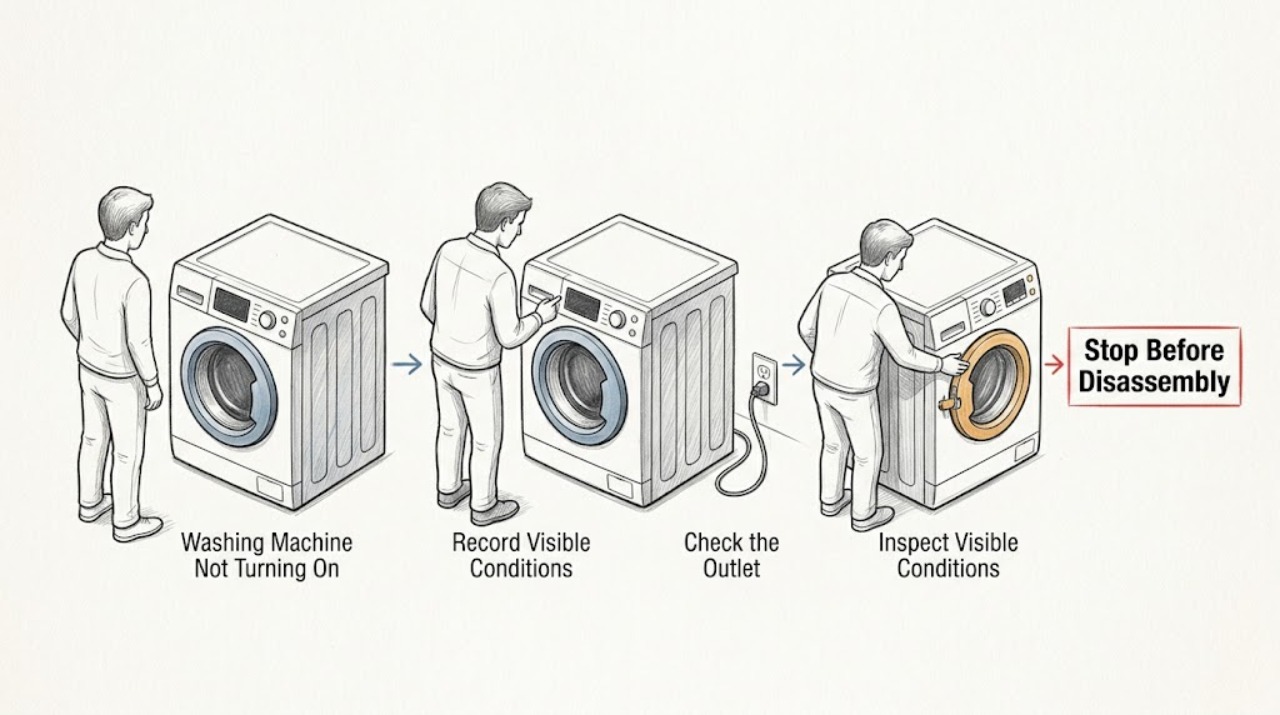
If a washing machine will not turn on, first separate a completely blank control from a machine that has lights but will not start. From a dry, safe position, check that the cord is fully seated in the correct grounded outlet, look for an obvious tripped breaker or GFCI, and do not use an extension cord. Then check the model manual for Control Lock, Delay Start, a required Start hold, an unlatched door or lid, a paused cycle, or a displayed code. A single model-authorized power cycle may clear a temporary control state, but do not repeat it after a trip or hazard. Stop for water near electrical parts, a hot or damaged outlet or cord, smoke, burning odor, visible arcing, or repeated trips; keep the washer out of use and call a qualified appliance technician or electrician.
Work through in order
Diagnostic checks
Use only checks that match the exact appliance or system and its official guide.
-
Check 1
From a dry position, press the normal Power or Start control once and note whether any display, indicator, sound, or lock light appears. Record the full model number and any exact code or symbol; do not keep pressing a nonresponsive control.
Expected result: The washer may be fully dark, show a lock or delay indicator, display a code, or light up but fail to begin a cycle.
Next step: Use the exact Owner's Manual for the displayed state. If smoke, a burning odor, arcing, or heat is present, stop immediately and arrange qualified help.
Why this matters
Why: A fully dark machine directs the check toward supply power, while a lit but inactive panel directs it toward a lock, door or lid state, program, delay, or code. A code is not a universal diagnosis across brands.
-
Check 2
With hands and floor dry, check that the washer cord is fully seated in its intended grounded wall outlet and that no extension cord or adapter is being used. Look only at the accessible plug, outlet face, cord, and nearby floor for looseness, scorch marks, moisture, or damage.
Expected result: The connection may be normal, the outlet or cord may be loose or damaged, or water may be present near the electrical connection.
Next step: Do not touch damaged or wet equipment. Keep the washer out of use and call an electrician or appliance technician; do not probe the outlet or try a makeshift power connection.
Why this matters
Why: A poor connection or protective-device trip can remove power, but visible heat, damage, moisture, or a loose outlet is not a user repair. Manufacturer guidance calls for a grounded outlet and no extension cord.
-
Check 3
Look at the accessible breaker or GFCI indicator without opening an electrical panel or touching wiring. Note whether a protective device is visibly tripped and whether other devices on the same area also lost power; do not repeatedly reset it.
Expected result: The device may be in a tripped position, the washer may be the only device affected, or the surrounding circuit may also be without power.
Next step: If it trips again, will not remain set, or any heat, odor, smoke, water, or arcing is present, leave it off and call a qualified electrician. Do not replace a protective device with a higher rating.
Why this matters
Why: A tripped device can indicate overload, a short, moisture, or an appliance fault. A wider outage can be upstream of the washer, while a repeat trip keeps an electrical fault in the branch.
-
Check 4
If the panel is lit, check the manual's controls for Control Lock, Delay Start, Pause, a required Start-button hold, and the door or lid closure indication. Close the empty door or lid normally without slamming or bypassing the latch, then select a valid cycle and follow the manual once.
Expected result: The lock or delay indicator may clear, the door or lid may fail to show closed, the Start command may begin a countdown, or the panel may remain unresponsive.
Next step: If the manual-supported unlock or start sequence does not work, keep the washer unused and arrange service. Do not bridge, tape, or otherwise bypass the door or lid lock.
Why this matters
Why: Whirlpool and Maytag describe Control Lock as a state that prevents touch commands; Whirlpool also documents model-dependent Start holds, door closure, and cycle selection. A latch that cannot engage is a service clue, not permission to defeat the interlock.
-
Check 5
If the model manual lists water as a start prerequisite, confirm from the faucet side that the hot and cold supply valves are normally open and that the visible inlet hoses are connected and not sharply kinked. Do not remove a hose or screen while connected to water pressure.
Expected result: Both supplies may be open, one may be closed, a hose may be kinked, or the machine may show a water or fill message even though its control panel is on.
Next step: Correct only an obvious valve position or hose bend without tools and only when there is no leak. If water leaks, the message returns, or the model requirement is unclear, call a technician.
Why this matters
Why: Some washer designs will not proceed when required water conditions are absent, but this does not explain a completely blank control. A supply or fill message needs the model's instructions rather than a guessed universal setting.
-
Check 6
Only when the area is dry, there is no damage or odor, and the manual authorizes it, perform one power cycle using the washer's normal plug or dedicated breaker and the manual's waiting interval. Restore power once, select the cycle again, and stop if the fault returns.
Expected result: The panel may recover, retain a code, remain dark, or cause the protective device to trip again.
Next step: Do not repeat the reset after a trip or recurring fault. Leave the washer disconnected or its circuit off as appropriate and provide the model, code, and observations to qualified service.
Why this matters
Why: A power cycle can clear a temporary control interruption, but it cannot prove that a supply, lock, motor, or control fault is safe. Manufacturers direct persistent nonresponse to service.
Use your observations
Decision map
Find the observation that best matches what you see, then follow the next safe action.
-
PATH 01Next step
What you see
The washer is completely dark and the outlet, cord, or protective device is wet, hot, damaged, scorched, or repeatedly trips.
Do this next
Stop using it, keep clear of the wet or damaged area, and call a qualified electrician or appliance technician; do not test the outlet or reset again.
-
PATH 02Next step
What you see
The washer is completely dark but there is no visible hazard and an accessible breaker or GFCI appears tripped.
Do this next
Record the visible state and follow the household device's normal safe procedure only once if appropriate; a repeat trip or no recovery requires an electrician.
-
PATH 03Next step
What you see
The panel is lit but shows Control Lock, Delay, Pause, a door or lid state, or a model-specific code.
Do this next
Use the exact model manual to clear or interpret that state once; do not bypass the interlock or reuse a code explanation from another washer.
-
PATH 04Next step
What you see
The panel is lit and the door or lid will not confirm closed or the Start command does not respond after the manual sequence.
Do this next
Keep the washer out of use and arrange appliance service for the latch, control, or wiring; do not force or defeat the lock.
-
PATH 05Next step
What you see
The panel is lit but the washer waits for water or shows a fill-related message.
Do this next
Check only the visible supply valves and hose routing when dry and leak-free; follow the model manual or call service if the condition remains.
-
PATH 06Next step
What you see
One manual-authorized power cycle does not restore operation or the problem returns.
Do this next
Stop resetting and give qualified service the model, power state, code, lock state, water state, and any leak or electrical observations.
Helpful context
Understand the symptom
“Not turning on” can mean no lights at all, a lit panel that ignores commands, or a selected cycle that never starts. Those states lead to different checks. This page is brand-neutral: Whirlpool, Maytag, GE, and other manufacturers use different lock symbols, button sequences, and error meanings, so use their pages only as examples and follow the manual for the washer in front of you.
Begin with accessible observations. Do not remove a rear panel, open the control console, bypass a door or lid lock, measure live power, or use an extension cord to reach a different outlet. Water and laundry equipment create an added shock risk when a cord, outlet, or floor is wet.
If the panel becomes responsive after a setting change or one manual-authorized reset, run only the normal cycle the manual supports and watch for a return of the fault. If the control remains dead or the fault repeats, preserve the exact symptoms for service rather than trying more resets.
Safety boundary
Stop conditions
- Stop immediately for water near the outlet, cord, controls, or motor area, a hot or damaged connection, smoke, burning odor, visible arcing, a shock, or repeated breaker or GFCI trips.
- Do not remove panels, measure live power, open the control console, bypass a door or lid lock, use an extension cord, or work on the washer while wet.
- Do not repeatedly reset a protective device or a washer that remains dark, trips, smells hot, or shows a recurring fault.
- Do not pull hoses, open a pressurized connection, or tilt the washer to reach hidden components as part of a no-start check.
- Arrange qualified appliance service when safe settings and one authorized power cycle do not restore operation or when the symptom returns.
When checks do not resolve it
Need a professional?
Call a qualified appliance technician when the washer remains dark or unresponsive after safe supply and model-setting checks, when the door or lid lock will not engage, when a code returns, or when a single authorized reset does not help. Call an electrician for a hot or damaged outlet, wiring concern, or repeated breaker or GFCI trip. Treat water near electrical parts, smoke, burning odor, visible arcing, shock, and active leaks as immediate stop conditions.
Have this ready
- Provide the model, whether the panel is blank or lit, exact codes or indicators, outlet and breaker observations, lock and door or lid state, water-valve state, the last successful cycle, any leak, odor, heat, smoke, arcing, or trip, and the result of one manual-authorized reset if performed.
Common questions
FAQ
What is the first check when a washing machine will not turn on?
Separate a blank panel from a lit panel, then check the dry, accessible cord and outlet connection and look for a tripped protective device without opening the appliance. Record any exact code or indicator.
Why is the washer display on but the cycle will not start?
Check the model manual for Control Lock, Delay Start, Pause, a required Start hold, a valid cycle, and door or lid closure. Do not bypass the latch or treat another model's code as universal.
Can I use an extension cord to start the washer?
No. Manufacturer guidance calls for the washer's grounded wall connection and says not to use an extension cord. A damaged, loose, hot, or wet connection needs qualified electrical help.
Should I reset the washer if it has no lights?
Only perform one power cycle when the area is dry, undamaged, and the exact manual authorizes it. Do not repeat a reset after a trip, odor, heat, water, or recurring fault; arrange service instead.
When is a washing machine no-start problem urgent?
Stop for water near electrical parts, smoke, burning odor, visible arcing, shock, a hot or damaged outlet or cord, or repeated breaker or GFCI trips. Keep clear and call qualified electrical or appliance service.
Read the exact guide
Official sources
- Not Starting or Not Operating - Front Load WasherWhirlpool Product Help · Manufacturer example of washer Control Lock, door, water, Start-button, cycle, code, and power-cycle checks
- How to Reset a WasherMaytag Product Help · Manufacturer example of a washer power cycle, Control Lock check, and manual-dependent reset
- Washer - Resetting the Electronic ControlsGE Appliances · Manufacturer example of washer control interruption, power reset, cycle re-selection, and service escalation
- Top Load Washer - No FillGE Appliances · Manufacturer example of washer power, water supply, timer or cycle state, lockout, and model-specific start behavior
- No Power - WasherMaytag Product Help · Manufacturer example of washer grounded power, breaker or GFCI, Control Lock, and electrician escalation
Community feedback
Share a repair observation
Share a plain-text repair observation. Accepted observations are published automatically; this page may take a moment to update.