
On this page
Start here
Quick answer
A Westinghouse dishwasher may pause while it heats or waits for water, so first check whether the display is still counting, paused, or showing an error. If it has stopped, inspect the water inlet, drain hose, filters, and pump area with power off, and confirm the door is fully closed. Westinghouse manuals identify door, delay, water-fill, drain, and power conditions as separate causes. Correct one accessible condition and run one supervised cycle; if the same stage repeats, water remains, or an error returns, stop and arrange service.
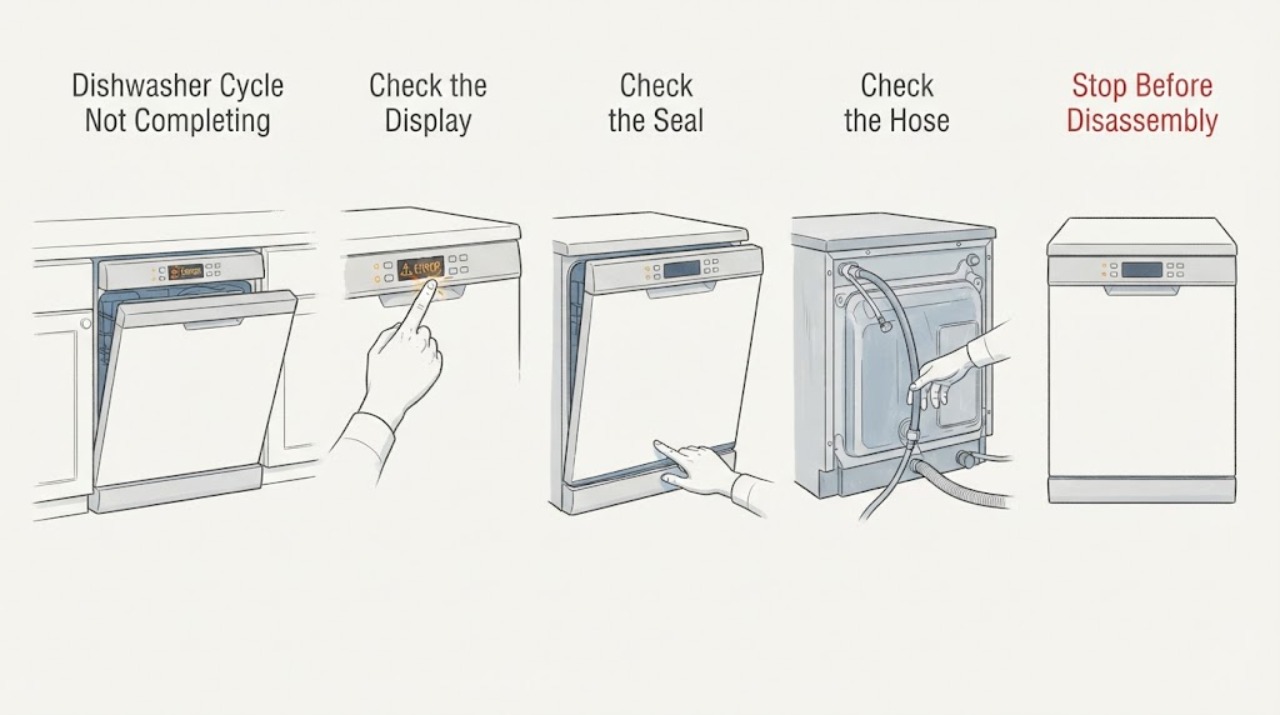
Work through in order
Diagnostic checks
Use only checks that match the exact appliance or system and its official guide.
-
Check 1
Read the display and wait briefly while observing whether the countdown advances. Check for a delay, flashing program key, or fault indication; do not repeatedly press Start.
Expected result: The display advances, stays at one stage, or shows an error/blank panel.
Next step: If it is advancing, allow the documented program to continue; if stalled, continue with water and drain checks.
Why this matters
Why: Advancing time supports a normal pause or heat phase. A repeated stage or error makes water, drain, door, or control trouble more likely.
-
Check 2
Open and close the door firmly, checking that racks, utensils, and the gasket are not preventing closure. Verify any delay setting is off using the model manual.
Expected result: The cycle resumes after the door is latched or delay is cleared, or it still stops.
Next step: Run one supervised cycle after the correction; do not bypass the latch.
Why this matters
Why: A door interlock or selected delay can suspend a cycle without a component failure. Persistence shifts attention to fill, drain, or power.
-
Check 3
With the dishwasher off and safe to access, confirm the water shutoff is open and the inlet hose is not kinked. Check the tub water level after a start.
Expected result: The tub never fills, fills slowly, or water enters normally before the stop.
Next step: Correct only an accessible valve or kink and test once; service persistent no-fill.
Why this matters
Why: No/slow fill supports an inlet valve, hose, screen, or supply issue. Normal fill makes drainage or program control more likely.
-
Check 4
If water remains, switch off power safely and clean only the user-accessible filters/strainer described by the manual. Inspect the visible drain hose for kinks and the pump area for loose debris; do not reach into a powered pump.
Expected result: The filter or hose is blocked, the tub drains after cleaning, or standing water remains.
Next step: Run one short supervised drain/cycle; arrange service if water remains or returns.
Why this matters
Why: Westinghouse troubleshooting links blocked filters, drain hose, and pump path with incomplete drainage. Remaining water after a clear path suggests a pump, sensor, or installation issue.
-
Check 5
After one door, water, and drain correction, run a normal program and record the stage, code, water level, and whether the cycle completes.
Expected result: The cycle completes, stops at the same fill/drain stage, or power cuts out.
Next step: Stop repeated resets and provide the model and observations to Westinghouse support/service.
Why this matters
Why: Completion after an accessible correction supports that condition. Repetition at a fixed stage indicates a component or control diagnosis; power loss requires electrical checks.
Use your observations
Decision map
Find the observation that best matches what you see, then follow the next safe action.
-
PATH 01Next step
What you see
The countdown advances after a heating/pause period and the cycle completes.
Do this next
Use the model manual for expected cycle options and monitor future runs.
Why this path and its safety boundary
Why it matters: The earlier pause was likely part of the selected program.
-
PATH 02Next step
What you see
The cycle stops before filling or the tub stays dry while the water valve is open.
Do this next
Correct the accessible supply condition; request service if fill does not return.
Why this path and its safety boundary
Why it matters: Water supply, inlet hose, valve screen, or inlet valve is more likely.
-
PATH 03Next step
What you see
The tub contains water and a clean filter/clear visible hose does not restore drainage.
Do this next
Leave the dishwasher off and arrange service; do not dismantle the pump.
Why this path and its safety boundary
Why it matters: A pump, sensor, hose installation, or control fault is more likely.
-
PATH 04Next step
What you see
The panel goes blank, the breaker trips, or water reaches the outlet or wiring.
Do this next
Isolate power only from a dry safe location and obtain qualified service.
Why this path and its safety boundary
Why it matters: Electrical or water exposure is a stop condition.
Helpful context
Understand the symptom
Do not assume a long cycle has failed. Note the selected program, remaining display, whether the pump or inlet valve is audible, and whether water is left in the tub. A clean display with a pause can be a programmed heating or standby period; an error, repeated stage, or standing water changes the next check.
Westinghouse sells freestanding and other dishwasher designs. Record the model from the rating plate and use its manual for filter access, drain layout, and reset instructions.
Only after diagnosis
Potential parts
- drain pump or drain hose
Consider only after the filter and visible hose path are clear and service confirms a drain fault for the exact model.
Freestanding and other Westinghouse models use different pump and hose fits. - water inlet valve
Consider only when water supply is present but model-specific diagnosis confirms a valve fault.
Do not infer compatibility from the cycle symptom alone.
When checks do not resolve it
Need a professional?
Contact Westinghouse support or qualified service when the cycle stops at the same stage after door, delay, water, filter, and visible drain checks; when an error returns; when the pump will not drain; or when power or water exposure is involved. Provide the model, program, display state, stage, and water level.
Common questions
FAQ
Is every long Westinghouse dishwasher cycle a fault?
No. Watch whether the countdown advances and whether the machine is in a documented heat or pause phase. A repeated stage, error, or standing water needs troubleshooting.
Why does the dishwasher stop with water inside?
Check the user-accessible filter and visible drain hose with power off. If the path is clear and water remains, a pump, sensor, or installation fault needs service.
Can I keep pressing Start to make it continue?
Do one door/delay correction and one supervised test. Repeated key presses can obscure the display state; service a recurring stop.
Read the exact guide
Official sources
- Westinghouse SupportWestinghouse · Official Westinghouse Australia support page; region and product availability vary.
- Westinghouse Dishwasher User ManualWestinghouse · Official Westinghouse dishwasher manual; exact model and regional fittings vary.
Community feedback
Share a repair observation
Share a plain-text repair observation. Accepted observations are published automatically; this page may take a moment to update.