
On this page
Start here
Quick answer
First classify what ‘not working’ means on the Whirlpool dryer: no display or drum light, controls that do not respond, a cycle that will not start, a drum that will not tumble, or a cycle that runs without heat. Check the door latch, control lock, cycle selection, Start button, and visible power condition before anything else. Electric models may use two household breakers while gas models use one; only check the applicable external supply and do not keep resetting a trip. Record any exact code. Stop immediately for gas odor, smoke, burning odor, arcing, a hot or damaged cord or receptacle, a scorched load, extreme heat, water near the appliance, or a repeated trip.
Work through in order
Diagnostic checks
Use only checks that match the exact appliance or system and its official guide.
-
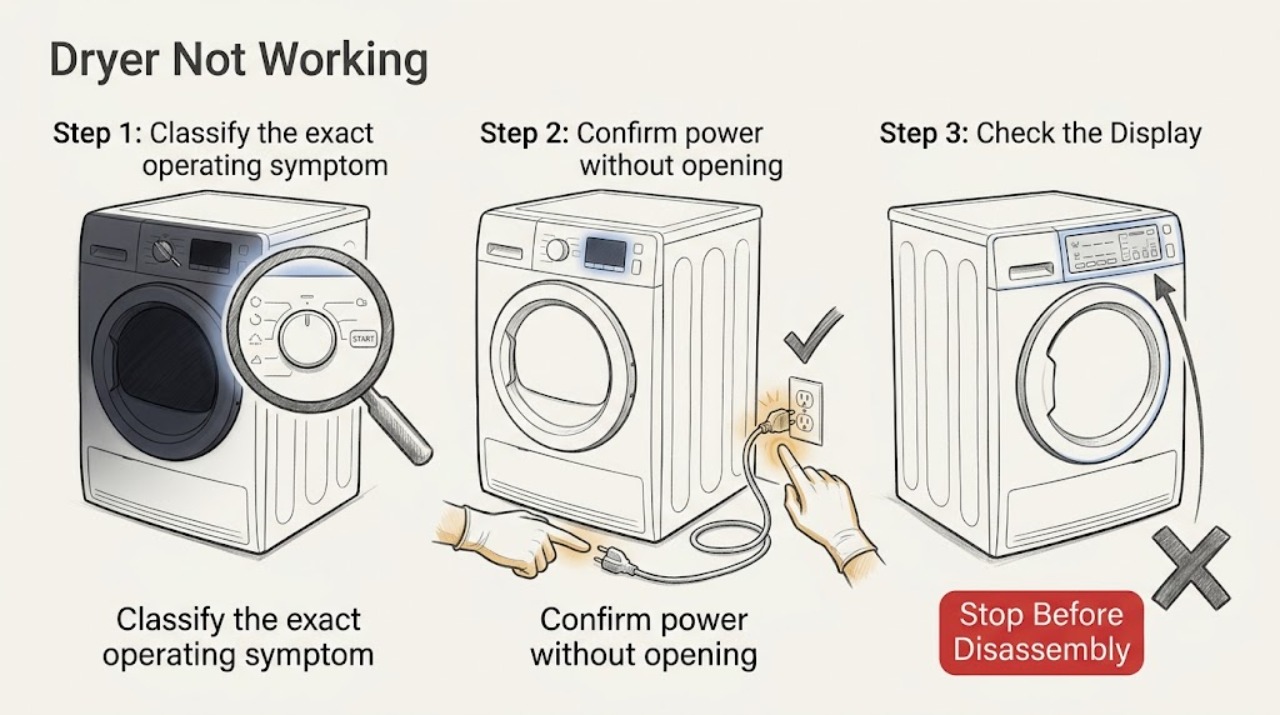
Classify the exact operating symptom
With the dryer stopped, note whether the console or drum light works, whether touch controls respond, whether the drum turns, whether the cycle begins and then stops, and whether the complaint is no heat rather than no operation. Record the model number, selected cycle, and every displayed character.
Expected result: A dark unit follows the power branch; a lit but locked or unresponsive console follows the controls branch; a cycle that will not begin follows the door, Start, and cycle branch; a turning drum with cold air follows the heating branch; a stopped drum needs drive or interlock service.
Next step: Use the matching action below and keep the exact code and model with the result.
Why this matters
Why: Separating these symptoms prevents a no-power check from being used to explain a heat-only failure or a control-lock condition from being treated as a mechanical fault.
-
Confirm power without opening the appliance
Check whether the console or drum light is lit and inspect the nearby cord and receptacle from a dry standing position for visible damage, discoloration, looseness, melting, or unusual heat. If the dryer is electric, look at both household breakers serving it; if it is gas, check the applicable household fuse or breaker. Do not repeat a reset when a breaker trips again.
Expected result: Whirlpool states that electric dryers use two household fuses or breakers, while gas dryers use one. A dark console or a tripped supply can prevent operation; a damaged or hot connection is a safety fault rather than a reset opportunity.
Next step: Continue to the controls and door checks only when the external power area is dry, cool, and undamaged.
Why this matters
Why: If the supply is visibly abnormal, leave the dryer off and arrange qualified electrical or appliance service. If the display is still dark with no visible supply issue, the fault may be upstream or inside the appliance.
-
Clear control-lock and input problems
Look for a Control Lock or Loc indicator. If it is lit and there is no safety symptom, use the model guide's control-lock button or hold gesture. Dry your hands and the touch surface with a clean, dry cloth, then press the model's Start, Push to Start, or Hold to Start control for the interval stated in the guide rather than tapping it once.
Expected result: A locked control normally ignores touch commands. Moisture or a very brief Start press can make a working panel appear dead; Whirlpool describes a two-to-five-second Start hold on applicable models.
Next step: Proceed to the door and cycle checks if the console responds; request service if it stays unresponsive with confirmed power.
Why this matters
Why: If the panel responds after the lock is cleared, the original issue was input state rather than a failed motor. If it remains blank or unresponsive, stop trying random button combinations and retain the model and display information.
-
Check the door latch and selected cycle
Open the door with the dryer stopped and remove any clothing, packing material, or visible debris that prevents the latch from seating. Close the door firmly, select an Automatic Dry or Timed Dry cycle supported by the model, and confirm the control is not on a wrinkle-only option. Do not force a bent latch or run with the door interlock defeated.
Expected result: The door can look closed without both latches engaging. Whirlpool also notes that a wrinkle-reduction or wrinkle-shield setting may not start the dryer on some models; clothing caught at the latch can block operation.
Next step: If the drum starts but does not turn, follow the no-tumble branch; if it runs but does not heat, follow the heating branch.
Why this matters
Why: A cycle that starts after the latch is clear and the correct program is selected points to an interlock or selection condition. A door that will not latch, a loose hinge, or a cycle that still will not begin needs service.
-
Separate no-tumble from no-heat
After the door and cycle checks, start one appropriate cycle only when the dryer is dry and has no odor, smoke, heat, or electrical warning. Observe from outside whether the drum turns and whether the cycle remains active. Do not reach into the drum while it can move and do not perform an internal test.
Expected result: No tumble with a responsive console points toward a door interlock, motor, drive, or control issue. Tumble with no heat points toward the selected cycle, applicable electric supply, gas supply, airflow, or heat system. Heat-pump models may feel cooler and run longer by design.
Next step: Stop the test at the first abnormal odor, sound, temperature, or electrical symptom and arrange qualified service.
Why this matters
Why: The movement and heat observations lead to different service paths; replacing a heating component will not correct a drum that never turns, and a drive repair will not correct a cold heated cycle.
-
Use the applicable heating or gas branch
If the drum turns but the complaint is no heat, check the selected cycle first. On an electric model, use only the external two-breaker and cord observations described in the model guide. On a gas model, verify only the normal visible supply condition when there is no gas odor; do not test ignition or disturb the gas connection. For a heat-pump model, clean the model-approved lint and bottom filters and compare the result with its lower-temperature cycle behavior.
Expected result: Air Only does not add heat. An electric dryer can tumble when one supply leg is unavailable; a gas dryer can tumble with its shutoff closed; and a heat-pump dryer can use low-temperature air and longer cycles.
Next step: Use the exact model guide and service path when the heating result remains abnormal; do not run another test after a safety symptom.
Why this matters
Why: A corrected cycle, supply condition, or filter can explain the symptom. A correctly selected cycle that remains cold, an open gas supply with no heat, or repeated power trouble requires qualified diagnosis rather than a guessed part.
-
Record and interpret the exact error code
Write down the complete code, including letters, numbers, and alternating segments, before clearing it. Note the cycle phase and whether the code returns. If the model guide gives a single safe power-cycle procedure and there is no hazard, follow that procedure once; do not use repeated resets to suppress a recurring code.
Expected result: Codes such as L2 can indicate a supply condition that affects the heater, while a lock or other code may identify a control state. Whirlpool's code guidance is model-specific, so a partial code or a code borrowed from another model can mislead the diagnosis.
Next step: Give the model, complete code, cycle, power type, and observed behavior to qualified appliance service.
Why this matters
Why: A returning code is evidence for a service diagnosis. A code accompanied by smoke, odor, unusual heat, arcing, a damaged connection, or a repeated trip is an immediate stop condition.
-
Verify the result and stop at the service boundary
Only after a safe user-level correction, run one small, appropriate load on the model-approved cycle and observe from outside whether the dryer starts, tumbles, heats as expected for its type, and completes without abnormal odor or temperature. Keep the model guide and all earlier observations available.
Expected result: Normal operation after clearing a lock, seating the door, selecting the correct cycle, restoring applicable supply, or cleaning an approved filter supports that correction. Failure to start, no tumble, no heat, a returning code, or abnormal heat means the fault remains.
Next step: Stop using the dryer and arrange qualified service when the final check fails or any stop condition occurs.
Why this matters
Why: A persistent fault can involve an interlock, motor or drive, thermal protection, control, power circuit, gas ignition system, or heat-pump system and needs model-specific qualified work.
Use your observations
Decision map
Find the observation that best matches what you see, then follow the next safe action.
-
PATH 01Next step
What you see
The console and drum light are dark
Do this next
Check the applicable visible household supply condition; if it is normal, leave the dryer off and arrange electrical or appliance service for a no-power diagnosis.
-
PATH 02Next step
What you see
The console is lit but controls do not respond or Control Lock is displayed
Do this next
Clear the lock using the model guide, dry the controls and hands, and use the documented Start hold; persistent unresponsiveness needs service.
-
PATH 03Next step
What you see
The dryer will not begin a cycle
Do this next
Seat the door latch, clear visible clothing or packing material, select an applicable Automatic or Timed cycle, and use the documented Start control.
-
PATH 04Next step
What you see
The console responds but the drum does not tumble
Do this next
Do not open panels or defeat an interlock; stop user testing and arrange qualified diagnosis of the door interlock, drive, motor, or control path.
-
PATH 05Next step
What you see
The drum tumbles but the cycle has no heat
Do this next
Check whether the cycle is intentionally unheated, then use only the applicable electric, gas, heat-pump, filter, and airflow checks; persistent cold operation needs service.
-
PATH 06Next step
What you see
A code returns after one model-directed safe reset
Do this next
Keep the complete code and model number, stop repeated resets, and arrange qualified service.
-
PATH 07Next step
What you see
There is gas odor, smoke, burning odor, arcing, a scorched load, extreme heat, a hot or damaged cord or receptacle, water near the appliance, or a repeated trip
Do this next
Stop immediately, keep clear of the hazard, and use the appropriate emergency or qualified-service path from a safe location. Do not run another test.
Helpful context
Understand the symptom
Classify the failure before choosing a fix
‘Not working’ is several different faults. A dark console points toward power or control supply; a lit console with no response points toward a lock, touch input, or selected cycle; a running drum with no heat needs the heat-specific path; and a drum that will not move needs a drive or interlock diagnosis. The model number and exact display behavior matter because Whirlpool controls and cycle names vary.
Keep the user checks external
Use dry hands and a dry cloth for the controls, inspect only visible parts, and follow the model guide for any reset. Do not remove panels, defeat the door or thermal interlock, probe energized wiring, open gas connections, or keep running a dryer that shows a safety symptom.
Only after diagnosis
Potential parts
- door latch or door interlock
Consider only after the door cannot latch or the interlock fails model-specific qualified testing while power and controls are otherwise correct.
Confirm the complete dryer model and manufacturer fit information before selecting a component. - drive motor or drum drive assembly
Consider only when the console responds and qualified testing confirms a drive or motor fault rather than a door or control condition.
Drive components vary by model; use the model guide and service findings. - thermal or control assembly
Consider only after qualified testing identifies a failed thermal protection, sensor, control, or applicable heating component.
Do not substitute a safety or control component without model-specific confirmation.
When checks do not resolve it
Need a professional?
Arrange qualified appliance or electrical service when the dryer remains dark with an apparently normal visible supply, the controls stay unresponsive, the door will not latch, the drum will not tumble, the correct cycle remains cold, a code returns, or the dryer stops unexpectedly. Stop immediately for gas odor, smoke, burning odor, arcing, a scorched load, extreme heat, water near the appliance, a hot or damaged cord or receptacle, or a repeated trip. Do not remove panels, probe energized wiring, open gas connections, defeat an interlock, or continue testing a hazardous appliance.
Common questions
FAQ
Why does my Whirlpool dryer have power but not start?
Check Control Lock, dry the touch surface, hold the documented Start control, confirm the door latch is seated, and choose an applicable Automatic or Timed cycle. If the console responds but the cycle still will not begin, qualified service may be needed.
Why does my Whirlpool dryer run but not heat?
Rule out Air Only first, then use the applicable electric, gas, heat-pump, filter, and airflow checks. An electric model can tumble with one supply leg unavailable, a gas model can tumble with its shutoff closed, and a heat-pump model can dry at a lower temperature.
What should I do if the dryer breaker trips?
Do not keep resetting it. Leave the dryer off when the trip repeats, the cord or receptacle is hot or damaged, or there is smoke, odor, arcing, or water nearby; arrange qualified electrical or appliance service.
When should I stop troubleshooting a Whirlpool dryer?
Stop for gas odor, smoke, burning odor, arcing, a scorched load, extreme heat, a hot or damaged cord or receptacle, water near the appliance, or a repeated trip. Do not run another test or open the appliance under those conditions.
Read the exact guide
Official sources
- No Power - Gas DryerWhirlpool Product Help · Whirlpool gas dryers
- Dryer Too HotWhirlpool Product Help · Whirlpool dryer overheating guidance
- Error Codes in DryersWhirlpool Product Help · Whirlpool dryer error-code guidance
- No Power - Electric DryerWhirlpool Product Help · Whirlpool electric dryers
- Dryer is Not HeatingWhirlpool Product Help · Whirlpool dryers
- L2 - Error Code - DryerWhirlpool Product Help · Whirlpool dryer L2 supply-code guidance
- Not Heating - Compact Heat Pump DryerWhirlpool Product Help · Whirlpool compact heat-pump dryers
- Not Starting or Not Operating - DryerWhirlpool Product Help · Whirlpool dryers
- Dryer Not Starting or No OperationWhirlpool Product Help · Whirlpool dryers
Community feedback
Share a repair observation
Share a plain-text repair observation. Accepted observations are published automatically; this page may take a moment to update.