
On this page
Start here
Quick answer
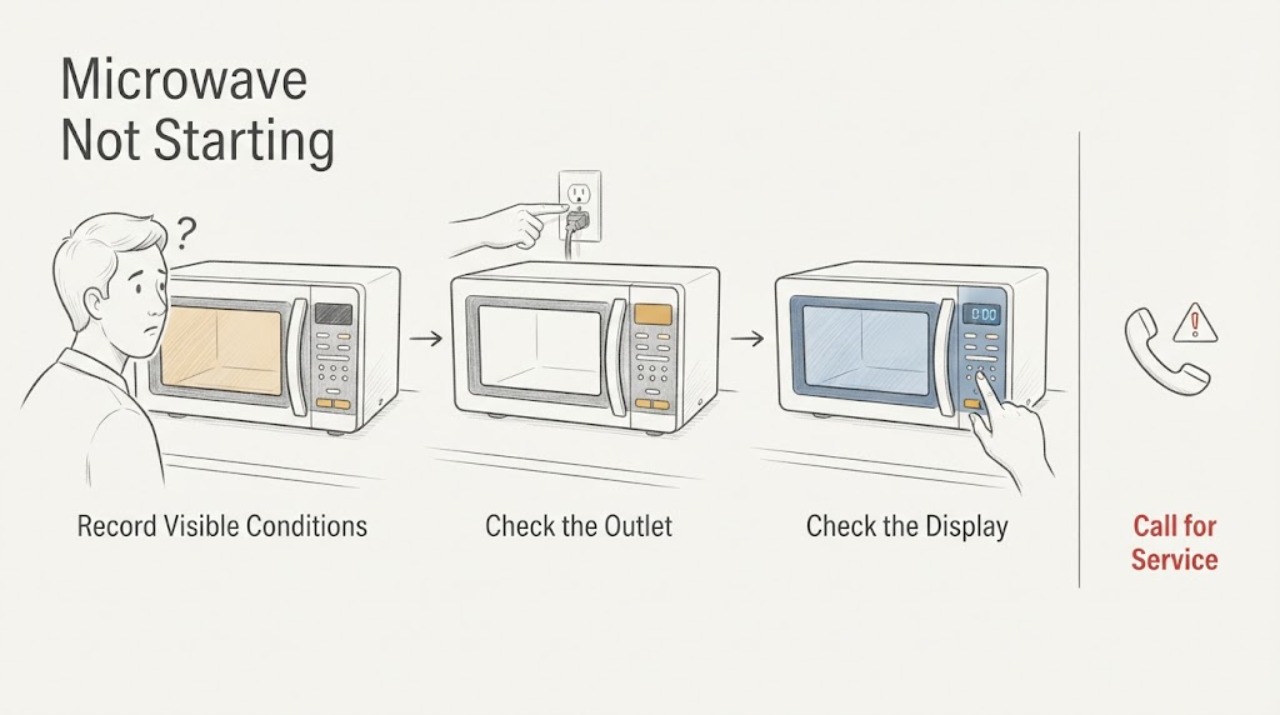
A Whirlpool microwave that will not start should first be separated into no power, a locked or demo control, an active timer, a door message or latch condition, or an internal control fault. Check the safe outlet and breaker path, clear only the model-specific control state, open and close the door when the display requests it, and use one documented power reset. Stop for a repeated trip, damaged latch, smoke, burning odor, arcing, or a microwave that remains unresponsive after these checks.
Work through in order
Diagnostic checks
Use only checks that match the exact appliance or system and its official guide.
-
Check 1
Separate a dark microwave from a powered microwave that will not begin cooking. Record whether the display or cavity light works, whether the panel beeps, whether “door,” “LOC,” “L,” or a padlock appears, whether a timer is counting down, and whether the unit is countertop, built-in, or over-the-range.
Expected result: The display is dark, the display is on but Start is ignored, a door or lock message appears, or the timer is active without heating.
Next step: Record the full model and exact indication, then use the matching Whirlpool manual before changing settings or opening any cover.
Why this matters
Why: Whirlpool treats supply power, Control Lock, timer state, door closure, and the cooking command as different start conditions. A powered panel does not prove that the door interlock or heating circuit is healthy.
-
Check 2
From a dry, safe location, confirm the power cord is fully connected to an operational grounded wall outlet, or check the dedicated breaker for a built-in or over-the-range unit. Test an accessible outlet with a suitable known-working appliance only when safe; do not use an extension cord or remove a cover.
Expected result: The outlet is dead, a breaker or fuse is open, the cord or receptacle is damaged, or power is normal but the microwave remains dark.
Next step: Stop for heat, moisture, damage, or a breaker or fuse that trips again; leave the microwave disconnected and arrange qualified electrical or appliance service.
Why this matters
Why: Whirlpool’s no-power guidance starts with the operational outlet and household protection. A repeat trip or damaged connection is an electrical fault boundary.
-
Check 3
Clear the control state using only the exact manual: turn Control Lock or Stop/Unlock off, cancel an active kitchen timer, select a manual cook function, press Start once, and close the door firmly. If the display says “door” after the door has been closed for several minutes, open and close the door before starting.
Expected result: The lock or timer clears, Start responds, the door message disappears after opening and closing, or the panel still ignores Start with the door apparently shut.
Next step: Use one model-approved unlock or cancel sequence. Do not bypass the door latch or repeatedly press a stuck keypad; arrange service for a persistent door or Start condition.
Why this matters
Why: Whirlpool explains that Control Lock disables pads, the timer does not start cooking, and a prolonged closed-door state can require an open-close action before a new start. A persistent Start or door condition suggests an interlock, keypad, or control fault.
-
Check 4
Inspect the door perimeter and latch area for packaging material, an oversized dish, a displaced rack where fitted, or visible damage that prevents the door from closing flush. Remove only a loose external obstruction after the oven is idle; do not adjust the latch or remove trim.
Expected result: The door closes firmly and the display recognizes it, a visible obstruction remains, the latch or hinges are damaged, or a door indication returns.
Next step: Clear a safe visible obstruction and try the documented Start sequence once. Stop and request qualified service for a damaged latch, hinge, seal, or returning door indication.
Why this matters
Why: Whirlpool lists packing material, dish size, rack position, and door closure as causes of a no-start or door message. A door that cannot close or is misaligned should be treated as an interlock safety issue.
-
Check 5
If the model page or manual permits a power reset, disconnect the microwave by unplugging it or turning its dedicated breaker off for one minute, restore power, and verify the display and one normal start attempt. Keep the unit out of service if the breaker trips or the microwave starts and stops abnormally.
Expected result: The display and Start control recover, the microwave remains unresponsive, the same lock or door state returns, or the breaker trips again.
Next step: Stop repeated resets and contact Whirlpool authorized service with the model, installation type, original indication, power result, and door or control observations.
Why this matters
Why: Whirlpool uses a one-minute power reset for some unresponsive or locked-control symptoms, but a returning condition indicates the reset did not correct the cause. A protection-device trip is not a reset invitation.
Use your observations
Decision map
Find the observation that best matches what you see, then follow the next safe action.
-
PATH 01Next step
What you see
The display is dark, the outlet or breaker is abnormal, or the breaker or fuse trips again after reset.
Do this next
Stop operating the microwave, disconnect power if safe, and obtain qualified electrical or appliance service.
Why this path and its safety boundary
Why it matters: An external electrical supply or appliance electrical fault is more likely than a control setting.
-
PATH 02Next step
What you see
The panel works but Control Lock, a timer, Demo mode, or a door message is present and clears after the model-specific sequence.
Do this next
Select the intended cook function and press Start once with the door firmly closed; use the exact manual for future lock or demo changes.
Why this path and its safety boundary
Why it matters: A control state or deliberate door-open safety behavior was preventing the start.
-
PATH 03Next step
What you see
The door will not close flush, the latch or hinge is damaged, or the door indication returns after a visible obstruction is removed.
Do this next
Do not bypass or force the latch; leave the microwave out of service and arrange qualified service.
Why this path and its safety boundary
Why it matters: The door interlock or alignment remains unsafe to diagnose by user controls.
-
PATH 04Next step
What you see
Power, controls, timer, door, and one documented reset are normal, but Start still does nothing or the microwave stops immediately.
Do this next
Stop testing and contact Whirlpool authorized service with the full model, installation type, display state, and checks completed.
Why this path and its safety boundary
Why it matters: A keypad, interlock, control, or internal power fault requires model-specific diagnosis.
Helpful context
Understand the symptom
Separate no power from a blocked start
A dark display, a locked keypad, a “door” message, and a Start button that does nothing are distinct paths. Whirlpool’s troubleshooting separates outlet and breaker checks from Control Lock, timer, door closure, Demo mode, and service conditions.
Keep controls model-specific
Countertop, built-in, and over-the-range Whirlpool microwaves use different layouts and control labels. Use the full model number to find the owner manual before applying an unlock, cancel, or reset sequence.
Only after diagnosis
Potential parts
- Whirlpool microwave door switch or latch assembly
Consider only when a qualified diagnosis links a persistent door-interlock symptom to the exact model’s switch or latch assembly.
Confirm the full model and revision; do not bypass the interlock or infer fit from the Whirlpool brand alone. - Whirlpool microwave control panel or electronic control
Consider only after power, lock, timer, door, and reset checks are normal and qualified service identifies a control fault.
Microwave control parts are model-specific and internal access is a service task.
When checks do not resolve it
Need a professional?
Use Whirlpool authorized or qualified appliance service when the microwave remains unresponsive after safe external checks, a door interlock is suspect, or an internal control or power fault is suspected.
Have this ready
- Provide the full model and serial, countertop or built-in type, display and light state, lock or timer message, door behavior, power result, breaker behavior, and reset attempt.
Common questions
FAQ
Why does my Whirlpool microwave show “door” and not start?
Whirlpool says a cooking function may be blocked when the door has been closed for about five minutes without starting, as a safety behavior. Open and close the door, then use the model’s Start sequence; service is needed if the message returns with a correctly closed door.
Can I keep resetting the microwave if the breaker trips?
No. Whirlpool says to stop attempting operation when the breaker or fuse trips again, disconnect the appliance if safe, and obtain qualified service.
Read the exact guide
Official sources
- Start Button Not Working - Built-In Microwave - Product Help | WhirlpoolWhirlpool Corporation · Applies to Whirlpool built-in microwave controls; lock and reset controls are model-specific.
- Whirlpool Manuals & LiteratureWhirlpool Corporation · Use the exact model number to locate the microwave owner manual before interpreting a door message or control sequence.
- Microwave Is Not Starting or Operating - Countertop Microwave - Product Help | WhirlpoolWhirlpool Corporation · Applies to Whirlpool countertop microwave operation; use the matching model manual for built-in or over-the-range controls.
- No Power - Not Operating - Built-In Microwave - Product Help | WhirlpoolWhirlpool Corporation · Applies to Whirlpool built-in microwave models; exact installation and control behavior vary by model.
- Not Powering On - Over-the-Range Microwave - Product Help | WhirlpoolWhirlpool Corporation · Applies to Whirlpool over-the-range microwave models; use the exact model manual for installation and control details.
Community feedback
Share a repair observation
Share a plain-text repair observation. Accepted observations are published automatically; this page may take a moment to update.