
On this page
Start here
Quick answer
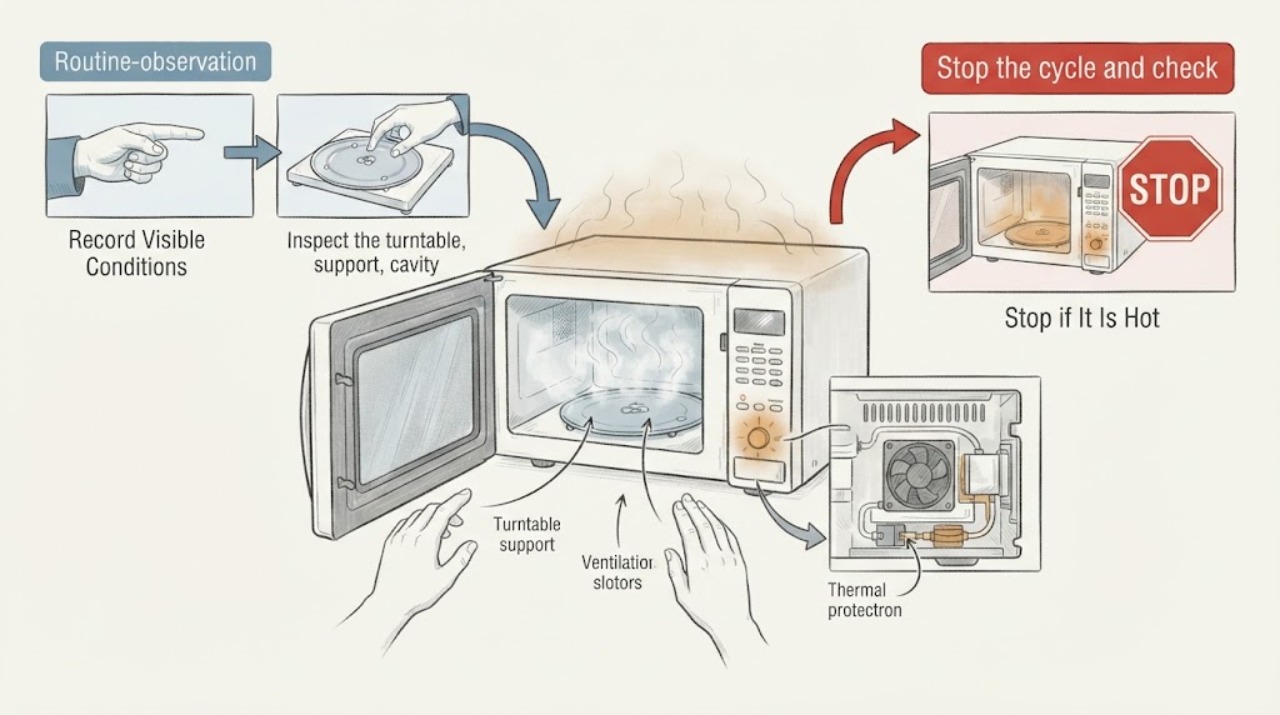
If a Whirlpool microwave overheats food or the appliance becomes unusually hot, stop the cycle and check the programmed time, power level, container and load, turntable, and ventilation clearance. Whirlpool manuals describe power changes and normal fan behavior, but smoke, arcing, burning odor, a hot cabinet, or repeated thermal shutdown is a stop condition. Never run an empty microwave or operate it with blocked vents. Internal high-voltage and thermal components require qualified service.
Work through in order
Diagnostic checks
Use only checks that match the exact appliance or system and its official guide.
-
Check 1
Stop the cycle and check for smoke, arcing, burning odor, melted material, or an unusually hot cabinet.
Expected result: A safety symptom is present or only the food is overcooked.
Next step: Unplug if safe and arrange service for a safety symptom; do not run another test.
Why this matters
Why: Smoke, arcing, odor, or cabinet heat may indicate an appliance fault and overrides setting adjustments.
-
Check 2
Record food type, amount, container, covered or uncovered state, cooking time, power level, and whether a sensor program was used.
Expected result: The time or power is excessive for the load, or settings appear appropriate.
Next step: Use the manual's recommended power and time for one supervised, nonhazardous test only.
Why this matters
Why: Overcooking can result from too much time or power, an undersized load, or a sensor program used with the wrong container.
-
Check 3
Inspect the turntable, support, cavity floor, and waveguide cover for correct seating, food residue, or damage without touching live parts.
Expected result: The turntable is stuck or residue/damage is visible, or the cavity is clean and intact.
Next step: Clean only accessible residue with the manual-approved method and stop for damage.
Why this matters
Why: Uneven rotation or residue can create hot spots and arcing, while a damaged cover requires service.
-
Check 4
Check that the microwave vents have the manual-required clearance and that the fan is not blocked by a wall, cabinet, or object.
Expected result: Ventilation is obstructed or clear.
Next step: Restore clearance and allow the appliance to cool fully before one controlled test.
Why this matters
Why: Restricted airflow can increase cabinet and component temperature and trigger thermal protection.
-
Check 5
Verify the door closes and the fan stops when the door opens during a safe, empty control observation; do not run the appliance empty.
Expected result: Door response and fan behavior are normal or abnormal.
Next step: Stop using the microwave for an unreliable door, fan, or interlock and arrange service.
Why this matters
Why: The door interlock and fan are safety and cooling functions, not optional conveniences.
-
Check 6
Apply the stop boundary after one supervised test: check whether food or cabinet overheats again, the display resets, a breaker trips, or a thermal shutoff occurs.
Expected result: Operation is normal or overheating recurs.
Next step: Stop use and arrange qualified Whirlpool service with the complete test record.
Why this matters
Why: Recurrence after correct time, load, turntable, and ventilation checks indicates sensor, control, fan, thermal, or high-voltage diagnosis.
Use your observations
Decision map
Find the observation that best matches what you see, then follow the next safe action.
-
PATH 01Next step
What you see
Only food is overcooked and the cabinet, fan, turntable, and controls are normal.
Do this next
Adjust using the exact manual and supervise one appropriate test.
Why this path and its safety boundary
Why it matters: The selected time, power, load, or container is the leading cause.
-
PATH 02Next step
What you see
The cabinet becomes unusually hot or the fan is blocked or does not run.
Do this next
Restore clearance if accessible; stop use and service a fan or thermal fault.
Why this path and its safety boundary
Why it matters: Ventilation or cooling failure can overheat components.
-
PATH 03Next step
What you see
Arcing, smoke, burning odor, melted material, or a damaged waveguide cover appears.
Do this next
Disconnect power if safe and obtain qualified service.
Why this path and its safety boundary
Why it matters: The appliance is unsafe to continue operating.
-
PATH 04Next step
What you see
Overheating recurs with correct settings, clear vents, and a normal turntable.
Do this next
Stop testing and arrange Whirlpool service.
Why this path and its safety boundary
Why it matters: Sensor, control, thermal, fan, or high-voltage components need diagnosis.
Helpful context
Understand the symptom
Stop cooking, leave the door closed briefly if there is smoke or arcing, and disconnect power only when safe. Record what was heated, the container, time, power, cavity and cabinet temperature, and whether the fan ran.
Overheating food is different from an appliance cabinet running hot. Use the exact Whirlpool manual for power levels, ventilation, sensor functions, and safe container guidance; do not remove covers.
Only after diagnosis
Potential parts
- cooling fan or thermal cutout
Only after a technician confirms airflow or thermal protection failure.
Match exact model; do not replace high-voltage parts by symptom.
When checks do not resolve it
Need a professional?
A technician may test fan airflow, thermal cutouts, door switches, controls, sensor circuits, turntable motor, and high-voltage components. Provide settings, load, time, fan behavior, and safety symptoms.
Common questions
FAQ
Why does my Whirlpool microwave overheat food?
Check time, power, load, container, sensor mode, and turntable operation. If correct settings still overheat food, stop and arrange service.
Is a warm Whirlpool microwave cabinet normal?
Some warmth can occur, but unusually hot surfaces, a fan that does not run, odor, smoke, or repeated shutoff are stop conditions requiring service.
Can blocked vents cause microwave overheating?
Yes. Restricted airflow can raise component temperature. Restore the manual-required clearance and service a fan or thermal fault that remains.
Should I test the microwave empty?
No. Never run it empty. Use a suitable load and follow the manual; internal diagnosis belongs to a qualified technician.
Read the exact guide
Official sources
- Whirlpool Manuals & LiteratureWhirlpool · Use to identify exact instructions before access or repair.
- MICROWAVE OVENWhirlpool · Use for Whirlpool microwave overheating symptoms; exact settings and clearance vary by model.
Community feedback
Share a repair observation
Share a plain-text repair observation. Accepted observations are published automatically; this page may take a moment to update.