
On this page
Start here
Quick answer
Do not force a Whirlpool oven door or invent a button sequence because the display says “Cool” with an unlock icon after a power loss. Whirlpool documentation uses that display with a door that remains locked while the oven is still too hot, and says the cooling fan may continue; its power-loss guidance also says a control lock can remain set after a power failure. First record the exact rating-label model and the full display, because the supplied W10406473 string was not confirmed by the opened Whirlpool Owner’s Center as a complete appliance model. Let the oven finish cooling, determine whether a self-clean or control-lock state is actually indicated by the matching manual, and use only that manual’s documented control step. If the exact model allows it, perform one external circuit-breaker reset for one minute and observe the oven for a minute after power returns. If “Cool”/the lock icon or an unresponsive control remains after the oven is cool and that permitted reset, stop using the oven and arrange qualified appliance service; never force the door, bypass the lock, or open energized panels.
Before you begin
Safety first
- Do not force the oven door, bend or defeat a latch, bypass an interlock, open control or electrical covers, access energized wiring, make live electrical measurements, or repeatedly reset a tripping breaker. Stop immediately for smoke, burning odor, abnormal heat, damaged wiring, water near electrical parts, or a hot/damaged cord. Isolate power only from a safe position.
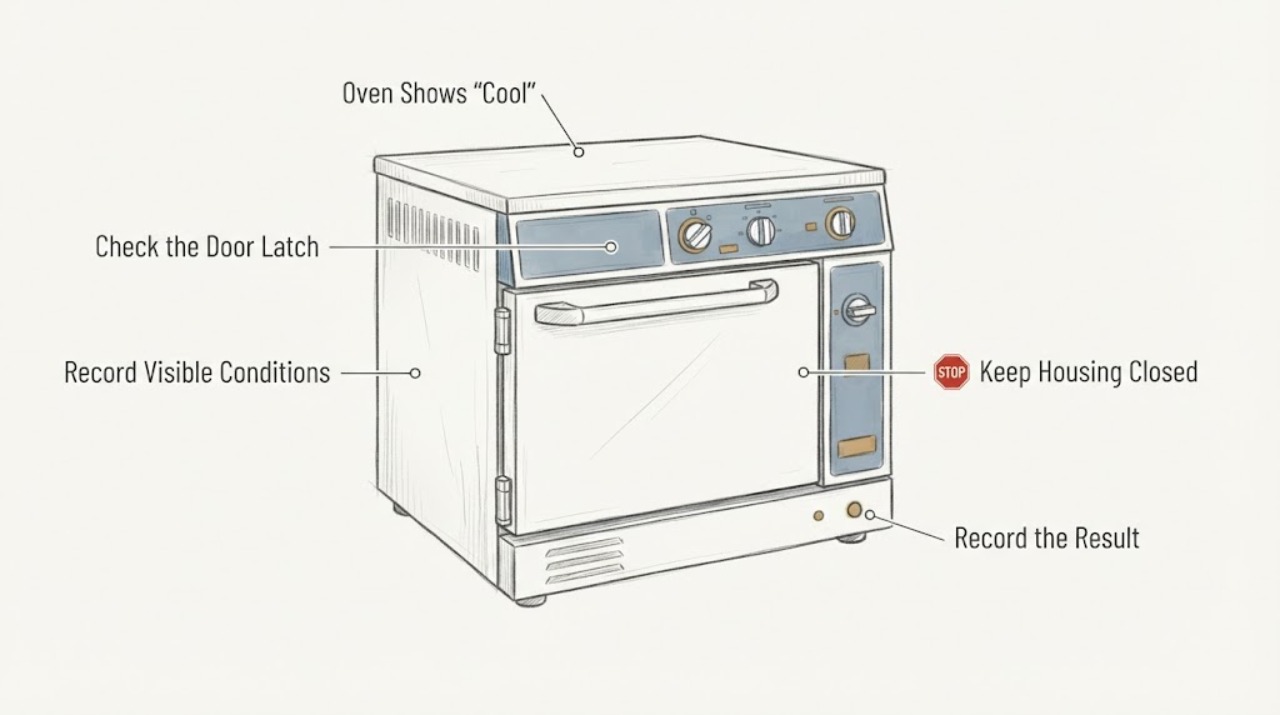
Work through in order
Diagnostic checks
Use only checks that match the exact appliance or system and its official guide.
-
Check 1
Without touching the door latch or opening any panel, write down the complete display exactly as shown: “Cool,” the unlock/lock icon, any other text, and whether the display is steady or flashing. Note when power returned, whether the oven had been hot or in Self-Clean, whether a cooling fan is audible, whether the door is physically locked, and whether there is smoke, a burning smell, or unusual heat.
Expected result: The oven is still warm or the cooling fan is running, the door is locked, the panel is unresponsive, or the oven is cool with no hazard but the display remains unchanged.
Next step: If there is smoke, burning odor, damaged wiring, or abnormal heat, stop using the oven and isolate power only if safe. Otherwise leave the door and controls alone while it cools and continue with identity and manual checks.
Why this matters
Why: A warm cavity, fan, and locked door fit the documented cooling/lock state more closely than a proven component failure. A cool cavity with a persistent message is a different branch; the display alone does not identify a latch or control part.
-
Check 2
With the oven cool and the door left in its current safe position, read the rating label and record the complete model, serial number, market, and appliance type. For a wall oven, inspect the accessible lower-left frame area with the door open; for a range, use the model-label location described by Whirlpool. Compare the panel layout with the matching Owner’s Manual rather than treating W10406473 as a complete model.
Expected result: A complete model and matching Whirlpool manual are found, or only W10406473 is available and the appliance type/model cannot be matched.
Next step: Use only the matching manual for any control-lock or door-release instruction. If the identity remains unresolved, do not try a guessed key combination or order a part; give the complete label information and a safe panel photo to qualified Whirlpool service.
Why this matters
Why: Whirlpool routes support and controls through the model and serial numbers. Without a match, the exact display meaning, lock behavior, and permitted reset cannot be selected safely; W10406473 may be a document or other identifier, but that was not established as fact by the opened sources.
-
Check 3
Check the matching manual or the visible control for whether Self-Clean was active and whether Control Lock is enabled. Do not start Self-Clean, pull the latch, pry the door, or try combinations copied from another Whirlpool model. If the exact manual documents a Control Lock release for this panel, use only that documented step after confirming the oven and timer are off.
Expected result: The manual confirms an active cooling/door-lock state, confirms Control Lock, or does not match the panel or gives no model-specific instruction.
Next step: For a documented cooling state, wait for complete cooling and allow the lock to release normally. For a documented Control Lock, follow that exact manual only. If the manual does not match or the state remains after cooling, use the service branch rather than forcing the mechanism.
Why this matters
Why: Whirlpool documents that a hot oven can keep the door locked and that Control Lock disables the control keys; the two states require different model-specific handling. A nonmatching manual cannot justify a reset sequence.
-
Check 4
After the oven is cool and only if the matching model guidance permits a power reset, switch off the household circuit breaker that supplies the oven for one minute, then restore it. Do this from a dry, safe position and do not remove covers or make electrical measurements. Watch the display for one minute after power returns and note whether the lock icon or “Cool” message clears.
Expected result: The display returns to normal and controls respond, the same message returns, or the breaker trips again or the oven shows an electrical hazard.
Next step: If operation is normal, use the oven only as the matching manual allows and keep the reset record. If the message returns, the controls remain dead, or the breaker trips, leave the oven off and arrange qualified appliance/electrical service.
Why this matters
Why: A normal display after one documented reset supports a transient post-outage/control state, not a confirmed repaired component. A returning message or repeated breaker operation needs model-specific service or electrical assessment; it is not evidence to replace a board or latch.
-
Check 5
Once fully cool, observe the door from outside without forcing it: record whether it is closed and locked, open and mechanically free, crooked, scraping, or blocked. Do not move a manual latch arm unless the exact model manual explicitly instructs that action and the oven is at room temperature; never defeat an interlock or use a tool to open the door.
Expected result: The door releases normally, remains locked after cooling, is visibly crooked or damaged, or will not latch without force.
Next step: Use the oven only when the door closes and seals normally. For persistent lock, damage, scraping, or forced closure, keep it off and arrange qualified appliance service; do not reuse the existing generic door-repair instructions as a substitute for this display/power-loss diagnosis.
Why this matters
Why: A door that releases after cooling is consistent with a normal thermal lock state. A lock that stays engaged, a damaged or crooked door, or a latch that needs force crosses from an observation check into model-specific service; it does not select a hinge or latch part by itself.
-
Check 6
Prepare a service record containing the complete model and serial, country/market, exact display text and icon, time and circumstances of the power loss, whether Self-Clean or cooking was running, cooling-fan behavior, door position after cooling, breaker result, and any odor, smoke, heat, or repeated trip. Keep the oven off while the status is persistent.
Expected result: The symptom is reproducible or persistent after cooling and the one permitted external reset, or the identity cannot be matched to a manual.
Next step: Request model-specific diagnosis and ask the provider to verify the display state, door-lock status, power supply, and control response before recommending a component. Do not continue cycling power or operating the oven to recreate the fault.
Why this matters
Why: Those details let a qualified provider distinguish a documented cooling or control-lock state from a post-outage control, supply, latch, or wiring fault without guessing a part from the message.
Use your observations
Decision map
Find the observation that best matches what you see, then follow the next safe action.
-
PATH 01Next step
What you see
The oven is still warm or the cooling fan is running, the door is locked, and “Cool” with the lock/unlock icon clears after the oven finishes cooling.
Do this next
Do not force the door. Use the oven only after it releases and the matching manual confirms normal operation; if the message returns while the oven is cool, move to the persistent-state branch.
Why this path and its safety boundary
Why it matters: This matches Whirlpool’s documented thermal cooling/door-lock behavior more closely than a failed part; the lock is protecting access while the oven is too hot.
-
PATH 02Next step
What you see
The oven is fully cool, there is no smoke or electrical hazard, and the lock icon or “Cool” message remains with no responsive controls after the power loss.
Do this next
Confirm the exact model/manual, perform at most the manual-authorized one-minute breaker reset, and arrange qualified service if the state returns or the controls remain dead. Do not force the door or guess a reset combination.
Why this path and its safety boundary
Why it matters: The normal cooling explanation no longer accounts for the persistent state. A control-lock state, stale post-outage state, door-lock feedback problem, or supply/control fault remains possible, but the display does not identify one component.
-
PATH 03Next step
What you see
The matching manual identifies Control Lock, the panel behaves like a locked control, and the lock state was present before or after the power failure.
Do this next
Use only the exact manual’s lock/unlock instruction with the oven and timer off. If the manual does not match, the lock cannot be released, or the icon returns immediately, stop and request model-specific service.
Why this path and its safety boundary
Why it matters: Whirlpool’s control guide says Control Lock shuts down the control keys and can remain set after a power failure. This is a control-state decision, not evidence that the latch, board, or other part should be replaced.
-
PATH 04Next step
What you see
The breaker trips again, there is smoke, a burning odor, exposed or damaged wiring, abnormal heat, water near electrical parts, or the oven remains electrically unsafe.
Do this next
Keep the oven off, isolate power only if safe, keep clear of smoke or heat, and arrange qualified appliance/electrical service. Do not open panels, make live tests, bypass a lock, or restart to see whether the display clears.
Why this path and its safety boundary
Why it matters: This is an electrical or fire-safety branch, not a normal cooling or lock reset. Repeated resets and internal access could worsen the hazard.
-
PATH 05Next step
What you see
The complete rating-label model cannot be matched and the only identifier available is W10406473.
Do this next
Stop part selection and guessed key sequences. Photograph or transcribe the full rating label and use the matching Whirlpool manual or qualified service; keep the oven off if it remains locked or inoperative.
Why this path and its safety boundary
Why it matters: Whirlpool’s opened Owner’s Center requires model and serial information for appliance-specific support, and the available evidence does not establish W10406473 as a complete oven model. Applying a different Whirlpool panel or door procedure would cross a model boundary.
Helpful context
Understand the symptom
What the display can and cannot establish
A Whirlpool manual opened during this research shows “cool” and a lock symbol when the oven is still too hot after a self-clean operation; the cooling fan may continue and the door is not to be forced. A separate Whirlpool control guide says Control Lock shuts down the control-panel keys and can remain set after a power failure. Those are two different states that can look like “the oven does nothing,” so the display and timing matter. Neither source identifies W10406473 as the appliance’s complete model number.
Confirm the appliance identity before using a reset
Whirlpool’s Owner’s Center says model and serial numbers are required for support and provides a wall-oven model-label location on the lower left side of the frame with the door open. Record the complete rating-label model, serial, market, and whether this is a wall oven or range. Treat W10406473 as an unverified identifier until that label and the matching manual confirm it; do not select a door-lock, control board, or other part from that string alone.
Why one reset is a boundary, not a diagnosis
Whirlpool’s power-loss support page recommends turning the household breaker for the range off for one minute, restoring it, monitoring for one minute, and verifying operation. It also warns that a continuing power-related error can require qualified electrical assessment. That can clear a transient state on a model that permits it, but it does not prove that a latch, control, wiring, or supply component failed or identify a replacement part.
When checks do not resolve it
Need a professional?
Arrange qualified Whirlpool appliance service when the oven remains locked or nonresponsive after complete cooling and the one model-authorized external reset, when the exact model cannot be matched, when the display returns, or when the door is damaged, crooked, scraping, or will not latch normally. Use qualified electrical service when the breaker trips again or the supply is suspected.
Safety scope: Do not force the oven door, bend or defeat a latch, bypass an interlock, open control or electrical covers, access energized wiring, make live electrical measurements, or repeatedly reset a tripping breaker. Stop immediately for smoke, burning odor, abnormal heat, damaged wiring, water near electrical parts, or a hot/damaged cord. Isolate power only from a safe position.
Have this ready
- Provide the complete rating-label model and serial, market, oven type, exact display text/icon, a safe external panel photo, power-loss timing, whether Self-Clean or cooking was active, cooling-fan behavior, door position after cooling, breaker-reset result, and any odor, smoke, heat, or repeated trips.
Common questions
FAQ
Is “Cool” with a lock icon always a failed Whirlpool oven?
No. Whirlpool documents that a too-hot oven can keep the door locked while “cool” and a lock symbol are displayed, with the cooling fan possibly still running. If the oven is fully cool and the message persists, it needs the exact model’s control and service path rather than a guessed part diagnosis.
Can a Whirlpool control lock remain after a power outage?
Whirlpool’s opened control guide says Control Lock can remain set after a power failure and disables most control keys. Confirm that the guide matches the appliance, then use only its documented unlock step; do not copy a button sequence from another Whirlpool model.
Is W10406473 the full Whirlpool oven model number?
That was not confirmed by the opened Whirlpool Owner’s Center. Whirlpool requires the complete model and serial for appliance-specific support, so read the rating label and match the manual before selecting a reset, lock procedure, or part.
Read the exact guide
Official sources
- Owners ManualWhirlpool · Opened Whirlpool owner manual used to verify the reader-visible “cool” and lock-symbol behavior when temperature is too high, cooling-fan behavior, the no-forcing warning, and unlock after cooling. It is not an exact W10406473 model match.
- Oven is Locked - What to DoWhirlpool Product Help · Opened Whirlpool support page to distinguish lock behavior during normal use versus Self-Clean and after an interruption; exact control details still depend on the model manual.
- Welcome to Whirlpool® Customer CareWhirlpool · Opened Whirlpool Owner’s Center; it requires model and serial numbers for support and shows where wall-oven/range model labels are located. The page does not confirm W10406473 as a complete appliance model.
- Oven Door Locked - Wall OvenWhirlpool Product Help · Opened Whirlpool wall-oven support page; it is not an exact W10406473 match, so its instructions are used only as family-level boundaries and not as a universal key sequence.
- Not Working After Power Outage - ElectricWhirlpool Product Help · Opened Whirlpool support page for post-outage operation; it is family-level guidance and explicitly routes model-specific control-lock and delayed-start behavior to the Owner’s Manual.
- Control Guide - W11417277 - Rev AWhirlpool · Opened Whirlpool control guide to verify that Control Lock disables control keys and can remain set after power failure. The guide is not confirmed for W10406473, so its key sequence is not generalized.
Community feedback
Share a repair observation
Share a plain-text repair observation. Accepted observations are published automatically; this page may take a moment to update.